

Two devices sit on one home network. One streams video. One joins a video call. Both reach the internet through one box. That box decides which network each packet belongs to, and which path it takes next.
The box is a router. Its job sounds simple. The decision behind it is not. A router reads a destination address, checks a table, and picks a next hop, thousands of times per second, for every device in the home.
Two networks meet in one box
A home network is a local area network, or LAN. It holds phones, laptops, televisions, and printers. The internet is a wide area network, or WAN. It holds everything outside the home. A router sits at the boundary between those two networks.
Every device on the LAN carries an IP address that identifies it on that network. A packet leaving a device carries a destination IP address in its header. The router reads that header. The header tells the router where the packet wants to go.
Question: What job does a router do that a switch does not? Answer: A switch moves frames inside one network, using hardware addresses to reach the right port. A router moves packets between networks, using IP addresses to pick the right next network. The switch article explains the inside-one-network side in full.
A router also runs the local network services most homes never see. It hands out local addresses to new devices, and it forwards name lookups toward a DNS server. Those jobs matter, but they are not the routing decision itself. The routing decision is the next hop.
A packet journey, step by step
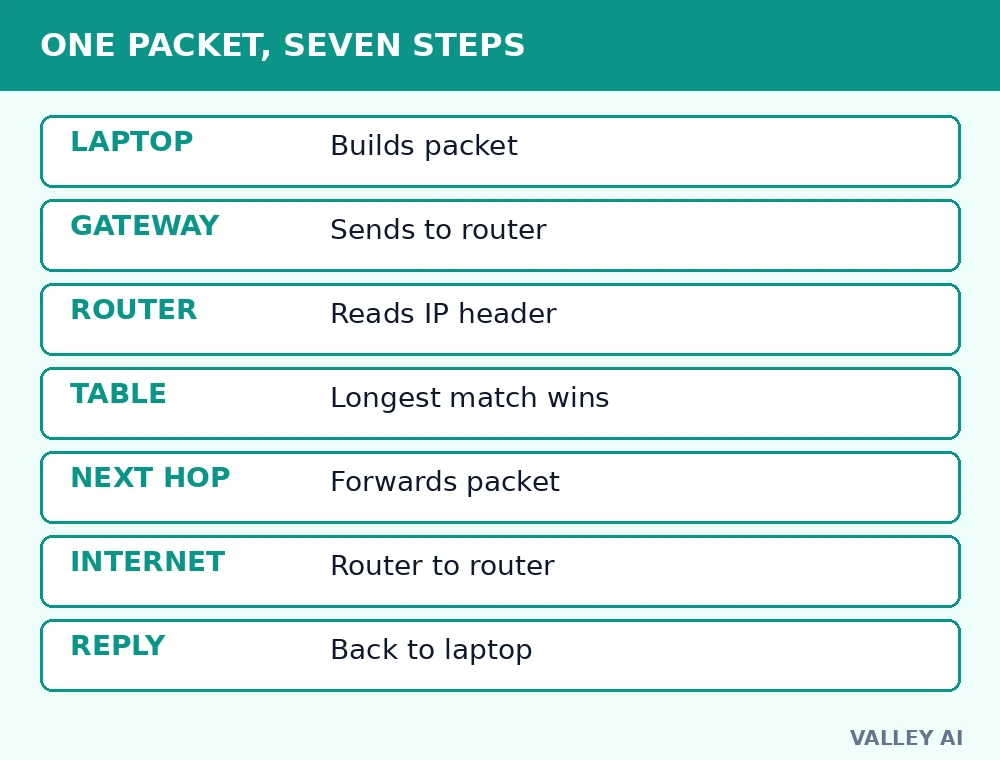
Follow one packet from a laptop to a website. Each step is a decision, and each decision uses only the header and the table.
- The laptop builds a packet addressed to the website server, and checks whether that address sits on its own local network.
- The address sits outside the local network, so the laptop sends the packet to its gateway, which is the router.
- The router reads the destination IP address in the packet header.
- The router searches its routing table for the longest matching network entry.
- The router picks the next hop from that entry, and forwards the packet out of the matching interface.
- The packet crosses router after router, with each router repeating the same lookup, until it reaches the destination network.
- The reply returns by the same logic in reverse, and the router delivers it to the laptop that asked first.
One field in the header keeps this journey from looping forever. Time to live starts at a set number, and each router lowers it by one. A packet that hits zero is dropped. A loop can waste hops, but it cannot circle forever.
The routing table: longest match wins
A routing table is a short list of destinations, next hops, and interfaces. It does not list every computer on the internet. It lists networks, and the next step toward each one. A home router table may hold only a handful of entries. An ISP router table may hold hundreds of thousands.
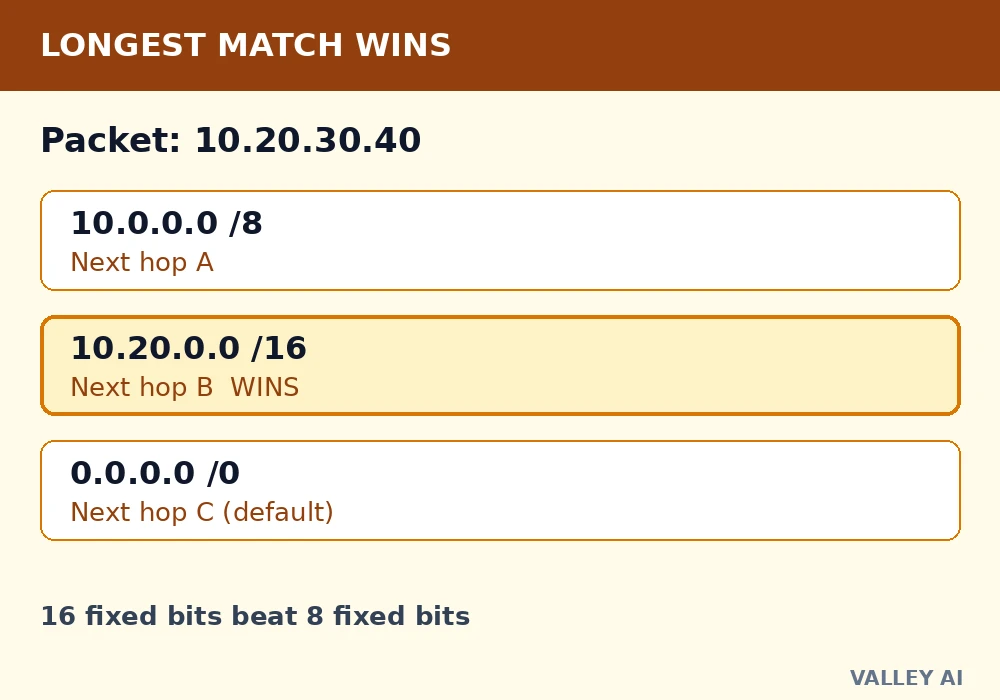
Work through three entries. The table holds 10.0.0.0/8 with next hop A, 10.20.0.0/16 with next hop B, and a default route, written 0.0.0.0/0, with next hop C. A packet addressed to 10.20.30.40 matches the first two entries. The /16 entry wins, because 16 fixed bits describe a smaller, closer network than 8 fixed bits. The packet goes to next hop B.
| Table entry | Next hop | Why it matters |
|---|---|---|
| 10.0.0.0/8 | A | Broad match, 8 fixed bits |
| 10.20.0.0/16 | B | Closer match, 16 fixed bits, wins for 10.20.30.40 |
| 0.0.0.0/0 (default) | C | Fallback when no other entry matches |
Question: Why keep a default route at all? Answer: No table can list every network on the internet. The default route sends unknown destinations to the ISP gateway, which holds a fuller table. The chain of defaults is how a packet finds a network its own router never listed.
Tables are filled two ways. Static routes are typed in by hand, and they suit small, stable networks. Dynamic routes are learned from neighbor routers through protocols such as OSPF, BGP, and RIP. A protocol update can reroute traffic around a dead link without a person touching the table.
Measured on a real machine: default route and NAT
On 3 November 2026, this machine’s routing table held exactly two entries. One was the local link, 198.19.0.0/30. The other was the default route, through gateway 198.19.0.1. A lookup for 8.8.8.8 returned that same gateway, with this machine as the source, 198.19.0.2. The table did not name the destination network. The default route handled it.
The same minute, a public address check showed a different story at the far end. The internet saw IPv4 address 104.29.194.187, while this machine’s own source address was 198.19.0.2. An address swap had happened between the machine and the public internet. That swap is network address translation, the step that lets many local devices share one public address.
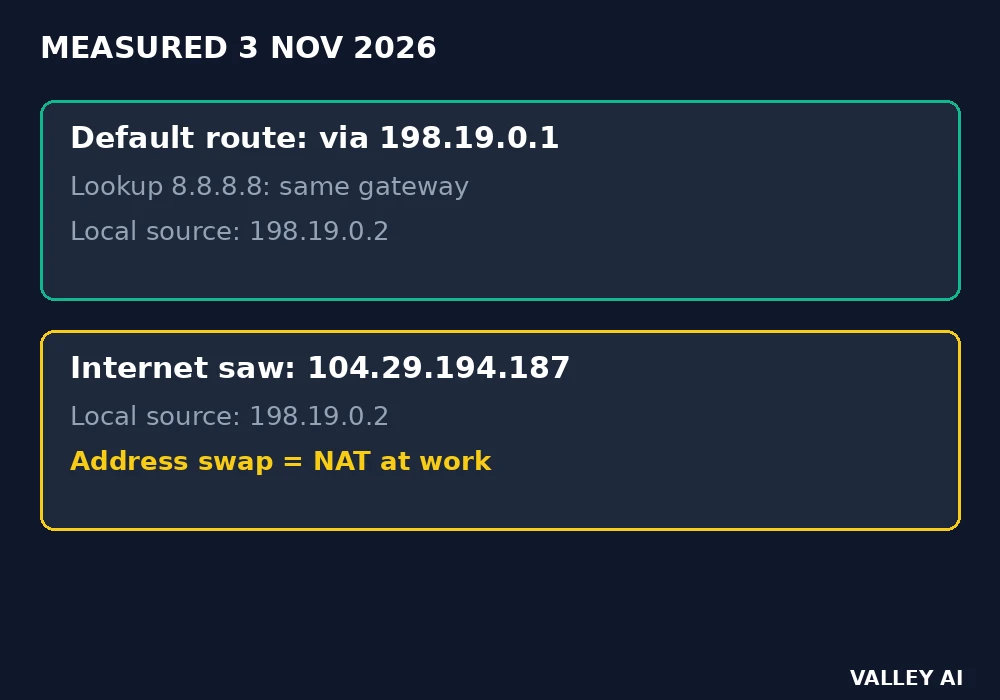
A home router runs the same two steps with familiar numbers. Local devices carry private addresses in the 192.168 range. The router swaps those addresses for its single public address on outbound traffic, and it uses a translation table to send each reply back to the device that asked first. The measurement above came from a virtual machine. Its gateway address differs from a home router gateway, but the logic is identical: default route out, translation on the way, translation table back.
When a packet matches no entry and no default route exists, the router drops it. The Huawei router guide notes the same outcome, plus an ICMP error back to the sender reporting the destination as unreachable. A home router almost always has a default route. A dropped packet at home usually points elsewhere.
Router, switch, modem, and access point: four jobs
One home box often performs four jobs at once, and that is why the names confuse people. A modem converts the ISP signal into digital data. A router moves packets between networks. A switch moves frames inside one network over cables. An access point creates the Wi-Fi radio network. The router versus modem comparison separates the first two jobs in detail.
| Box or part | Reads | Moves |
|---|---|---|
| Router | IP address in the packet header | Packets between networks |
| Switch | Hardware address in the frame | Frames inside one network |
| Modem | ISP signal | Data between the ISP line and the router |
| Access point | Wi-Fi radio signal | Traffic between wireless devices and the wired network |
Question: Does a router create the internet connection? Answer: No. The ISP link and the modem supply the connection. The router directs traffic across it, and it shares that connection among local devices. A router with no modem link still runs a local network, but that network reaches no websites.
Wi-Fi belongs to the access point job, carried by radio instead of cable. The Wi-Fi article explains bands and channels, and the Ethernet article explains the wired side the switch and the router ports use.
When the internet breaks, check the router in this order
A fault order saves time. It separates a dead ISP link from a local problem, and a single-device problem from a whole-network problem. Work through it in order, and stop at the step that changes the symptom.
- Check the WAN light and the cable between the modem and the router. A dark WAN light or a loose cable points at the ISP link, not at Wi-Fi settings.
- Test a second device. If the second device loads pages, the fault sits on the first device. If both fail, the fault sits on the network.
- Check the device gateway setting. A device with no gateway, or a gateway address that matches no box on the network, cannot leave the local network.
- Restart in order: modem first, then router, with a short wait between them. The modem must lock onto the ISP signal before the router can route through it.
- Look for a second router behind the first. Two routers in series create double NAT, and that breaks port forwarding and some game and tunnel connections.
Name errors differ from routing faults. A page that fails with a DNS error reached the network. Name lookup failed there. A page that times out on every site points at the route or the link. The DNS guide covers the name side. The firewall article covers a blocked port. That fault can look like a dead site from one device only.
Buying and placing a router: what changes speed and what does not
Two ceilings govern home speed, and they bind different traffic. The internet plan caps traffic that enters the home. The local link caps traffic inside the home, such as a file copy between two local devices. A new router cannot lift the plan ceiling. It can lift the local ceiling, by giving wireless devices a faster radio link or wired devices a faster port.
Placement changes wireless speed more than most settings do. A router tucked behind a television, inside a cabinet, or at one end of a long home forces distant devices onto a weak signal. A central, raised, open position gives every room a shorter radio path. A mesh set suits a large home with dead corners, because extra nodes shorten the radio path instead of shouting louder from one corner.
Device count matters too. A router processor tracks a connection table for every active session. A home with dozens of phones, cameras, and televisions keeps far more sessions open than a home with three laptops. A router that stalls under that load shows slow pages on all devices at once, while a plan speed test stays fine on a single wired device.
Before buying, run that fault order. A single wired speed test, a second-device test, and a check of the WAN light separate a plan limit, a placement problem, and a dying box. Buying a faster box fixes only the third case. Internet safety habits apply here: change the default admin password, and keep the box on a supported firmware line.
Conclusion
Find the gateway address in one device settings screen, and run the second-device test the next time pages stall. Those two moves tell you whether the fault sits on a device, on the local network, or on the ISP link, before any new box enters the home.
Frequently asked questions
Do I need a separate router if my ISP box already gives Wi-Fi?
In most homes, no. An ISP box usually combines a modem, a router, and an access point in one case. A separate router earns its place only for wider coverage, stronger parental controls, or extra features the ISP box lacks. Basic connection needs no second box.
What is a gateway address?
A gateway address is the router local address that devices use as their exit from the local network. Common values are 192.168.1.1 and 192.168.0.1. Device network settings show the gateway in use, and opening that address in a browser usually reaches the router admin page.
How do I know if I have double NAT?
Double NAT means two routers translate addresses in series, usually an ISP router feeding a second personal router. Port forwarding fails, some online games report a strict NAT type, and some work tunnels refuse to connect. Putting the ISP box in bridge mode, or using the second box as an access point, removes the second translation step.
Should router firmware be updated?
Yes, when the vendor releases an update. Firmware fixes security flaws in the box itself, and an unpatched router can be recruited into a botnet or used to watch traffic. Check the admin page every few months, and turn on automatic updates when the vendor offers them.
Can a router connect two local networks with no internet?
Yes. Routing between local networks needs no ISP link. Two office LANs linked by a router exchange packets by the same table lookup, with no website involved. Internet access fails in that setup, but local traffic between the two networks still flows.
What changes with IPv6 routing?
The lookup logic stays the same: match the destination, pick the next hop. Addresses grow far longer, and a typical home setup needs no address translation step, because public addresses are plentiful. A home router still keeps a table, still picks a next hop, and still uses a default route for unknown destinations.

Kaleem
Kaleem is a Computer Science graduate (Virtual University of Pakistan) and the founder and editor of Valley AI, where he publishes in-depth, tested guides on computer hardware, artificial intelligence, and how the internet works. Every guide is researched from primary sources, tested hands-on where possible, and updated when the facts change.