

Every device in your home has its own IP address. Your phone has one, your laptop has one, your smart TV has one. But step outside your house and the entire internet sees only a single address. Somewhere between your couch and the rest of the world, your router is quietly performing one of the most important translations on the internet. It is called NAT, and it is the reason 4 billion IP addresses were enough to connect tens of billions of devices.
NAT (Network Address Translation) is the process a router uses to rewrite the private IP addresses of devices on your home network into one shared public IP address as their traffic heads out to the internet, and to translate the replies back on their way in. It is the invisible receptionist sitting between your living room and the rest of the world.
Why NAT exists at all
The internet was built on IPv4, where every address is 32 bits long. That gives about 4.3 billion unique addresses, which sounded like more than anyone could ever need when the scheme was designed in the early 1980s. It was not. By the early 2010s, the world had effectively run out of new IPv4 addresses to hand out.
The original design of the internet assumed every device would get its own unique, globally reachable address: true end-to-end connectivity, no translators in the middle. But with billions of phones, laptops, TVs, and cameras coming online, that math stopped working. So engineers did something clever and slightly heretical. They set aside three ranges of addresses for private use, ranges that any home or office could reuse without asking anyone: 10.0.0.0/8, 172.16.0.0/12, and 192.168.0.0/16. These addresses are never allowed on the public internet. Your router hands them out freely to your devices, and your neighbor’s router hands out the exact same ones, because they never leave the house.
NAT is the gatekeeper that lets those private addresses talk to the public internet anyway. First proposed in RFC 1631 in 1994 as a temporary measure (later formalized in RFC 3022), it worked so well that it became permanent infrastructure. The internet we use today runs on it.
There is a partner process worth knowing about here. The private addresses in this story are not chosen by your devices at random: your router hands each one out using a protocol called DHCP, complete with a lease and an expiry time. If you have ever wondered how your phone receives its 192.168 address the moment it joins the Wi-Fi, our guide to what DHCP is and how it works walks through the four step handshake behind it.
That translation happens exactly at the boundary of your subnet: the subnet mask is what marks which addresses are local and which must be translated.
How NAT actually works: one packet’s journey
Follow a single packet. Your laptop, sitting at the private address 192.168.1.50, opens a connection to a website at 142.250.185.78 on port 443 (HTTPS). Your laptop picks a random source port, say 51000, and sends the packet on its way.
The packet reaches your router, which is the boundary between your private network and the internet. The source address 192.168.1.50 is private, which means it cannot be routed on the public internet at all. So the router does three things. First, it creates an entry in its translation table recording this conversation. Second, it rewrites the packet’s source address to its own public address, for example 203.0.113.10. Third, it forwards the packet to the website.
From the website’s point of view, the request came from 203.0.113.10. It has no idea your laptop exists, and it does not need to. It sends its reply back to 203.0.113.10, port 51000. Your router looks up the entry it recorded, rewrites the destination back to 192.168.1.50, port 51000, and hands the packet to your laptop. Round trip complete, and your laptop never knew the translation happened.
Network engineers have names for the four addresses involved, and there is a simple memory trick for them. Inside or outside says which network the host lives on; local or global says from whose point of view the address is described.
- Inside local: the private address of your device as your home network sees it (192.168.1.50).
- Inside global: how your device appears to the outside world after translation (203.0.113.10).
- Outside global: the real public address of the website you are visiting (142.250.185.78).
- Outside local: how that website appears to your network, which is usually identical to its outside global address.
The translation table: NAT’s memory
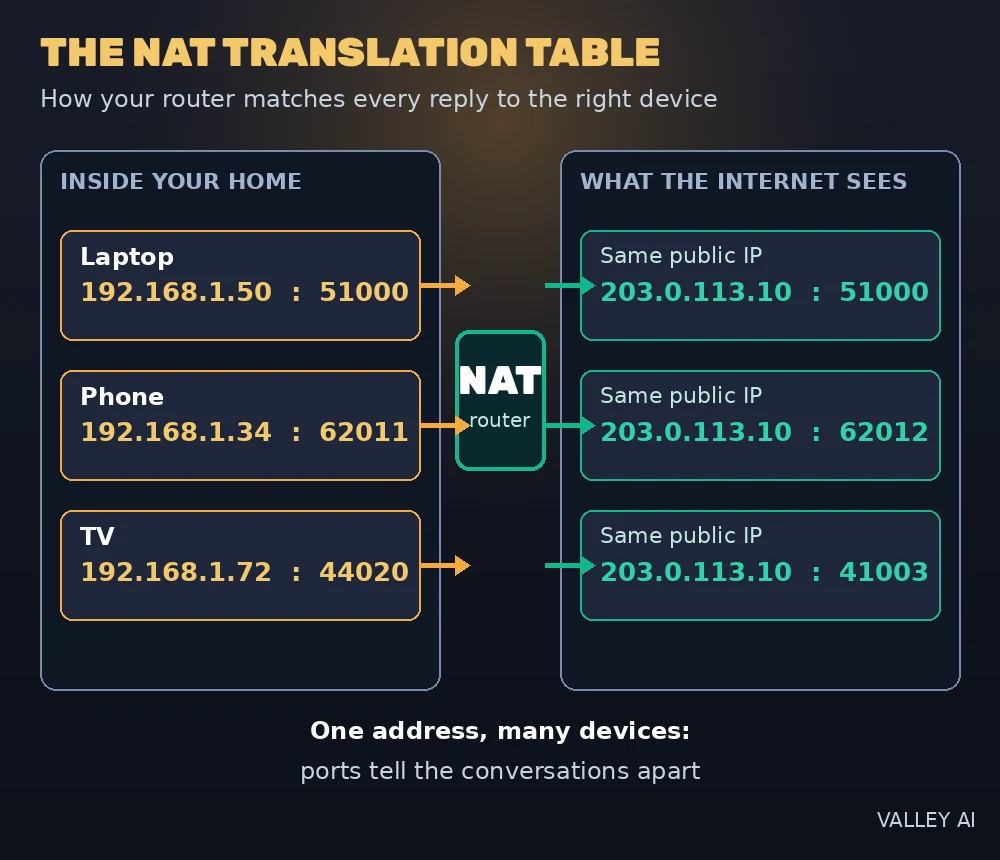
The translation table is the entire mechanism. It is a list of active conversations your router is tracking, and every packet that crosses it is matched against that list. A simplified table might look like this:
| Inside IP | Inside port | Outside IP | Outside port | Protocol |
|---|---|---|---|---|
| 192.168.1.50 | 51000 | 203.0.113.10 | 51000 | TCP |
| 192.168.1.34 | 62011 | 203.0.113.10 | 62012 | TCP |
| 192.168.1.50 | 53 | 203.0.113.10 | 41003 | UDP |
Notice what is happening in that table. Two different devices (192.168.1.50 and 192.168.1.34) both appear to the internet as the same public address, 203.0.113.10. The router tells them apart by port number. That is the whole secret of how one address serves a whole household.
Two rules govern this table, and together they explain most of what NAT does to your daily internet experience. First, an entry is created only by outbound traffic. Your device has to start the conversation; nothing from the outside can create an entry on its own. Second, a packet that arrives from the internet with no matching entry is dropped. The router simply has no idea which device it belongs to, so it discards it. This is why unsolicited connections from the internet cannot reach your devices by default, and it is the root of both NAT’s accidental privacy and most of its headaches.
Entries also expire. A UDP entry can vanish after as little as 30 seconds of idle time on some routers, which is why apps that need a constant connection keep sending tiny keep-alive packets. Each entry also costs the router a little memory, so a machine running heavy peer-to-peer software with thousands of simultaneous connections can fill the table and cause new connections to fail, one of the few ways NAT can genuinely slow a network down.
The three flavors: static, dynamic, and PAT
NAT comes in three flavors, and they differ in how permanent the mapping is and how many public addresses are needed. Only one of them runs in your home, but knowing all three makes everything else about NAT click.
Static NAT
Static NAT creates a permanent, one-to-one mapping between a private address and a public address. A company that wants its internal web server reachable from the internet at a consistent address uses static NAT: 192.168.1.10 always appears as 203.0.113.20, in both directions. It is simple and predictable, but it consumes one public IP for every host you publish, so it cannot scale to whole networks.
Dynamic NAT
Dynamic NAT keeps a pool of public addresses and lends one to each private device when it needs to go online, taking it back when the session ends. It scales better than static NAT, but it is limited by the size of the pool: if five public addresses are shared and a sixth user tries to connect, that sixth user simply cannot get out. Because it still needs roughly one public address per active device, dynamic NAT is mostly a historical curiosity today.
PAT (NAT overload)
PAT, Port Address Translation, also called NAT overload, is the flavor that runs the modern internet. Many private devices share a single public address, and the router tells their conversations apart by port number, exactly as the translation table above showed. One public IP can theoretically support around 65,000 simultaneous sessions. This is what every home router, every office firewall, and every phone carrier does.
| Static NAT | Dynamic NAT | PAT (NAT overload) | |
|---|---|---|---|
| Mapping | One private to one public, permanent | One private to one public, temporary, from a pool | Many private to one public, distinguished by port |
| Public addresses needed | One per published host | One per active device (pool size) | One, total |
| Inbound connections | Yes, always reachable | No, unless a mapping is active | No, without port forwarding |
| Where it is used | Publicly reachable servers | Rare today, mostly historical | Home routers, offices, carriers |
What your router actually does: PAT in your home
Strip away the jargon and here is your home network: every phone, laptop, tablet, TV, and smart bulb in the house holds a private address like 192.168.1.x, and your router presents all of them to the internet as one single public address. When people say “NAT” about a home network, they almost always mean PAT.
See NAT in action yourself (60 seconds)
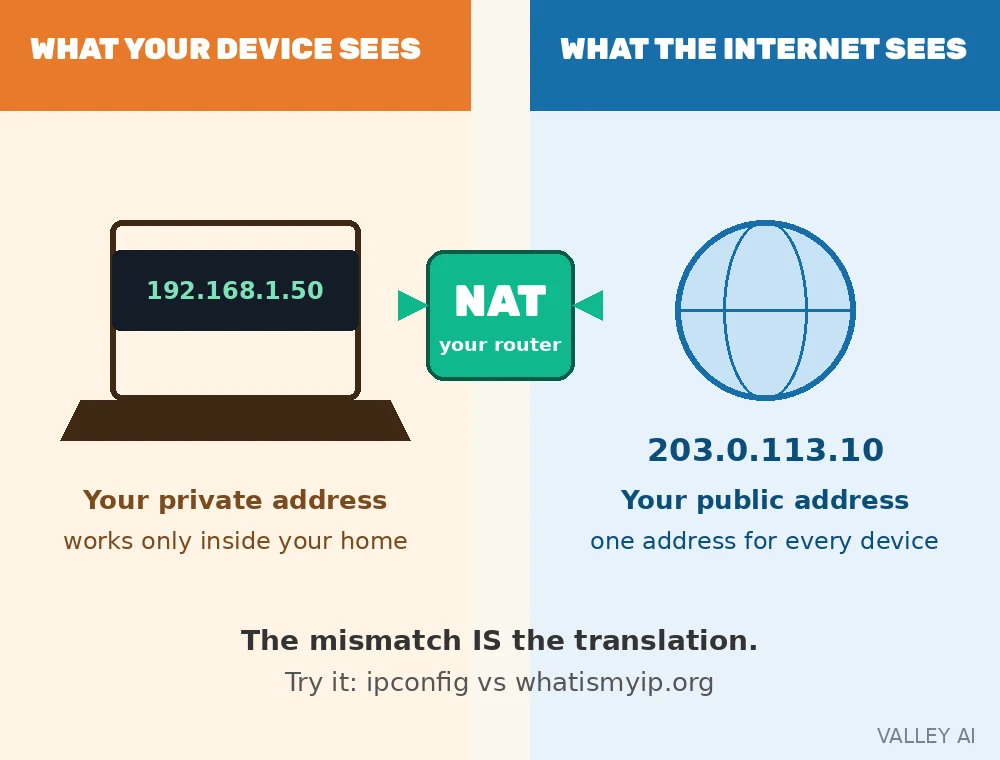
You can watch NAT working on your own devices right now. First, find your device’s private address: on Windows open a terminal and type ipconfig, on a Mac check your Wi-Fi settings or run ifconfig in Terminal. You will see something like 192.168.1.50. Second, visit whatismyip.org in your browser. The address it shows will be completely different, something like 203.0.113.10. That mismatch is NAT: the private address is what your device calls itself at home, and the public address is what the internet sees after your router translated it.
For a bonus round, open your router’s admin page (usually 192.168.1.1 or 192.168.0.1 in a browser) and look under the advanced settings for a NAT table, session list, or connection tracking page. You will see live entries matching the translation table from this article: your devices’ private addresses and ports on one side, your single public address on the other.
Can a website still track me if NAT hides my private IP? Yes. NAT hides your private address from other devices on the internet, but every site you visit still sees your public IP address, the one your whole household shares. NAT gives you zero anonymity against the services you contact. For that, you need a VPN or similar tools, which work on an entirely different principle.
Port forwarding: punching a deliberate hole
Because PAT drops inbound packets that match no entry, hosting anything behind NAT needs a manual exception: a permanent entry you write yourself. On a consumer router this is called port forwarding, and it is a single static rule of the form: anything arriving at my public IP on port 80 goes to 192.168.1.10, port 80. That is how people reach a home game server, a security camera recorder, or a self-hosted service from outside.
This is also the cleanest way to understand two terms you will see in networking guides. SNAT (Source NAT) rewrites the source of outbound packets: that is what your router does all day for your browsing. DNAT (Destination NAT) rewrites the destination of inbound packets: that is what a port-forwarding rule does. Everyday home NAT is SNAT with a few DNAT rules added by hand.
One important caveat: port forwarding only works if your router actually holds a public IP address. If your ISP is doing its own translation on top of yours, your rules point at an address you do not control, and nothing gets through. That situation has a name, and it deserves its own section.
Double NAT: when two translators fight
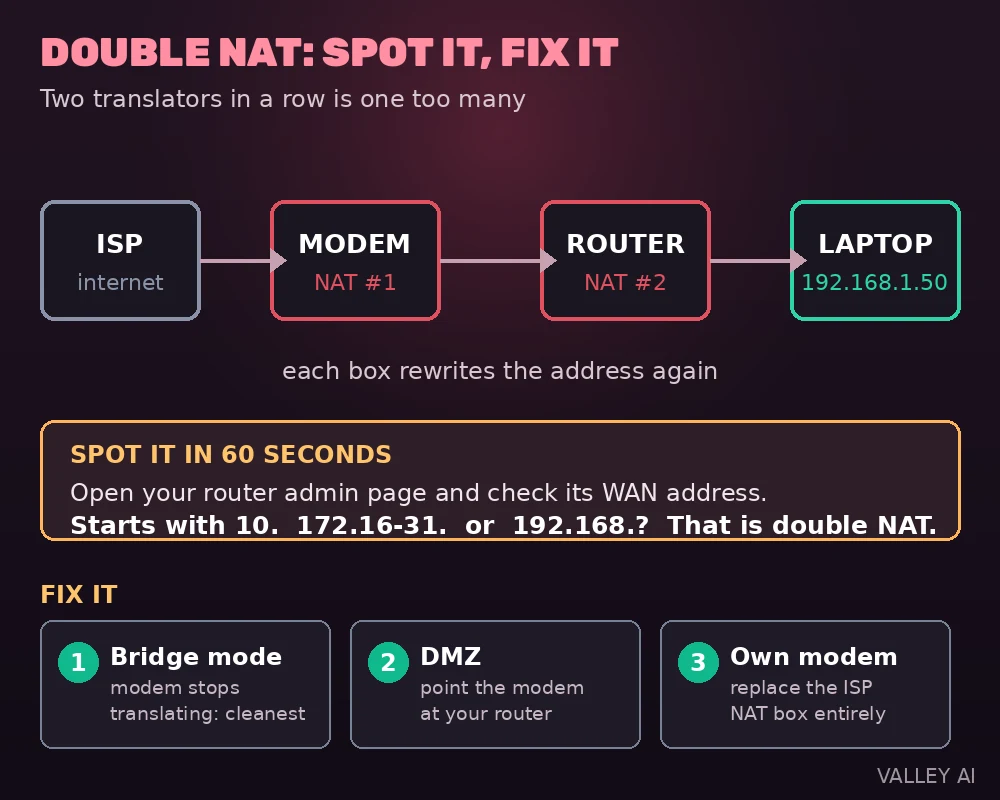
Double NAT happens when your traffic passes through two NAT devices in sequence. The classic setup: your ISP’s modem performs NAT, and your own router performs NAT behind it. Your laptop’s address gets translated to your router’s address, which gets translated again to the modem’s public address. Two translation tables, two layers of state, and twice the opportunity for something to break.
The symptoms are distinctive. Port-forwarding rules on your router mysteriously have no effect, because the ISP modem drops the inbound traffic before it ever reaches your router. Game consoles report strict NAT and refuse peer-to-peer matchmaking. Voice-over-IP calls suffer one-way audio. VPN connections drop at odd moments.
You can detect double NAT in under a minute. Open your router’s admin page and check the WAN or internet status: if the address it shows starts with 10., 172.16. through 172.31., or 192.168., your router is behind another NAT device upstream. A traceroute tells the same story: the first couple of hops are all private addresses.
The fixes, from cleanest to messiest: put the ISP modem into bridge mode so it passes the public IP straight through to your router and stops translating entirely; point the modem’s DMZ at your router’s WAN address so all inbound traffic is forwarded to it; or replace the ISP’s modem with your own device that does not perform NAT. Bridge mode is the one to ask your ISP about first.
CGNAT: when your ISP translates too
ISPs ran out of public IPv4 addresses long before you did, so many of them run NAT themselves. This is CGNAT (Carrier-Grade NAT): the ISP holds the public IP, and your router receives a shared private address instead of a public one. Combined with your own router’s NAT, the chain has three layers, sometimes called NAT444.
The practical consequence is blunt: behind CGNAT, port forwarding is impossible. You cannot open a port on an address you do not control. If you have ever set up a perfect port-forwarding rule and it still did nothing, and you are not double-NATed at home, CGNAT is the likely culprit. Some ISPs will assign you a real public IP on request, which is the only real fix.
Detection is easy once you know the tell. CGNAT subscribers get addresses from the shared range 100.64.0.0/10 (reserved specifically for this purpose). If your router’s WAN page shows an address starting with 100.64. through 100.127., you are behind carrier-grade NAT.
Is NAT a firewall? The myth, settled
NAT and the firewall live in the same box on your router, which is why people mix them up. But they are different jobs. A firewall enforces a policy: which traffic is allowed, which is blocked. NAT rewrites addresses so private devices can share one public IP. Most consumer routers do both, but one does not imply the other: a router can translate addresses with no filtering at all (common in front of public-facing servers), and a firewall can filter traffic between public addresses with no translation involved.
NAT does have a side effect that looks like security. Since inbound packets with no translation entry are dropped, your devices are unreachable from the outside by default. That accidental blocking is real, but it is a consequence of the address-sharing trick, not a security policy. NAT inspects nothing, filters nothing, and does not stop malware on your laptop from phoning home, because that malicious traffic rides out over a connection your own device opened, exactly the kind of traffic NAT is happy to translate.
If NAT hides my devices, does that make me safe from hackers? No. Hiding is not inspecting. NAT never looks at what is inside your packets, so it cannot recognize an attack. The firewall in your router is the security control; NAT is just the translator standing next to it.
NAT vs proxy: the confusion people actually have
Both NAT and a proxy make your traffic appear to come from one address, so learners reasonably mix them up. The difference is in how they work and where they sit. NAT operates at the network layer on your router, transparently and automatically, for every device and every app behind it. Nobody configures anything; it just translates packet headers as they pass.
A proxy is a service you deliberately point an app or browser at. Instead of connecting to the website directly, your app asks the proxy to fetch on its behalf. The proxy can live anywhere in the world, which is why proxies are used for privacy and getting around regional restrictions. NAT is always your local gateway, and it exists to share addresses, not to hide your identity or change your apparent location.
- Setup: NAT is automatic for the whole network; a proxy is configured per app or browser.
- Scope: NAT translates every packet from every device; a proxy handles only the traffic sent to it.
- Location: NAT sits at your network’s edge; a proxy can sit on another continent.
- Purpose: NAT shares one public IP among many devices; a proxy fetches content on your behalf for privacy, filtering, or access.
Why games, calls, and VPNs care about NAT
Anything that needs the internet to reach you suffers behind NAT: peer-to-peer gaming, voice and video calls, and remote access all need inbound paths. The universal survival trick is to start from the inside. When you make a WhatsApp voice call, both phones call out to WhatsApp’s servers, which relay the audio between them. No inbound connection was ever needed, so NAT’s default dropping never comes into play. Most modern apps are designed around this outbound-first pattern precisely because NAT is everywhere.
Gamers meet NAT through the console’s NAT type report. Type 1 (open) means effectively no NAT in the way. Type 2 (moderate) means NAT is present but the console managed to open what it needs, usually via UPnP or port forwarding. Type 3 (strict) means inbound traffic is blocked, and that is when matchmaking fails and voice chat cuts out. The fix is the same one from earlier: enable UPnP on the router or forward the game’s specific ports.
Why does my game say strict NAT even though my internet is fast? Because NAT type measures reachability, not speed. Strict means nothing from the internet can reach your console unsolicited. Your 500 Mbps connection is irrelevant to that question; what matters is whether the game’s ports are open or forwarded.
VPNs have their own famous fight with NAT. IPsec VPNs verify packet integrity, and the older AH mode authenticates the IP header itself, so the moment NAT rewrites that header, the receiving end assumes tampering and drops the packet. The industry fix is NAT-Traversal: the encrypted traffic is wrapped inside a UDP packet on port 4500, so NAT can translate the outer wrapper freely while the encrypted payload inside stays untouched.
Where NAT goes from here
IPv6 was designed to make NAT unnecessary. With 128-bit addresses, there are enough for every device on earth to hold a globally unique address, and then some. NAT66 exists but is actively discouraged; the whole point of IPv6 is to restore the original end-to-end design.
There is a catch worth knowing. Without NAT, its accidental inbound blocking disappears too, which means an IPv6 home network needs a real stateful firewall doing deliberate filtering, not the translator’s side effect doing it by luck. During the long transition, NAT64 and DNS64 bridge the gap, letting IPv6-only clients reach IPv4-only servers.
None of this means NAT is dying. The vast majority of home and mobile internet still runs on IPv4, CGNAT keeps growing as ISPs squeeze the last public addresses, and the translation table in your router will keep quietly doing its job for years. The next time whatismyip.org shows you one address while your laptop insists it has another, you will know exactly who is standing in between.
Frequently asked questions
What does NAT stand for?
NAT stands for Network Address Translation. It is the process a router uses to rewrite private IP addresses on a local network into one shared public IP address for traffic heading to the internet, and to translate the replies back.
What is the difference between NAT and PAT?
PAT (Port Address Translation) is a form of NAT. NAT translates addresses; PAT translates addresses and ports, so many devices can share a single public IP address. When people say NAT about a home router, they almost always mean PAT.
Does NAT slow down my internet connection?
Not noticeably on modern hardware. The translation happens in the router’s normal packet-forwarding path. The only real slowdown risk is the translation table filling up under extremely heavy load, such as thousands of simultaneous peer-to-peer connections, at which point new connections start failing.
How many devices can share one public IP address?
Theoretically around 65,000 simultaneous sessions per public IP, because sessions are distinguished by port number. In practice, each device holds many sessions at once, so a few hundred to a few thousand devices can comfortably share one address depending on usage.
Why can’t I host a website behind NAT without port forwarding?
Because inbound packets from the internet have no matching entry in the router’s translation table, so they are dropped. Port forwarding creates a permanent manual entry that tells the router where to send traffic arriving on a specific port, which is what makes hosting possible.
What is the difference between SNAT and DNAT?
SNAT (Source NAT) rewrites the source address of outbound packets, which is what your router does for everyday browsing. DNAT (Destination NAT) rewrites the destination address of inbound packets, which is what happens with port forwarding. Most home setups use SNAT for outbound traffic plus a few DNAT rules added by hand.

Kaleem
Kaleem is a Computer Science graduate (Virtual University of Pakistan) and the founder and editor of Valley AI, where he publishes in-depth, tested guides on computer hardware, artificial intelligence, and how the internet works. Every guide is researched from primary sources, tested hands-on where possible, and updated when the facts change.