

How does a QR code work? A QR code holds text. Your phone photographs the square, reads the black and white modules as ones and zeros, rebuilds the text, and acts on it. The whole scan takes about a second.
The text is usually a web address, and that is why a code feels like a link. It is not a link. It is a printed string, and the phone decides what the string means. A URL opens in the browser, a Wi-Fi string joins a network, a contact string saves to the address book.
Three pieces make the mechanism work: a pattern the camera can find at any angle, spare copies of the data woven through the grid, and a reading order the phone follows from the bottom right.
What a QR code holds
A QR code stores data. The pattern encodes characters, and the characters form a string. That string might be https://valleyai.net, or WIFI:T:WPA;S:HomeNet;P:secret123;;, or a contact block starting with BEGIN:VCARD. The phone reads the string first and chooses the action second.
That order matters. A code on a poster gives no hint about where it leads, because the destination is text inside the pattern and human eyes cannot read the pattern. That fact drives the safety checks: read the decoded text, then tap.
The name is short for Quick Response. Denso Wave engineer Masahiro Hara and his team built the format in 1994 to track car parts on a Toyota assembly line, where barcodes held about 20 characters and needed precise alignment. Denso Wave released the format as an open standard, ISO/IEC 18004, and never enforced its patent. The code spread from factory floors to menus, tickets, payments, and logins.
The four parts of the pattern
Every QR code uses the same four functional zones. Each one has a single job, and the scanner reads them in a fixed order.
- Finder patterns: the three large nested squares in the top-left, top-right, and bottom-left corners. They tell the camera where the code is and which way is up.
- Timing patterns: alternating black and white modules running between the finder patterns. They act as a ruler for the grid size.
- Format information: a narrow band near the finder patterns storing the error correction level and the mask pattern.
- Data modules: the rest of the grid, holding the message plus the error-correction copies.
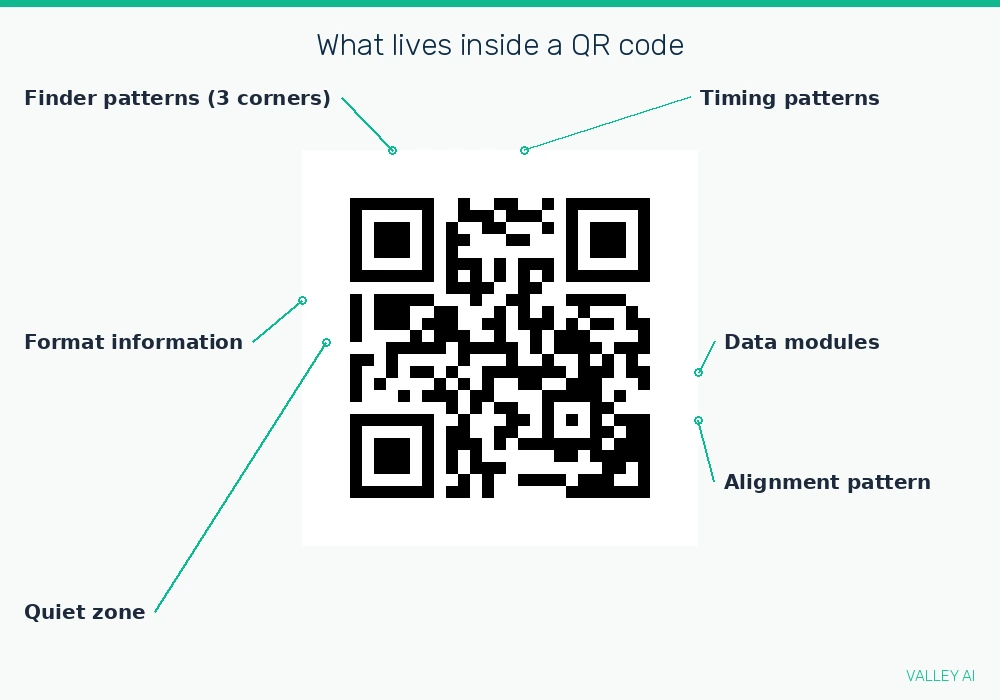
The finder patterns are the reason a code scans upside down. Each one is a 7 by 7 square with a fixed black-white-black run ratio of 1:1:3:1:1 along any line through its center. A camera sweeps the image for that ratio, and the ratio looks the same from any angle. Count the runs in a printed code and you can check the pattern yourself: one black module, one white, three black, one white, one black.
Why do the three corner squares look identical? A camera finds a code by searching for that exact shape, so the shape never changes with the content. The missing fourth corner is deliberate: it tells the scanner which corner is absent and therefore which way is up.
Timing patterns run between the finder patterns in an alternating black-white rhythm. They tell the scanner how many rows and columns the grid holds, and that number changes with the version. Format information sits beside the finder patterns and carries two facts the scanner needs before it reads a single data module: the error correction level and the mask pattern.
Two more features sit outside the four zones. The quiet zone is a blank white border at least four modules wide around the whole code, and it separates the pattern from surrounding print. Larger codes add alignment patterns, small squares inside the grid that help the scanner correct for a curved surface or a tilted camera, such as a code printed on a bottle.
How your phone reads it in under a second
The camera takes a photograph. Software searches the image for the finder ratio, maps the grid, and reads the modules as ones and zeros. The full sequence runs in six steps, and a modern phone finishes it in under a second. The work resembles a scanner reading a page, except the code carries its own reference marks, so the phone needs no alignment guides.
- Capture: the camera photographs the code. Contrast matters more than perfect focus.
- Locate: the software finds the three finder patterns and fixes the orientation and the grid boundaries.
- Format: it reads the format information to learn the error correction level and the mask pattern.
- Read: it walks the data zone in a zigzag from the bottom right, two modules at a time, reading the mode indicator, the character count, then the data itself.
- Repair: Reed-Solomon error correction rebuilds any modules that are damaged or covered.
- Act: the decoded string triggers the action. A URL opens in the browser, a Wi-Fi string joins the network, a contact string saves to the address book.
That static look is deliberate. Raw data can form long runs of one color, and long runs confuse a scanner, so the encoder tests eight mask patterns, scores each one for readability, and keeps the best. The chosen mask is recorded in the format information, and the scanner reverses it before decoding. The mask changes how the code looks, never what it stores.
The reader is the phone camera, and the camera is the same hardware a webcam uses to turn light into an image. The difference is the software after the sensor: a webcam streams frames to a call, while a QR reader searches one frame for the finder ratio.
Versions and capacity: how much data fits
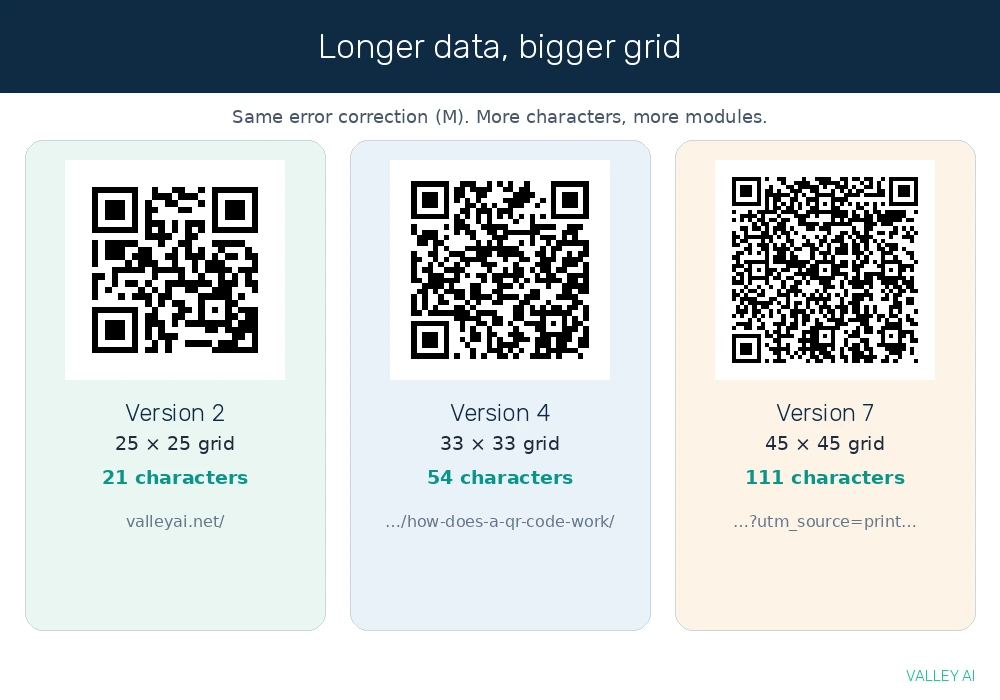
QR codes come in 40 versions. Version 1 is a 21 by 21 grid. Each version adds four modules per side, up to Version 40 at 177 by 177. A larger version holds more data, and a denser grid is harder to read from a distance, so the smallest version that fits the data is the one generators pick.
The growth shows in five payloads generated on 10 November 2026:
| Payload | Characters | Version | Grid |
|---|---|---|---|
| https://valleyai.net/ | 21 | 2 | 25 by 25 |
| https://valleyai.net/computer/how-does-a-qr-code-work/ | 54 | 4 | 33 by 33 |
| Article URL with tracking parameters | 111 | 7 | 45 by 45 |
| 200 characters of text | 200 | 8 | 49 by 49 |
| 400 characters of text | 400 | 12 | 65 by 65 |
Four encoding modes share the grid. Numeric mode stores digits only, alphanumeric mode adds capital letters and a small set of symbols, byte mode stores any 8-bit data, and kanji mode stores Japanese characters. The mode is recorded at the start of the data, and the scanner reads it before the characters. At Version 40 with the lowest error correction, the maximums are 7,089 numeric characters, 4,296 alphanumeric characters, 2,953 bytes, and 1,817 kanji. A generation test confirmed the top figure: 7,089 digits encoded as a Version 40 code, 177 by 177 modules, and decoded back to the identical string.
Most codes people scan hold far less than the maximum. A short web address runs 30 to 100 characters, a Wi-Fi password rarely passes 30, and a full contact card lands near 200 to 300. Short data means a small version, a clean pattern, and a scan that works from farther away. A long tracking URL pushes the version up and the modules down in size, which is one reason shortened links scan better on posters.
Error correction: what a damaged code survives
A QR code survives damage because it carries spare copies of its data. The encoder adds Reed-Solomon error-correction codewords alongside the message, spread across the grid, so the decoder can rebuild missing pieces from the copies that remain.
The repair works like a crossword: a missing letter can be filled in from the crossing words, as long as enough of the grid is still legible.
Four levels set how much of the code is spare copies. Level L recovers about 7% of damaged codewords, M about 15%, Q about 25%, and H about 30%. Higher correction means a denser code, because more of the grid goes to redundancy. The split for a Version 2 code:
| Level | Data codewords | Error-correction codewords | Redundancy |
|---|---|---|---|
| L (Low) | 34 | 10 | 22.7% |
| M (Medium) | 28 | 16 | 36.4% |
| Q (Quartile) | 22 | 22 | 50.0% |
| H (High) | 16 | 28 | 63.6% |
Why does a damaged code still scan? The decoder does not need every module. It needs enough codewords to rebuild the message, and the spare copies supply the missing ones. A logo in the center of a printed code works the same way: the scanner treats the covered area as damage and repairs it, as long as the level chosen leaves enough spare copies.
A test run on 10 November 2026 measured the limits instead of quoting them. The same web address was encoded at all four levels, a white square was placed over the center of each code, and the codes were decoded with OpenCV 5.0.0. The largest patch each level survived: Level H lasted longest, Level Q sat in the middle, and Levels L and M failed first.
| Level | Largest surviving center patch |
|---|---|
| L (Low) | 5% of the printed area |
| M (Medium) | 5% of the printed area |
| Q (Quartile) | 10% of the printed area |
| H (High) | 15% of the printed area |
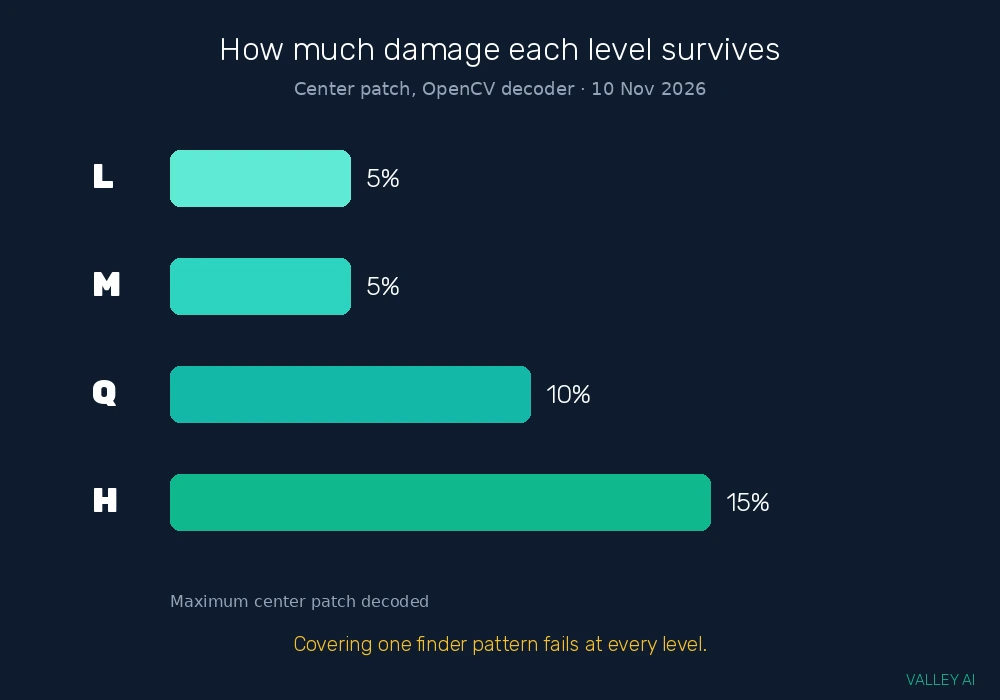
Those numbers sit below the spec figures of 7, 15, 25, and 30 percent, and the gap has a reason: the spec percentages describe damaged codewords, while the test covered a share of the printed area. A single blotch in the center destroys a contiguous block of codewords, which is harder to repair than the same damage scattered across the grid. The test ran on a software decoder. A phone camera may tolerate slightly more or less. The order holds either way: H outlasts Q, and Q outlasts M and L.
One kind of damage beat every level. Covering a single finder pattern stopped the scan at L, M, Q, and H alike. Finder patterns sit outside the error-correction system: if the camera cannot find the code, it never starts reading. A logo in the center is safe. A sticker over a corner is not.
The quiet zone showed the same pattern in miniature. Codes printed with a border of four, two, and even one module all decoded, while a code with no border at all failed. The standard calls for four modules, and four is the safe choice for print, but the test shows the border is what the decoder needs to tell the code apart from the print around it.
Static vs dynamic: the same square, two different promises
Two codes can look identical and behave differently, because the difference sits in the stored string. A static code stores the final data in the pattern itself. A dynamic code stores a short redirect link, and the real destination lives on a server.
A static code never changes. Print it on a business card or a Wi-Fi password sign and it works as long as the destination exists. A dynamic code can change its destination after printing, and its owner can count scans, but the destination can also change into something the person who printed it never intended.
How do you tell a static code from a dynamic one? Look at the decoded address before you tap it. A static code shows the real destination, such as a restaurant menu page. A dynamic code shows a short redirect domain, and the real destination stays hidden until the redirect runs. The phone preview shows the first address only.
The stored string follows a format the phone recognizes. A web address starts with https://, a Wi-Fi code reads WIFI:T:WPA;S:NetworkName;P:Password;;, a contact block starts with BEGIN:VCARD, a text message uses SMSTO:, and an email uses mailto:. The format decides the action, which is why the preview matters: it shows the format and the destination in one line.
Print a static code when the destination is permanent, such as a home Wi-Fi password, a phone number, or a vCard. Choose a dynamic code when the destination will change, such as a seasonal menu, a campaign page, or a ticket link.
The risk in the square
A QR code cannot infect a phone by itself. The pattern holds text, and text alone does nothing. The risk starts when the phone acts on that text, and the person scanning cannot read the text with their eyes. That gap is what QR phishing, known as quishing, exploits.
The common attacks share one trick: the code hides the destination. A fake code leads to a login page that copies a bank or delivery service and collects passwords. A sticker pasted over a real code on a parking meter or a restaurant table sends payments to the wrong account. A dynamic code can point somewhere safe when it is printed and somewhere else later. The FBI has warned the public about malicious QR codes, and the warning names the same pattern: a code the victim cannot read, leading to a page that asks for credentials or payment.
Four checks catch most of it. Read the preview address before tapping. The domain is the part to check, because page design is easy to copy. Run a finger over a printed code and feel for a sticker layered on top. Refuse any code that demands urgency, such as a package on hold or an account about to close. Never type a password or card number on a page reached from a code you did not expect.
The test numbers decide how to print a code of your own. Use level H when the code will live on paper, a poster, or a menu, because it survived the largest patch in the test. Keep all three finder patterns clear and uncovered, since covering one stopped the scan at every level. Leave the full four-module quiet zone around the code, because the decoder needs the border to find the edge. A code printed that way survives more wear, and it gives the person scanning it a clean preview to check first.
Frequently asked questions
Do QR codes work without the internet?
Scanning works offline, because the camera only reads the pattern. A code holding a web address still needs a connection to load the page, while a Wi-Fi code, a contact, or plain text works with no connection at all.
How small can a QR code be printed?
Print size follows scan distance. A code on a business card scans from a few inches away, while a code on a poster needs to be large enough for a phone to resolve its smallest modules from the distance people stand. Test the printed code from the distance people will actually stand at before you put it up.
What happens if a QR code links to a deleted page?
The code still scans, because the pattern holds the address and the address is still valid text. The browser opens the address and shows an error, the same as a typed link to a deleted page. The code breaks only when the destination goes away, never on its own.
Can a phone scan a QR code on a screen?
Yes. A phone camera reads a code on another screen the same way it reads one on paper, as long as the screen is bright enough and the code is large enough to resolve. Glare and low brightness cause most screen-scan failures.
Do QR codes work on any phone?
Any modern phone scans QR codes with its built-in camera app, with no extra app needed. Apple added native scanning in iOS 11, released in September 2017, and Android phones gained it through the camera app on Android 8 and later. Older phones need a free scanner app.
Can you create a QR code for free?
Yes. Free generators encode a web address or a Wi-Fi password into a static code in seconds, and the code works without any account or service behind it. Dynamic codes need a service to host the redirect, so they come from a QR platform rather than a one-off generator.

Kaleem
Kaleem is a Computer Science graduate (Virtual University of Pakistan) and the founder and editor of Valley AI, where he publishes in-depth, tested guides on computer hardware, artificial intelligence, and how the internet works. Every guide is researched from primary sources, tested hands-on where possible, and updated when the facts change.