

You land in a new country, switch on your phone, and the data doesn’t work. The home plan charges roaming rates, the airport kiosk sells a plastic SIM you have to cut to size, and the queue moves slowly. The trip starts with a chore instead of a connection.
An eSIM removes the queue and the plastic. The phone already carries the SIM as a chip, and the carrier’s profile arrives as a download. You buy the plan at home, install it on Wi-Fi, and switch it on when you land.
The convenience has edges. A profile binds to one phone, a travel plan rarely includes a number, and a QR code in the wrong hands spends your plan. The mechanism explains all three, so the mechanism comes first, and the checks that follow it tell you whether an eSIM fits your phone.
The chip and the profile: two halves of one SIM
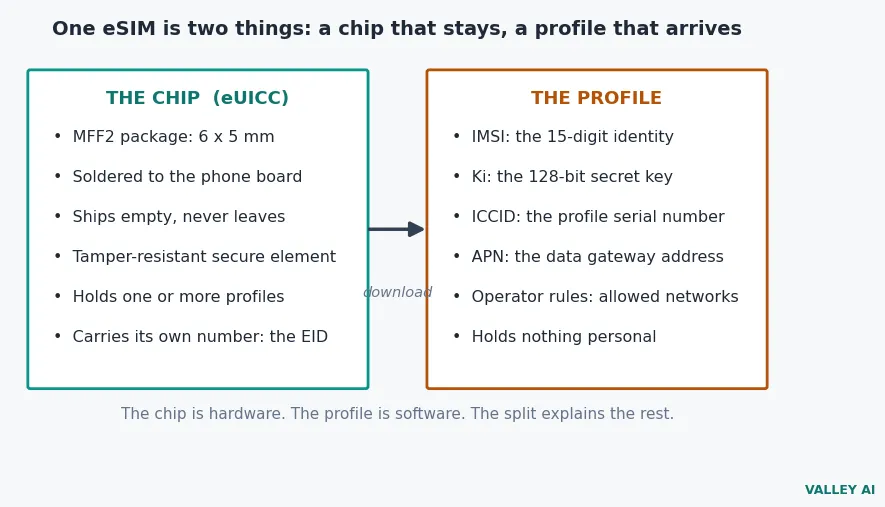
An eSIM is two things, and the distinction explains almost everything about how eSIMs behave. The chip is the hardware. The profile is the software. Most explainers treat an eSIM as one thing, and that is where the confusion starts.
The chip has a standards name, eUICC, short for embedded universal integrated circuit card. It sits in the most common package, MFF2 (the machine-to-machine form factor), a 6 by 5 millimeter block soldered to the phone’s board at the factory. It never leaves the device. Inside it sits a tamper-resistant secure element that stores the profiles and runs the cryptography. The chip ships empty, and the carrier’s profile arrives later.
A profile holds five things. The IMSI is the 15-digit identity the network uses to find the account, and the Ki is a 128-bit secret key shared only with the carrier. The ICCID is the profile’s serial number, and the APN is the gateway address data flows through. Operator rules say which networks the profile may attach to. A profile holds nothing personal: no name, no payment card, no browsing history, no contacts. The link between a profile and a paying customer lives in the carrier’s billing system. The phone itself holds no billing record.
Each eUICC carries an identity number of its own, the EID, a 32-digit number burned in at the factory. The provisioning server asks for it when it sets up a profile, and the profile it sends is bound to that one chip, so no other phone can install the same download. Software on the phone does the installing. The GSMA calls it the Local Profile Assistant, and it manages download, enable, disable, and delete. The chip holds the profiles, the assistant manages them, and the server prepares them.
A cellular watch shows why the chip matters. No tray fits on a wrist, and the first cellular watch, Apple Watch Series 3 in 2017, shipped with an eSIM. Smartwatches use the same split: a chip inside, a profile downloaded.
The standard comes from the GSMA, the body that represents mobile operators worldwide, and its consumer specification is SGP.22. The GSMA sets out the architecture, the profile format, and the provisioning flow, so one phone works with any carrier that follows it.
Identity is the profile’s job, and the radio that talks to the network is a separate part. A modem modulates the signal, and the SIM supplies the identity the modem presents. The two meet at the authentication step.
From QR code to connected line
Installing an eSIM is a download, and the download follows six steps. Each step has one job, and the chain breaks if any step fails.
- Buy the plan. The carrier reserves a profile for your phone and prepares a QR code or an install link.
- Scan the QR code. The phone’s camera reads the activation code, or you type it in by hand.
- Contact the server. The phone’s Local Profile Assistant opens a secure connection to the SM-DP+ server named in the code.
- Check both ways. The server and the chip check each other’s certificates, and the server confirms the phone may receive the profile.
- Download the profile. The server encrypts the profile and sends it over the connection.
- Switch it on. The profile arrives switched off, and you enable the line in Settings when you want it live.
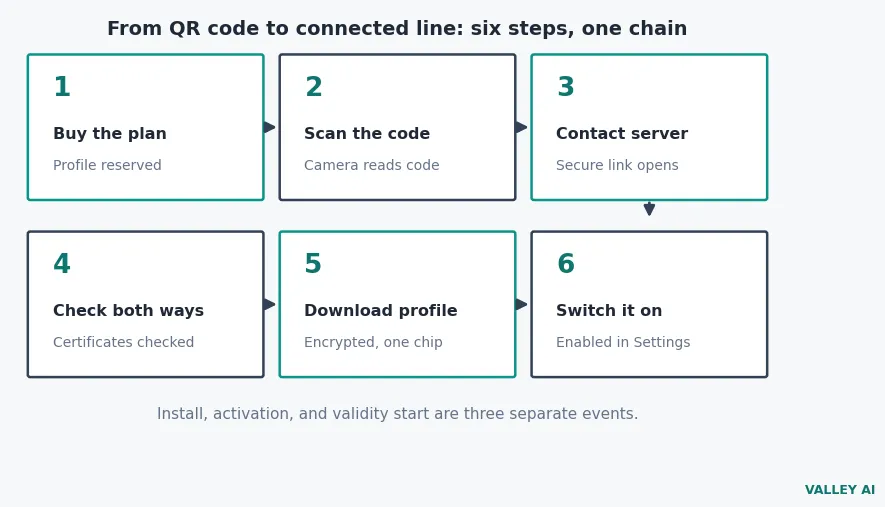
Three events get rolled into the word activation, and telling them apart protects your data allowance. Installation is the download step, when the profile lands on the chip and sits there inert for days or weeks before departure, at no cost. Activation is the moment service exists, when you toggle the line on and the phone registers on a network, for a travel eSIM usually a partner network at the destination. Validity start is when the plan’s clock begins. Most providers start it at activation or at first data use abroad, but some start it at installation and a few at purchase. A 30-day window that starts at install quietly loses two weeks on the sofa.
Does the QR code contain your whole SIM? No. The code carries the server address and a matching ID, and nothing else. The profile itself downloads over an encrypted connection. That’s why carriers warn against sharing the code: until it has been used, any compatible phone that scans it can download your connection.
That code is the weakest link in the whole chain. It works as a bearer token until used: whoever scans it first consumes the profile. Never post it publicly, never resell it, and never buy QR codes from marketplaces where the original buyer may have scanned them already.
The download needs the internet, and home Wi-Fi is the usual route. The code names the server directly, so the phone goes straight to it, while some carriers skip the code and let the phone ask a discovery server, the SM-DS, which server holds its profile. Either route ends at the same place: a profile on your chip, ready to switch on. The download rides home Wi-Fi, and the line itself runs on the mobile network once you switch it on.
Apple’s own setup guide names five routes onto the phone: Quick Transfer from a previous iPhone, carrier activation, a QR code, a carrier link, and a carrier app. Apple support lists the steps for each route, and the QR code route is the one most travel plans use.
The numbers behind the chip
The eSIM story is usually told without numbers. The numbers are the proof, and they come from standard dimensions, a 128-bit key, and the QR format itself.
I divided each SIM size by the chip to see how much plastic the eSIM drops. A full-size SIM measures 85.6 by 53.98 millimeters, which multiplies out to 4,620.7 square millimeters. The MFF2 chip measures 6 by 5, or 30 square millimeters, and dividing 4,620.7 by 30 gives 154: the first SIM was 154 times the area of the chip that replaces it.
| Format | Size (mm) | Area (sq mm) | Times the eUICC |
|---|---|---|---|
| Full-size 1FF | 85.6 x 53.98 | 4,620.7 | 154.0x |
| Mini 2FF | 25 x 15 | 375 | 12.5x |
| Micro 3FF | 15 x 12 | 180 | 6.0x |
| Nano 4FF | 12.3 x 8.8 | 108.2 | 3.6x |
| MFF2 eUICC | 6 x 5 | 30 | 1x |
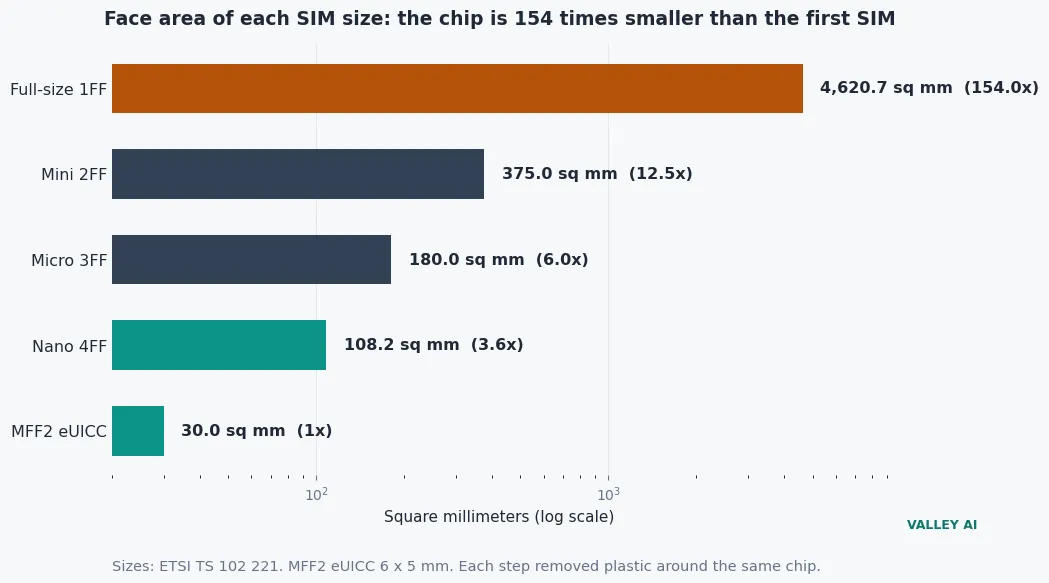
At the small end, the nano SIM shows the same pattern. It measures 12.3 by 8.8 millimeters, or 108.2 square millimeters, and the chip is 3.6 times smaller still. Every step in the table removed plastic around the same chip. The eSIM removes the plastic entirely, and the chip is all that is left.
The shrink is the point. Nothing about the eSIM makes a call faster or a signal stronger: the radio does that work. What the chip buys is space inside the phone, and space is what the tray, the slot, and the ejector pin used to cost.
I worked out what a billion guesses a second would need to crack the key. The network sends a 128-bit random challenge, and the chip answers with a response computed from its 128-bit secret key. Two to the power of 128 gives 3.4 x 10^38 possible keys. At a billion guesses a second, trying every key takes 1.1 x 10^22 years. The average case, half the keys tried, takes 5.4 x 10^21 years. The universe is 13.8 billion years old, so the average case runs about 390 billion times the age of the universe.
The same handshake runs on 4G and 5G alike, under the name 5G-AKA on the newer network. The key stays 128 bits on both, and the challenge stays random on both.
Does the secret key ever leave the chip? No. The chip computes the response inside its tamper-resistant element and sends only the response. The network holds a copy of the key and checks the response against its own calculation. A match opens the line, and the key itself never crosses the air.
The QR code carries an address, and the format’s own ceiling shows why that is enough. A standard QR code holds at most 2,953 bytes, at its largest grid and lowest error correction. A typical activation code, a server address plus a matching ID, runs about 120 bytes. That is 4.1 percent of the largest code, and 44.3 percent of a Version 10 code, the size of a code printed on a card. The code fits with room to spare, because it is a pointer. The profile travels over the internet instead, encrypted for one chip.
Three cautions sit beside those numbers. The shrink ratios are exact, because they divide standard dimensions. The brute-force time assumes a labelled guess rate of a billion a second, and it prices an attack that needs the key in hand, which no attacker gets. The QR arithmetic uses a typical-length activation code, labelled as typical because no carrier publishes the size of one code. No live provisioning ran in this session. No eSIM phone and no carrier account were available to run it against.
What an eSIM changes when you travel
Travel is where the download pays off. The queue at the airport disappears, and so does the tray. The home line stays where it is, and the travel line carries data beside it.
Two lines run at once on a modern phone. An iPhone keeps several profiles stored and runs two lines together, and switching between them takes seconds in Settings. The home number keeps calls and texts. One line handles voice, the other handles data, and the phone uses one cellular data network at a time.
Bank codes are the trap. Most travel plans carry data only, so a verification code sent by text has nowhere to go on the travel line, which is why the home line must stay active for those messages. Let the eSIM carry everything else. Two-factor authentication codes arrive by text or app, and the text ones need a line that can receive them.
Changes:
- The plan arrives as a download. No card comes in the post.
- Several profiles live on one chip, and you switch lines in Settings.
- Switching carriers takes minutes in Settings, with no trip to a shop.
What stays the same:
- The network still checks the same secret key before it opens a line.
- The radio, the antenna, and the data speeds stay exactly as they were.
- The carrier still bills the plan; the chip only proves who you are.
Buy the travel eSIM at home, not at the airport. The install needs Wi-Fi, the validity clock may start at install, and the airport gives you neither time nor a good connection. A plan bought at home and switched on at landing costs the same and wastes none of its window.
One more guard matters. The profile on the phone was never the weak point; the carrier account is. A strong password on that account, kept in a password manager, protects the line better than any setting on the phone.
Where the eSIM loses
The eSIM loses in four places. A phone tied to one carrier can’t use another company’s eSIM until the carrier releases it, which is a matter for the carrier’s support desk rather than a setting on the phone. A travel plan rarely includes a local number, so calls and texts stay on the home line. Some phones now take nothing else: US iPhone 14 models and the iPhone Air have no SIM tray at all. And a profile that binds to one chip cannot be handed to a friend the way a card can.
Can you move an eSIM to a new phone the way you move a plastic SIM? Not by hand. A plastic card moves with your fingers; a profile stays on its chip. Where the carrier supports it, iPhones move the line with Quick Transfer and Pixels move it during setup. Where transfer is not supported, the carrier sets the line up again on the new phone.
Three checks before you buy settle it. First, look for the EID under Settings: no EID means no eSIM chip. Second, confirm the phone is not tied to one carrier, or the new profile will not install. Third, read the plan terms for the validity start, and install at home only when the clock starts at activation or at first use abroad. Pass all three and the download does the rest.
Frequently asked questions about eSIM
Does an eSIM give you a phone number?
A travel eSIM usually arrives without a callable number. These are data-first products: some can receive SMS, a few include outbound calling credit, and none replaces your home line for calls. Check the plan’s SMS reception before you buy if verification codes matter to you.
Can an eSIM work without Wi-Fi?
Only the download needs an internet connection. Apple asks for Wi-Fi or a hotspot when you set one up, although eSIM-only iPhones can activate without Wi-Fi in some countries. Once installed, an eSIM runs on the mobile network the same way a plastic card does.
How many eSIMs can one phone hold?
The standard sets no fixed number: the GSMA specification says a chip may hold several profiles, limited by its memory. Apple says an iPhone manages eight or more eSIMs (two lines active at once), while Samsung puts the Galaxy ceiling at 20 profiles on some models.
Is an eSIM safer than a plastic SIM?
In one way, yes: a profile binds to one chip and can’t be pulled out of a lost or stolen phone the way a card can. Two limits temper that. First, the code is a single-use credential, so treat a screenshot of it like a password and delete it after the install. Second, SIM-swap fraud usually starts with social engineering at the carrier, and the profile on your phone was never the weak point there.
What happens to your eSIM if you factory reset your phone?
A factory reset can wipe installed eSIM profiles on some phones, so reset before a trip, never during one. A deleted profile has to be replaced by a new one from the carrier, so check the carrier’s reissue policy before you wipe.
Do you need a different eSIM for each country?
Coverage follows the plan. The chip itself adds no coverage. A single-country plan registers on partner networks in that one market, a regional plan covers a group of neighboring countries, and a global plan works across many destinations at a different rate. Match the plan’s coverage list to your itinerary before you buy.

Kaleem
Kaleem is a Computer Science graduate (Virtual University of Pakistan) and the founder and editor of Valley AI, where he publishes in-depth, tested guides on computer hardware, artificial intelligence, and how the internet works. Every guide is researched from primary sources, tested hands-on where possible, and updated when the facts change.