

One Password for Everything: Why That Is Safe
A typical person holds somewhere between 70 and 250 online accounts. Email, banking, shopping, streaming, work tools, government portals. Each one asks for a password, and each one works best with a password used nowhere else. No one can remember 200 different passwords, so people reuse a few. That reuse is the problem a password manager exists to fix.
When one site is breached, the stolen passwords get tried on every other site automatically. The attack has a name, credential stuffing, and it works because the same password opens more than one door. Stolen credentials figured in more than a third of confirmed breaches in the Verizon Data Breach Investigations Report for 2026. A password manager breaks the chain: every account gets its own long random password, and you remember one passphrase instead of a hundred.
One strong passphrase in your head, a different generated password on every account. After you type the passphrase, it is stretched into a key, the key locks a vault file, and the vault only opens for the right address.
The Slow Lock: What the Master Password Becomes
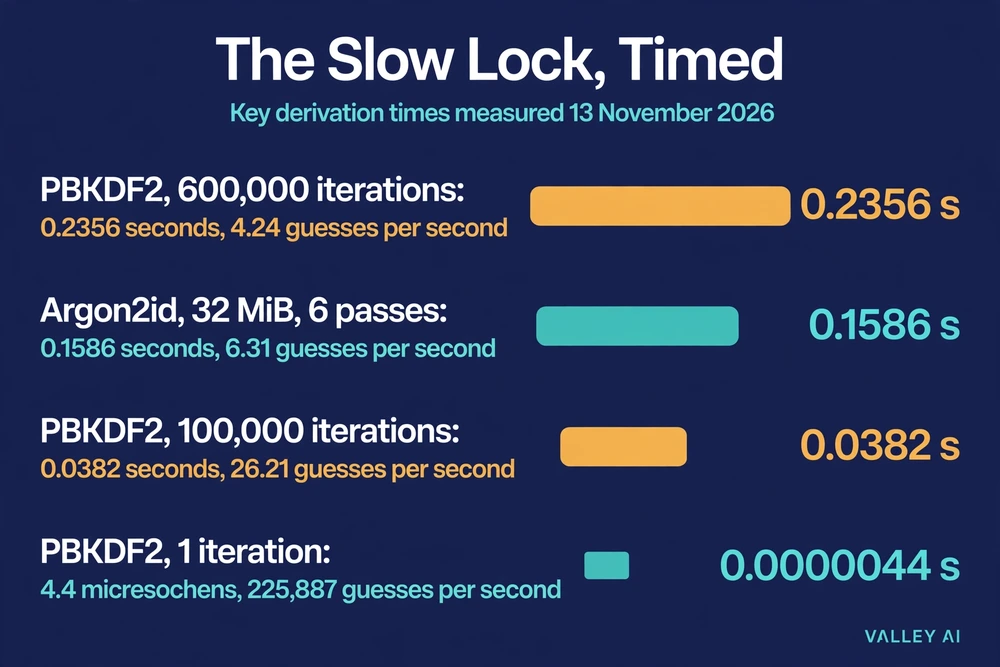
Your master password is never the encryption key. The manager feeds it through a key derivation function, a deliberately slow piece of math that turns a short passphrase into a 256-bit key. Two functions do this job in modern managers. PBKDF2 repeats a hash operation hundreds of thousands of times. Argon2id fills a block of memory and works through it several times, so a machine built for guessing must pay in memory as well as time. Argon2id is the memory-hard function described in RFC 9106.
I tested it on 13 November 2026, and the numbers show what the slowness costs in practice. The demo used a passphrase chosen for the test, oak-river-mango-lantern-7, and a fixed salt, so the run can be repeated. PBKDF2 with 600,000 iterations took a median of 0.2356 seconds per derivation. That count is the Bitwarden default, set to match the OWASP recommendation. Argon2id at Bitwarden’s defaults, 32 MiB of memory, 6 passes, 4 threads, needed a median of 0.1586 seconds. One iteration of PBKDF2 cost about 4.4 microseconds. You feel a quarter of a second once, when you open the vault. An attacker guessing passwords pays it for every guess.
The table turns those timings into guessing speeds. The rate is one core of this machine. A real attacker runs many cores, so read the guesses-per-second column as a floor.
| Function | Settings | Seconds per guess | Guesses per second, one core |
|---|---|---|---|
| PBKDF2 | 600,000 iterations | 0.2356 | 4.24 |
| Argon2id | 32 MiB, 6 passes, 4 threads | 0.1586 | 6.31 |
| PBKDF2 | 100,000 iterations | 0.0382 | 26.21 |
| PBKDF2 | 1 iteration | 0.0000044 | 225,887 |
Time alone is only half the story. The other half is how many guesses the attacker needs. A 16-character password drawn at random from the 94 printable characters carries 104.9 bits of entropy. A six-word passphrase drawn from a 7,776-word list carries 77.5 bits. An eight-character lowercase password carries 37.6 bits. At the measured KDF rate of about 4 guesses a second on one core, the six-word passphrase needs 1.6 quadrillion years. The eight-character lowercase password needs 1,555 years on one core. Give the attacker 1,000 cores and the passphrase still needs 1.6 trillion years, while the short password falls in about a year and a half. Take the KDF away entirely, at a stated rate of ten billion raw guesses a second, and the passphrase still needs 677,206 years. The short password falls in about 20 seconds.
The Vault File: What an Attacker Steals
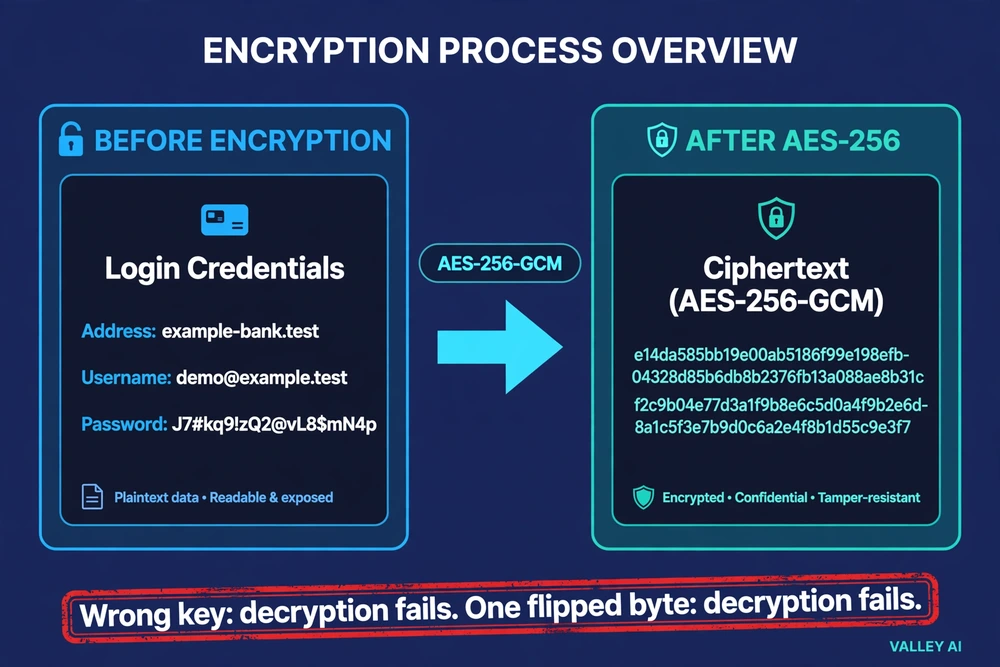
The vault is a file. KeePass keeps it as a single database file. Cloud managers keep the same shape on their servers. Every entry inside, the address, the username, the password, the notes, is encrypted with AES-256 before the file is written or sent anywhere. The key is the one the slow lock produced. Without it, the file is scrambled bytes.
That run encrypted a sample vault entry with that key: one login for a demo bank site, with a generated 20-character password. The ciphertext came out as a 164-character string: 4U2lhbsZ4Aq1GG+Z4ZjvsEMo2FttuLI3b7E6CIrosxwL7faeBnfDDC2UryZmRTGtToANoWSmnO0iVKcWyWonaLxdPQf9U7l0RHvfAiee2HbwsWUkOqrdNz0ElSbxNCHsKolNlfKIh1Fa0G/AAAZSrmJUYpMesBD3qA==. Nothing in it reads as a username, an address, or a password. With the right master password, the same run decrypted it back to the original entry. With a wrong master password, decryption failed outright. Changing one byte of the ciphertext failed the same way.
Does the company know my master password? No. The password never leaves your device in any form. Encryption and decryption happen on your device, and the company stores only the scrambled copy. That design has a name, zero-knowledge, and it is also the reason there is no password reset for the vault itself. NIST’s digital identity guidelines say verifiers shall allow password managers and autofill, and that managers make stronger passwords more likely.
You can see the scrambled file yourself. In a local-file manager, open the vault file in a plain text editor. You will find no readable passwords, no usernames, no addresses. In a cloud manager, open the account settings and look at the key derivation settings. Bitwarden lists them under Settings, Security, Keys. The iteration count should read 600,000. A lower number means each guess costs the attacker less.
Autofill: The Address Check That Catches Fake Sites
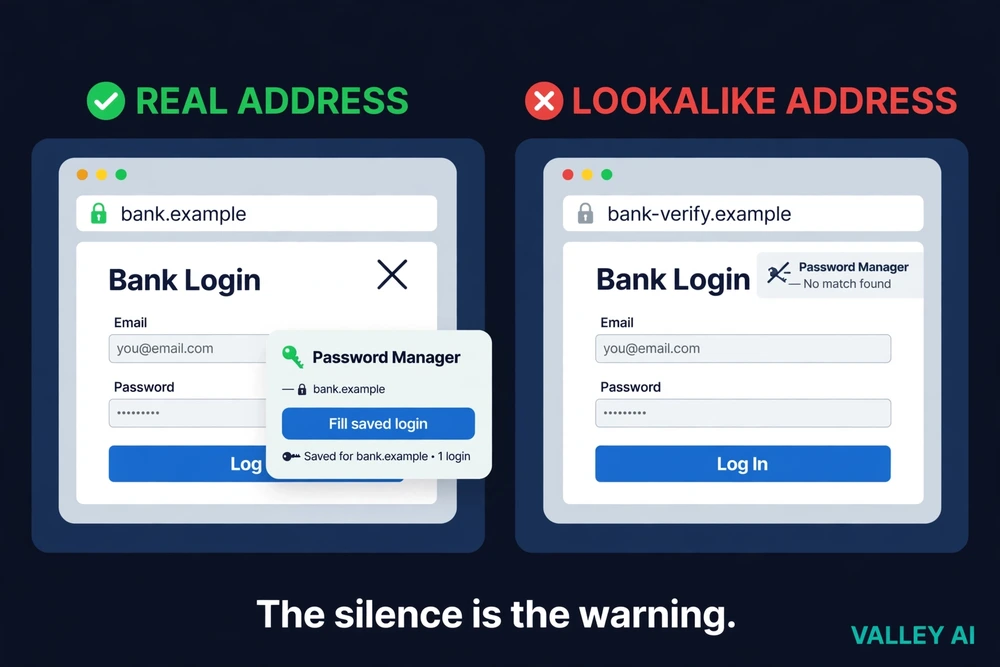
Autofill is the feature that makes the vault usable day to day. The browser extension watches for login fields. When a page shows a username and password box, the manager compares the page’s address against the addresses saved in the vault. A match brings up the offer to fill. No match brings up nothing.
That silence is a safety feature. A phishing page can copy a bank’s design pixel for pixel, but it cannot copy the bank’s address. The manager will not offer the bank’s password on a lookalike domain, and the missing offer is the warning. The UK’s National Cyber Security Centre puts it plainly: the password will only autofill on the correct website.
The protection has one gap, and it is the person using it. If you copy the password out of the vault and paste it into a fake page by hand, the manager cannot stop you. The address check only works when the manager does the filling.
Try the check yourself. Open a site where you have a saved login and watch the offer appear. Then open a misspelled copy of the address and watch it stay silent. Many managers let a fingerprint sensor open the vault, so the passphrase is typed once and the sensor handles the daily opening.
Where the Promise Has Limits
A stolen vault is only as safe as the master password and the iteration count behind it. LastPass showed both halves of that sentence in December 2022, when attackers copied a backup of customer vaults. Website addresses in the backup were not encrypted. Passwords were, with AES-256, and LastPass said guessing a master password under its default settings would take millions of years. The default then was 100,100 iterations, and the timed run used 100,000 as the round figure for it. Many older accounts still sat at 5,000 iterations, and those accounts were never forced to upgrade. The numbers from the timed run show what the iteration count is worth: at that count an attacker manages 26 guesses a second per core on this machine, while at 600,000 the rate falls to 4. Blockchain analysts at TRM Labs traced $438 million in confirmed cryptocurrency thefts to vaults cracked after the breach, in a report published in December 2025.
The zero-knowledge promise has a second limit. It assumes the company’s servers behave. Researchers at ETH Zurich and the Università della Svizzera italiana tested that assumption in a paper presented at USENIX Security 2026, and found that under a malicious or hacked server, the zero-knowledge claims of four cloud managers did not always hold. The vendors were notified and fixes are being worked on. The promise is real, but it rests on the server behaving as promised.
A third limit sits on your own device. If malware controls your phone or laptop while the vault is open, encryption does not help, because the malware sees the master password as you type it and the passwords as they are filled. Device security is a condition of the whole arrangement, not an extra.
What happens if I forget the master password? The vault stays locked. Under true zero-knowledge, the company cannot reset it, because it never had it. Many managers offer a recovery route set up in advance: a recovery code, an emergency contact, or a trusted device. That route only exists if you set it up before you need it.
One exception matters before you choose. Google’s standard setup keeps the key for its password manager in your Google Account, so the company holds a copy. On-device encryption moves the key onto your devices only, and Google warns it cannot be removed once set up. A built-in manager is convenient. Check whether it is zero-knowledge before you trust it with everything.
The manager guards passwords at rest. Passwords in transit are a different job. On public Wi-Fi, the login page still gets its address check, but the traffic around it is visible to the network. Encrypting that traffic is how a VPN works, and the two tools cover different parts of the same login.
Setting One Up Without Locking Yourself Out
Managers come in three shapes. Built-in managers live in the browser or operating system, cost nothing, and work best inside one ecosystem. Standalone apps sync through the vendor’s cloud, work across Apple, Android, and Windows, and charge for some features. Open-source managers keep the vault as a local file you own, with no provider involved, and backups and sync are your job. The mechanism is the same in all three. The difference is who holds the encrypted copy and what happens if you forget the passphrase.
- Pick one manager and install it on your phone and main computer.
- Create a long master passphrase: four or more unrelated words. Six random words clear the bar with room to spare, and NIST sets 15 characters as the minimum where a password is the only protection.
- Turn on a second factor for the vault account. The setup is the one described in how two-factor authentication works, with an authenticator app as the usual choice.
- Set up recovery before you need it, using whichever route the manager offers.
- Import the passwords saved in your browser, then delete the old copies.
- Change your most important passwords first: email, then banking, then your phone’s Apple or Google account. Let the manager generate them. Email goes first because it resets the others, and how email works shows why the inbox is the master key to every account.
- Run the security check for reused or breached passwords and fix a few accounts at a time.
- Add passkeys wherever a site offers them.
Can I trust the free manager built into my browser? On your own devices, yes. It is the easiest way to start, and the NCSC says it is safe to save passwords in the browser on your own devices. Know its limits: it works best inside one ecosystem, Google holds the key unless on-device encryption is on, and you must never save passwords on a shared computer. The manager lives inside the browser, and how a web browser works explains the parts it plugs into.
Install one today and start with email. Import what the browser already saved, change the email password to a generated one, and let the manager take it from there. The passphrase you choose is the only password you will ever need to remember, so make it long, write it down somewhere safe until you know it by heart, and set up the recovery route before you need it.
Frequently asked questions
Is it safe to store banking passwords in a password manager?
Yes, and banking logins are the ones to move first. A bank’s own second factor and fraud monitoring still apply on top of the manager, and the manager adds the domain check against lookalike banking pages. If the vault is ever stolen, change the banking passwords before the rest, because they are the entries an attacker tries first.
What happens to my passwords if the company shuts down?
An encrypted export, made with the master password, opens in another manager. Export it regularly and keep the file somewhere safe. A local-file manager has no company to shut down. The file is yours, and its safety depends on your backups.
Should I keep my two-factor codes in the same manager as my passwords?
It is convenient, and it weakens the separation. A code stored beside the password stops being an independent second factor: anyone who opens the vault gets both. Keep the codes in a separate authenticator app where you can, and use the manager’s code storage only for accounts where you accept the trade.
Can a password manager fill logins inside apps, not just in the browser?
Yes. Phones hand the job to the operating system’s autofill framework, which asks the manager for the matching login when an app shows its sign-in screen. The app must match the saved address before anything is filled.

Kaleem
Kaleem is a Computer Science graduate (Virtual University of Pakistan) and the founder and editor of Valley AI, where he publishes in-depth, tested guides on computer hardware, artificial intelligence, and how the internet works. Every guide is researched from primary sources, tested hands-on where possible, and updated when the facts change.