

In September 2024, three researchers at ETH Zurich trained a vision model on the image puzzles Google uses to tell humans from bots. The model solved every challenge it was given: 100 percent. A test built to separate people from programs had stopped separating them, at least for that model, on that day.
A CAPTCHA is the test itself: a small challenge a website puts in front of a visitor to decide whether a person or a program made the request. It appears where a request has value, at a login, a signup, a checkout, a vote. The name spells out the job, Completely Automated Public Turing test to tell Computers and Humans Apart, and the test was born at Carnegie Mellon University, where Luis von Ahn, Manuel Blum, and Nicholas Hopper built the first version in the early 2000s.
Judge a CAPTCHA by what it costs a bot. A puzzle a person solves in ten seconds and a trained model solves in one slows a bot down without stopping it. The checks that still work measure behavior and raise cost, and most of them run where the visitor never sees them.
The Test in One Sentence
Every CAPTCHA runs the same loop. The site presents a challenge. The visitor answers. The site checks the answer. The answer decides whether the request goes through. Four steps, and the fourth is the one most explanations skip: the check happens on the site’s server. The visitor’s browser never makes the call.
When the visitor passes, the browser receives a token, a short string that proves the check ran. The browser sends that token with the login or signup request. The site’s server then asks the CAPTCHA provider whether the token is real, a step the hCaptcha developer guide calls siteverify. A token lives a short time and works once. Browser code can be skipped or faked, so the server never trusts the browser’s word alone.
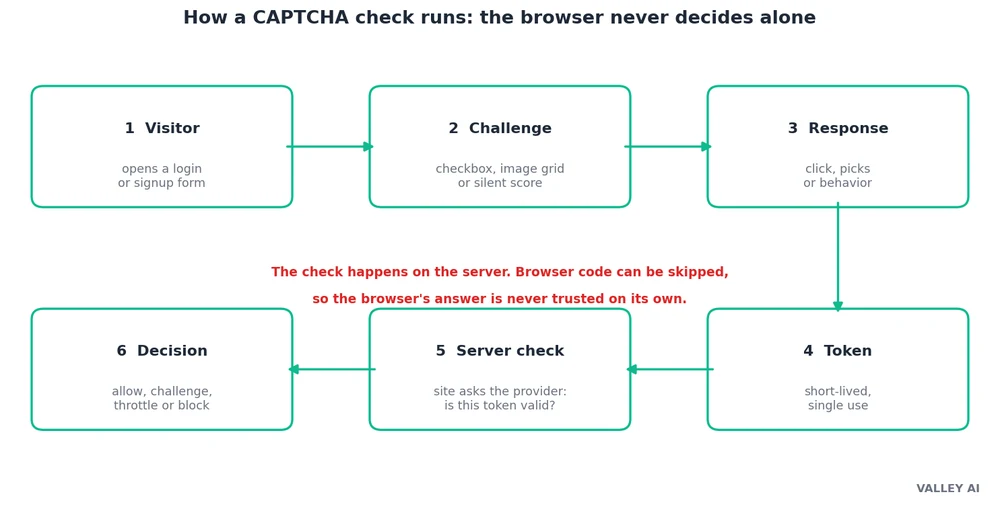
Who decides whether I pass, my browser or the site? The site. The browser collects the answer and carries the token, and the server makes the call. A bot that skips the browser check still faces the server check, and the server has no puzzle to solve.
Five patterns cover most of what a visitor meets. The first two ask the visitor to do something. The last three measure the visitor, and the visitor often never sees them.
| Pattern | What the visitor sees | What it measures | Where it fits |
|---|---|---|---|
| Text | Warped letters and numbers to type | Reading under distortion | Legacy forms, low-traffic sites |
| Image grid | A 3×3 or 4×4 grid, pick the tiles holding a named object | Object recognition | General sites that need a visible check |
| Checkbox | A box labelled “I am not a robot” | Mouse movement, timing, cookies, history | Login and signup forms |
| Invisible score | Nothing | Behavior across the whole visit | High-traffic logins and checkouts |
| Proof-of-work | Nothing, or a brief spinner | A small cryptographic puzzle solved in the browser | Sites that want no puzzle at all |
Behind those five rows sits a question the whole field asks: how do you tell a person from a program when both type into the same box? The guide to what artificial intelligence is sets out the field the question comes from.
Warped Letters and the OCR Race
Warped text came first because reading warped text was hard for machines and easy for people. Carnegie Mellon’s Gimpy bent words until only a person could read them, and Yahoo used it on signup pages. Then Google turned the idea into reCAPTCHA v1: one word the system already knew, to prove the visitor was human, and one word from a scanned book that OCR could not read, so the visitor’s answer digitized the book. Millions of visitors transcribed books one word at a time without knowing it.
That gap closed fast. In 2014, a Google team led by Ian Goodfellow built a model to read house numbers from Street View photos, then turned it on reCAPTCHA’s distorted text. It read the text with 99.8 percent accuracy, as the team reported in their 2014 paper. People do worse on the same task. A 2023 study of CAPTCHA friction by Searles and colleagues put the human first-try rate at 50 to 84 percent, depending on how hard the distortion is.
Distortion still stops one kind of reader: a general OCR engine with no training on the task. I ran a test on 14 November 2026 to measure how far that gap goes.
I generated 20 text CAPTCHAs with a short script: five random characters each, drawn from a set that excludes the easily confused 0, O, 1, l, and I, each letter rotated up to 25 degrees, bent along a wave, crossed by four noise lines, and dusted with 120 specks. Then I ran RapidOCR, a general-purpose OCR engine, over all 20 and counted exact matches.
The engine read 1/20 of the strings exactly right, and 3/20 when case was ignored. Counting single letters in their correct positions, it scored 35 percent. Those numbers look like a win for distortion until the misses are read closely. The engine recognized 88 percent of the letters somewhere in its output. In 6 of the 20 images it found every letter and put them in the wrong order. One distorted t came back as the Chinese character for seven. The wave and the rotation did not hide the letters. They scrambled their order.
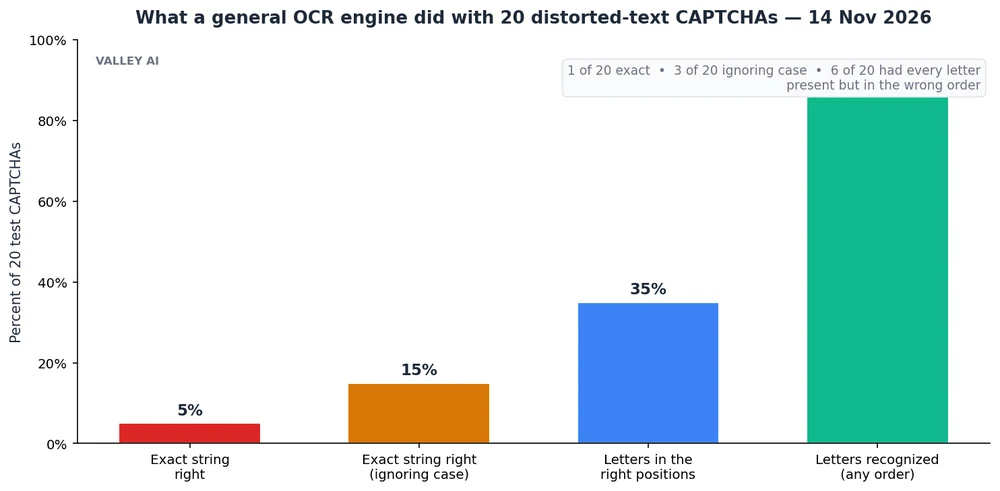
That result measures one engine on one distortion recipe, in a single run of 20 samples. RapidOCR is a document reader. It was never trained to solve CAPTCHAs. A model trained on the task closes the gap. Goodfellow’s team proved that on the text of its day, and the ETH result shows the same for image grids. Distortion buys time against generic tools. It does not stop a trained attacker.
Why do the letters get harder to read every year? The solvers improve, so the distortion has to increase to stay ahead, and people pay the price. A puzzle that stops a model and still lets a person through gets narrower every year, which is why the visible puzzle is fading from the web.
Image Grids: Pick the Traffic Lights
The image grid replaced the warped word when OCR caught up. A visitor sees nine or sixteen tiles and a prompt: pick the tiles holding a traffic light, a crosswalk, a bicycle. The answer comes from consensus. Thousands of visitors answer the same grid, and the majority answer sets the key. A bot that guesses faces long odds. Picking exactly the three right tiles from nine gives 1 chance in 84, about 1.19 percent. A wrong pick usually brings a fresh grid.
Three forms of Google’s grids appear in the ETH Zurich paper. The first shows nine static tiles. The second cuts one picture into sixteen squares. The third replaces tiles when clicked, so the visitor keeps picking until the target is gone. Thirteen object classes cover the whole set, from bicycles and buses to traffic lights and stairs.
The ETH team fine-tuned YOLOv8, an object-detection model, on thousands of photos of those classes, and the model answered the grids about as fast as the paper’s human baseline. YOLOv8 is a neural network trained on labeled photos, and how a neural network works sets out the training that makes that possible. The paper’s other findings matter more than the headline number. Earlier published work had reached 68 to 71 percent, and the new model beat that by a wide margin. The v2 check also leans heavily on cookie and browser-history data, which means the grid is the second line of defense. The first line is the history and cookie read that happens before any puzzle appears. The full paper is Breaking reCAPTCHAv2.
Against the bot that guesses, a grid still works. It fails against the attacker that trains. That split is the story of the whole article, and it is why the industry moved the test out of sight.
The Checkbox That Watches You Click
The checkbox works like a bouncer who watches how you walk to the door. The ID you show matters less than the walk. The box is the ID. The walk is everything before the click.
reCAPTCHA v2 watches the cursor on its way to the box. A human hand moves with tiny unconscious wobbles, even on the straightest path. A script moves in a straight line or jumps in fixed steps. The check reads the path, the speed, the pauses, and the timing of the click, then weighs the browser’s cookies and history. A browser with a long, ordinary history usually passes on the click alone. A fresh browser, a new profile, or a scripted one gets the image grid instead.
A reader can see the effect without instruments. Open a site in a fresh private window, with no cookies and no history, and the checkbox is more likely to escalate to a grid. The same site in the usual browser, signed in to a Google account, waves the same person through. The difference is the history the browser carries. The person at the keyboard is the same either way.
The same signals explain why a CAPTCHA appears uninvited. A VPN or a proxy server masks the visitor’s address, and the check treats an unfamiliar address as risk. Rapid-fire logins, repeated failures, and missing cookies do the same. what a proxy server is sets out the tool behind the masked address.
Why does the same checkbox challenge me on one site and wave me through on another? Each site sets its own risk policy and reads the same browser differently. One site challenges every fresh visitor. Another trusts the history and lets it pass. The checkbox is one widget. The policy behind it belongs to the site.
The Invisible Score
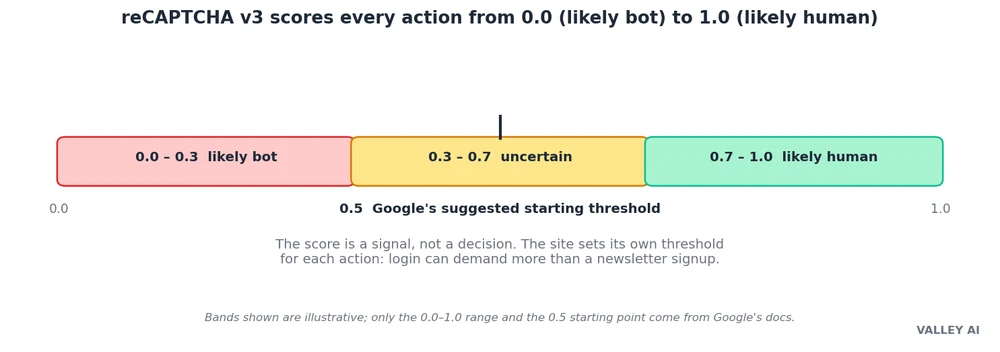
reCAPTCHA v3 drops the puzzle entirely. It runs in the background while the visitor uses the site, watches behavior across the whole visit, and returns a score from 0.0 to 1.0: near 0 means the visit looks automated, near 1 means it looks human. Google’s documentation suggests 0.5 as a starting threshold, and the site decides what each score means.
A site might set three thresholds for three actions. A newsletter signup passes at 0.3, because a fake signup costs little. A login needs 0.5, and a low score gets a second challenge. A password reset needs 0.7, because a stolen account costs the most. Those numbers are the site’s choice. Google publishes the scale, and each site sets its own line. Each action carries its own score, so a bot that passes the signup still faces the login.
Treat the score as a signal. A low score can mean a bot. It can mean a scripted test, a browser that blocks the signals the scorer reads, or a person on a shared network with a bad reputation. A site that blocks every low score locks out real people. The usual answer is friction in proportion to the risk: a challenge for the middle, a block for the bottom.
Invisibility costs data. The scorer reads behavior across the sites that use it, and the practice has drawn criticism under Europe’s GDPR. Providers that market privacy, hCaptcha and Cloudflare Turnstile among them, collect less, and the trade is real: less data means a weaker read on the visitor.
Proof-of-Work and the Post-Puzzle CAPTCHA
One pattern skips the puzzle and the score both. The browser quietly solves a small cryptographic puzzle in the background, a proof of work, and the server checks the answer. A normal browser finishes in a fraction of a second. A bot farm solving thousands in parallel pays the cost thousands of times over. Cloudflare Turnstile runs this way in its managed mode, and Friendly Captcha does the same.
Difficulty adapts with suspicion. A visitor who looks ordinary gets an easy puzzle. A visitor who looks automated gets a harder one, and the extra seconds make the attack uneconomic. The mechanism is the same idea as the grid, restated in cost: the test does not have to prove the visitor is human. It has to make pretending to be human cost more than the attack is worth.
Two quieter tools work alongside. A honeypot hides a form field no person can see, and a bot that fills every field gives itself away. Private Access Tokens, introduced by Apple in 2022 and backed by Google and Cloudflare, let a trusted device vouch for its owner with a cryptographic token, so the site never sees a puzzle or a score. The token proves the device passed a check somewhere else, and the check stays private.
None of this proves identity. A CAPTCHA proves, at best, that the request probably came from a person. It says nothing about which person, or whether that person means well. Proving the person is the account owner is a different job, and what a second factor proves at login covers that second check.
What to Do When a CAPTCHA Keeps Failing
A CAPTCHA that keeps failing usually points at the browser. The person is rarely the problem. Four fixes cover most cases. Turn the VPN or proxy off for the site, because a masked address raises the score. Allow cookies for the site, because the check reads history to trust the visitor. Turn JavaScript on, because the invisible checks run on it. Try the usual browser instead of a fresh private window, because a fresh profile carries no history to vouch for it.
If the login itself keeps failing, reset the password from the usual browser, where the history vouches for the visitor. A password manager stores the new password, so the reset is the last time the password needs typing by hand.
Frequently asked questions
Is CAPTCHA the same as reCAPTCHA?
No. CAPTCHA is the idea: a test that separates people from programs. reCAPTCHA is Google’s product built on that idea. hCaptcha and Cloudflare Turnstile are other products built on the same idea, and a site can run any of them, or none, and still use a CAPTCHA.
What happens if I fail a CAPTCHA three times?
The site decides. Most sites offer a fresh challenge, a few lock the form for a short time, and some escalate to a different check. A lockout is the site’s policy, not the CAPTCHA’s rule, so the same failure can end three different ways on three different sites.
Do CAPTCHAs work on phones?
Yes, with the same checks behind them, and the small screen makes grids harder for people, which is one more reason sites moved to invisible scores. A phone that stays signed in to its accounts usually passes the checkbox on the first tap, because the history travels with it.
Are audio CAPTCHAs easier for bots?
Yes, and that is why they sit in the fallback role. Speech recognition handles distorted audio better than distorted images, so an audio challenge stops fewer bots than a grid. They exist because a visual test locks out people who cannot see it, and the trade is accepted: access first, strength second.
Will CAPTCHAs disappear?
The visible puzzle is already fading. The industry is moving toward invisible scores, proof-of-work checks, and device tokens that vouch for the visitor without a test. The grid will stay for the highest-risk actions, where a site wants a person to do something a script cannot fake cheaply. The test is not dying. It is moving out of sight.

Kaleem
Kaleem is a Computer Science graduate (Virtual University of Pakistan) and the founder and editor of Valley AI, where he publishes in-depth, tested guides on computer hardware, artificial intelligence, and how the internet works. Every guide is researched from primary sources, tested hands-on where possible, and updated when the facts change.