

A VR headset puts two small screens centimeters from your eyes and bends their light so your brain reads them as a world. The left eye and the right eye get different pictures, separated by the gap between your pupils, and your brain fuses the pair into depth. Move your head, and both pictures change to match.
The hard part is timing. The scene must update within about 20 milliseconds of your head moving, or your eyes and your inner ear disagree and you feel sick. Every part of the headset serves one of those two jobs: fooling the eyes, and beating the clock. The frame budget and the latency budget decide whether it wins, and both come from numbers you can check on a spec sheet.
Two pictures for two eyes
Your eyes sit about 63 millimeters apart, so your left eye sees the world from a slightly different angle than your right. Your brain fuses the two views into one picture with depth. That trick has a name, stereopsis, and a VR headset copies it directly. One panel serves the left eye and one serves the right, and the scene is drawn twice from two camera positions spaced like your eyes.
Virtual reality, as what virtual reality is explains, replaces the world your eyes see with one a computer draws. The headset is the hardware that does the replacing, and every part inside it serves the two pictures.
Panels come in three kinds. LCD shines a backlight through liquid crystal shutters, so it’s bright and cheap while black stays a dark gray. OLED lights every pixel on its own, so a black pixel switches off, while micro-OLED builds the same idea on a silicon wafer and packs far more pixels into the same space. The Quest 3 uses LCD at 2064 by 2208 pixels per eye. PlayStation VR2 uses OLED. Apple Vision Pro uses micro-OLED, with 23 million pixels across both displays. The panel in a headset works like the panel in a monitor. Its backlight, pixels, and signal path follow the design how a monitor works describes.
I divided the panel by the field of view to see how sharp the picture looks. The Quest 3 spreads 2064 pixels across 110 degrees of horizontal view, which gives 18.8 pixels per degree. Vertically it spreads 2208 pixels across 96 degrees, which gives 23.0. Meta publishes 25 pixels per degree for the same headset. The two numbers measure different things. Division gives the average across the whole field, while the published figure is the lens-center value, where the optics concentrate the pixels. A single sharpness number always hides that choice.
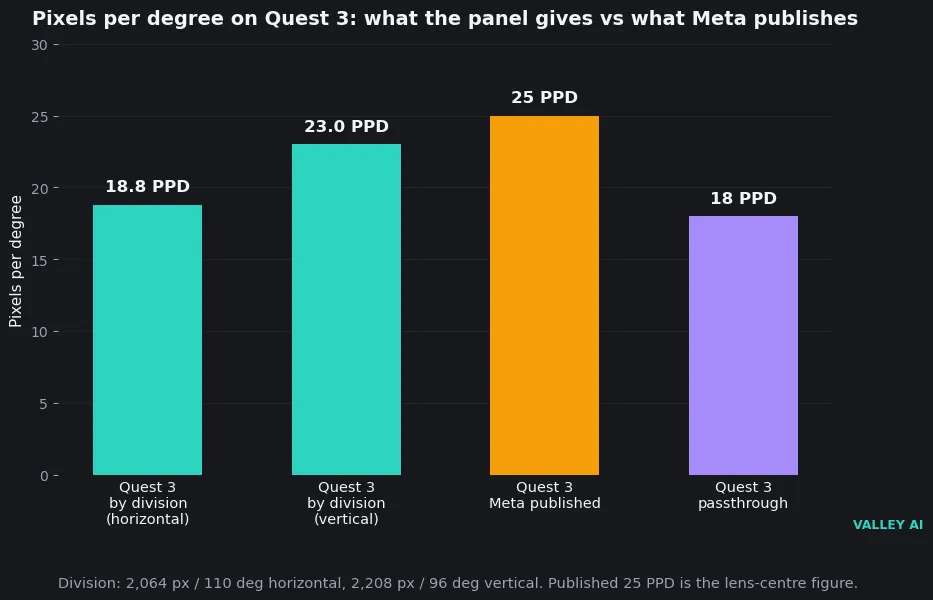
Resolution alone misleads. The Quest 3S shares the Quest 2 panel at 1832 by 1920 pixels per eye, and both headsets rate 20 pixels per degree. More pixels spread over a wider field buy nothing, and a narrower field with the same panel looks sharper. Read the field of view next to the resolution, or the pixel count tells you nothing about what you’ll see.
The frame budget: why 90 Hz is the floor
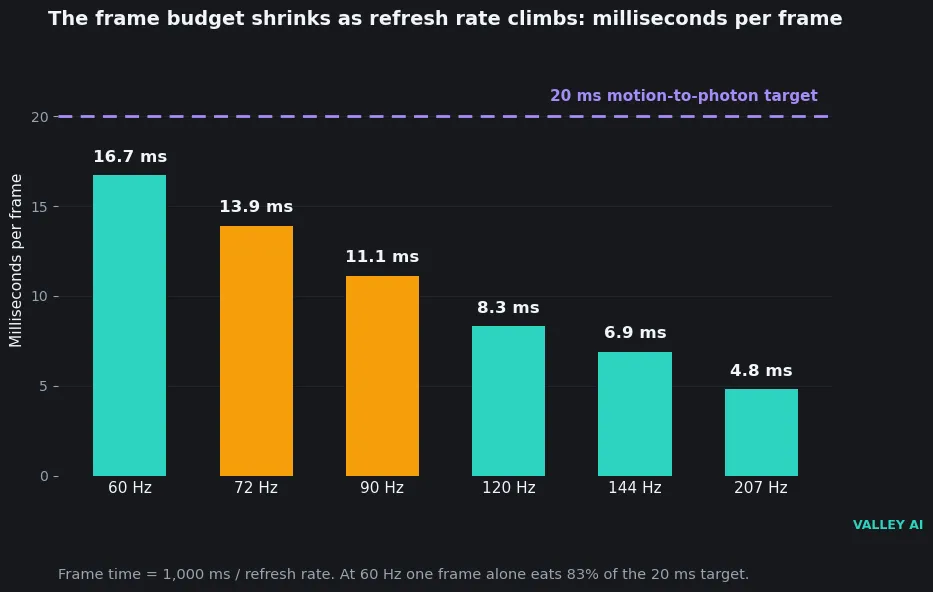
Refresh rate counts the new images a display shows per second, and it sets a hard budget for every frame. Divide 1000 milliseconds by the refresh rate and you get the time a frame is allowed. The table lists the budgets that matter.
| Refresh rate | Milliseconds per frame | Share of the 20 ms target |
|---|---|---|
| 60 Hz | 16.7 ms | 83% |
| 72 Hz | 13.9 ms | 69% |
| 90 Hz | 11.1 ms | 56% |
| 120 Hz | 8.3 ms | 42% |
| 144 Hz | 6.9 ms | 35% |
| 207 Hz | 4.8 ms | 24% |
A 60 Hz display spends 16.7 milliseconds on one frame, which leaves 3.3 milliseconds for everything else in the pipeline. That is why consumer headsets start at 90 Hz. The frame budget at 90 Hz is 11.1 milliseconds, which leaves room for tracking, rendering, and the display itself. The same math runs a monitor. A faster panel feels smoother because the refresh rate gives each frame less time on screen.
Does a higher refresh rate always mean less sickness? No. The frame budget is part of the pipeline. Slow tracking or a slow render still breaks the 20 millisecond target, and a 120 Hz display can’t fix either one.
The render load is the part buyers miss. A Quest 3 draws 2064 by 2208 pixels per eye, twice per frame, 90 times a second, which adds up to 820 million pixels a second. The 2016 Rift drew 2160 by 1200 pixels at the same rate, which Oculus chief architect Atman Binstock put at 233 million pixels a second. The Quest 3 asks its chip for 3.5 times the pixels the Rift asked for, and it does it on battery power. The work falls on the graphics processor. A chip turns draw calls into pixels, and the pace it keeps is the one how a GPU works walks through.
Foveated rendering trims the load. Human vision stays sharp only in a small central patch, so the headset draws full detail there and less at the edges. Eye-tracked foveation follows your gaze. Fixed foveation holds the sharp patch in the middle. PlayStation VR2 and Vision Pro track the eyes. The Quest 3 doesn’t, so it pays the full render cost on every frame. A headset that tops out at 72 Hz saves money and spends the whole latency budget on the display alone.
The 20 millisecond race
Motion-to-photon latency measures the time from your head moving to the matching light reaching your eye. The target comes from Michael Abrash, writing at Valve in 2012. Research suggested the real threshold might be 15 milliseconds or even 7. He found more than 20 milliseconds too much for VR, and his worked example for a typical game at 60 Hz reached 36 milliseconds in total.
I worked the budget out stage by stage for a Quest 3 at 90 Hz. The IMU samples the head’s motion first. SLAM corrects the pose from the cameras. The GPU renders two views. Timewarp shifts the finished frame to the newest pose. The display scans the frame out. The table lists the stages with their times.
| Pipeline stage | Time |
|---|---|
| IMU sample | 1.0 ms |
| SLAM fusion, pose correction | 5.0 ms |
| Render two views | 11.1 ms |
| Timewarp to newest pose | 2.0 ms |
| Display scan-out | 11.1 ms |
| Total, raw pipeline | 30.2 ms |
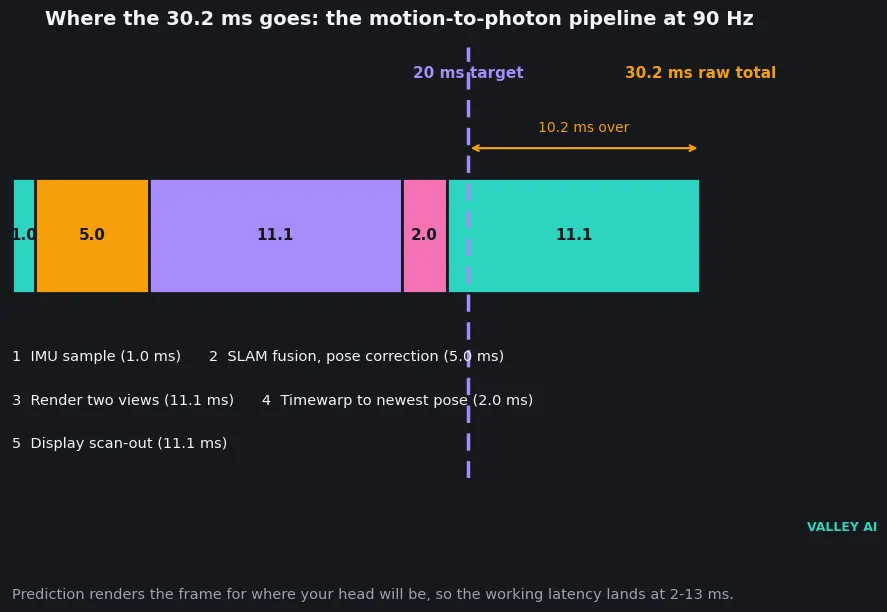
Treat the total as a model. The stage values mix published figures with one labeled estimate: the 2 milliseconds for timewarp. Real headsets vary by scene and by how fast you turn your head. Published measurements put the delay at the start of a sudden move at 21 to 42 milliseconds, close to the 30.2 the model gives.
Prediction closes the gap. The headset renders the frame for where your head will be when the photons arrive, and it aims ahead using the speed and direction of the turn. OpenXR hands the engine a predicted display time for the next frame, so the render starts from a pose in the future. With prediction working, the delay a wearer feels falls to 2 to 13 milliseconds. Prediction, not raw speed, is what makes modern VR work.
Two ceilings bind the experience, and they bind different parts. The refresh rate caps the frame budget: 90 Hz allows 11.1 milliseconds per frame and no more. The whole pipeline caps the experience: 30.2 milliseconds from motion to light, before prediction. Raising the refresh rate from 90 to 120 Hz buys 2.8 milliseconds of frame budget. The tracking and scan-out stages keep their time, so the total barely moves. A faster display alone never fixes a slow render or slow tracking.
How the headset knows where your head is
A headset pose has six degrees of freedom: three for position (forward and back, left and right, up and down) and three for rotation (pitch, yaw, roll). A headset that tracks rotation alone is 3DoF. It lets you look around but not lean in. Most headsets today track all six, which is what lets you duck, crouch, and walk. Meta’s own Quest help page puts it as a test you can run yourself. If you can move closer to an object, tracking runs in 6DoF.
The inertial measurement unit carries the speed. A gyroscope plus an accelerometer samples rotation and acceleration hundreds of times a second, with about a millisecond of delay, and it works in any light. Its weakness is drift. Position worked out from acceleration wanders within seconds, so a second system has to correct the drift.
Inside-out tracking is that second system. Cameras on the headset watch the room, pick out high-contrast features, and build a map of the space as you move. The software locates the headset inside that map, fusing the camera data with the IMU hundreds of times a second. The technique is called SLAM, and it is a computer vision method: the headset reads the room the way a vision model reads a photo, matching the features it mapped a moment earlier. It needs texture and steady light. A blank wall, a dark room, or bright sunlight through a window all degrade it.
Outside-in tracking turns the arrangement around. Base stations in the room sweep infrared lasers across the space 100 times a second. Photodiodes on the headset time the sweeps to work out their position. Valve claims sub-millimeter resolution across a 10 by 10 meter area with four base stations. The first Rift and the original Vive worked this way. Consumer headsets moved inside-out because base stations need mounting, calibration, and a room to themselves.
Why does tracking fail in a dark room? The cameras cannot see the features they use to correct the IMU. The IMU keeps reporting motion, but its position drifts within seconds, so the headset loses the room. A lamp fixes it more often than a settings change does.
Controllers carry their own IMUs, and infrared LEDs on their shells let the headset cameras see their pose. Hand tracking skips the controllers and estimates finger poses from the cameras directly. Eye tracking points infrared cameras inward: one per eye on PlayStation VR2, four on Vision Pro. A VR controller is a game controller with its sticks and triggers tracked in space. The buttons and the rumble work the same way they do on a flat screen.
Sound comes from small drivers near the ears, the same kind how a headset works describes. The engine places sounds in 3D space, so a voice to your left sounds left. Haptics in the controllers add touch: a vibration when you grab an object, resistance when you pull a trigger.
Lenses and the fit
Your eye cannot focus on a screen a few centimeters away. The lenses bend the light so the panel looks about two meters away, and they magnify it until it fills most of your vision. Two designs do the bending. Fresnel lenses cut a thick curved lens into concentric rings, which saves weight and costs glare, while pancake lenses fold the light path between polarizing layers and let the panel sit closer. Bright objects on dark backgrounds show streaks of light through a Fresnel lens. The fold cuts the optical depth by about 40 percent on the Quest 3. Every pass through a polarizer throws light away, so the panel has to shine brighter.
Interpupillary distance is the gap between your pupils, about 63 millimeters on an average adult. The lenses have to line up with your eyes, or the image blurs and depth looks wrong, which is why the Valve Index adjusts physically from 58 to 70 millimeters. The Quest 3 adjusts continuously across its range, while the Quest 3S offers three preset positions. Set the slider before you judge the picture: a headset with the wrong IPD looks broken when the optics are fine.
Why do the edges of the picture look blurry? The lens has a small sweet spot. The center stays sharp and the edges fall off, and an IPD mismatch pushes your eye toward the edge where distortion rises. Move the IPD slider until the center text is crisp, then check the edges again.
Passthrough films the real room with outward cameras, corrects for the offset between camera and eye, and shows the result on the internal displays. Virtual objects drawn over that feed are what makers call mixed reality. The Quest 3 passthrough runs at 18 pixels per degree against 25 for rendered content. The real room looks about 28 percent softer than the virtual one. That gap is the price of filming the world instead of drawing it.
Standalone, PC, or console
Three types cover the market, and they differ in where the rendering happens. A standalone headset carries its own chip, battery, and storage. A PC headset sends the work to a graphics card over a cable. A console headset plugs into a PlayStation 5. The table sets them side by side.
| Type | Where rendering happens | Best picture | Freedom to move | Battery or cable | Pick it when |
|---|---|---|---|---|---|
| Standalone (Quest 3) | In the headset (XR2 Gen 2) | Good | Full, wireless | About 2.2 hours | You own no gaming PC |
| PC VR (Valve Index) | On a gaming PC | Sharpest | Tethered by cable | No battery, cable to PC | A gaming PC already sits in the room |
| Console VR (PlayStation VR2) | On a PlayStation 5 | Strong, OLED | Tethered by one 4.5 m cable | No battery, one cable | You own a PS5 and want its games |
A gaming PC in the room already buys the sharpest scenes and the highest refresh rates, while a standalone headset works without one and its battery sets the session length. Console VR sits between the two: one cable, one console, and games built for the headset alone.
The headset to buy for the room you have
Buy standalone unless a gaming PC already sits in the room. Check the IPD adjustment covers your eyes and the refresh rate reaches 90 Hz, then compare prices. Measure the play space before you order: two meters by two meters of clear floor, with nothing to trip over. The headset that fits your room and your eyes is the one you will keep wearing.
Frequently asked questions about VR headsets
Can I wear glasses inside a VR headset?
Most headsets ship with a glasses spacer that adds room between the lenses and your frames. Prescription lens inserts clip in for regular use and sit closer to the lens than glasses do, which keeps the picture sharp at the edges.
Can a standalone headset play PC VR games?
Yes, over Quest Link by cable or Air Link over Wi-Fi. The PC renders the scene and streams it to the headset, so the headset only displays it. A 6 GHz Wi-Fi channel gives the cleanest wireless path where your region allows it.
How much room do I need for VR?
Seated or standing play needs about 2 by 2 meters of clear floor. Room-scale play needs the floor clear of furniture and cables. The guardian boundary warns you before you cross it, so draw it tight around the real obstacles.
Does VR work if I get motion sick easily?
Start seated, keep sessions short, and use snap turning where the app offers it. Short sessions with breaks beat long ones for building tolerance. Stop as soon as you feel queasy.
Is VR bad for your eyes?
No study has shown permanent eye damage from VR headsets. Long sessions cause eye strain the same way a monitor does, so take a break every half hour and stop if your eyes feel tired.

Kaleem
Kaleem is a Computer Science graduate (Virtual University of Pakistan) and the founder and editor of Valley AI, where he publishes in-depth, tested guides on computer hardware, artificial intelligence, and how the internet works. Every guide is researched from primary sources, tested hands-on where possible, and updated when the facts change.