

When a character moves on its own
Your character creeps across the screen while both sticks sit untouched. No button is pressed. No stick is tilted. The game keeps reading movement.
That creeping has a name in controller repair shops. Technicians call it stick drift. A stick sensor reports a position away from center, and the game treats that offset as an input. Controllers belong to a wider family of computer input devices that turn hand movement into data. Every one of them can report a wrong value when a sensor goes out of calibration.
A dead zone hides small errors. Games ignore stick movement below a set threshold, so a tiny sensor offset stays invisible. Drift becomes visible when the offset grows past that threshold. The sections ahead follow the signal from your hands to the screen. Each part of that chain can then be checked in turn.
From a press to the screen in seven steps
Every input on a modern gamepad travels the same chain. A press starts the chain. A picture on the screen ends it. Seven stages sit between those two points.
- A switch closes under a button, or a stick sensor changes its output value.
- A microcontroller inside the controller reads every control at the same moment.
- Each reading becomes part of one digital report, with buttons stored as on or off bits and sticks stored as axis numbers.
- The report waits for its next scheduled transmission slot on the cable or radio link.
- The cable or radio link carries the report to the console or computer.
- System software delivers the report to the game input layer.
- The game applies the report on its next frame, and the screen updates.
Delay can enter at any stage. Sensing takes time. Packaging takes time. Transmission takes time. The game frame adds its own wait. Chasing one stage in isolation misses the chain. Check the link and the settings before any part gets blamed.
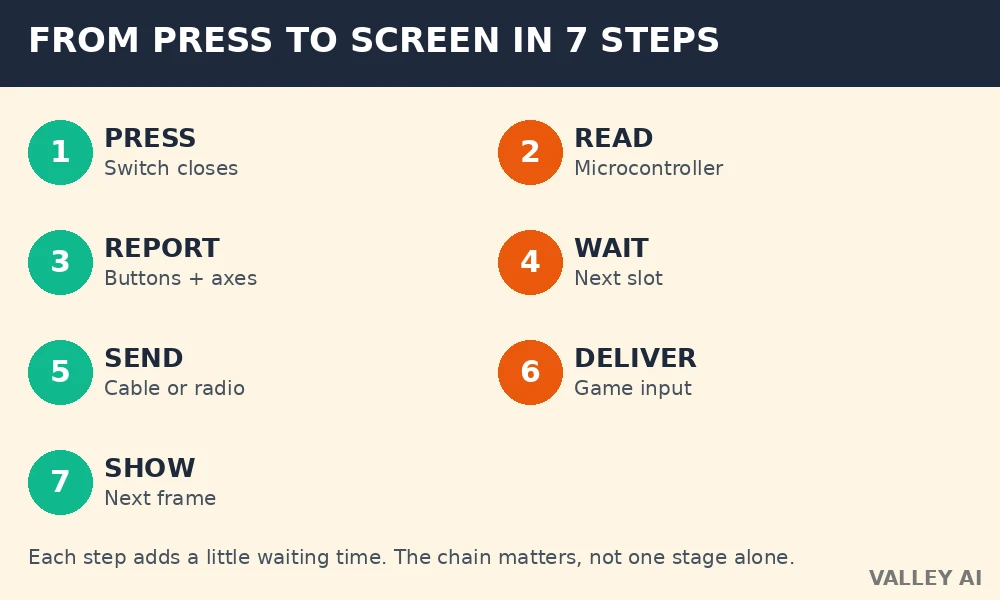
That chain explains why two controllers can feel different on the same game. One link in the chain may report less often. Another link may wait longer for a transmission slot. The sections ahead open each link and name the part that does the work.
Buttons and the D-pad: on or off
Face buttons are digital controls. Pressing one pushes a conductive pad onto two contacts on the circuit board, and the closed circuit tells the microcontroller that the button is down. Releasing the button breaks the contact, and the microcontroller reads the button as up. The whole event is binary. Partial presses do not exist for a face button.
Why does one press sometimes register twice? Contact bounce causes the double registration. Metal contacts can chatter for a few milliseconds as they meet, opening and closing several times before settling. Controller firmware waits out that chatter with a debounce window of roughly 5 milliseconds, and only the settled state reaches the game. A worn contact that chatters longer than the window can let a second press through.
D-pad design solves a different problem. Four direction contacts sit under one pivoting rocker, and the pivot lets the pad tilt toward one direction at a time. Pressing straight down on one edge gives a clean single direction. Rolling a thumb across the pad can trigger a diagonal, because two neighboring contacts close together. Cheap pads with a loose pivot make accidental diagonals more common, while a stiff pivot resists them.
Button feel comes from the switch under the cap. Rubber dome switches give a soft landing and a quiet press. Microswitches give a short travel and a sharp click. Neither type changes the digital signal. Both report the same on or off state, and the difference sits entirely in travel distance and sound.
Analog sticks: tilt measured as a number
Analog sticks report direction and distance together. Two sensors sit at right angles under each stick, one for left and right movement and one for forward and back movement. Tilting the stick changes both sensor outputs, and the pair of values fixes the stick position on a flat plane. Pushing the stick down adds a separate digital click, the L3 or R3 press, which reports on or off.
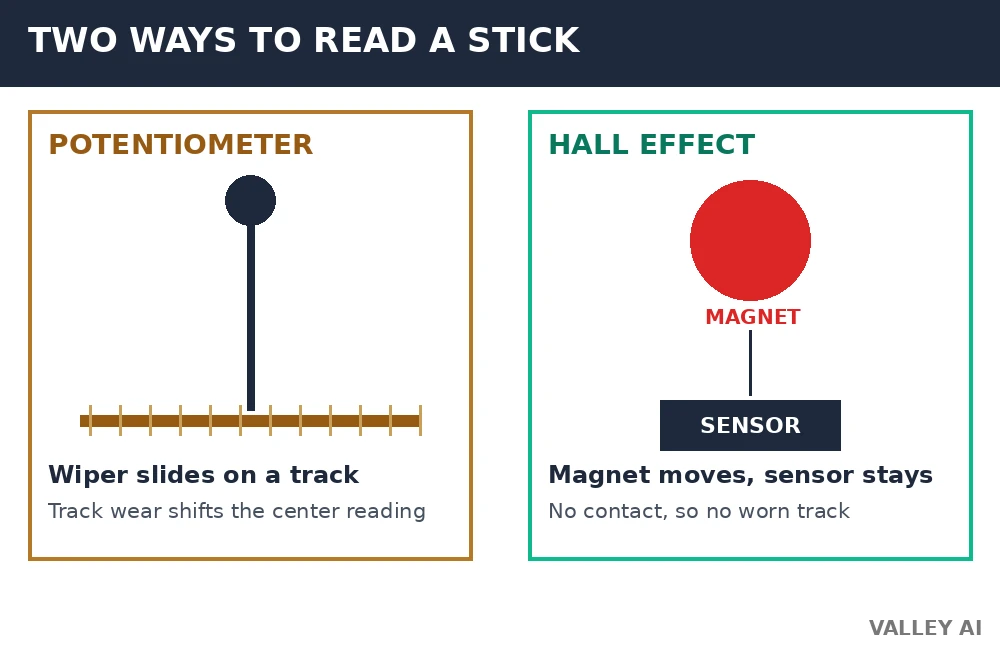
Most sticks in older and budget controllers use potentiometers. A potentiometer works like a dimmer switch for a lamp. Sliding a contact along a resistive track changes the resistance. The controller reads that change as position. Wear enters through that sliding contact. The track wears thin, debris builds up on the contact, and the center reading shifts. That shift is the common mechanical root of drift.
What turns a stick tilt into a number? An analog-to-digital converter performs the conversion. The converter samples the sensor voltage and assigns it an integer step. A 12-bit converter gives 4096 steps, numbered 0 to 4095, with the center near 2048. Full left tilt reads near 0 on that axis. Full right tilt reads near 4095. Every position between those ends gets its own step.
Worked calculation for stick position and dead zone. Inputs are a 12-bit range of 0 to 4095 and a center value of 2048. The dead zone is 10 percent of full tilt. The sample reading is 2300. Step one multiplies 10 percent by 2048, giving 204.8 steps, about 205 steps of ignored travel on each side of center. Step two subtracts the center from the reading, so 2300 minus 2048 gives an offset of 252 steps. Step three compares the offset with the dead zone, and 252 steps exceeds 205 steps, so the game reads movement. Step four divides the offset by 2048, giving 0.123, about 12 percent of full tilt.
- Open a controller tester screen on a console or computer and leave both sticks untouched for 10 seconds.
- Watch the axis numbers with sticks at rest and note any value that sits away from center.
- Tilt each stick slowly in a full circle and watch for jumps, flat spots, or values that stick at one number.
- Release each stick and check that the numbers return close to center without a long delay.
Hall effect sticks remove the sliding contact from the chain. A magnet moves with the stick, and a stationary sensor reads the changing magnetic field. SlashGear describes Hall effect sticks as contact-free magnetic sensing, which removes the worn-track failure path that causes most potentiometer drift. Springs, pivots, calibration, and stick-cap fit can shift a Hall stick reading, so magnetic sensing lowers drift risk without making drift impossible.
Choosing between the two sensor types comes down to wear path and price. Potentiometer modules cost less and dominate budget controllers. Hall effect modules cost more and hold their center reading longer. A player who keeps one controller for years gains more from magnetic sensing than a player who replaces controllers often.
Triggers: pressure measured in stages
Analog triggers report travel distance as a value. Squeezing a trigger partway sends a partial value, and squeezing it fully sends the maximum value. Racing games map that value to brake or throttle force, so a half squeeze brakes gently and a full squeeze brakes hard. Digital shoulder buttons work differently. They report on or off only, with no partial value at any point in their travel.
Adaptive triggers add a motor to the trigger mechanism. Cheat Code Central describes a small motor and worm gear behind each adaptive trigger. The gear repositions a lever to change how far the trigger travels and how much force the pull needs. A game can program that resistance curve. Drawing a bowstring then feels progressively heavier. A jammed weapon can lock the trigger until the player eases off. Power off the motor, and the trigger falls back to spring tension alone.
Trigger response depends on game support. A game that never programs the adaptive motor gets an ordinary analog trigger. A game that programs the motor on every pull gets resistance changes tied to in-game events. Players who find adaptive resistance distracting can switch it off in system settings on consoles that offer the option. The trigger then behaves as a standard analog control.
Rumble, haptics, and motion: feedback in both directions
Why does rumble feel different from haptic feedback? The actuator behind each sensation differs. Old rumble uses an eccentric rotating mass motor, a small motor spinning an unbalanced weight to shake the whole grip. Modern haptics use a voice-coil actuator, a coil driving a mass back and forth at a set frequency to shape a waveform. Broad shaking comes from the spinning weight. Textured pulses come from the shaped waveform.
Grip placement gives haptics a sense of direction. One actuator sits in each grip, and each actuator can play its own waveform. A pulse on the left grip alone reads as an event on the left side. Timed pulses across both grips can read as movement from one hand to the other. Games that author distinct waveforms for gravel, metal, mud, and rain produce distinct textures, while games that reuse one buzz for every event waste the hardware.
Motion sensing adds a second input path. An accelerometer measures linear acceleration along three axes, including the constant pull of gravity, which reveals tilt. A gyroscope measures rotation rate around three axes, which reveals turning speed. Software combines both sensors to track orientation, since the accelerometer anchors tilt and the gyroscope tracks fast turns. Gyro bias is a small constant offset in the rotation reading. It can make a motion-aimed view creep over time. Recalibration at rest clears that offset.
Aiming adjustments and steering gestures suit motion input. Small wrist turns adjust aim without moving a stick. Large swings steer or swing a virtual object. Precision favors sticks for long sessions, because holding a controller steady in midair tires arms faster than resting thumbs on sticks.
Wireless links, polling, and power
Wireless controllers use one of two radio designs. Bluetooth links the controller to any compatible device with no extra hardware, using a shared radio standard built for low power and wide compatibility. A proprietary 2.4 GHz link uses a small USB dongle paired to one controller family, trading universal pairing for a dedicated radio channel. Bluetooth pairing and profiles explain why a Bluetooth controller can move between a phone, a computer, a console, and a tablet with no dongle in the bag.
Polling rate sets how often a controller sends a fresh report. The report interval in milliseconds equals 1000 divided by the report rate in hertz, so the rate converts directly into a waiting time. Mouse polling rate follows the same conversion. Polling is a shared input-device concept, and it applies to mice and controllers alike. A higher rate shortens the gap between reports. A lower rate stretches that gap.
Worked calculation for report interval and slot waiting. Inputs are a report rate of 1000 hertz for a wired or dongle link and a Bluetooth connection interval of about 7.5 milliseconds. Step one divides 1000 by 1000, giving a report interval of 1 millisecond for the 1000 hertz link. Step two takes the Bluetooth slot of about 7.5 milliseconds as the longest wait for a fresh input to catch a transmission slot. Step three subtracts 1 millisecond from 7.5 milliseconds, giving a difference of 6.5 milliseconds in worst-case slot waiting. That difference covers slot timing only. Radio processing and game frame timing sit outside it, and total felt delay runs longer on both links.
Battery cost follows the radio and the motors. A rechargeable lithium cell powers the microcontroller, the radio, the actuators, and the motion sensors together. Heavy rumble and a high report rate drain the cell faster than quiet play on a low rate. Wired play removes battery drain from the equation, since the cable supplies power while carrying reports. A controller that disconnects at low charge may still have enough energy for the microcontroller. It may lack enough voltage for stable radio transmission. Charging first rules out the cheapest cause of dropouts.
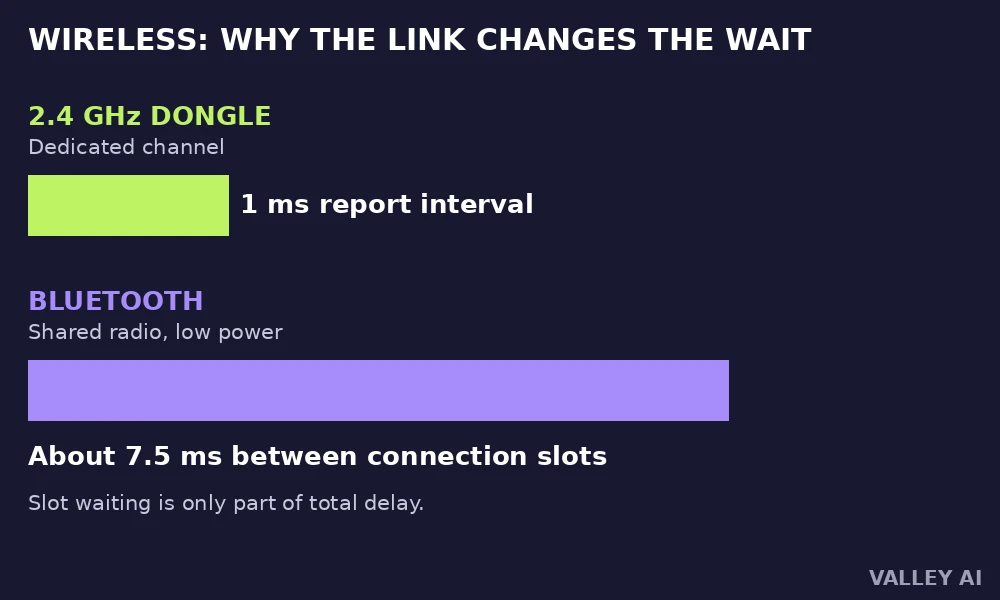
Link choice follows use. Competitive play on a fixed setup gains from the dongle link and its short report interval. Couch play across several devices gains from Bluetooth and its universal pairing. Neither link fixes a worn stick sensor. A fast link carrying a drifted reading still delivers drift, only sooner.
Conclusion
Start with the tester screen. Note the rest values, run the slow circle check, and try a slightly larger dead zone. Test the controller on a cable when wireless play feels slow, and test it on a second device when dropouts persist. Buy a replacement only after those checks point to the sensor itself, and favor magnetic stick sensing for a controller meant to last years.
Frequently asked questions
Do trigger stops change how a game reads a trigger?
Trigger stops shorten the physical travel of a trigger, so the trigger reaches its maximum value earlier in the pull. Games that read partial trigger values see full input sooner, which suits rapid fire in shooters. Games that need fine brake control lose the gentle part of the range, so trigger stops suit fast shooting better than careful driving.
Can a controller work on a phone or tablet?
Most modern controllers pair with phones and tablets over Bluetooth, and the mobile device treats the controller as a standard gamepad. Game support varies widely, since mobile games must include controller input to respond at all. Touch-only games ignore the controller, while games with controller support map buttons and sticks in their settings menus.
Why does a controller need a firmware update?
Firmware updates fix input bugs, adjust dead zones, improve radio stability, and add support for new console features. Manufacturers ship updates through console system software or a companion app on a computer. A controller that misbehaves after a system update may need matching firmware before the fault gets blamed on hardware.
How should a controller be stored to protect the sticks?
Store the controller with sticks at rest, away from pressure on the stick caps, and out of direct heat. A bag that presses a stick sideways for weeks can weaken the centering spring. Dust covers or a closed case keep debris out of the stick base, where grit accelerates wear on contact-based sensors.
What are back paddles for?
Back paddles are extra buttons on the rear of a controller, placed where middle fingers rest during play. Players map them to actions that normally need a thumb to leave a stick, such as jumping or reloading. Keeping thumbs on sticks during those actions improves aim control in fast games, which explains their popularity in competitive play.
Why does vibration stop in some games but not others?
Vibration depends on game code sending feedback commands the controller understands. Games built for one console may use feedback features another platform never implements. A game with no feedback code produces no vibration on any controller, while a game with full haptic support can drive each grip actuator separately.

Kaleem
Kaleem is a Computer Science graduate (Virtual University of Pakistan) and the founder and editor of Valley AI, where he publishes in-depth, tested guides on computer hardware, artificial intelligence, and how the internet works. Every guide is researched from primary sources, tested hands-on where possible, and updated when the facts change.