

Modem is short for modulator-demodulator. The name describes the whole job: the box takes digital bits from your home, turns them into signals that can travel over your provider’s line, and turns the returning signals back into bits your devices can read.
That translation is the reason the box exists. Your computer speaks in ones and zeros. The cable outside your wall carries television channels, and the phone line carries voice. Neither one carries raw digital bits. The modem bridges the two worlds, and the way it packs bits into waves decides how fast your connection can run.
The Name Tells You the Job: Modulator-Demodulator
A modem has two halves. The modulator stamps digital data onto a wave. The demodulator reads the wave at the other end and recovers the data.
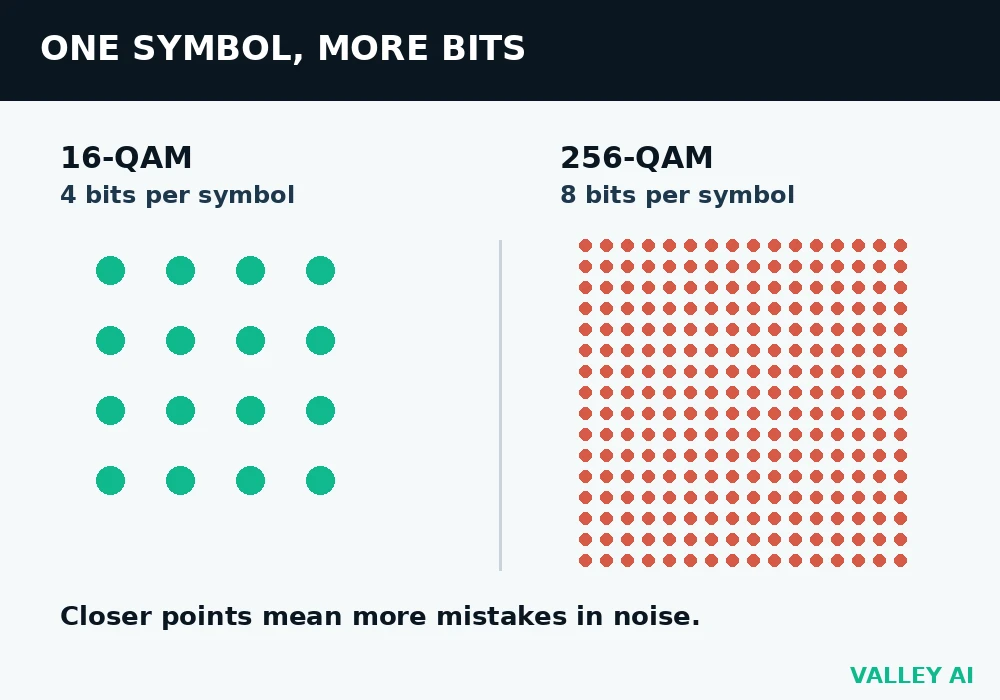
The stamping method is called quadrature amplitude modulation, or QAM. A QAM signal carries its data in symbols, and each symbol is one point on a grid. The number of points on the grid decides how many bits each symbol carries. The grid works like a parking lot with marked spaces. Each symbol is one marked space, and the receiver must tell which space a signal landed in.
More points mean more bits per symbol, and points packed closer together mean the receiver mistakes one for another more often when noise shakes the signal. That tradeoff is the whole story of modem speed.
| Modulation | Points on the grid | Bits per symbol | Where it runs |
|---|---|---|---|
| 16-QAM | 16 | 4 | DOCSIS upstream, some DSL |
| 64-QAM | 64 | 6 | Older DOCSIS downstream |
| 256-QAM | 256 | 8 | DOCSIS 3.0 downstream |
| 1024-QAM | 1,024 | 10 | DOCSIS 3.1 OFDM |
| 4096-QAM | 4,096 | 12 | DOCSIS 3.1 OFDM downstream |
Take a DOCSIS 3.0 downstream channel. It is 6 MHz wide, and it sends 5.36 million symbols a second. At 256-QAM, each symbol carries 8 bits, so 5.36 million times 8 gives 42.88 Mbps before overhead. Error correction and signaling take their share, leaving about 38 Mbps of usable data per channel.
Why does the modem need to modulate at all? Because the line was built for something else. A coaxial cable was built to carry television channels, and a phone line was built to carry voice. Neither one can carry raw digital pulses over any distance, so the modem wraps the bits in a wave the line can carry.
The same idea runs in reverse on the way back. The provider’s equipment modulates the reply, your modem demodulates it, and the bits land on your home network as Ethernet frames. Dial-up modems in the 1990s topped out at 56 kbps down and 33.6 kbps up on a 3.1 kHz voice channel, which shows how far the same idea has come.
How a Cable Modem Packs Data Into TV Channels
A cable modem rides on the same coaxial cable that carries television. The cable’s spectrum is sliced into 6 MHz channels, and each channel carries one television station or one data carrier.
DOCSIS is the standard that governs the data carriers. DOCSIS 3.0 bonds several channels together, so a modem listens to eight downstream channels at once and transmits on four upstream channels.
| Modem type | Channels bonded | Usable speed down | Usable speed up |
|---|---|---|---|
| DOCSIS 3.0, 8×4 | 8 down, 4 up | 304 Mbps | 108 Mbps |
| DOCSIS 3.0, 16×4 | 16 down, 4 up | 608 Mbps | 108 Mbps |
| DOCSIS 3.1, OFDM | 192 MHz blocks | Up to 10 Gbps | Up to 1 to 2 Gbps |
Why is upload slower than download? Because the upstream band is narrower and holds fewer channels. A cable line gives downstream the spectrum from 54 MHz upward, while upstream lives in the 5 to 42 MHz slice, so four upstream channels is normal where eight or sixteen downstream channels is normal.
Two ceilings cap a cable connection. The plan caps it first: a 300 Mbps plan never delivers more than 300 Mbps, whatever the modem can do. The modem caps it second: an 8×4 DOCSIS 3.0 modem tops out near 304 Mbps, so it cannot carry a gigabit plan even on a clean line. The slower of the two ceilings wins, and upgrading only one side changes nothing.
On the provider side sits a CMTS, a cable modem termination system. It assigns channels, tells each modem when it may transmit upstream, and measures the signal each modem sends back. When a modem first powers on, it scans for a downstream channel, locks on, then asks the CMTS for upstream slots in a process called ranging. Registration takes seconds on a healthy line and minutes on a noisy one. Registration ends with the modem receiving a public IP address from the provider, and from there DNS turns the names you type into addresses the network can route.
The modem hands the connection to the router as plain Ethernet. On a desktop, the cable plugs into a port that sits on the motherboard, which is the one place this box touches the inside of your computer at all.
How a DSL Modem Squeezes Internet Above Your Voice
A DSL modem uses the same copper pair as a landline phone. Voice lives below 4 kHz. DSL puts internet above it, from about 25 kHz upward, so a call and a download share the wire without hearing each other.
ADSL2+ uses frequencies up to 2.2 MHz and reaches 24 Mbps downstream. VDSL2 reaches up to 17 MHz, or 35 MHz on profile 35b, and reaches 100 Mbps, or 300 Mbps at short loop lengths on 35b.
Distance is the limit. The signal weakens with every meter of copper, so a home 5 km from the exchange syncs far slower than a home 500 m away. The modem reports its sync rate on its status page, and that number is the ceiling for the line, whatever the plan promises.
A splitter or microfilter keeps the phone’s voice band separate from the DSL band. Plug a phone in without one and the DSL signal leaks into the earpiece as hiss, while the phone drags the DSL sync rate down.
What a Fiber ONT Does Differently
No radio wave carries a fiber connection. The box on the wall is an optical network terminal, an ONT. It turns light pulses into Ethernet and Ethernet into light pulses. There is no wave to modulate, because the fiber carries light.
GPON is the shared fiber standard most providers use. One port gives 2.5 Gbps downstream and 1.25 Gbps upstream, then splits it across as many as 32 homes. A single home never sees the full 2.5 Gbps. The split is the reason a fiber plan’s speed is shared capacity.
Providers still call the ONT a modem on bills and support pages, because it plays the same role: the box where the provider’s network ends and the home network begins. The job is the same. The physics changed.
Why Noise Decides Your Speed
Every modem faces the same enemy: noise. Noise is random energy on the line from loose connectors, damaged coax, nearby transmitters, and the provider’s own amplifiers. It shakes each symbol away from its grid point, and when the shake is bigger than half the gap between points, the receiver reads the wrong symbol, and the error shows up on your connection as packet loss.
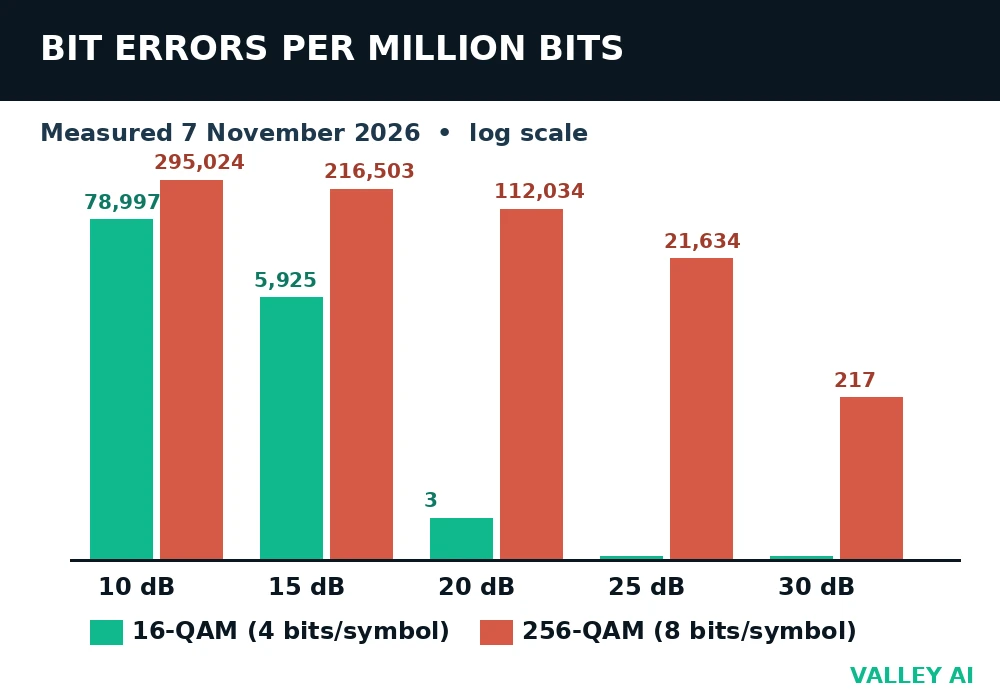
The test below shows the cost. One million random bits were packed into QAM symbols, white noise was added at five signal-to-noise ratios, and the receiver decoded by nearest grid point. The test ran on 7 November 2026, and the simulation carried no error correction, so the numbers show the raw cost of packing bits tighter.
| Signal-to-noise ratio | 16-QAM errors per million bits | 256-QAM errors per million bits |
|---|---|---|
| 10 dB | 78,997 | 295,024 |
| 15 dB | 5,925 | 216,503 |
| 20 dB | 3 | 112,034 |
| 25 dB | 0 | 21,634 |
| 30 dB | 0 | 217 |
Compare the two columns at the same row. At 20 dB, 16-QAM loses 3 bits in a million. At the same 20 dB, 256-QAM loses 112,034, more than one bit in ten. The denser grid doubles the bits per symbol and multiplies the errors by tens of thousands at the same noise level.
The 30 dB row is where the measurement meets the manufacturer’s guidance. At 30 dB, 256-QAM drops to 217 errors per million, and ARRIS lists 30 dB as the minimum downstream SNR for 256-QAM. A real modem adds error correction on top, which cleans up most of what is left, so a line at 30 dB runs clean in practice.
One formula sets the ceiling. Shannon-Hartley says a channel’s capacity is its bandwidth times log2(1 + SNR). A 6 MHz channel at 35 dB SNR holds log2(1 + 3162), about 11.6 bits per second per hertz, or about 70 Mbps. The 38 Mbps a DOCSIS channel delivers sits below that ceiling because real modulation and error correction cost overhead. No modem beats Shannon. A cleaner line is the only way up.
The Numbers on Your Modem’s Status Page
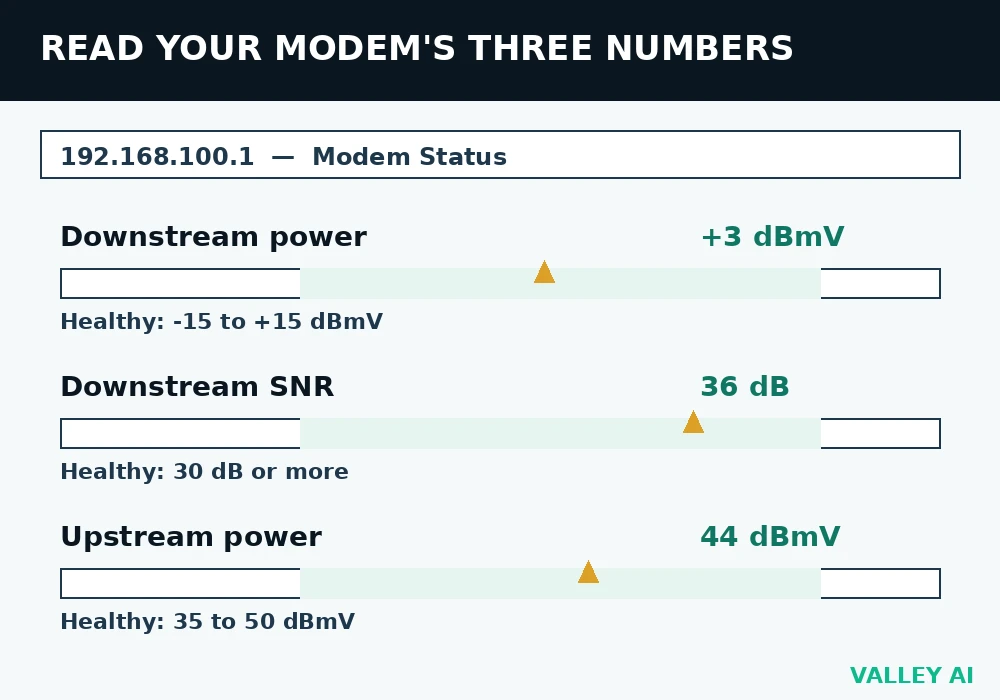
Most cable modems expose their signal readings on a status page, usually at 192.168.100.1. Open it in a browser while connected to the home network, and look for the downstream and upstream sections.
| Reading | Healthy range | What an out-of-range reading means |
|---|---|---|
| Downstream power | -15 to +15 dBmV | Below -15: too much loss on the line or a bad splitter. Above +15: too much signal, an amplifier or attenuator problem. |
| Downstream SNR | 30 dB or more (256-QAM) | Below 30: noise on the line, damaged coax, or a loose connector. |
| Upstream power | 35 to 50 dBmV | Above 50: the modem is shouting to be heard, which points to return-path loss. |
Check the readings when the connection is misbehaving. Readings taken while everything works hide the fault. A downstream SNR that sits at 36 dB on a quiet afternoon and falls to 29 dB in the evening points at temperature or load on the provider’s plant, and a number gives support something to act on.
Ignore a single channel that sits a few dB away from its neighbors. Channels vary, and the pattern across all of them is what matters.
Can a modem slow down a fast plan? Yes, and it happens often. An 8×4 DOCSIS 3.0 modem caps near 304 Mbps, so a 500 Mbps plan on that modem delivers about 300 Mbps at best. The fix is a DOCSIS 3.1 modem, which removes the modem ceiling and leaves the plan as the only cap.
The modem carries TCP and UDP traffic alike. The difference between the two decides what packet loss costs each application: a download retries a lost packet, while a live call has no time to wait for one.
Modem or Gateway: Which Box to Buy
Most providers ship one box that does both jobs: a gateway. A separate modem plus a separate router costs more up front and gives more control. The choice turns on three facts: who pays for the box, who controls the settings, and what happens when one half breaks.
| Setup | Hardware cost | Monthly equipment fee | If one half fails |
|---|---|---|---|
| Rented gateway | $0 up front | $15 a month on older Xfinity plans, $0 on current plans | Both jobs stop |
| Own modem plus own router | About $130 for a DOCSIS 3.1 modem, plus a router | No monthly fee | Replace only the broken half |
The rental math decides it for many homes. Xfinity lists a $15 monthly gateway lease on its older plan labels. That is $180 a year. Its current-plan labels list the gateway at $0. A $130 DOCSIS 3.1 modem, such as the Motorola MB8611, pays for itself in about nine months against a $15 rental. After that it saves $180 every year. Check the equipment line on your own bill first, because the saving exists only where a rental is charged.
A second box brings one trap. Plugging a router into a gateway leaves two devices doing NAT, one behind the other. Double NAT breaks some games, video calls, and remote access. The fix is bridge mode on the gateway, which turns off its routing and leaves the modem job alone.
The gateway broadcasts the home Wi-Fi too, so replacing it means setting up the wireless network again. A separate modem leaves the wireless network untouched when the modem is swapped. The full comparison of the two boxes sits in the modem and router comparison.
Conclusion
Open the modem’s status page tonight and read three numbers: downstream power, downstream SNR, and upstream power. Compare them with the ranges above. If all three sit inside their ranges and the plan still feels slow, the modem is not the problem, and the next place to look is the router or the Wi-Fi. If a number sits outside its range, the line needs a technician.
Frequently asked questions
How long does a modem last?
Most cable modems serve 3 to 5 years. Heat and capacitor aging wear them out, and a new DOCSIS generation or a faster speed tier usually retires a modem before it breaks. A modem that needs restarting every week is telling you its time is near, whatever its age.
Can I use my own modem with any internet provider?
No. The modem must match the line type, cable, DSL, or fiber, and the provider must approve the model. Xfinity publishes an approved device list, and other cable providers do the same. Check the exact model against the list before buying, because approval is per model and per speed tier.
Why does my modem need restarting so often?
A restart clears the modem’s memory, reloads its firmware, and forces a fresh ranging session with the provider’s equipment. Weekly restarts point at failing hardware, overheating, or a noisy line. A healthy modem runs for months without one.
Does a modem affect gaming latency?
A healthy modem adds only a few milliseconds. Latency that jumps when the connection is busy usually comes from bufferbloat in the router or gateway. A modem with a bad signal level is the exception: noise forces retransmissions, and retransmissions show up as lag spikes.
Can I plug a computer straight into a modem?
Yes. One computer gets the public IP address and reaches the internet directly. The tradeoff is that nothing is shared: no Wi-Fi, no second device, and the computer’s own firewall is the only protection between it and the internet.
Why does my modem have so many lights?
Each light reports one stage: power, downstream lock, upstream lock, online registration, and LAN activity. A blinking downstream or upstream light means the modem is still locking onto its channels. A solid online light means registration finished. A light that never turns solid names the stage that is failing.

Kaleem
Kaleem is a Computer Science graduate (Virtual University of Pakistan) and the founder and editor of Valley AI, where he publishes in-depth, tested guides on computer hardware, artificial intelligence, and how the internet works. Every guide is researched from primary sources, tested hands-on where possible, and updated when the facts change.