

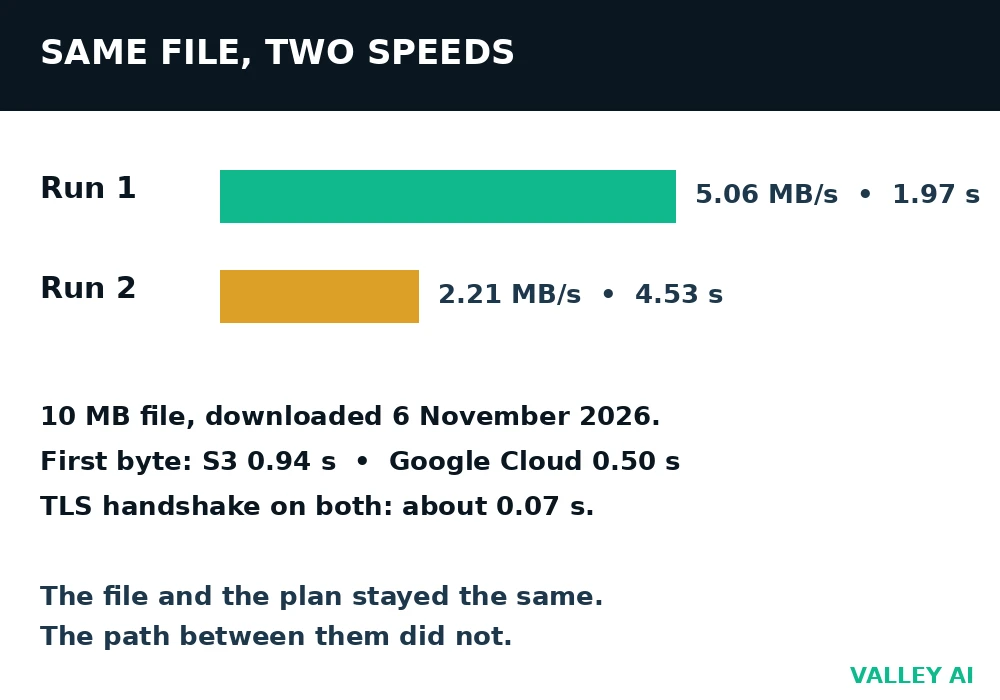
A 10-megabyte file downloaded from a cloud server in under two seconds on 6 November 2026. The same file from the same server took more than twice as long on a second run. Nothing changed in between except the network path, and the gap between the two runs says more about cloud computing than any definition can.
That gap is the whole subject. Cloud computing rents computing power, storage, and software over the internet. Every part of the deal moves with conditions you cannot see: speed, price, and reliability. The sections that follow trace one file from a device to a data center. They show who manages what, price a real bill, and name the two limits that decide how fast anything feels.
| Measurement, 6 November 2026 | Result |
|---|---|
| 10 MB download, run 1 | 1.97 s at 5.06 MB/s (40.5 Mbps) |
| 10 MB download, run 2 | 4.53 s at 2.21 MB/s (17.7 Mbps) |
| First byte, S3 (s3.amazonaws.com) | 0.94 s |
| First byte, Google Cloud Storage | 0.50 s |
| TLS handshake, both endpoints | about 0.07 s |
Does the cloud store files in the sky?
No. Files sit on disks inside data centers, which are large buildings full of servers, cooling, and power backups. The word cloud describes how you reach those disks, over the internet, from any device, rather than where the disks sit.
The meter runs from the first byte
Cloud computing is on-demand access to computing resources over the internet, paid for by measured use. The National Institute of Standards and Technology lists five traits that separate it from ordinary hosting. They are self-service provisioning, access over standard networks, pooled resources shared across customers, fast scaling up and down, and a meter that records what you use. A provider that misses any of those traits sells hosting with a new name.
The meter is the trait that shapes behavior. Storage, requests, and data sent out each carry a price, and the bill adds them as separate lines. A file that sits untouched still accrues a storage charge each month. Downloads add a transfer charge each time the file is fetched. The meter runs whether anyone watches it or not.
One physical fact sits under all five traits. Every cloud service runs on servers in a building somewhere. The abstraction hides the building, and the meter hides nothing. Both halves matter: the building sets the limits, and the meter sets the cost.
A file upload, step by step
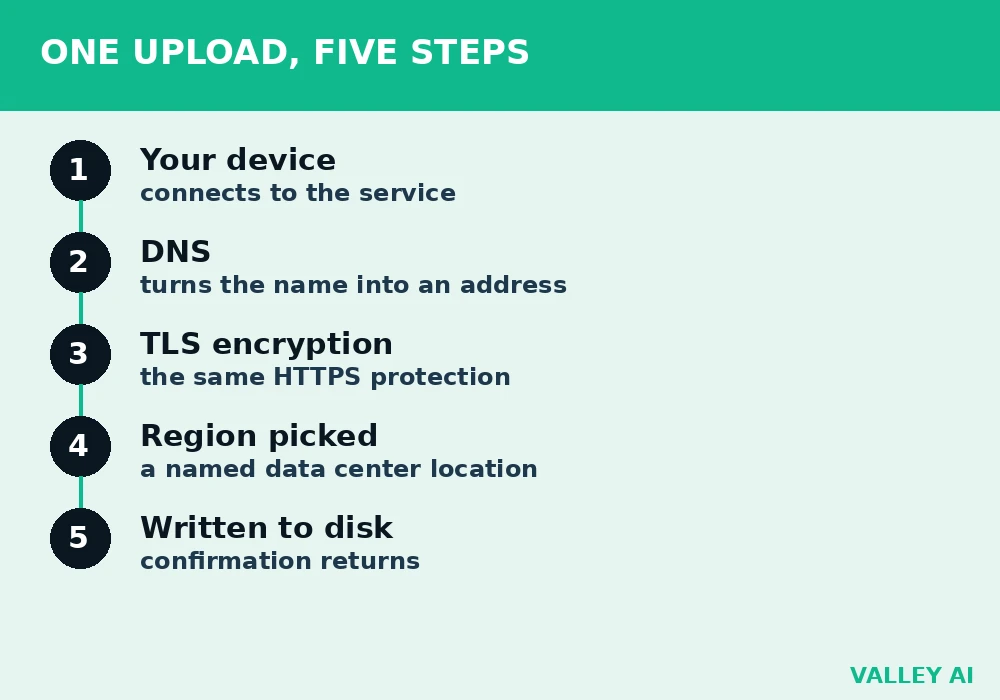
Uploading a photo to cloud storage moves through five steps. Your device connects to the service. DNS turns the service name into an IP address the network can reach. The connection is encrypted with TLS, the same HTTPS protection that guards a login page. The service picks a region, a named data center location, and writes the file to disk there. The service then returns a confirmation, and your device shows the upload as done.
The region matters more than most people expect. A file stored in a data center on another continent travels farther on every read, and the delay shows up as slow loading even on a fast home connection. Providers let the account holder pick a region at setup, and the choice stays with the stored data until someone moves it.
Amazon launched its Elastic Compute Cloud in 2006. Renting a server by the hour replaced buying one and waiting weeks for delivery. The idea spread to storage, databases, and whole applications, and the three large providers today are Amazon Web Services, Microsoft Azure, and Google Cloud.
Virtualization: one server becomes many
One physical server in a data center can run dozens of separate virtual machines. A hypervisor, a thin layer of software, carves the server’s processor, memory, and storage into slices and hands one slice to each virtual machine. Each slice behaves like a computer of its own, with its own operating system and its own files.
Isolation is the point. One customer’s virtual machine cannot read another’s files, even when both run on the same physical host. The hypervisor enforces that boundary. When a virtual machine crashes, its neighbors keep running.
Virtualization lets one machine serve many customers at once, which is how a provider rents slices of a server instead of whole servers. A reader can see it in any provider console. A virtual machine lists virtual CPUs and gigabytes of memory, and those numbers describe a slice. A plan that offers 4 virtual CPUs and 16 GB of memory rents that slice. The physical server underneath stays invisible by design.
The service models, and who manages what
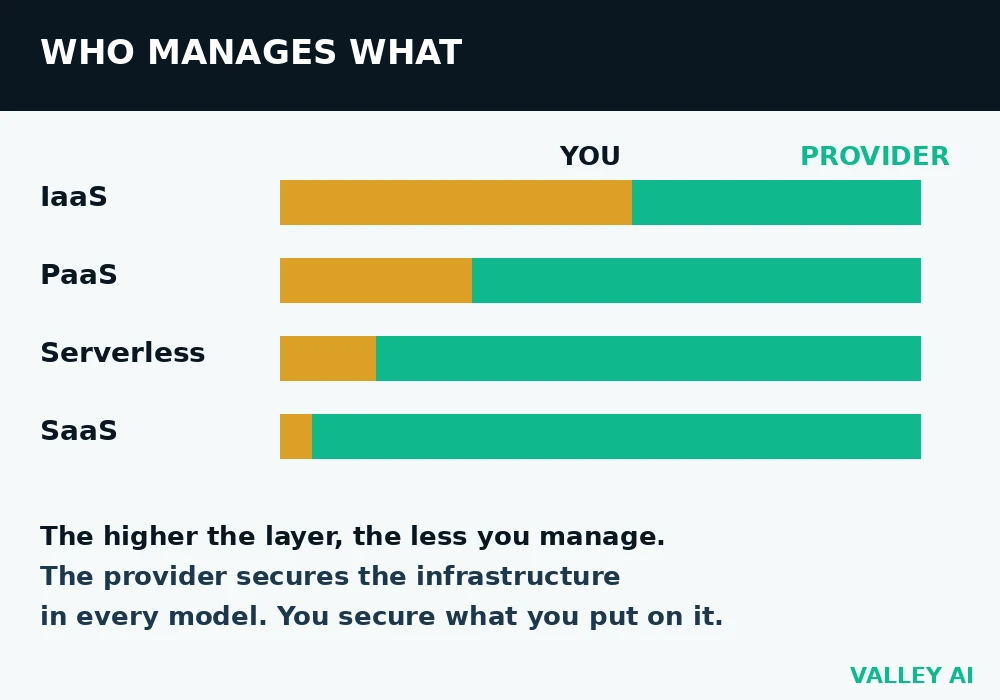
Cloud services come in layers, and each layer moves one more job from the customer to the provider. Infrastructure as a Service rents raw building blocks: virtual machines, storage, and networking. The customer installs the operating system and everything above it. Amazon EC2, Azure Virtual Machines, and Google Compute Engine sell this layer.
Platform as a Service adds a runtime. The customer deploys code, and the platform handles the operating system, patching, and scaling. Heroku, AWS Elastic Beanstalk, and Google App Engine sell this layer. Serverless goes further: the customer writes single functions, the provider runs them when an event arrives, and the bill counts executions. AWS Lambda, Azure Functions, and Google Cloud Functions sell this layer.
Software as a Service delivers a finished application. The customer opens it in a browser and uses it. Email runs this way: Gmail and Outlook are cloud applications, and the provider manages the software, the servers, and the updates.
| Layer | You manage | Provider manages |
|---|---|---|
| Infrastructure as a Service | Operating system, apps, data | Hardware, virtualization, network |
| Platform as a Service | Your code and data | Runtime, OS, scaling, hardware |
| Serverless | Your functions and data | Everything below the function |
| Software as a Service | Your data and settings | The whole application |
Responsibility splits with the layer. The provider secures the infrastructure in every model, and the customer secures what it puts on it: its data, its accounts, its settings. A misconfigured storage bucket leaks data on the most secure platform, because the setting belongs to the customer. That split is called the shared responsibility model, and it is the one security idea every cloud user needs.
Public, private, hybrid, multicloud
Deployment models describe who shares the infrastructure. A public cloud serves many customers from shared hardware, with each customer’s data isolated by the hypervisor. Public does not mean the data is public. It means the platform is open to any paying customer.
A private cloud serves one organization on dedicated hardware, either in its own building or in a reserved section of a provider’s data center. A hybrid cloud joins the two, with some workloads public and some private, connected by networking and shared identity. Multicloud uses two or more public providers at once, often to keep a backup provider or to pick the best service from each.
Video streaming shows why the distinction matters. A streaming service can store its catalog in a public cloud, run its encoding on rented virtual machines, and deliver the video through a CDN. The storage, the compute, and the delivery sit in different places, and each piece follows its own model.
What the bill measures
A cloud bill has four lines, and each line has its own price. Storage is priced per gigabyte per month. Requests are priced per thousand. Data sent out to the internet is priced per gigabyte after a free allowance. Data sent in is free on most providers. A bill that looks high traces to one of the four lines, and the fix depends on which one.
Amazon S3 Standard, the best-known object store, publishes its first-tier US East prices. Storage costs $0.023 per gigabyte per month. PUT requests cost $0.005 per 1,000. GET requests cost $0.0004 per 1,000. Data sent out costs $0.09 per gigabyte after the first 100 GB free each month. Those are list prices, and they change by region and by volume.
| Bill line, one month | Amount | Cost |
|---|---|---|
| Storage, 1,000 GB | 1,000 x $0.023 | $23.00 |
| PUT requests, 50,000 | 50 x $0.005 | $0.25 |
| GET requests, 300,000 | 300 x $0.0004 | $0.12 |
| Data sent out, 200 GB | 200 x $0.09 | $18.00 |
| Total | $41.37 |
The total is $41.37 for the month, and storage is only $23.00 of it. Data sent out adds $18.00, nearly as much as the storage itself. A site that serves many downloads pays more for the leaving traffic than for the keeping. Some newer providers charge nothing for data sent out: Cloudflare R2 lists $0.015 per gigabyte per month for storage with no egress fee, which changes the math for download-heavy workloads.
Is the cloud always cheaper than owning servers?
No. A workload that runs at full capacity day and night can cost less on hardware the owner already bought, because the cloud meter never stops. A workload with sharp peaks, or one that may shut down next month, costs less in the cloud, because idle capacity is not billed. Compare measured use against the purchase price. A sticker price and a monthly bill measure different things.
Free tiers exist, and the details shifted in 2025. Google Cloud still gives 5 GB of Cloud Storage free every month in US regions. Amazon retired its 12-month 5 GB S3 free tier for new accounts on 15 July 2025 and now gives signup credits instead. A free tier that a guide written before that date still promises may no longer exist. At the first run’s measured speed, filling the 5 GB free tier takes about 16 minutes of steady downloading.
When a server fails, your file stays put
Providers copy stored data across servers and, for the standard storage class, across separate data centers in the same region. One failed disk, one failed server, or one failed building changes nothing the user sees. The service reads from another copy and keeps answering.
Can one failed server lose my files?
Hardware failure alone cannot lose them. The copies exist for that exact case. A file is lost when the account holder deletes it, when an application overwrites it, or when an attacker gains access to the account. Replication guards the hardware. Backups and version history guard the human side.
Regions add a second layer. An application can run copies in two regions at once. A region-wide outage is rare, and it is the reason large services spread across regions. A single user with files in one region relies on the copies inside that region, and that is enough for storage.
Two ceilings: your connection and the cloud
Cloud speed has two ceilings, and they bind different traffic. The internet plan caps traffic that leaves the home: a download cannot beat the plan’s speed, and an upload cannot beat its upload rate. A file stored in the cloud crosses that ceiling on every trip, so the plan sets the speed the user feels.
Traffic that never leaves the cloud follows a different ceiling. A file copied from one cloud service to another inside the same provider moves over the provider’s own network, and the home plan never touches it. A video streamed from a cloud region to a phone crosses the plan ceiling once, at the last step. The plan caps the outside trip. The provider’s network caps the inside trip.
The home network adds a third limit that people miss. A slow router or a crowded Wi-Fi channel caps the speed before the traffic reaches the internet at all. The request leaves through the home router, and a router that cannot keep up holds back everything behind it.
Two downloads of the same file at very different speeds show the ceilings in action. The file, the server, and the plan stayed the same. The path between them did not. At the first run’s measured speed, a 1 GB video file takes about 197 seconds to arrive. At the second run’s speed, the same file takes about 453 seconds. A reader who wants to see the same effect can download any large file twice and compare the times. The numbers will differ, and the difference comes from the network.
The Conclusion
Start with a measurement. Download a file of known size twice, divide the size by the seconds, and keep the two speeds. Then open one provider’s pricing page and find the four lines: storage, requests, data in, data out. Price 100 GB of storage for a month and one full download of that same 100 GB. The two numbers together show what the cloud costs and what the connection allows. That pair decides whether a workload belongs in the cloud or on a machine in the room.
Frequently asked questions
What is the difference between the cloud and the internet?
The internet is the global network that moves data between computers. Cloud computing is a way of renting computers that are reached through that network. A laptop with no internet connection still runs its own programs, while a cloud application with no connection is unreachable.
How do I know which country my data sits in?
The provider console shows the region for each service, and the region is picked when the service is created. Some services let the account holder pin data to one country for legal reasons. A service that does not show its region is one to question before storing anything sensitive.
What happens to my files if I stop paying for cloud storage?
Most providers keep the files for a grace period after payment stops, then delete them. The length of that period varies by provider and by plan. Download a local copy before cancelling. The grace period protects against a missed payment, and a backup protects against deletion.
Can I move my files from one cloud provider to another?
Yes. Download the files from the first provider and upload them to the second, or use a transfer tool that copies between the two. Moving data out carries a transfer fee on most providers, so a large move can cost more than a month of storage. Check that fee before starting a big migration.
Does cloud storage back up my files automatically?
Storage and backup are different jobs. Cloud storage keeps the current version of each file and syncs changes across devices, so a deletion on one device can remove the file everywhere after the recycle window passes. A backup keeps older versions and deleted files on a separate schedule. Use both for files that matter.
Why do some cloud services feel slow on a fast connection?
The connection is only one part of the path. The service may run in a distant region, the provider’s own network may be busy at that hour, or the plan for that service may cap its own throughput. Try the same action at a different time and, if the provider allows it, from a nearer region. A service that stays slow at every hour carries the limit on its own side.
Is a free cloud tier enough for personal use?
For light use, yes. Five gigabytes of free storage holds about 1,600 photos at 3 MB each, or a few hundred documents with room to spare. The limit that catches people is the transfer allowance: Google Cloud’s free tier includes only 1 GB of data sent out each month, so heavy downloading burns through it fast. Count the downloads too. The stored gigabytes tell only half the story.

Kaleem
Kaleem is a Computer Science graduate (Virtual University of Pakistan) and the founder and editor of Valley AI, where he publishes in-depth, tested guides on computer hardware, artificial intelligence, and how the internet works. Every guide is researched from primary sources, tested hands-on where possible, and updated when the facts change.