
Press play on a two-hour film and the first frame appears in a second or two. The rest of the film sits on a server far away. Your device stores a few seconds of it at any moment.
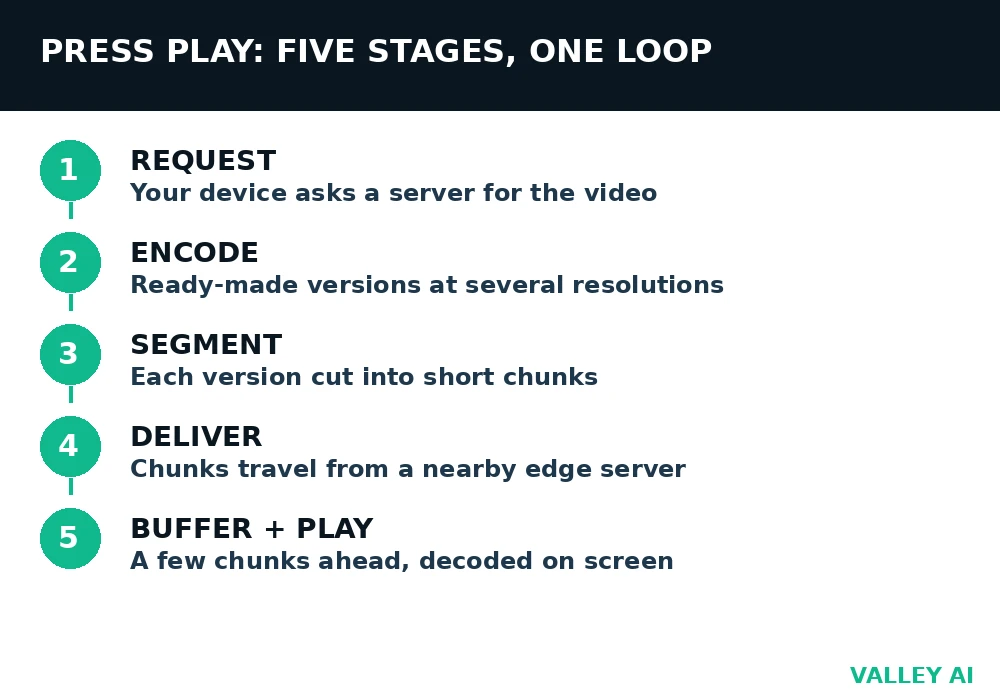
Streaming works because the player fetches video in small pieces, plays each piece, and throws it away. Five stages run in a loop from the moment you press play.
- Request: your device asks a server for the video.
- Encode: the server offers ready-made versions at several resolutions.
- Segment: each version is cut into short chunks, usually 2 to 10 seconds long.
- Deliver: chunks travel over the internet, often from a nearby edge server.
- Buffer and play: your device stores a few chunks ahead, decodes them, and shows them on screen.
Does streaming download the video to your device?
It downloads pieces of it, then deletes each piece after playback. The player maintains a rolling window of a few seconds, never the full file. Closing the app leaves no film on your disk, which is why a stream cannot play without a connection.
Pressing play starts a pipeline
A download moves a complete file, then plays it. A stream plays the file while it moves. The difference shows up the first time a connection drops. A download resumes where it stopped. A stream stalls within seconds because its rolling window runs dry.
One request starts the pipeline, and it needs an address. DNS turns the service name into an IP address, the number the network uses to reach the server that hosts the video.
The player in your browser or app does the decoding. It reads each chunk, rebuilds the pictures, and puts them on screen in order.
Packets carry the chunks. TCP delivers them in order and resends any that go missing, which suits on-demand video. UDP skips the resending, which suits live video, where a late packet is useless anyway.
Scrubbing to a new point works the same way. The player drops the buffered segments, asks for the segment at the new timestamp, and starts filling the buffer from there. The jump feels instant when the segment is ready and waiting. It lags when the player must fetch a fresh segment over a slow link.
Compression decides how much data each second needs
Raw video is enormous. One second of 480p pictures contains about 29.5 million bytes before compression. A two-hour film at that rate would fill more than 200 gigabytes.
Compression shrinks that by keeping the changes between frames. A codec stores one full picture, then records the movement and the differences for the pictures that follow. H.264 is the codec most services ship. H.265 cuts the size further at the same quality and needs more processing power to decode. AV1 compresses better and runs on newer devices.
Newer codecs cost processing power. H.265 and AV1 squeeze a stream smaller, but the player works harder to rebuild each picture. An old phone or TV may drop frames on AV1 and play H.264 smoothly. That is why services store several codec versions of the same video, and the player picks the one the device handles well.
The webcam on a laptop does the same job in miniature. It compresses each frame before the data leaves the camera, or a video call would need far more bandwidth than a home connection provides.
Compression is lossy. The codec throws away detail the eye is least likely to miss, and that loss is permanent. A higher bitrate preserves more detail. A lower bitrate preserves less. The quality menu in a player is a choice between bitrates, and each bitrate is a different trade between size and detail.
One clip, three resolutions, and the real cost of encoding
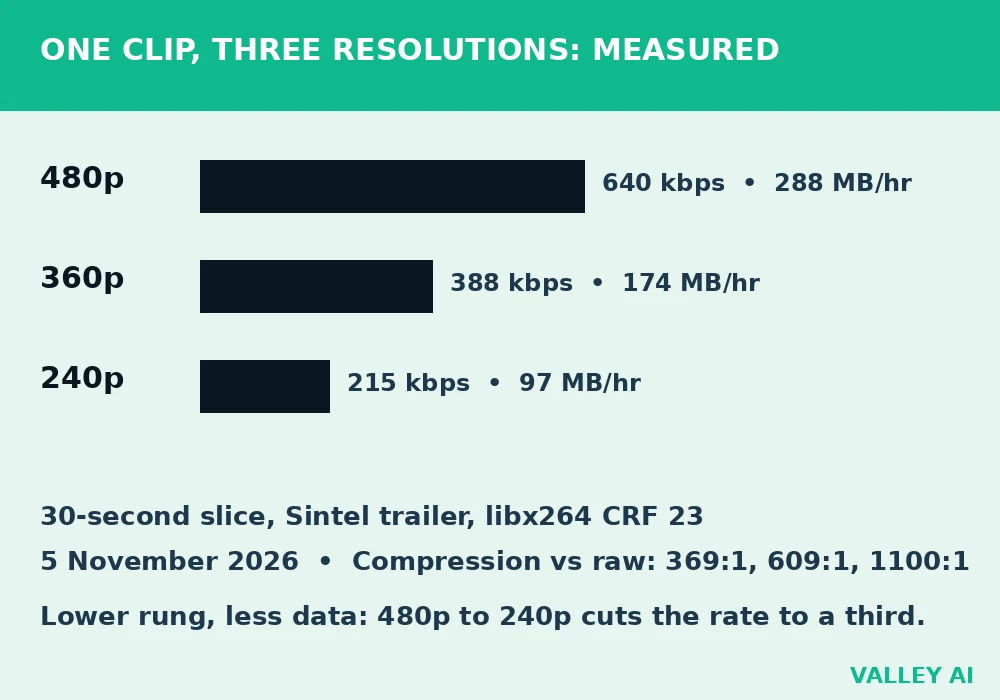
Published bitrate tables give planning figures. A measurement gives the real numbers for one clip, with the settings named. The test, run on 5 November 2026, used a 30-second slice from the Sintel trailer, an open movie clip, encoded with ffmpeg and libx264 at CRF 23. The same slice was encoded at three resolutions.
| Resolution | Bitrate | File size, 30 seconds | Data per hour | Compression vs raw |
|---|---|---|---|---|
| 480p | 640 kbps | 2.40 MB | 288 MB | 369 to 1 |
| 360p | 388 kbps | 1.45 MB | 174 MB | 609 to 1 |
| 240p | 215 kbps | 0.81 MB | 97 MB | 1100 to 1 |
The 480p file measured 640 kilobits per second, below the 1.5 megabits per second that planning tables quote for the same resolution. The gap comes from the content: animation with large flat areas compresses well, while the quoted figures cover busier footage. A scene with rain, confetti, or a moving crowd measures higher at the same settings.
Dropping from 480p to 240p cuts the data rate to about a third. That is the trade a player makes when a connection falters: it swaps a sharp picture for a soft one that keeps playing. Those numbers are the measured cost of each rung on that ladder.
Segments and adaptive bitrate: how the player switches quality
A stream is not one long download. The server cuts each encoded version into short segments, usually 2 to 10 seconds each, and the player fetches them one at a time. A playlist file tells the player where each segment lives and which quality rungs exist.
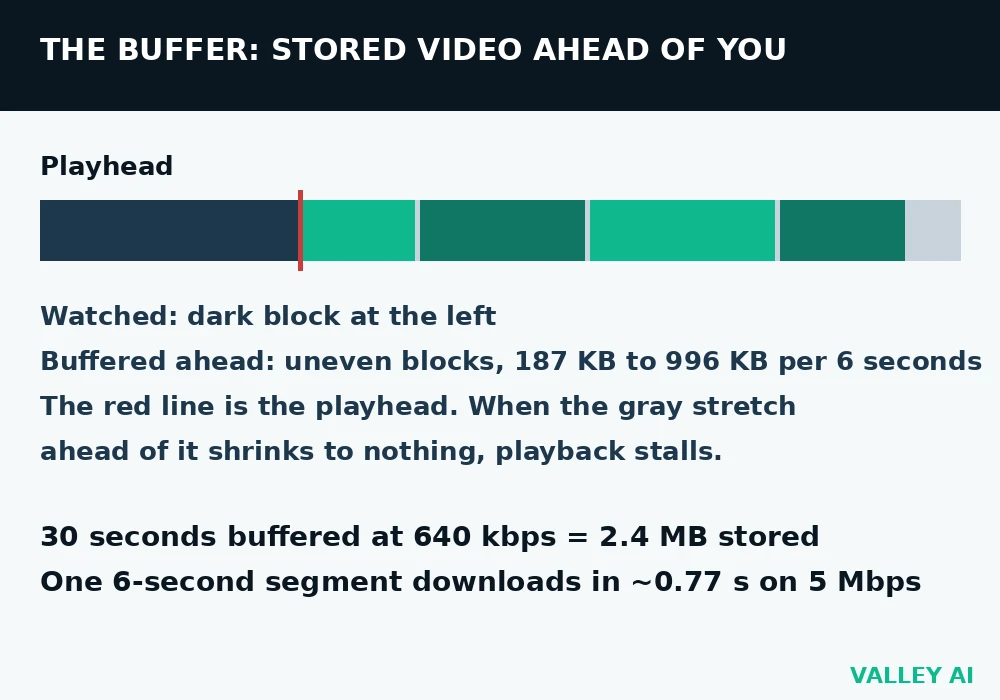
The segments are not equal in size. The 480p test file split into five 6-second segments measured 304 KB, 428 KB, 491 KB, 996 KB, and 187 KB. The largest segment covers a scene change, where almost every pixel moves at once. Equal time does not mean equal bytes, and the player must fetch each segment on its own merits.
Segments usually arrive from an edge server close to the viewer, which shortens the trip. A content delivery network stores copies of each version on servers around the world, and the player is sent to the nearest one.
Adaptive bitrate is the player watching its own download speed and picking the rung that fits. When the connection slows, the next segment comes from a lower rung. When it recovers, the player climbs back up. The switch happens at a segment boundary, so the picture changes in a step, never mid-frame.
Two protocols carry most of this traffic. HLS, from Apple, and DASH, the open standard, both work over ordinary HTTP and both support adaptive switching. HLS typically runs 10 to 30 seconds behind live.
The playlist file is small and readable. An HLS playlist ends in .m3u8, a DASH manifest in .mpd. Either one lists the segment addresses and the available rungs. A curious reader can open one in a browser and see the ladder the player climbs.
Why does quality drop in the middle of a scene?
Its download speed fell on the last segment, so it picked a lower rung for the next one. The drop is the player protecting playback: a soft picture that keeps moving beats a sharp picture that freezes.
The buffer is the shock absorber
A buffer is a small store of segments the player has fetched but not yet shown. It sits between the network, which delivers in bursts, and the screen, which needs a steady flow. When the network hiccups for a second, the buffer covers the gap and playback continues.
The measured 480p rate makes the buffer concrete. Thirty seconds of buffered video at 640 kilobits per second adds up to 2.4 megabytes. A single 6-second segment averages about 480 kilobytes. On a 5 megabit connection, that segment downloads in under a second, so the player stays well ahead of the playhead.
Two ceilings bind a stream, and they are easy to confuse. The plan from the internet provider caps traffic that leaves the home. The Wi-Fi link inside the home caps traffic between the router and the device. A fast plan cannot fix a weak Wi-Fi signal in a far room. A strong Wi-Fi signal cannot push more data than the plan allows.
The ceilings show up in a real house. A 25 megabit plan feeds the router, while a weak Wi-Fi link in a far bedroom delivers 3 megabits to the TV. The stream gets 3 megabits, and 4K stalls. The Wi-Fi link sets the ceiling here. The plan could deliver eight times more, and the TV would never see it.
Why does pausing for a minute fix buffering?
Playback stops, but the download continues. The buffer fills while the screen waits, and the extra seconds of stored video carry the stream through the next slow patch.
You can watch the buffer work. Open a video, and the progress bar shows a gray stretch ahead of the playhead. That gray stretch is the buffered portion. When it shrinks to the playhead, the next stall is seconds away.
Live streaming changes the pipeline
On-demand video can buffer well ahead without harm. Live video cannot. A viewer watching a match wants the goal seconds after it happens. A delay of half a minute turns a live match into a replay. Live pipelines shrink every stage: shorter segments, smaller buffers, and protocols built for low delay.
The encoder for a live stream works in real time, turning camera output into segments as the event happens. There is no finished file to cut up. The server publishes each segment the moment it is ready, and the player fetches it the moment it appears.
Delay is the price of reliability. Broadcast protocols trade delay for stability, which suits a match or a concert where nobody talks back. WebRTC trades the other way. It limits delay to under a second and serves video calls, live auctions, and interactive streams, where a late reply breaks the exchange.
Live changes failure too. A stalled on-demand stream resumes where it stopped. A stalled live stream rejoins at the live edge, and the seconds missed during the stall are gone. The player jumps forward to stay live.
Conclusion
If streams stall at home, check the two ceilings in order. Run a speed test next to the router, then run one where you sit. A slow result at the router means the plan is the limit. A fast result at the router with a slow one where you sit means the Wi-Fi link is the limit. Drop the quality one rung, or move closer to the router, and the buffer gets the seconds it needs.
For a quick check on any video, open the player stats readout if it has one. YouTube calls it Stats for nerds. It shows the current resolution, the connection speed, and how much of the buffer is filled. Those three numbers tell you which piece of the pipeline is struggling.
Frequently asked questions
How much data does streaming use per hour?
Planning figures from streaming platforms put a 480p stream near 0.7 GB per hour, 720p near 1.5 GB, 1080p near 3 GB, and 4K between 7 and 12 GB. The rate moves with the content: a still interview uses less than a football match at the same resolution. A metered connection is safest with the quality set to 720p or lower.
Why does a video look worse on a big TV than on a phone?
A phone screen stretches 480p across a few inches, and the eye forgives the softness. A TV stretches the same 480p across fifty inches, and every missing detail shows. The stream did not change. The screen got bigger. Picking 1080p or 4K on a TV closes the gap, if the connection can hold that rung.
Does a VPN slow down streaming?
It can. A VPN encrypts the traffic and routes it through an extra server, which adds delay and can cut throughput. A nearby VPN server on a fast connection may cost little. A distant server on a slow one can push the player down a rung or two. Some services also block VPN addresses outright.
What speed do I need for 4K streaming?
Streaming platforms recommend at least 25 megabits per second for a steady 4K stream, with headroom above that for other devices on the same connection. A wired connection holds that rate more steadily than Wi-Fi in a far room. If the rate dips, the player steps down to 1080p, and playback stays smooth.
Why does a stream restart from the beginning after a long pause?
On-demand players usually resume where you left off. A long pause can still end the session: the app releases the stream to free the connection, and reopening it starts a fresh session at the beginning. Short pauses keep the buffer and the session intact.

Kaleem
Kaleem is a Computer Science graduate (Virtual University of Pakistan) and the founder and editor of Valley AI, where he publishes in-depth, tested guides on computer hardware, artificial intelligence, and how the internet works. Every guide is researched from primary sources, tested hands-on where possible, and updated when the facts change.