

Type gcc discount.c and press Enter. A moment later a file called a.out sits in the folder, and running it prints 723. Nothing on screen explains what happened in that moment.
The compiler read 15 lines of C, checked every word against the rules of the language, rewrote the program into simpler forms, and turned it into 16,040 bytes of machine code. It did all of that before the program ran a single time.
What follows is that program’s trip through every stage, with the output each stage produced on a real machine. The program works out a discounted price: 850 cents, 15 percent off, answer 723.
What a compiler is?
A compiler takes in a whole program as text and gives back a file of machine code: numbered instructions for one processor family, nothing else. The translation is finished before the program runs, so the output file stands on its own. Delete the source file and the compiled program still works; that independence is the practical test of a compiled program.
Two jobs fall to the compiler. It must keep the meaning of the program exactly as written. It must produce code that runs well on the target machine. The first job is about correctness. The second is about speed and size.
Is a compiler the same thing as an interpreter? No. A compiler translates the whole program first and hands over a finished file. An interpreter reads the program and carries out each line while it runs, with no finished file at the end. The difference is timing: translate first, or translate as you go.
A translator working on a book shows the difference. A compiler translates the whole book before anyone reads it. An interpreter stands beside the reader and translates each sentence aloud as it comes. Both deliver the same story. The book translation takes longer up front and then reads fast. The spoken translation starts at once and never stops working.
Real compilers include GCC and Clang for C and C++, rustc for Rust, and the Go compiler. The measurements here come from GCC 13.3.0 on Linux. Machine code is the only language a processor runs, and how a CPU works through those instructions one at a time is the subject of the CPU guide.
One program, every stage
The program is discount.c. It reads a price and a discount percent, works out the price after the discount, and prints the answer. With 850 and 15 it prints 723. Every stage below ran on that file, and the table shows what each stage took in, what it gave out, and what it left behind.
#include <stdio.h>
#include <stdlib.h>

#define RATE 15

int discounted(int price, int percent) {
    return price - price * percent / 100;
}

int main(int argc, char **argv) {
    int price = argc > 1 ? atoi(argv[1]) : 850;
    int percent = argc > 2 ? atoi(argv[2]) : RATE;
    printf("%d\n", discounted(price, percent));
    return 0;
}| Stage | What goes in | What comes out | What it left behind |
|---|---|---|---|
| Preprocessor | discount.c, 15 lines | Expanded source | 1,930 lines |
| Lexer | Expanded source | Token stream | 9 tokens for the key line |
| Parser | Tokens | Syntax tree | A tree with the multiply grouped first |
| Semantic check | Syntax tree | Checked tree | Three error classes it can catch |
| IR | Checked tree | Simpler steps | t1, t2, t3 |
| Optimizer | IR | Better IR | 18 instructions down to 9 |
| Code generator | Optimized IR | Assembly text | discount-O0.s and discount-O2.s |
| Assembler | Assembly text | Object file | 1,840 bytes |
| Linker | Object file | Executable | 16,040 bytes, prints 723 |
That table is the map. The walk starts with the preprocessor.
The preprocessor expands first
Before the compiler starts, the preprocessor rewrites the source. It pulls in the headers named by #include and replaces each macro with its value. The command gcc -E stops after this stage and prints the expanded source.
Fifteen lines became 1,930. Almost all of that is stdio.h and stdlib.h, the standard headers, expanded in place. The macro RATE became 15 where it was used. Line 1927 of the output reads: int percent = argc > 2 ? atoi(argv[2]) : 15;
Count the lines yourself with gcc -E discount.c | wc -l. It prints 1930. The preprocessor changes the form while the meaning stays the same, and it hands the compiler a longer file that says the same thing.
Lexing: characters become tokens
Next the lexer reads the expanded source one character at a time and groups characters into tokens. A token is one word of the language: a name, a number, or an operator. Spaces and comments vanish here. They only separate words.
The return line of discounted() breaks into nine tokens:
| Token | Kind |
|---|---|
| return | keyword |
| price | name |
| – | operator |
| price | name |
| * | operator |
| percent | name |
| / | operator |
| 100 | number |
| ; | punctuation |
Grammar is not the lexer’s business. It would hand over the tokens price price as two names in a row without complaint. Deciding whether that sequence makes sense is the parser’s job.
Parsing: tokens become a tree
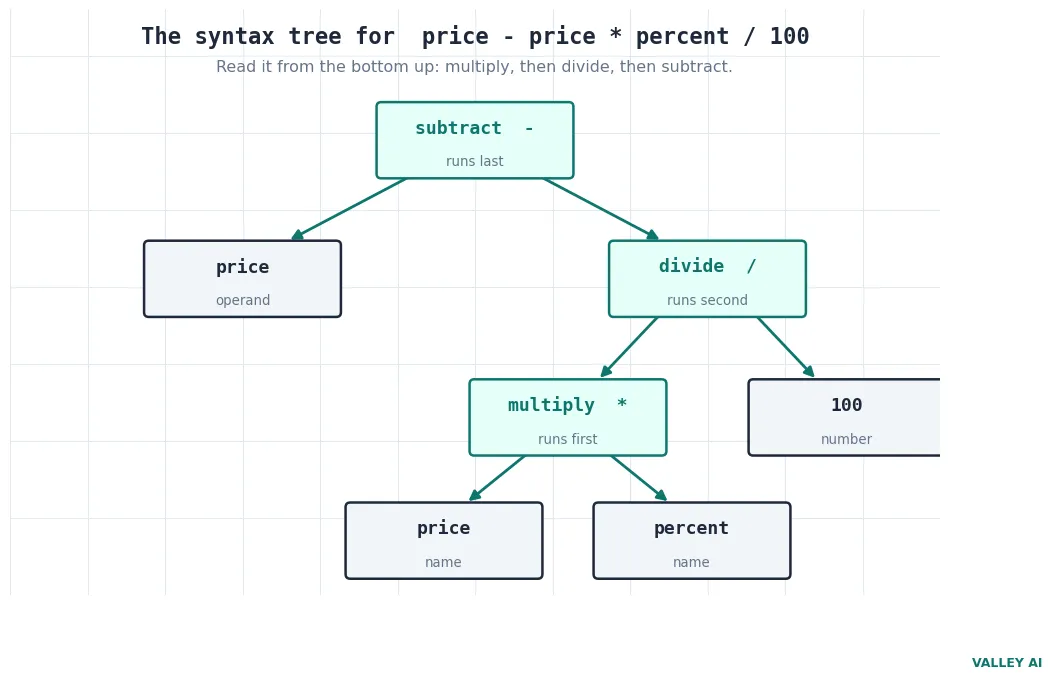
Now the parser checks the tokens against the grammar of C and builds a syntax tree. The tree records which parts of the line belong together and in what order they run. Multiplication and division bind tighter than subtraction, so the tree groups price * percent first, divides by 100 next, and subtracts the result from price last.
subtract (-)
  price
  divide (/)
    multiply (*)
      price
      percent
    100
Read the tree from the bottom up: multiply, then divide, then subtract. That order is the meaning of the line. Change the tree and you change the answer.
GCC can print its own lowered form of the program with -fdump-tree-original. For discounted() it reads: return (price * percent) / -100 + price; The form looks odd, dividing by -100 instead of subtracting a division by 100, and it gives the same answer. The compiler rewrote the subtraction as an addition of a negative division.
Everything after this stage works on the tree. The raw text drops away. The tree is the first form of the program a machine can reason about.
The meaning check: three ways a program fails
A program can follow the grammar and still be wrong. The semantic check catches what grammar cannot: names that were never declared, values used the wrong way, functions called with the wrong number of arguments. It runs on the tree, and it refuses the build when it finds a fault.
Three broken versions of discount.c show the three catches. Each one stopped the build with a single error and produced no output file.
A stray @ in the return line is a lexical error. The lexer hit a character that belongs to no token, and it stopped at the exact spot:
err-lexical.c:7:18: error: stray '@' in program
    7 |     return price @ - price * percent / 100;
      |                  ^
The missing semicolon is a syntax error. Every token is a valid word, and the grammar is broken. The parser points at the place where a semicolon belongs:
err-syntax.c:7:41: error: expected ';' before '}' token
    7 |     return price - price * percent / 100
      |                                         ^
Calling discounted() with three arguments is a semantic error. The grammar is fine. The call does not match the function, and the checker knows the function takes two arguments because it read the declaration:
err-args.c:13:20: error: too many arguments to function 'discounted'
   13 |     printf("%d\n", discounted(price, percent, 5));
      |                    ^~~~~~~~~~
One more case shows the line between a warning and an error. Passing the text “850” where a number belongs compiles with a warning by default. GCC refuses it only when warnings are turned into errors with -Werror, and the message then reads: passing argument 1 of ‘discounted’ makes integer from pointer without a cast.
Why does a compiler refuse a program that looks fine to a person? Because looking fine is not the same as following the rules. A person reads intent. A compiler reads only the text, the grammar, and the types. A mismatch in any of the three stops the build, and the error message names the line where it stopped.
That refusal is the point. Every mistake the compiler catches is one that never reaches a user.
The in-between form and the optimizer
Once the checks pass, the compiler lowers the tree into an intermediate representation, or IR. The IR is a list of tiny steps, each with its own scratch value: t1 = price * percent, then t2 = t1 / 100, then t3 = price – t2. The IR is simpler than C and easier to improve than machine code, so the optimizer works on it.
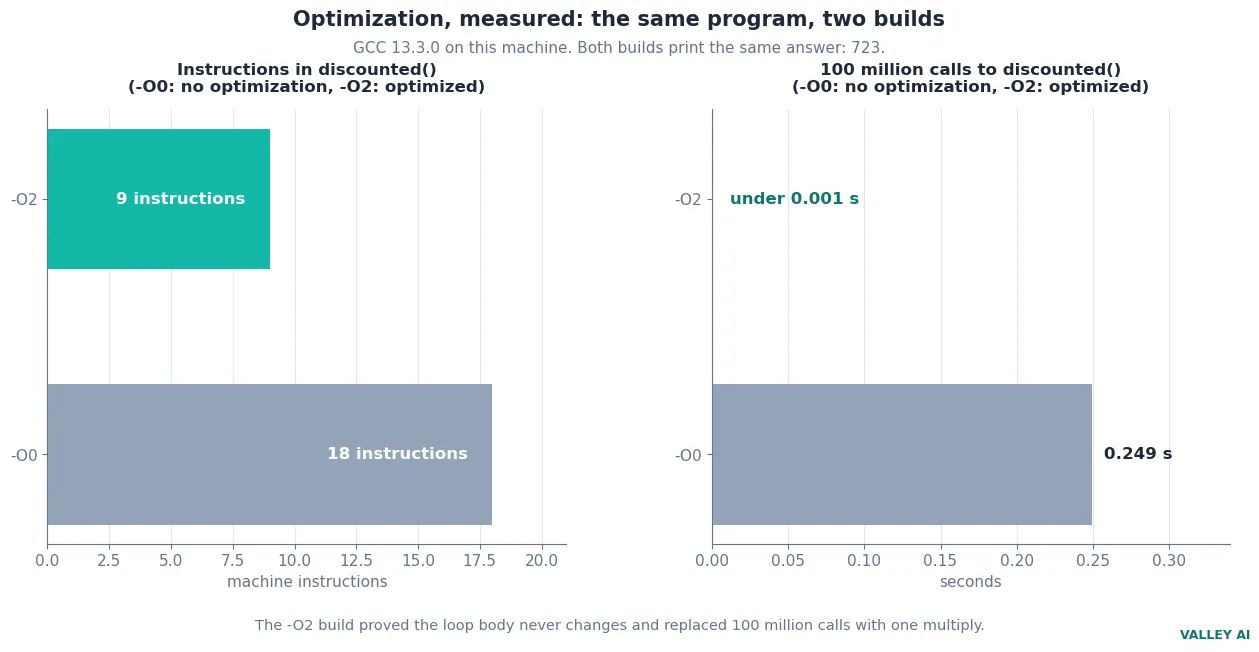
Optimization rewrites the steps without changing the result. For discounted(), the -O0 build, with no optimization, produced 18 instructions. The -O2 build produced 9. The -O2 version drops the stack frame and the repeated loads. It keeps the arithmetic. The GCC manual lists what each -O level does.
Both builds replace the division by 100 with a multiplication by 1374389535 followed by shifts. Dividing is slow for a processor, so the compiler multiplies by a large number chosen so the result matches a division by 100. I expected that trick to appear only at -O2. It appears at -O0 too, because dividing by a constant is expanded before optimization starts.
A bench run shows what the optimizer does to a loop. Calling discounted() 100 million times, with the price and percent read from the command line, took 0.249 seconds at -O0 and under 0.001 seconds at -O2. Both runs printed the same total, 72300000000. I expected a modest gap from the loop and got the whole loop folded away: the -O2 assembly shows the optimizer proved the call gives the same answer every time and replaced 100 million calls with one multiplication by 100000000.
That speedup came from removing work. The arithmetic itself ran at the same speed. It is one loop on one machine, and the number belongs to that loop. A different loop, with values that change each time round, would show a smaller gap.
Does -O2 always make a program faster? Not always. It made this loop far faster by removing repeated work. A program that spends its time waiting on input, or on memory, gains little from a faster arithmetic step. Optimization helps where the work is, and nowhere else.
From assembly to a runnable file
Code generation turns the optimized IR into assembly, text a person can read that sits one step above machine code. The -S flag stops the build there. The assembly for discounted() is 18 instructions at -O0 and 9 at -O2, and each line names one operation: multiply, shift, add, return.
Then the assembler turns that text into machine code in an object file. The command gcc -c produced discount.o, 1,840 bytes. The symbol table inside it lists what the file defines and what it still needs:
                 U atoi
0000000000000000 T discounted
0000000000000034 T main
                 U printf
T marks a function defined here. U marks a name used here and defined somewhere else. printf and atoi live in the C library, and the linker joins them in.
Linking takes the object file, resolves every U name, and writes the executable: 16,040 bytes. The file command describes it as an ELF 64-bit executable for x86-64, dynamically linked. Running it prints 723.
That binary is 16,040 bytes for a program that prints one number. I expected a small file and got 16,040 bytes. Most of it is startup code and the printing library. The arithmetic takes a few dozen bytes inside a file that carries everything the program needs to start and print.
Each instruction in that file flips transistors in the processor. What logic gates do with those switches is the subject of the logic gates guide.
Compiler, interpreter, JIT: three ways to run code
Not every language takes the ahead-of-time route. The approaches split on one question, and that question is when the translation happens.
| Approach | When translated | Output | Examples |
|---|---|---|---|
| Compiler (ahead of time) | Before the program runs | Machine code file | GCC, Clang, rustc |
| Interpreter | While the program runs, line by line | No file | CPython, Ruby |
| Bytecode and virtual machine | Before running, then at run time | Bytecode file | Java, Python |
| JIT compiler | While the program runs, for the busy parts | Machine code in memory | V8, JVM HotSpot |
Timing decides when a mistake surfaces. A compiler refuses a broken program before anyone runs it. An interpreter reaches the broken line while running and stops there. A JIT compiler sits between the two: it starts by interpreting, watches which parts run most often, and compiles those parts while the program runs.
You meet the JIT route every day without noticing. A browser’s JavaScript engine compiles the busy parts of a page’s scripts while the page runs, which is why a heavy page speeds up after it loads. How a web browser works through a page, scripts included, is the subject of the browser guide.
Build with -O0, ship with -O2
The measurements point to a working habit. Develop with -O0 and the -g flag: builds stay fast, the assembly stays readable, and the debugger can map each instruction back to a source line. Ship with -O2: the same program, the same answers, half the instructions in the hot function and the dead work removed.
Remember 18 instructions against 9, 0.249 seconds against under a millisecond, and 723 either way. Compile discount.c yourself with both flags and compare the assembly. The difference between the two files is the optimizer’s whole job, written out where you can read it.
Frequently asked questions about compilers
Do I need a compiler to run Python?
Python compiles too, but it hides the step from you. Running a Python file first turns it into bytecode, and an interpreter then runs that bytecode. You never type a compile command, and no machine-code file appears. The compiler is there, working quietly between your file and the run.
Is GCC the only compiler?
No. Clang, Microsoft’s MSVC, rustc for Rust, and the Go compiler all do the same job for their own languages. GCC is the compiler used for the measurements here, and its flags (-E, -S, -c, -O2) appear in the command lines quoted alongside each stage.
Can one compiler build a program for a different chip?
Yes, with a cross-compiler. A compiler running on an x86-64 machine can emit ARM machine code when it is built with the ARM target. The binary it writes will not run on the machine that built it. It runs on the chip it was built for.
Why do compilers warn instead of stopping?
Some code is legal but risky, and the compiler cannot tell whether the programmer meant it. GCC reports those cases as warnings and keeps building. The -Werror flag turns warnings into errors for a build where nothing risky is allowed through.
What is the difference between a compiler and an assembler?
A compiler translates a whole programming language into assembly. An assembler translates assembly mnemonics into machine code, one instruction at a time. GCC runs both: -S stops after the compiler’s assembly, and the assembler runs when the object file is written.

Kaleem
Kaleem is a Computer Science graduate (Virtual University of Pakistan) and the founder and editor of Valley AI, where he publishes in-depth, tested guides on computer hardware, artificial intelligence, and how the internet works. Every guide is researched from primary sources, tested hands-on where possible, and updated when the facts change.