

Judge satellite internet by one number: the time light needs for the round trip. The speed on the box matters less than the distance the signal must cross, and that distance depends on where the satellite sits.
Two systems share the name, and they sit at opposite ends of the sky. One parks 35,786 km overhead and never moves. The other races past at 7.6 km/s only 550 km up. Everything about the service, from the delay you feel to the dish on your roof, follows from which one you are using.
The path a click takes
Click a link and the request leaves your laptop over Wi-Fi, reaches a router, and then meets the part that makes satellite internet different: a dish that talks to space. The dish sends the request upward on the uplink. A satellite catches it and sends it down to a ground station on the downlink. From there the request joins the ordinary internet and travels by fiber to the site you asked for. The reply comes back the same way in reverse. How Wi-Fi works covers the first hop, inside the home; the dish takes over from there.
That dish sends as well as it listens, which makes it a transceiver, and in practice it’s your own tower. A mobile phone borrows a tower the carrier built. A satellite customer puts the tower on the roof. The ground station plays the same role at the other end: a big dish wired into the backbone, catching traffic from the sky and handing it to the fiber network.
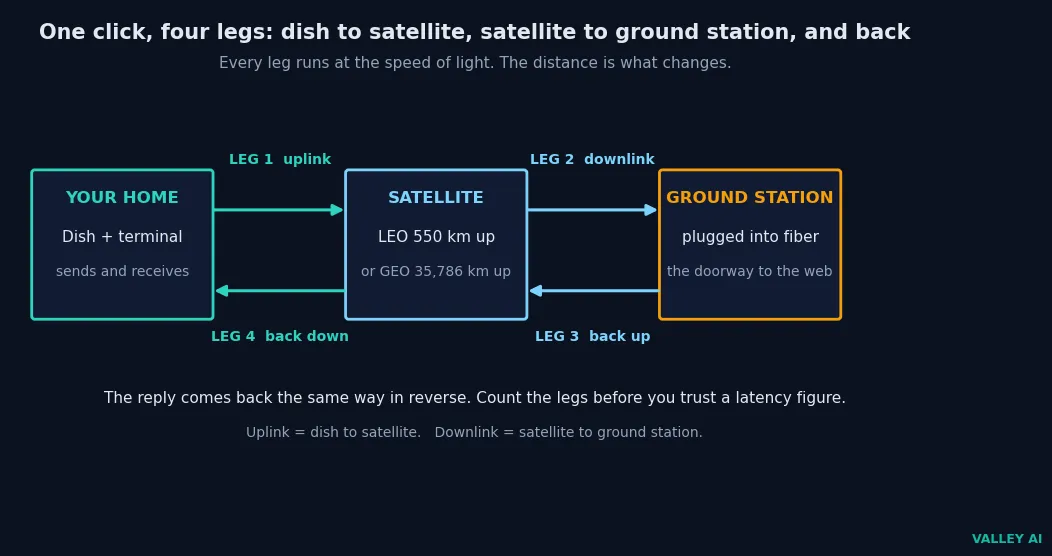
The box beside the dish does the job of a modem. It turns the radio signal from the sky into data your home network can use, and it turns your replies back into radio. The dish, the terminal, and the router form one chain, and a weak link anywhere in it shows up as a slow connection.
Four legs, then. Dish to satellite, satellite to ground station, ground station to the internet, and back again. Keep that count in mind. It’s the number the whole delay hangs on.
Two systems under one name
Satellite internet is two different services wearing one name, and the table tells them apart at a glance. Low orbit is the new system. Geostationary orbit is the old one. Fiber sits in the last row for reference, because every satellite claim is really a comparison with a cable.
| System | Altitude | Round-trip light time | Satellites needed | Dish | Typical ping |
|---|---|---|---|---|---|
| Low Earth orbit (Starlink and others) | 550 km | 7.3 ms | Thousands | Flat panel that steers its beam | 20-40 ms |
| Geostationary orbit (HughesNet, Viasat) | 35,786 km | 477.5 ms | A handful | Fixed dish, pointed once | Around 600 ms |
| Fiber (for reference) | On the ground | Grows with distance | None | None, a cable into the home | Often under 20 ms |
The old system parked its satellites so far away for a reason. One geostationary satellite can see roughly 40 percent of the planet, so three of them cover nearly the whole globe outside the polar regions. The price is the distance: every packet crosses 35,786 km four times. Low orbit pays the opposite price. A satellite 550 km up sees only a small patch of ground, so the network needs thousands of them, and the dish must chase a target that never stops moving.
GPS satellites live in a third orbit, medium Earth orbit, about 20,200 km up. They carry no internet traffic. They only broadcast timing signals, which is a different job at a different height, and how GPS works is a story about clocks.
Altitude is the whole story here, not the speed on the box. A satellite internet plan can advertise hundreds of megabits and still feel slow on a video call, because the delay comes from the height, and no plan changes the height.
The numbers behind the delay
Light moves at 299,792 km every second, and that speed is the same for every satellite service. The delay is the distance divided by that speed, counted over four legs. For a satellite 550 km overhead, the round trip is four times 550 km, which is 2,200 km. Divide by 299,792 and the answer is 7.3 milliseconds. For a geostationary satellite, the round trip is four times 35,786 km, which is 143,144 km. That division gives 477.5 milliseconds.
Those two numbers are the floor. The ping you’ll see runs higher. What ping measures in practice includes the terminal’s work, the routing, and the ground station, and the satellite is rarely straight overhead, so the legs run longer than the straight-up distance. A real Starlink connection usually reports 20 to 40 ms. A geostationary connection usually reports around 600 ms, for the same set of reasons.
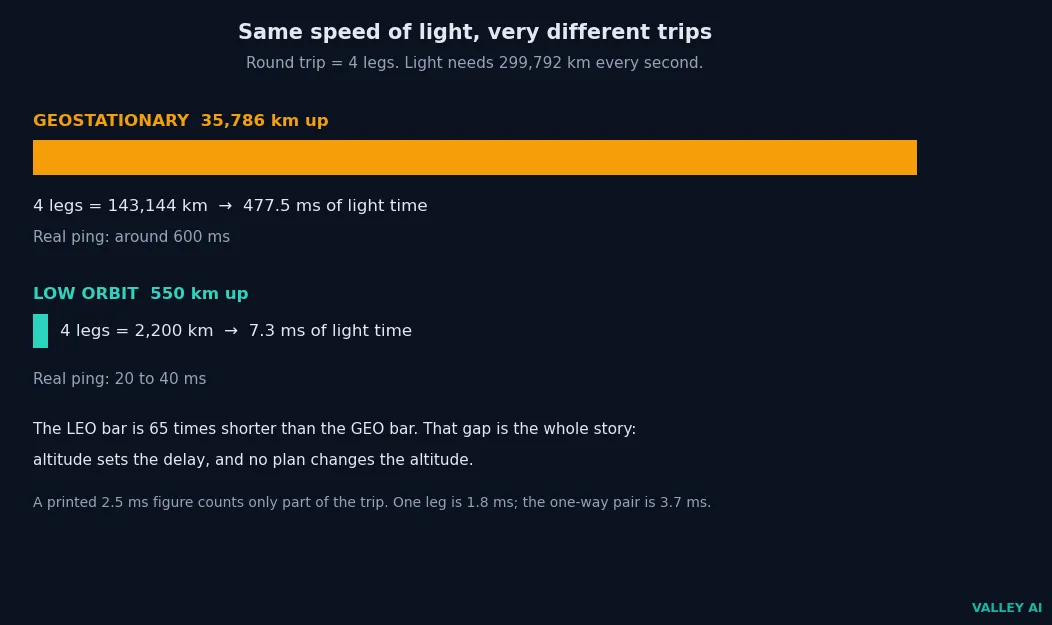
Some pages print a 2.5-millisecond figure for low-orbit latency. That number counts only part of the trip. One leg up to a 550 km satellite takes 1.8 ms, and the one-way pair to the ground station takes 3.7 ms. Neither is a round trip, and a round trip needs all four legs. The same mistake sits behind a printed 240-millisecond figure for geostationary service: 238.7 ms is the one-way pair, dish to satellite to ground station. The round trip is double that. I worked the legs out before trusting any printed figure, and the 2.5 ms claim fell apart on the first division.
Is the 2.5-millisecond latency figure real? No. It counts a leg or two of the journey and calls the total a round trip. Count all four legs and the floor is 7.3 ms, before the terminal and the network add their share.
Low orbit adds a second clock. A satellite at 550 km circles the Earth in 95.5 minutes, moving at 7.6 km/s, and it stays above one rooftop for about 4.1 minutes when it passes at least 25 degrees above the horizon. Rings of 72 satellites space the next one about 604 km behind. A fresh satellite comes overhead roughly every 80 seconds, and the terminal hands the connection over without dropping it.
These numbers carry labels. The 7.3 ms floor assumes a satellite straight overhead, and a low pass stretches the legs and the time. The 80-second handover is an along-track figure from evenly spaced rings, and real handovers also jump between rings. The fiber length in the long-haul comparison is a labelled estimate, chosen to stand for a realistic cable route. No live terminal was measured here. The numbers are worked from the speed of light and the published altitudes, and the real-world pings quoted beside them come from the ranges the providers and trackers report.
The same arithmetic answers a question the laser links raise: can a signal through space beat a cable under the sea? Take New York to London, 5,570 km as the crow flies. A fiber cable takes the longer road, about 6,500 km of glass, and light in glass runs at roughly 200,000 km/s, so the one-way trip takes 32.5 ms. The laser route goes up 550 km, across 5,570 km of vacuum, and down 550 km. All of it runs at the full 299,792 km/s, which takes 22.2 ms. On a long haul, the space route wins by about 10 ms, because light in vacuum outruns light in glass. How optical fiber works explains why the glass slows it down.
The dish that follows a moving target
A geostationary dish points once and stays put, because its satellite never moves. A low-orbit dish faces a different problem: its satellite crosses the sky in about four minutes, and the next one is already coming. Motors could chase it, but motors wear out, they move slowly, and they fail on a moving truck or boat. The flat panel on the roof solves it without moving at all.
Inside the panel sit 1,280 small antenna elements (each about a centimeter across) arranged in a honeycomb. Each one sends and receives with a tiny time delay, and the delays add up so the radio waves reinforce each other in one direction and cancel in the others. Shift the delays and the beam points somewhere else, in microseconds. Drop two pebbles in a pond a hand apart and the ripples add up where their crests meet and cancel where crest meets trough. A phased array does the same with radio waves, steering its beam across the sky while the panel itself never moves.
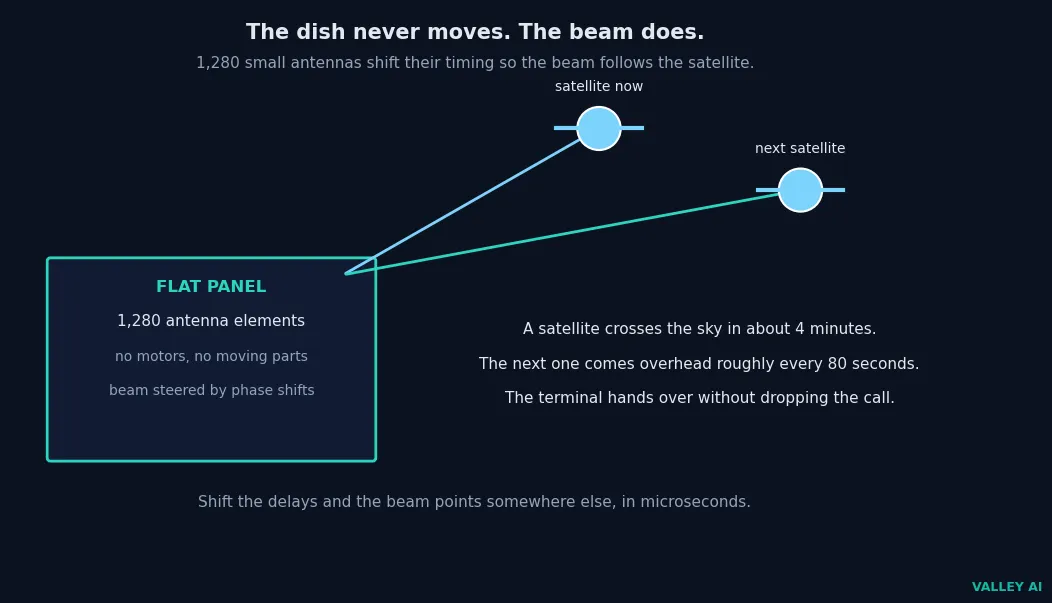
The beam has to find the satellite in the first place. The terminal knows where the satellites are and picks the best one, then hands the connection to the next as each pass ends. You can watch the other half of this job yourself. The Starlink app asks you to point your phone at the sky, and it paints the obstructions it sees, trees and rooflines included, so you can move the dish before you mount it. A clear view is not a suggestion. The beam needs open sky, and a branch in the way is a branch in the way at every pass.
Does the dish move to follow the satellite? No. The panel stays fixed and the beam does the moving, steered by the phase shifts across its 1,280 elements.
The dish needs three things: open sky, power, and a router to hand the connection to. It draws power through its cable, melts snow off its own face in winter, and works in heavy rain less well than in clear air.
The two ceilings on speed
Two separate ceilings cap a satellite connection, and they have nothing to do with each other. The first is the sky. The second is the sharing.
Rain, snow, and thick cloud weaken the radio signal on its way up and down. Engineers call the effect rain fade. Light rain barely registers. A heavy downpour can drop the link until the storm passes, and wet snow on the dish does the same until the heater clears it. Trees and buildings count too: anything between the dish and the satellite blocks the beam, which is why the dish belongs on a roof with open sky. Under an eave, the dish sees wall.
The second ceiling is other people. One satellite beam serves many homes at once, and the share each home gets shrinks at peak hours. Ground Control’s guide puts consumer contention ratios as high as 400 to 1 (four hundred subscribers drawing on one beam’s capacity). Plans handle this with priority data: full speed up to an allowance, then slower speeds once the allowance is used. Evening slowdowns on satellite internet usually come from this ceiling, while the weather stays quiet.
Laser links between satellites belong to neither ceiling. They carry traffic through vacuum, where light runs at full speed, while fiber carries it through glass, where light runs at about two-thirds speed. That’s why a signal can cross an ocean faster through space than through a cable under it, even though the space route is longer. I expected the cable to win the long-haul numbers, and the laser link beat it by 10 ms.
Does rain slow the signal down, or cut it off? It weakens it. Light rain costs little speed, heavy rain can cut the link outright, and the connection comes back when the storm passes.
Where satellite internet loses
Satellite internet loses in three places, and each one matters before the decision. The first is delay on the old system: a geostationary connection answers every click half a second late, which makes fast multiplayer games and some VPN work feel broken. Low orbit answers in tens of milliseconds, which most games tolerate. The full verdict on satellite internet for gaming spells out which games survive the longer delay.
The second is the allowance. Most plans sell priority data: full speed up to a monthly allowance, then slower speeds after it. Heavy households burn through an allowance on streaming and backups, and the slowdown that follows is the plan working as written. The kit is fine; the allowance ran out.
Hardware is the third. The dish and terminal cost real money up front, and Starlink’s own site lists speeds up to 400+ Mbps for its current service, which is the number the plan sells against. A professional install adds more on the old systems, while the new kits are built for self-install on a roof or a pole.
Three checks settle it before you order. First, check the sky: point the phone app at the spot you would mount the dish and look for open sky. Branches in the frame mean a blocked beam. Second, check what else reaches the address: where fiber or cable already arrives, take it, because no satellite beats a cable that is already in the ground. Third, read the priority-data terms: the allowance, the speed after it, and the price of more. If the sky is open, nothing else reaches, and the allowance fits the household, satellite internet is the right connection. If any of those three fails, look elsewhere.
Frequently asked questions about satellite internet
Why is satellite internet more expensive than cable?
The network is the expensive part: thousands of satellites, constant launches to replace them as they burn up, and ground stations around the world. A cable company digs once and serves a street for decades. A satellite company keeps launching, and the hardware and the monthly plan both carry that cost.
Can two homes share one dish?
No. A terminal serves one service address under one account, so a second home needs its own terminal and its own plan. The dish is tied to the spot it was installed for, and moving it means updating the service address with the provider.
Does satellite internet work during a power cut?
No. The dish, the terminal, and the router all need power, so a blackout takes the connection down with them. A small battery backup keeps the kit running through a short cut, which is one reason remote households pair the dish with one.
Does satellite internet need a phone line?
No. The dish is the whole connection to the outside world: it talks to the satellite, and the satellite talks to the ground station. Nothing in the chain uses a phone line, which is the point for homes the phone network never reached.
Can you take the dish traveling?
Yes, with a portable kit and a roaming plan. The dish needs the same thing on the road as at home: open sky above it and power for the terminal. It will not work from inside a car or under a roof, and it needs a clear view wherever it stops.
How many satellites does Starlink have?
More than 10,000 were in orbit as of September 2026, and launches keep adding to the count. The constellation is the reason a low-orbit service works at all: thousands of satellites are needed to keep one in view at every moment.
Is satellite internet available everywhere?
Nearly everywhere with a clear view of the sky, but not in every country. The service needs a license in each country it operates in, and Starlink lists more than 160 countries and territories so far. The dish itself works anywhere the constellation flies overhead and the service is licensed.

Kaleem
Kaleem is a Computer Science graduate (Virtual University of Pakistan) and the founder and editor of Valley AI, where he publishes in-depth, tested guides on computer hardware, artificial intelligence, and how the internet works. Every guide is researched from primary sources, tested hands-on where possible, and updated when the facts change.