
A page that waits on a server an ocean away
A visitor in Karachi opens a small news site hosted in Virginia. Every image, stylesheet, and script on that page travels the full distance before the page looks complete. The connection itself is healthy. The server answers fast. The wait comes from distance alone, and no upgrade to the origin server shortens it.
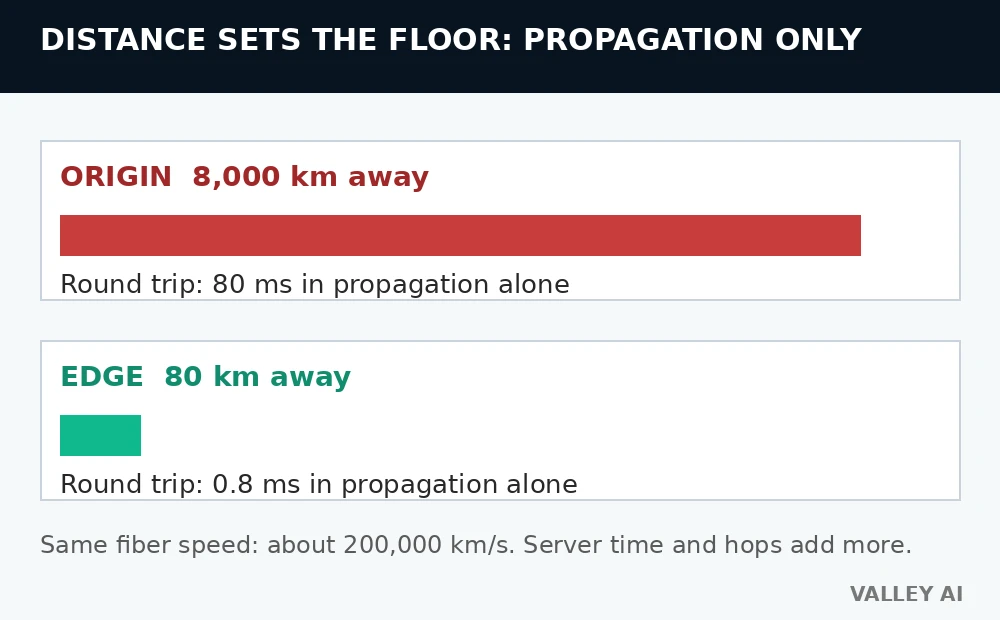
Light in fiber travels at about 200,000 kilometers per second. A signal covering 8,000 kilometers needs 40 milliseconds one way, so a single round trip costs 80 milliseconds in propagation alone. That figure counts only the travel time. Server processing and each routing hop add their own delays on top.
Move a copy of those files to a server 80 kilometers from the visitor, and the same calculation changes completely. The one-way trip drops to 0.4 milliseconds. The round trip drops to 0.8 milliseconds. Distance stops dominating the wait. That is why moving the copy closer cuts both server distance and ping. The original files often sit in cloud regions before a CDN copies them to the edge; see how the cloud stores files.
Distance is only one part of the delay. A 2 megabyte image sent over a 20 megabit per second link needs 0.8 seconds of transfer time alone. Two megabytes equal 16 megabits, and 16 divided by 20 gives 0.8. Shortening the distance and widening the link attack different parts of the wait.
What an edge server stores
Across many cities, a content delivery network keeps servers that hold copies of files for sites on the network. The site’s own server keeps the master copy. That server is called the origin. The network’s servers are called edge servers, and a city holding one or more of them is called a point of presence.
A branch library offers a close comparison. The central library holds every book, and each branch holds copies of the books its neighborhood requests most. A reader borrows from the branch down the road, and the central library ships a title only when no branch copy exists yet.
Edge servers store files that stay the same from one visitor to the next.
Does the edge hold a complete copy of a website? No. It holds copies of individual files, and only the files visitors request. A file nobody near that edge has asked for is never stored there.
How a request finds the nearest edge
A visitor’s browser asks for a page by domain name. The lookup follows how DNS finds a website’s server, and the answer names an edge address near the visitor. The routing system picks the edge that serves that visitor best, usually the closest one with spare capacity. Two visitors in different cities can receive the same page from different servers.
Many large networks announce the same address from every point of presence at once, a method called anycast. Internet routing then carries each request to the nearest announcing location with capacity. Other networks answer the DNS lookup with the address of one chosen edge. Either method keeps the trip short. When a CDN announces the same prefix from many networks, learning how BGP picks a path explains why a request reaches the nearest edge with capacity.
Once the browser holds an edge address, it connects to that address like any other server address. That rule covers edge servers and origin servers alike, since how an IP address locates a device stays the same for both.
A cached DNS answer can point at an edge for a while after routing changes. That delay is why how cached DNS answers expire matters when a site moves between providers.
Cache hit, cache miss, and the ratio that matters
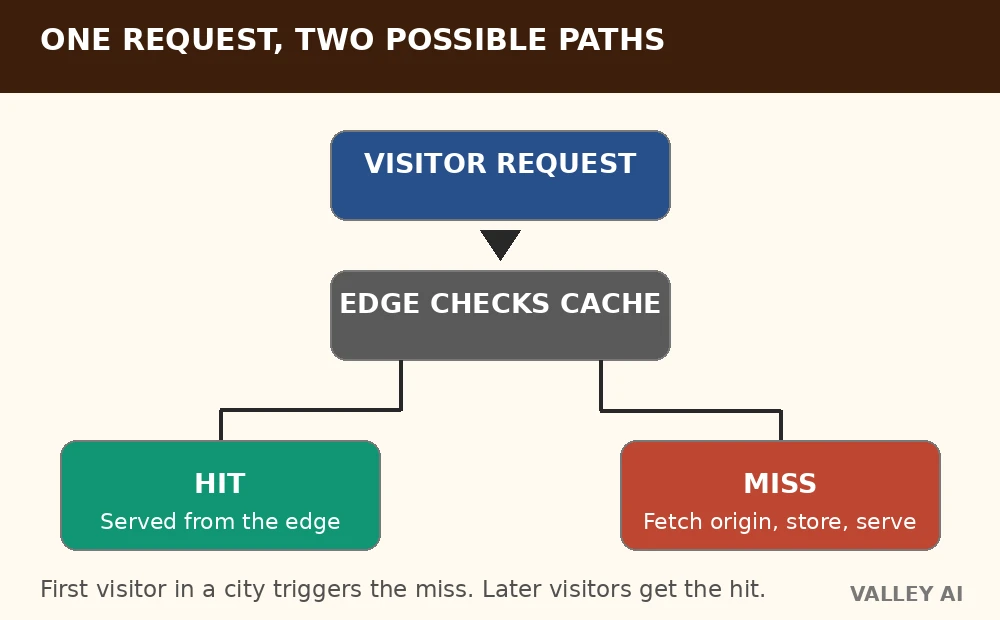
When a request reaches an edge server, the server checks its own storage first. A stored, unexpired copy produces a cache hit, and the edge answers right away without contacting the origin. A missing or expired copy produces a cache miss, and the edge fetches the file from the origin, stores a copy, and answers the visitor. The visitor who triggers a miss waits longer.
| Situation | What the edge does | Origin contacted | Next visitor nearby |
|---|---|---|---|
| Cache hit | Answers from its stored copy | No | Served from the edge |
| Cache miss | Fetches from the origin, stores a copy, then answers | Yes, once | Served from the edge |
Why does the first visitor in a city wait longer? That visitor pays the full distance cost once, because no copy exists at that edge yet. The fetch leaves a copy behind for the next request.
The share of requests answered from cache is called the cache hit ratio, and it decides how much work the origin still carries. Take 10,000 requests at a 94 percent hit ratio. The edge answers 9,400 of them, and 600 reach the origin. Drop the ratio to 60 percent, and the origin must answer 4,000 requests from those 10,000. A small change in the ratio moves thousands of requests between the edge and the origin.
Tiered caching adds a middle layer between edges and the origin. An edge with a miss asks the middle layer first. The middle layer asks the origin only when its own copy is missing. One origin fetch can then stock many edges at once, which lifts the ratio the origin feels. Fastly calls this middle layer shielding.
What gets cached, and what bypasses the edge
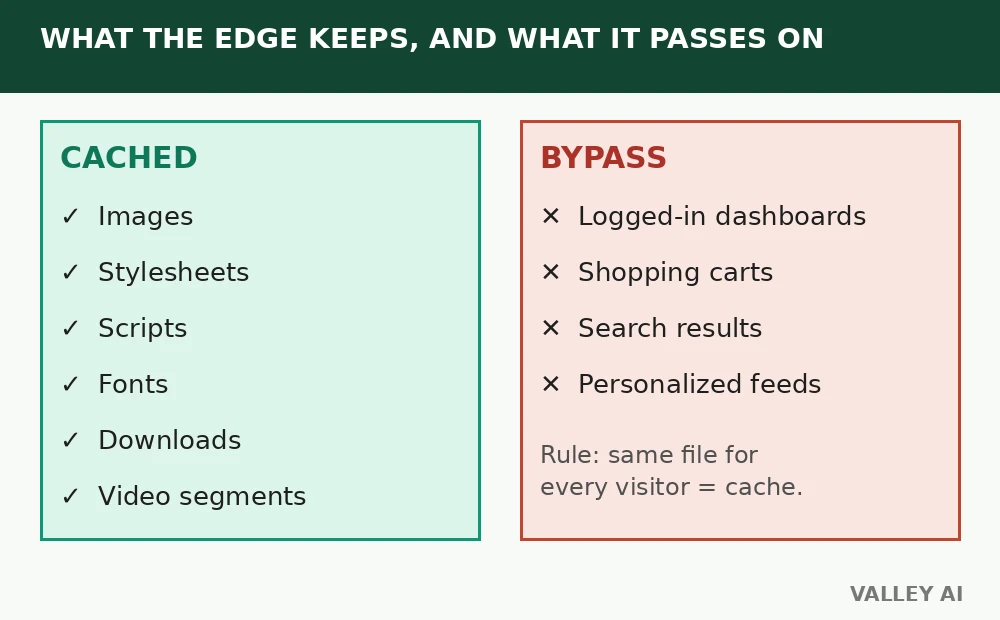
Files that look identical for every visitor are the natural cache cargo. Images, stylesheets, scripts, fonts, and downloadable files all qualify. Video segments qualify too, since every viewer of one segment receives identical bytes. That same edge delivery is central to how video streaming works.
Pages that change per visitor bypass the cache. Logged-in dashboards, shopping carts, search results, and personalized feeds are assembled for one person. Storing one visitor’s copy for another would serve the wrong content. Those requests travel to the origin on every visit, and the edge passes them through without storing a copy.
Each response carries a lifetime rule that tells the edge how long its copy stays valid. When a site owner changes a file before its lifetime ends, a purge removes the old copy from every edge. The next request fetches the fresh file.
Readers can watch this behavior directly. Open browser dev tools, open the Network panel, reload a page, and pick a static asset such as an image. The response headers include a cache status entry. HIT means the copy came from the edge. MISS means the copy came from the origin on that load. Reloading the same page turns a first-load MISS into a HIT, once the edge has stocked the file.
Why does one asset show MISS on every load? Some responses carry rules that forbid storage, so the edge fetches them fresh on every visit. The header reads MISS each time, and that result is correct behavior for that file.
When a CDN helps less, and what it never replaces
A CDN adds a delivery layer in front of a web host. The CDN holds temporary copies near visitors, and the host handles everything the edge cannot store. Cloudflare states the same boundary: a CDN caches content at the edge and cannot replace proper hosting.
Shorter delivery is only half the story. Work that happens on the origin before delivery starts keeps its own speed, such as building a page from a database or running application code. Slow origin work stays slow behind a fast edge. The benefits of cloud computing in networking reach further than delivery alone, from private backbones to central control.
A traffic surge spreads across many edges, which keeps any single server from taking the full load. If one edge fails, requests route to nearby edges with capacity.
For a site with visitors far from its origin, the next step is measuring the gap. Compare load times from a distant location with and without the edge layer. Check the hit ratio after a week of traffic. The numbers show whether the edge earns its place.
Frequently asked questions
Does every website need a CDN?
A site with visitors near its origin gains little, since the distance saving is small. A site with a spread-out audience gains more, because more visitors sit far from the origin. Need follows audience geography, and a local site can run fine without one.
Can a CDN stop every kind of attack?
A CDN absorbs large traffic floods at the edge and filters many abusive requests before they reach the origin. Attacks that exploit flaws in the site’s own code still need fixes in that code, since the edge cannot patch an application.
Does a CDN hide the origin server from attackers?
Traffic passes through the edge first, so casual probes hit edge addresses. A determined attacker can still find an origin address that is exposed through other records, so origin addresses need their own protection.
Do visitors see a different address when a CDN serves a page?
No. The browser shows the site’s own domain, and the edge answers under that domain. The visitor never types a CDN address.

Kaleem
Kaleem is a Computer Science graduate (Virtual University of Pakistan) and the founder and editor of Valley AI, where he publishes in-depth, tested guides on computer hardware, artificial intelligence, and how the internet works. Every guide is researched from primary sources, tested hands-on where possible, and updated when the facts change.