For decades, network engineering was defined by physics and logistics. If you needed to expand capacity, you were constrained by lead times on hardware delivery, fiber installation, and the physical limits of your rack space.
The transition to cloud networking moves the work from building infrastructure to consuming it. For network administrators and CIOs, the value sits in specific architectural and operational capabilities that legacy hardware cannot replicate.
Each benefit below is tangible, grounded in the realities of modern NetOps. It names the mechanism, the number where one exists, and the limit that comes with it.
1. From Provisioning Hardware to Consuming Global Backbones
Deployment speed is the most immediate difference between on-premise networking and the cloud. In a traditional MPLS (Multiprotocol Label Switching) environment, provisioning a secure, private link between a London office and a New York data center involves carriers, contracts, and a lead time often measured in months.
In a cloud environment, peering two Virtual Private Clouds (VPCs) across different geographic regions takes approximately 15 minutes of configuration. That speed rests on how cloud computing works: providers pool servers, storage, and networking, then rent slices of that pool on demand.
Accessing the Hyperscaler Backbone
A frequently overlooked benefit is access to the cloud provider’s private fiber network. When you utilize AWS, Azure, or Google Cloud networking, your traffic often rides their private global backbone rather than the congested public internet.
- Traditional: Traffic hops across multiple public ISPs, subject to unpredictable latency and packet loss (the hot potato routing method).
- Cloud: Traffic enters the nearest Point of Presence (PoP) and stays on the provider’s dedicated, optimized fiber until it reaches the destination application.
That access gives organizations a global, carrier-grade network without the capital expenditure of building one.
Cloud is not always the right answer for every workload. For predictable, high-throughput enterprise systems, dedicated hosting still wins on cost and consistency.
2. Killing the Hairpin: Architectural Agility
Legacy network architectures were designed for a world where applications lived in the headquarters’ data center. Remote offices connected via hub-and-spoke topologies, backhauling all traffic including internet browsing through the HQ firewall.
In the era of SaaS (Software as a Service) and video conferencing, this “hairpin” effect is a performance killer. It adds unnecessary latency and saturates the expensive MPLS links with traffic destined for the public internet (like Zoom or Office 365).
Cloud networking supports a Direct-to-Cloud or Edge Networking model. SD-WAN (Software-Defined Wide Area Network) joins with cloud gateways, and traffic is routed by policy:
- Trusted SaaS traffic breaks out locally to the internet.
- Internal application traffic routes securely to the cloud VPC.
- Suspicious traffic is diverted to a cloud-based security stack (SSE) for inspection.
The gain is the ability to change traffic patterns instantly with a policy update. No physical appliance needs re-cabling for the change to take effect.
3. NetOps Becomes Code (IaC)
Perhaps the most profound shift for the engineer is the move from the Command Line Interface (CLI) to Infrastructure as Code (IaC).
Managing physical switches often involves SSH-ing into individual boxes to paste configuration commands. This manual process is prone to configuration drift, where undocumented changes accumulate over time, making the network fragile and difficult to troubleshoot.
Cloud networking treats the network topology as software. Using tools like Terraform or CloudFormation, you define your subnets, route tables, and gateways in code.
The Operational Gain:
- Version Control: You can track every change to the network in Git.
- Immutability: If a network segment is compromised or misconfigured, you don’t spend hours troubleshooting. You tear it down and redeploy the known-good state from your code repository in minutes.
- Replicability: You can spin up an exact replica of your production network in a staging environment for testing, ensuring that a firewall change won’t break production.
4. Security: Identity Over Geography
In a physical network, security is largely tied to the port and the wire. If a server is plugged into the HR VLAN port, it has HR access. Segmentation relies on rigid IP ranges and VLAN tags.
Cloud networking decouples security from physical location. Security Groups and Network Access Control Lists (NACLs) wrap around the logical instance (the workload), regardless of where it resides.
This structure natively supports Zero Trust principles. Instead of trusting an IP address because it falls within a certain subnet range, cloud networking allows you to define access based on identity tags (e.g., App=Finance, Env=Prod). If the Finance application autoscales from two servers to fifty, the security policy automatically applies to the new instances without manual firewall ticket intervention.
5. The Elasticity Reality Check: Performance vs. Cost
Traditional capacity planning is a gamble. You have to buy load balancers (like F5 or Citrix ADC) sized for your peak traffic perhaps Black Friday or a seasonal launch. For the rest of the year, that expensive hardware sits 90% idle.
Cloud networking introduces native Elastic Load Balancing (ELB/ALB). These are software-defined appliances that expand and contract automatically based on throughput or connection count. Capacity follows demand, so a quiet night needs a fraction of the capacity a launch day needs.
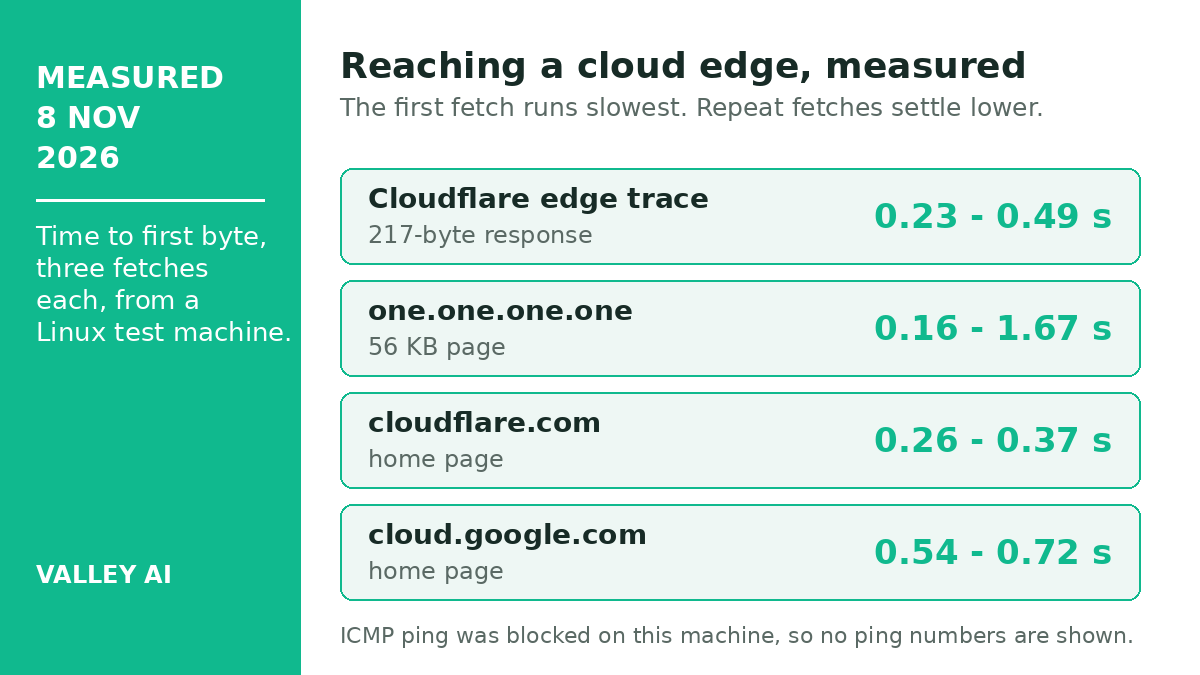
Measured on 8 November 2026 from a Linux test machine, reaching a cloud edge took 0.23 to 0.49 seconds to first byte across three fetches of a 217-byte Cloudflare response. A 56 KB page from the same edge took 0.16 to 1.67 seconds. The first fetch ran slowest in each set, then repeat fetches settled near the low end. ICMP ping was blocked on that machine, so no ping reading is reported here.
The Cost Warning (Egress Fees)
While the operational benefits are clear, the financial benefit is nuanced. Cloud networking is rarely “cheaper” in raw dollar terms if managed poorly. The primary cost trap is Data Egress fees charged for data leaving the cloud provider’s network.
The benefit is cost alignment. In a hardware model, you pay for capacity upfront (CapEx) regardless of usage. In a cloud model (OpEx), costs scale with your business activity. If traffic spikes, costs rise, and revenue should rise with them. If traffic drops, costs fall. That alignment reduces financial risk, even when the monthly bill needs careful monitoring.
A Worked Example: One Load Balancer, Two Ways to Pay
Take one load balancer and price it two ways over five years. The hardware route buys a pair of appliances at $9,500 each, $19,000 in total, plus $1,900 a year in support. The five-year hardware total is $28,500.
The cloud route rents the same function at example rates of $0.0225 per hour and $0.008 per GB processed. A balancer running all month and processing 500 GB costs $20.43 a month. The five-year cloud total is about $1,226. That is roughly a twenty-third of the hardware figure.
Does pay-as-you-go always cost less than buying hardware?
No. The example favors the cloud balancer because the traffic is light, at 500 GB a month. A link that moves terabytes a day changes the math, and egress fees grow with it. Pay-as-you-go wins when demand varies or starts small. A flat, heavy, predictable load can cost less on owned hardware. This comparison covers the load balancer only. A full network carries more parts, and egress fees sit outside this sum.
Disaster Recovery: Recovery Time You Can Put a Number On
A network fails in two ways that matter: data lost, and time lost. Recovery point objective (RPO) caps the first. Recovery time objective (RTO) caps the second. A nightly backup sets an RPO of 24 hours: a failure at 5 p.m. loses the whole working day. Continuous replication to a second region sets an RPO near zero: the copy sits seconds behind the original.
- RPO 24 hours: nightly backups. A failure loses up to one day of changes.
- RPO 5 minutes: snapshots every five minutes. A failure loses at most five minutes of changes.
- RPO seconds: continuous replication. A failure loses seconds of changes.
- RTO hours: rebuild from backups. A failed site returns in hours.
- RTO minutes: automated failover to a second region. Traffic moves to the standby region in minutes.
How fast must a network recover after an outage?
The answer depends on the RTO the business sets. A brochure site tolerates hours. An order system does not. The point is the target exists in writing before the outage, with the cost of meeting it attached.
Cloud providers run the second region. The standby copy, the failover test, and the traffic switch arrive as services. The team needs no second building of its own. That is the disaster recovery gain. Recovery becomes a setting with a number, and the team can test it before the day it matters.
Uptime in Minutes: What an SLA Percentage Means
A service level agreement (SLA) states uptime as a percentage, and the percentage hides the minutes. A 99.9% SLA allows 43 minutes and 12 seconds of downtime in a 30-day month. A 99.99% SLA allows 4 minutes and 19 seconds. The table below lists the three common tiers.
| SLA | Allowed downtime per month | Allowed downtime per year |
|---|---|---|
| 99.9% | 43 min 12 sec | 8 hr 46 min |
| 99.95% | 21 min 36 sec | 4 hr 23 min |
| 99.99% | 4 min 19 sec | 53 min |
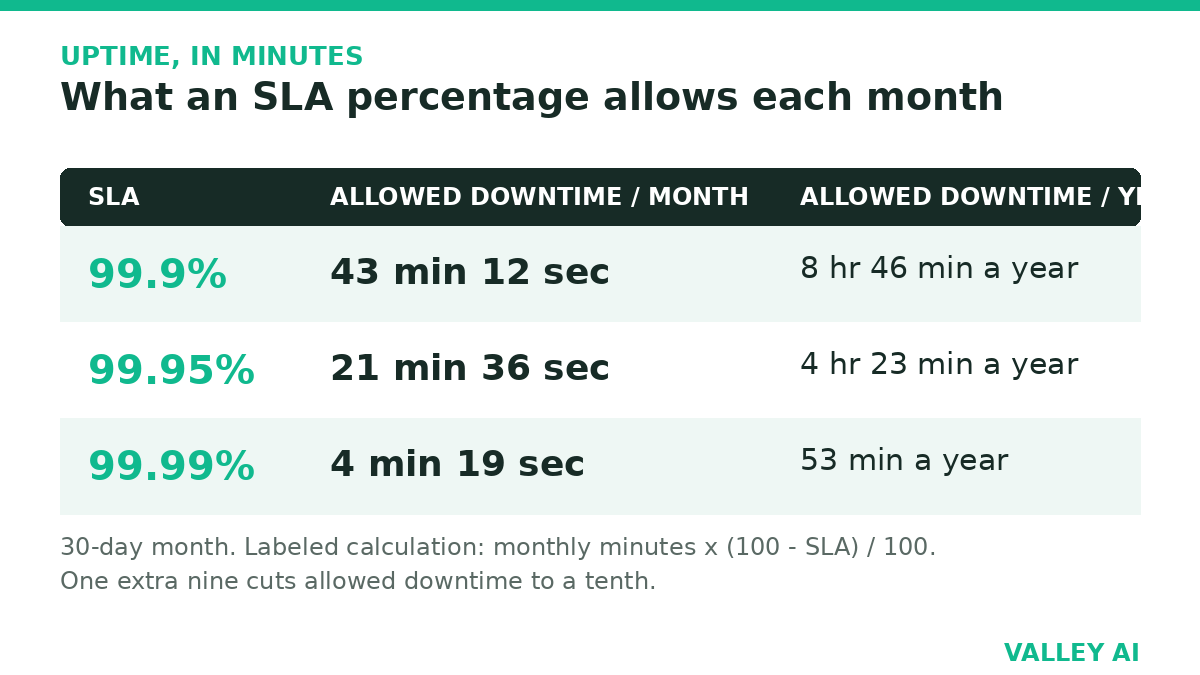
The calculation uses monthly minutes multiplied by the downtime share. A 30-day month holds 43,200 minutes. One tenth of one percent of that is 43.2 minutes. Read the SLA before signing. The percentage is a promise, and the minutes are what an outage costs.
One Dashboard for the Whole Network
Cloud networking gathers every branch, remote worker, and workload into one console. A policy change lands everywhere at once. A configuration push onboards a new office, with no site visit needed.
Three checks show the gain on screen. First, the console lists every connected device in one place. Second, a blocked connection names the rule that blocked it. Third, traffic by application is visible without logging into separate boxes.
Can one dashboard cover branch offices, remote workers, and cloud workloads?
Yes. The dashboard reads the same policy and the same logs for each location. A branch office, a laptop on home Wi-Fi, and a workload in a VPC appear as entries in one list, each under the same rules.
That stream of live data feeds the next step. Past traffic shapes the next capacity decision, which is the core of data-driven networking.
Hybrid Networks and the Edge: Cloud Where the Users Are
Some workloads stay on site: a factory controller, a hospital imaging archive, a latency-bound trading desk. A hybrid network keeps those local and joins them to the cloud with one identity and one policy. Multicloud goes further, spreading workloads across two providers so one provider outage cannot take everything down.
The edge is the same idea at the user end. A content delivery network stores copies near visitors, and how a CDN works decides which copy serves each request. Edge computing runs the logic there as well, so a video call or a game session answers from a nearby point of presence, cutting the distance the request travels.
Distance still sets a floor. A signal in fiber needs about 30 milliseconds one way across 6,000 kilometers, and no plan beats that floor. Ping and latency measurements show where the remaining milliseconds go, hop by hop.
Conclusion
Start with the workload that suffers most from the hairpin. SaaS traffic forced through headquarters is one candidate. A branch that waits months for a new link is another. Move one first, measure the change, then decide the next move on the numbers.
Keep the egress meter in view from day one. A cloud network bills by use, and the bill rewards teams that watch it.
Related: cloud computing jobs
Recommended Next Steps For Learning
- Deep Dive: Explore Managing Cloud Egress Costs to understand how to design topologies that minimize data transfer fees.
- Skill Building: Read Introduction to Terraform for Network Engineers to start the transition from CLI to IaC.
- Comparison: Review SD-WAN vs. MPLS for a detailed look at modernizing branch connectivity.
Frequently Asked Questions About Cloud Computing in Networking
What is the difference between the functions of cloud computing and virtualization?
The difference between cloud computing and virtualization is that the latter only allows for the provisioning of CPU, memory, and storage as a service, while cloud computing can provide a much larger range of services such as software or web hosting. Both rest on hypervisors: software that carves one physical machine into many virtual ones, the mechanism behind what virtualization is.
How long does it take to move an existing network to the cloud?
A small office with a few services can move in weeks. A company with many branches, private links, and compliance rules needs months. The slow parts are the audit of the current network and the testing of the new one. The cloud setup itself is the quick part.
Which cloud provider has the largest global network?
Amazon Web Services, Microsoft Azure, and Google Cloud each run a private global backbone with points of presence on every continent. The largest network in one region may not be the largest in another. Choose by where the users sit and which services the workloads need. A single ranking cannot capture either factor.
What happens to cloud networking when the office internet goes down?
That office loses its path to cloud resources until its connection returns. Other offices, remote workers, and the cloud services themselves keep running. A second internet link at the office, or a 4G or 5G backup, keeps the office online while one connection is down.
What are the drawbacks of using cloud computing?
The main drawbacks are cost control and provider dependence. Moving data out of the cloud carries fees that rise with volume, and an outage at one provider pauses every service without a second region. A team used to manual hardware work needs time to learn code-based networking.

Kaleem
Kaleem is a Computer Science graduate (Virtual University of Pakistan) and the founder and editor of Valley AI, where he publishes in-depth, tested guides on computer hardware, artificial intelligence, and how the internet works. Every guide is researched from primary sources, tested hands-on where possible, and updated when the facts change.