

You step away from your computer for ten minutes. You come back to the login screen, your documents closed, and a game or a video call cut off mid-sentence. Nothing warned you. Nothing asked.
That restart has a cause, and Windows usually writes it down before the screen goes dark. The timing of the restart narrows the cause to one of five faults, and the log names it. The fix follows the cause. The order below follows the evidence: timing first, log second, fix third.
What the timing of the restart tells you
| When it restarts | Likely cause | Check first |
|---|---|---|
| Overnight or while you are away, with apps closed afterward | A Windows Update restart | Settings, Windows Update, Update history |
| Seconds after a blue flash, or at random while you work | A stop error with auto-restart on | Event 41 BugcheckCode; switch auto-restart off |
| Only under load: games, video export, many tabs | Heat, or a power supply short of wattage | Vents and fans; the wattage budget in the last section |
| Since a driver, BIOS, or Windows update | A driver or firmware change | Update history; the maker’s driver updates |
| Before Windows finishes loading, or in the BIOS | A hardware fault | Memory test; the maker’s diagnostics |
Match your restart to one row before you open any tool. I put the timing table first because the strongest pages I read open with one. The row tells you where to look first, and it stops you fixing the wrong cause. A restart that only happens overnight is almost never a hardware fault.
One distinction comes first. A machine that switches off and stays off until you press power is shutting down. Heat cut-outs, a dead battery, and a failing charger sit behind that fault. The checks below assume the machine boots again on its own. If yours stays off, start with the power cable, the charger, and the vents.
A restart you trigger yourself is a different thing from the fault on this page. The shortcut list shows how to restart your computer with keyboard shortcuts when you choose the moment yourself.
If the machine restarts before Windows finishes loading, the fault sits below Windows, in the firmware that starts the computer. No update, driver, or Windows setting can cause a restart that early, so the fix list for that row starts with hardware.
The log that records every unexpected restart
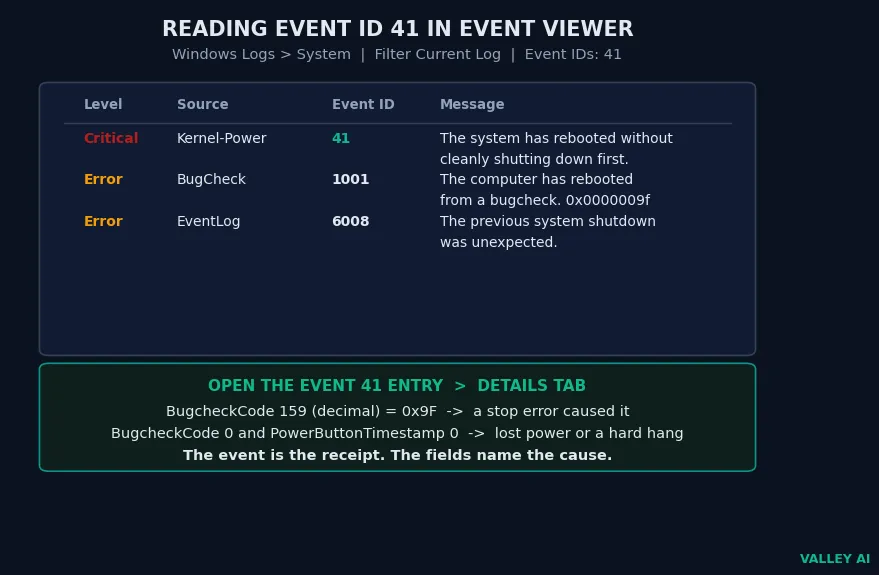
Windows records every unexpected restart, so read that record before you change anything. Press Windows key + R, type eventvwr.msc, and press Enter. Expand Windows Logs, select System, then choose Filter Current Log and type 41 in the Event IDs box. The entries that remain are the Kernel-Power records for each restart.
Each entry carries one message. The message reads ‘The system has rebooted without cleanly shutting down first’. Microsoft Learn states that Event ID 41 on its own may not hold enough information to say what happened. The event is the receipt for an unclean restart. The cause sits in the fields inside it and in the events just before it.
Open the most recent entry and switch to the Details tab. Two fields decide the next step. BugcheckCode holds the stop code in decimal form, while Microsoft’s documentation lists those codes in hex. PowerButtonTimestamp holds a value only when the power button was held down.
| BugcheckCode (decimal) | Hex code | Name | Where it points |
|---|---|---|---|
| 159 | 0x9F | DRIVER_POWER_STATE_FAILURE | A driver in a bad power state |
| 292 | 0x124 | WHEA_UNCORRECTABLE_ERROR | Hardware: heat, memory, or CPU |
| 26 | 0x1A | MEMORY_MANAGEMENT | A memory error |
| 0 | None | No crash recorded | Lost power or a hard hang |
A nonzero BugcheckCode means Windows crashed with a stop error, and the code names the fault. A zero in both BugcheckCode and PowerButtonTimestamp means Windows recorded no crash at all, which points toward lost power or a hard hang. When both values are zero, Microsoft says to look for a volmgr Event 46 entry. That entry means crash-dump setup failed, so Windows could not record the crash.
Reliability Monitor shows the story in chart form. Press Windows key + R, type perfmon /rel, and press Enter. Each column is a day. A red cross marks each critical event. Click View technical details on the days the machine restarted. Repeated critical events from one driver or one app are the best software clue you will find.
Does Event ID 41 mean the power supply failed? No. The event only proves the last shutdown was unclean. A failing supply is one of several causes that produce it, and the BugcheckCode field decides whether a crash or a power loss came first.
The Windows Update restart
An update restart leaves no crash record behind, which is how you tell it apart from a crash. That is the tell. The machine finishes an update while you are away, and you return to closed apps and a login screen. Check Update history first: Settings, Windows Update, Update history. An update listed on the day of the restart settles it.
Windows schedules that restart outside active hours. The default window runs 8 AM to 5 PM, according to Microsoft Learn. Set the window to your real working hours in Settings, Windows Update, Advanced options, Active hours. The window stretches to 18 hours at most, so a long day fits inside it.
Two more controls sit in the same place. Switch on “Notify me when a restart is required to finish updating” and Windows warns you before a scheduled restart. Pause updates for one to five weeks when a deadline leaves no room for a restart, then let the pause lapse so the updates land.
The update controls are one corner of a wider set of Windows 11 tips. The active-hours window is the one that decides when your machine reboots without asking.
The crash restart you never see
A stop error shows a blue screen with a code, then Windows restarts. The restart is so fast that the screen flashes past before you can read the code. That is the default behavior: “Automatically restart” under System failure is switched on, so the crash hides itself.
Why does Windows restart instead of showing the error? Windows treats a restart as the fastest recovery from a crash. The setting assumes you would rather have the machine back than read the code, and for a one-off crash that trade is fair. When the crash repeats, the code matters more than the quick recovery, so switch the setting off.
Press Windows key + R, type sysdm.cpl, and press Enter. Open the Advanced tab, click Settings under Startup and Recovery, and clear “Automatically restart” under System failure. The next crash stays on screen with its stop code. Photograph it, then search the code itself: MEMORY_MANAGEMENT points at RAM, DRIVER_POWER_STATE_FAILURE points at a driver, and WHEA_UNCORRECTABLE_ERROR points at hardware.
Switching the setting off fixes nothing on its own. It buys you the name of the fault. The name decides the next step. Update the driver the code names, or run the memory test when the code names RAM. Once the restarts stop, switch the setting back on so a future crash recovers on its own.
When the code names no driver and the crashes began after an update, repair the system files. Open Command Prompt as administrator and run DISM first. It fetches the files SFC uses for repairs (Microsoft Support lists DISM before SFC), so SFC runs second: DISM.exe /Online /Cleanup-image /Restorehealth, then sfc /scannow. If the restarts began right after an update, uninstall that update from Update history and watch for a day.
Heat, power, and memory
Restarts that happen only under load point at heat or power. A CPU or graphics card that passes its limit trips a protection circuit, and the machine restarts rather than cooking the part. Protective mechanisms engage between 90 and 100 degrees C, and the CPU overheating triage covers the fan, dust, and paste checks in order.
A reading of 90 degrees C under load looks alarming, and on some chips it is normal. What counts as hot for a modern CPU depends on the chip’s own limit and how long the reading lasts. Judge a temperature against the limit in the chip’s spec sheet. Round numbers mislead. AMD lists 89 degrees C as the maximum operating temperature for the Ryzen 7 7800X3D (its Tjmax). A sustained 89 on that chip leaves no headroom.
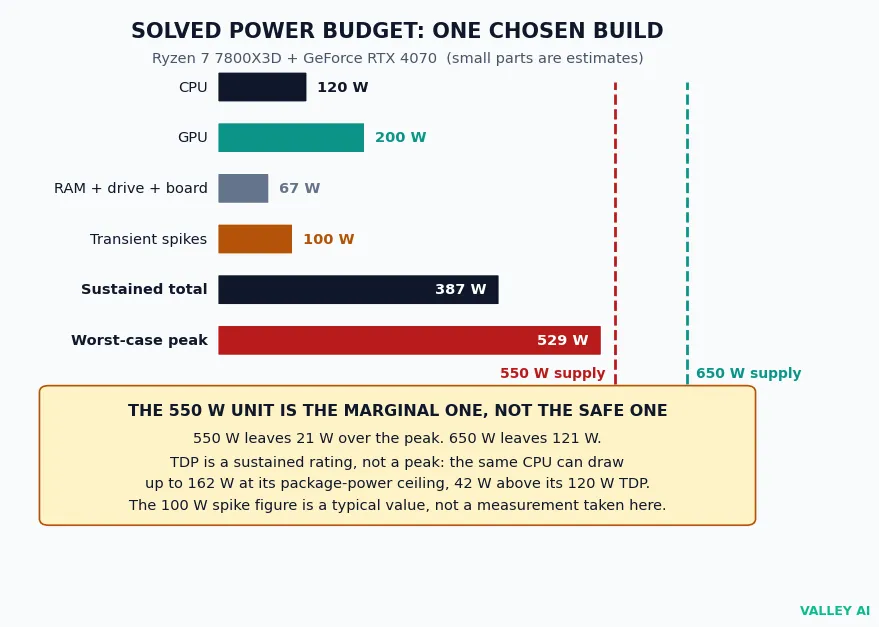
Power is the cause most often guessed and least often measured. I solved the budget for one chosen build so you can see the numbers worked out. Start with the parts list: the computer hardware guide names every part that draws power, and the budget below adds them one by one. The parts: a Ryzen 7 7800X3D, rated 120 W by AMD, and a GeForce RTX 4070, rated 200 W total graphics power by NVIDIA. Add 10 W for two memory sticks, 7 W for one NVMe drive, and 50 W for the board, fans, and USB devices. The sustained total comes to 387 W.
That 387 W rests on TDP figures, and TDP is a sustained rating. Short peaks run above it. AMD’s own package-power ceiling for that chip is 162 W, which lifts the sustained total to 429 W. Allow a typical 100 W for short spikes from the CPU and graphics card together, and the worst-case peak reaches 529 W. A 550 W supply leaves 21 W over that peak. A 650 W supply leaves 121 W, and 650 W is the figure NVIDIA recommends for a system with this card. The budget says the 550 W unit is the marginal one.
The budget covers one chosen build, and the small-part figures are estimates. Treat the totals as a worked example for your own parts. They describe one chosen build. The 100 W spike allowance is a typical value. I did not measure it here. What the budget did not check: a second graphics card, an overclock, or a supply that has aged for five years. Each of those moves the peak, and an old supply sags below its label.
Memory faults hide behind that symptom. Press Windows key + R, type mdsched.exe, and press Enter. Choose “Restart now and check for problems” from the options that appear. The tool runs two passes and writes the result under MemoryDiagnostics-Results in the System log. Errors there mean a stick is failing. On a desktop, test one stick at a time to find which one it is.
How much power supply wattage is enough? Enough to cover the worst-case peak with room left over. Add the CPU and graphics card ratings, the small parts, and a spike allowance. Then pick a supply rated at least 20 percent above the peak. For the build in this section, that arithmetic points to 650 W.
Start from what the log showed. An update in Update history and no crash record means active hours and the pause control. A nonzero BugcheckCode means the stop code decides: driver first, memory test second. All-zero Event 41 entries under load mean power and heat: work the wattage budget, then check the vents and the fans. A code that repeats after every fix means the part it names is failing. A repair shop with a spare supply settles that question in one visit.
Frequently asked questions about restarts
Why does my computer restart at night when nobody touches it?
Overnight restarts with closed apps and no crash record are usually update restarts. Match the restart time against Update history, then widen active hours to cover the hours you work. The pause control buys up to five weeks when a deadline leaves no room for a restart.
Can a virus make a computer restart on its own?
Yes, though malware sits behind restarts far less often than updates, crashes, heat, and power. Run a full scan with Windows Security, then check the startup apps list for anything you do not recognize. A scan that comes back clean rules the cause out, and the log still holds the answer.
Why does my computer restart only when I play games?
Games load the CPU and the graphics card together, which is when heat and wattage limits bite. Clean the vents, check that every fan spins, and work the wattage budget for your parts. Restarts that happen only in games and never on the desktop point at load.
Should I turn off Fast Startup to stop the restarts?
Turn it off when the restarts follow sleep, shutdown, or waking the machine. Fast Startup saves the kernel session to disk and skips a full close, and a stale session can carry a fault into the next boot. Find it under Control Panel, Power Options, Choose what the power buttons do. Leave it off while you test. If the restarts continue with it off, the cause sits elsewhere, so switch it back on and keep reading the log.
How long should I wait after a fix before trusting it?
Give the machine one full working day of normal use: video calls, browser tabs, documents, and one heavy task. Open Event Viewer afterward and confirm no new Kernel-Power 41 entries appeared in the last 24 hours. A day with no new entries and steady temperatures means the fix held.
What if the restarts happen before Windows even loads?
Windows is not running yet, so updates, drivers, and auto-restart cannot cause it. The fault is hardware: memory, the board, or the supply. Run the memory test and the maker’s diagnostics from the boot menu, and reseat the memory sticks and power connectors before buying any part.

Kaleem
Kaleem is a Computer Science graduate (Virtual University of Pakistan) and the founder and editor of Valley AI, where he publishes in-depth, tested guides on computer hardware, artificial intelligence, and how the internet works. Every guide is researched from primary sources, tested hands-on where possible, and updated when the facts change.