
A browser tab loads a page while a mail client checks a mailbox and a chat program holds a call open. Three programs share one IP address, one network cable, and one router. The traffic still reaches the right program every time.
Port numbers do that sorting. A port is a 16-bit number attached to a connection. The IP address names the machine. The port names the program on that machine that should receive the traffic.
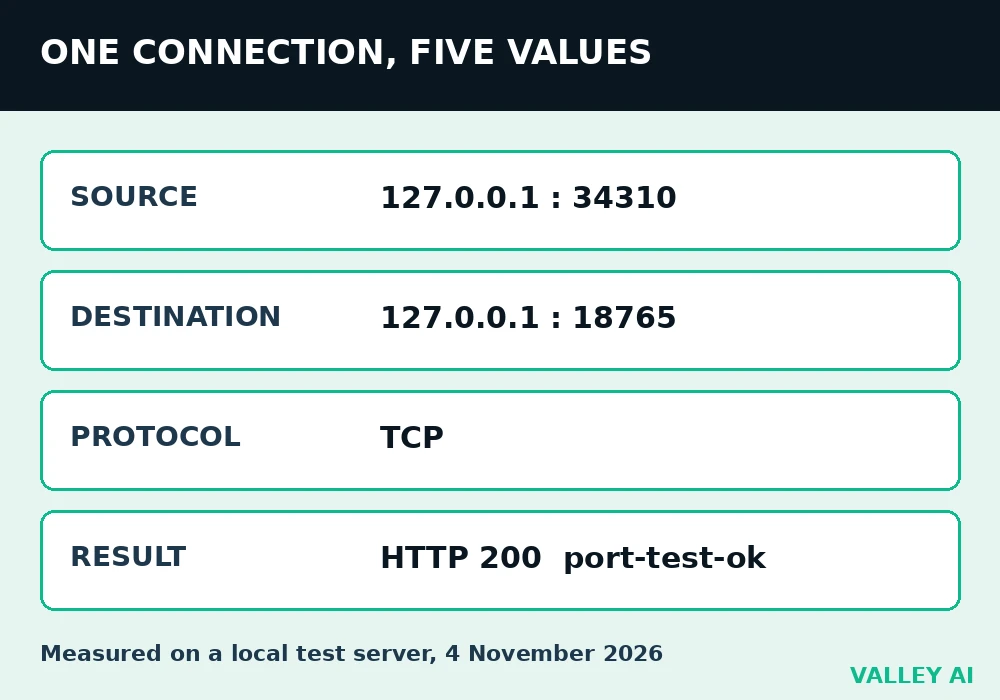
The local test run on 4 November 2026 shows all five values of one connection in one place:
- Source: 127.0.0.1, port 34310, chosen by the operating system when the connection opened.
- Destination: 127.0.0.1, port 18765, where the test server listened.
- Protocol: TCP.
- Result: HTTP 200, with the body port-test-ok.
- Listening socket before the visit: 127.0.0.1:18765, shown by the ss command.
The number that names a program
A network port is a number the operating system uses to hand traffic to a program. It has no shape, no pins, and no place on the case. A USB socket is hardware you can touch. A network port exists only as a number in a packet header and as an entry in the operating system’s tables.
The split works like extension numbers on one office phone line. One published number reaches the building. The extension reaches the right desk. An IP address works the same way at network scale: it reaches the machine, and the port reaches the program.
Why does one IP address need port numbers at all? One address serves every program on the machine, and the address alone carries no program name. Without the port, the operating system would have no rule for choosing among the programs waiting on that machine.
Five values identify one connection
Every connection carries five values: source IP, source port, destination IP, destination port, and protocol. Change one value and the connection is a different conversation. The test visit carried all five, and the server recorded the client as 127.0.0.1:34310.
The source port was temporary. The operating system picked 34310 when the connection opened and frees such a number when the connection closes. A second visit picks a different number. The destination port stays stable because the service listens there by agreement.
Why does a browser visit show a different source port every time? The source port is temporary by design. The operating system hands out a fresh one for each outgoing connection, so replies can find their way back to the exact program that asked.
Ping carries no port number. It uses ICMP, a protocol with no port field, so a ping reply says nothing about which program answered. A port belongs to TCP and UDP traffic, where a program waits at the far end.
Three ranges cover all 65,536 numbers
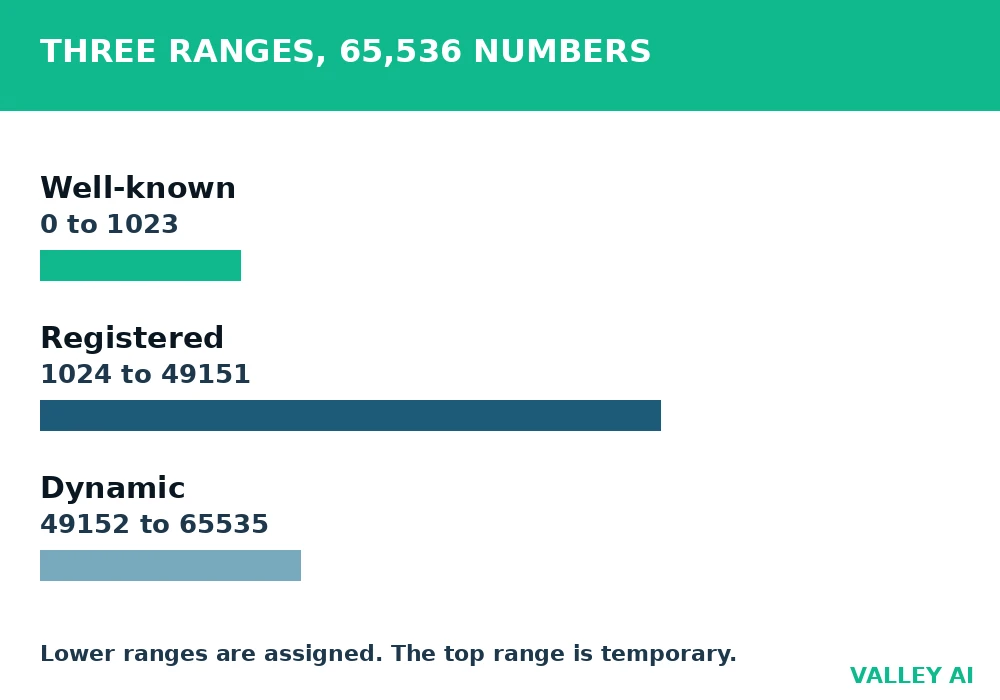
Sixteen bits hold 65,536 values, numbered 0 through 65535. The Internet Assigned Numbers Authority assigns the lower ranges and leaves the top range for temporary use.
| Range | Name | Used for |
|---|---|---|
| 0 to 1023 | Well-known | Standard services assigned by IANA |
| 1024 to 49151 | Registered | Named applications that register a port |
| 49152 to 65535 | Dynamic | Temporary source ports picked by client systems |
Well-known ports sit at the bottom of the range. Registered ports sit in the middle. Dynamic ports sit at the top, and the test visit drew its source port from that top range.
TCP and UDP keep separate lists
TCP and UDP each carry their own port numbers. A TCP service on port 53 and a UDP service on port 53 are two separate entries. The protocol is part of the address, so the number alone never completes it. The comparison of TCP and UDP lays out how the two protocols move data differently.
DNS shows the split in daily use. A name lookup uses UDP port 53 for most queries and TCP port 53 for large replies. One number, two entries, two protocols, and the DNS lookup chooses between them by reply size.
If TCP and UDP both use port 53, are they the same service? No. They are separate entries in separate lists, and a program binds one or both as its design requires. A listener on UDP 53 hears nothing from TCP 53.
Ports you will meet every day
Most daily traffic touches a short list. A browser and a name lookup account for nearly all of it, and the table names the numbers behind those everyday jobs.
| Port | Protocol | Service | Where you meet it |
|---|---|---|---|
| 22 | TCP | SSH | Remote login to a server |
| 25 | TCP | SMTP | Mail sent between servers |
| 53 | UDP and TCP | DNS | Name lookups |
| 80 | TCP | HTTP | Web traffic without encryption |
| 443 | TCP | HTTPS | Web traffic with encryption |
| 3306 | TCP | MySQL | Database connections |
| 3389 | TCP | RDP | Remote desktop |
The number after the colon in a server address is the destination port. A browser assumes 443 for an HTTPS address and 80 for an HTTP address when no number is given, which is why those two numbers rarely appear in an address bar. The difference between HTTP and HTTPS explains what changes on the wire once the connection opens.
Listening, open, closed, filtered: four readings
Listening describes a program’s state on its own machine. Open, closed, and filtered describe what a remote check observes. The four words answer different questions, and mixing them up causes most port confusion.
| Reading | What it means |
|---|---|
| Listening | A program waits on that port on its own machine |
| Open | A service answers from outside |
| Closed | The host replies that nothing listens there |
| Filtered | No reply arrives, often because a firewall drops the packet |
A closed reading is information. The host answered, and the answer was refusal. A filtered reading is the absence of information. Silence can mean a firewall dropped the packet, or a host that never answers. A firewall rule that drops packets by port turns an open port into a filtered reading from outside.
What a port check cannot tell you
One port check reports a number and a state. It gives no program name, no version, and no verdict on safety. Two different programs can listen on the same number on different machines, and the check alone cannot tell them apart.
Encryption adds a second limit. Traffic on 443 hides its contents, while the port number stays visible in the header. A check from inside the machine sees listening programs. A check from outside sees only what the firewall and the router let through.
Find the ports on your own machine
Run the checks on a machine you own. Each step takes under a minute, and the last step ties the output back to the five values of a single connection.
- List listening ports: on Linux run ss -tlnp in a terminal; on Windows run netstat -ano in a terminal.
- Match each listening port to the program beside it in the output.
- Open chrome://net-internals in Chrome to watch live sockets for browser traffic, as described in the net-internals guide.
- Compare one live socket with the five values of a single connection: source, destination, and protocol.
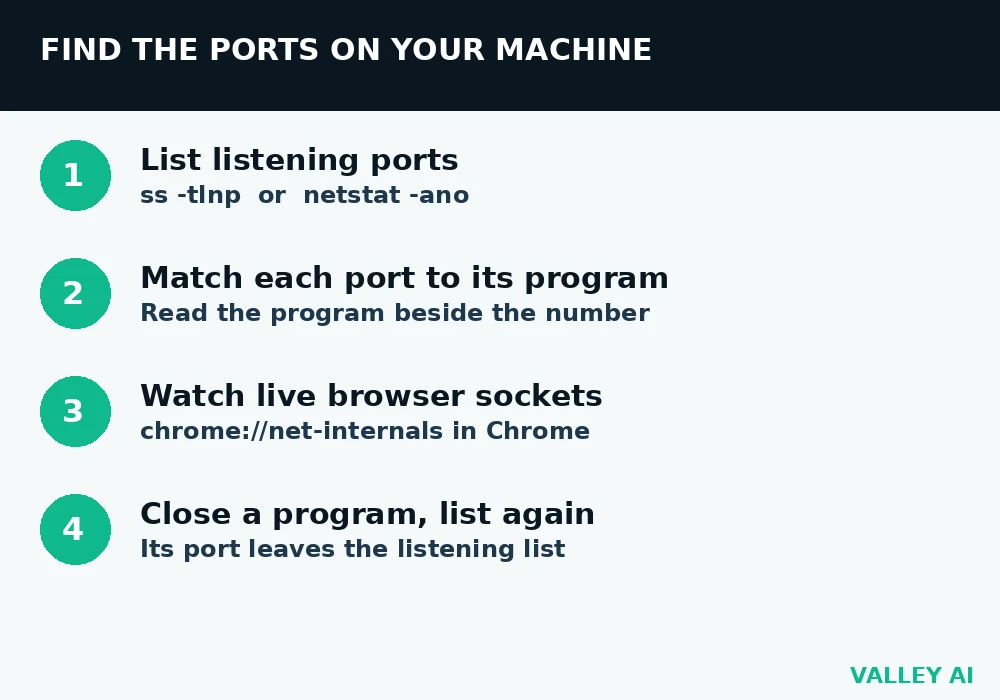
Close a program and run the list again. Its port leaves the listening list. That disappearance is the clearest proof that the number belonged to the program, and it takes no extra tool to see it.
Conclusion
Learn the short list in the table, then run the listening list on your own machine once. Match one number to a program you use, then check one remote reading against the four meanings above. After that, a port number reads as an address for a program, and the rest of the network starts to look less mysterious.
Frequently asked questions
What is port forwarding, and when do you need it at home?
Port forwarding is a router rule that sends traffic arriving on one of its ports to a chosen machine inside the home network. You need it when you host a service others must reach, such as a game server or a home camera feed. Browsing, streaming, and calls need no forwarding rule because those connections start inside the home.
Why do some programs offer a custom port, such as 8080 for a web server?
A custom port lets a second service run beside the standard one, or lets a program run without the privilege that low ports require on Linux. The number changes nothing about the service itself. Visitors must then name the port in the address, since browsers assume the standard port when none is given.
What is UPnP, and why do routers sometimes open ports on their own?
UPnP is a protocol that lets programs inside a home network ask the router to forward a port for them, without a person writing the rule. Games and chat programs use it to accept incoming connections. The convenience has a cost: a program you did not intend to expose can gain an open path, so many security guides advise turning UPnP off when no program needs it.
Do you need to open a port to use a VPN?
No inbound port is needed on your own machine for an outbound VPN connection. Your device connects out to the VPN server, which listens on its own port. The return traffic comes back through the connection you started, so the firewall treats it as a reply.

Kaleem
Kaleem is a Computer Science graduate (Virtual University of Pakistan) and the founder and editor of Valley AI, where he publishes in-depth, tested guides on computer hardware, artificial intelligence, and how the internet works. Every guide is researched from primary sources, tested hands-on where possible, and updated when the facts change.