

The difference between HTTP and HTTPS comes down to one letter and everything it protects. HTTP carries your requests and the site’s responses across the internet as readable plain text. HTTPS wraps that same conversation in TLS encryption, so anyone watching the network sees only scrambled noise. The S stands for Secure, and the machinery behind it decides what strangers on your network can and cannot see about you, not what a search engine keeps in its index. HTTPS normally runs over the port behind HTTPS.
What HTTP actually does
HTTP, the Hypertext Transfer Protocol, is the request and response language of the web. Your browser uses it to ask for things, and servers use it to answer. You type an address, the browser sends a request, and the server replies with the page. That back and forth is all HTTP is.
Here is what a real request looks like on the wire:
GET /login HTTP/1.1
Host: example.com
User-Agent: Mozilla/5.0 (Windows NT 10.0; Win64; x64)
Cookie: sessionid=9f3a2c1e7b
Every line is readable. On plain HTTP, anyone positioned between you and the server can read it: the coffee shop WiFi owner, your internet provider, or any machine the request passes through. Passwords, search terms, and login cookies all travel in the open.
Before any of this happens, your browser asks DNS for the site’s address, and the request is then routed across the internet to that IP address. On your own network, the packet first hops to your router using MAC addresses before IP takes over for the journey across the internet.
What the S adds: the TLS layer
HTTPS is not a separate protocol. It is ordinary HTTP carried inside TLS, Transport Layer Security. You will still see the old name, SSL, on certificate products, but SSL was retired years ago and TLS is the current standard. The S adds three guarantees that plain HTTP lacks.
| HTTP | HTTPS | |
|---|---|---|
| Data on the wire | Readable plain text | Scrambled ciphertext |
| Server identity | No check | Verified by TLS certificate |
| Tampering | Undetectable | Detected and rejected |
| Default port | 80 | 443 |
| Browser label | “Not Secure” | Padlock icon |
Notice what encryption alone would not give you. Without the identity check, you could hold a perfectly encrypted conversation with an impostor. Authentication is the quiet half of the S.
One more honest detail, because most explainers skip it: HTTPS hides the content of your conversation, not the fact that it happened. Your provider can still see which site you connected to, because the domain leaks through DNS lookups and parts of the handshake. A newer extension called Encrypted Client Hello is closing that last gap, but it is not yet universal.
There is a speed angle too. The newer HTTP/2 and HTTP/3 protocols, which make pages load noticeably faster, effectively require HTTPS in every major browser. The encrypted web is also the fast web.
How the TLS handshake works
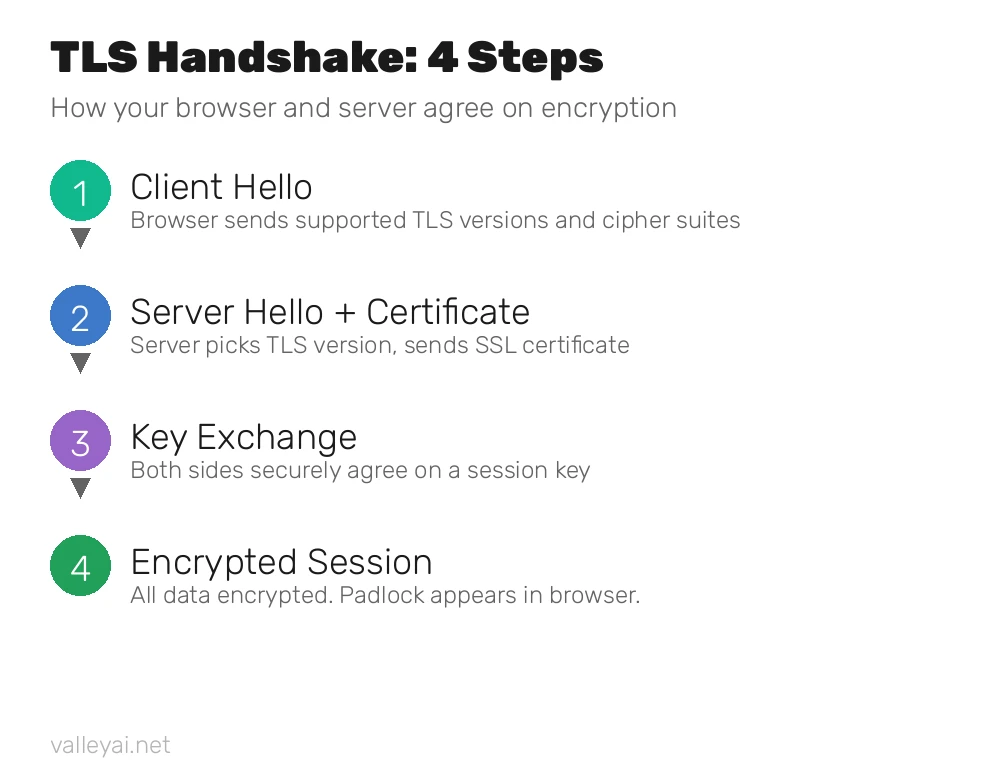
Before a single byte of page data moves, your browser and the server perform a quick negotiation called the TLS handshake. It takes milliseconds. With the current TLS 1.3 standard, it completes in a single round trip, which is one reason modern HTTPS feels instant. This independent walkthrough covers the same sequence with packet level detail if you want to go deeper.
Step 1: the hello and the identity check
Your browser opens with a ClientHello message: the TLS versions it supports, the cipher suites it understands, and a batch of random bytes. The server answers with its own hello, picks the settings both sides will use, and sends its TLS certificate. Your browser then verifies that certificate against the certificate authorities it already trusts, in a chain that ends at a root certificate built into your operating system or browser.
Step 2: the key exchange
Next, the two sides agree on a shared secret without ever sending it in the open. They use public key cryptography: data encrypted with the server’s public key can only be decrypted by its private key. From that exchange, both sides independently derive the same session keys. TLS 1.3 simplified this by having the browser guess the key method up front, which cut the handshake down to one round trip.
Looking ahead, the industry is already preparing for quantum computers with hybrid key agreement that mixes today’s elliptic curve methods with new post-quantum algorithms, so traffic recorded now cannot be decrypted later.
Step 3: the encrypted session
From here on, everything uses fast symmetric encryption, typically AES-256-GCM or ChaCha20-Poly1305, with the session keys. Fresh keys are generated for every session and discarded afterward, so a stolen key unlocks nothing but one conversation.
Curious what this looks like live? Chrome’s net-internals tool shows your browser’s active HTTPS sessions and their socket state as they happen (see it in chrome://net-internals).
What a TLS certificate actually contains
A TLS certificate is the server’s ID card. It contains the domain name it is valid for, the server’s public key, the name of the certificate authority that issued it, validity dates, and the authority’s digital signature.
Your browser checks four things: the certificate is signed by a trusted authority, the domain on the certificate matches the site you asked for, the current date falls inside the validity window, and the certificate has not been revoked.
When a check fails, you get the full page warning, and each flavor means something specific. An expired certificate usually means the site forgot to renew. A name mismatch means the certificate belongs to a different domain, which is exactly what an impostor’s site would show. A self-signed certificate means nobody vouches for it at all. On banking, email, or shopping pages, never click through these warnings.
Certificates used to last for years. Browsers now cap public certificate lifetimes, and the industry is shrinking them further, to just 47 days by 2029. Shorter lifetimes mean a stolen certificate dies quickly, and automation handles renewals instead of humans. You will also see Domain Validated, Organization Validated, and Extended Validation on product pages. Those labels describe how carefully the authority checked the applicant, not how strong the encryption is.
Ports 80 and 443: how your browser picks
Every internet service listens on a numbered port, and the web has two famous ones: port 80 for HTTP and port 443 for HTTPS. When you type a plain address, your browser fills in the port silently based on the scheme. You can override it, as in example.com:8443, but almost nobody needs to. Think of the IP address as the building and the port as the apartment number: the address gets your request to the right machine, and the port gets it to the right service on that machine.
Firewalls and networks treat the two ports differently, which is why some locked down networks allow 443 but block 80. When a site seems half broken on strict office or school WiFi, the port rules are a common culprit.
Why HTTPS matters: what can go wrong on plain HTTP
The risks of plain HTTP are not theoretical. They happen daily on networks you already use.
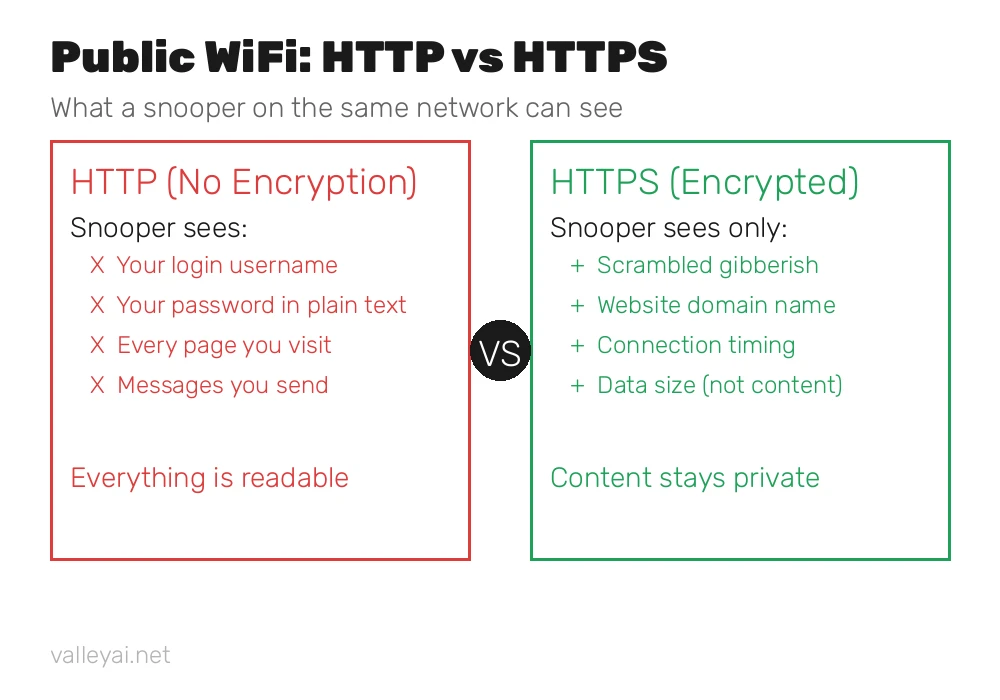
On public WiFi, anyone with basic free tools can watch unencrypted traffic. Passwords typed into HTTP login forms travel as readable text. Worse, login session cookies can be stolen straight off the air, and a stolen cookie logs the thief in as you, with no password needed.
The Secure flag sends a cookie only over HTTPS, as explained in how the Secure flag limits cookies.
HTTP responses can also be modified in transit. Some internet providers have injected their own ads and tracking scripts into HTTP pages passing through their networks. On HTTPS, any modification breaks the integrity check and the browser rejects the page.
And without certificates there is no identity check at all, which makes HTTP perfect cover for impostor sites.
This is also why proxies deserve a second thought: a proxy server forwards your HTTP requests, and on plain HTTP the proxy operator can read everything passing through. Note the division of labor with a VPN too. HTTPS encrypts your conversation with one website, while a VPN encrypts everything leaving your device, including traffic HTTPS never sees.
Why HTTP still exists
If HTTPS is strictly better, why does HTTP survive? Mostly at the edges. Developers run local test servers on HTTP because there is no network attacker to protect against. Hotel and airport WiFi login pages historically used HTTP so the network could intercept the very first request. Some ancient embedded devices and legacy systems never got TLS support.
The direction is still one way. Browsers label every HTTP page Not Secure, and most now offer an HTTPS only mode that upgrades connections automatically or warns you before loading an HTTP page.
How to check a site, and what to do on HTTP-only pages
Checking takes two seconds. Look for the padlock next to the address, then click it: your browser will show who issued the site’s certificate and how long it stays valid. On an HTTP page, Chrome and other browsers show Not Secure instead, a label introduced back in 2018 with Chrome 68.
Treat HTTP-only pages with simple rules. Never log in, pay, or type personal details on one. If a site you trust suddenly shows a certificate warning, stop. It can signal interception, a misconfigured server, or an expired certificate, and none of those are safe to click through.
If you run a website yourself, there is no excuse left for HTTP. The nonprofit Let’s Encrypt issues free certificates with automatic renewal, and most hosting panels now set up HTTPS in one click. Redirect all HTTP traffic to HTTPS and enable HSTS, which tells browsers to never even try the insecure version.
After the secure files arrive, see how a browser draws a page from the files it fetches.
HTTPS does not only protect page loads: how DNS over HTTPS carries lookups inside HTTPS shows the same TLS protection applied to the name lookup that happens before a page loads.
Frequently asked questions
Is HTTPS the same as SSL?
Almost. SSL, Secure Sockets Layer, was the original protocol that secured HTTP. It was replaced by TLS, Transport Layer Security, which fixed SSL’s flaws. People still say SSL certificate out of habit, but every modern certificate is really a TLS certificate.
Does the padlock mean a website is trustworthy?
No. The padlock means your connection to the site is encrypted and the certificate matches the domain. It says nothing about the site’s honesty. Phishing sites routinely use valid HTTPS certificates, so judge trustworthiness by the site’s reputation, not the padlock.
Why do some websites still use HTTP?
Usually legacy: old systems that were never upgraded, local development servers, and some embedded devices. Browsers now label every HTTP page Not Secure, so any serious public website has moved on.
Does HTTPS slow down websites?
Not in any way you would notice. The TLS 1.3 handshake takes a single round trip, session resumption makes repeat visits even faster, and the HTTP/2 and HTTP/3 protocols that speed up modern pages require HTTPS in practice.
Can my internet provider see what I do on HTTPS sites?
Partially. It can see which domains you connect to, from DNS lookups and connection metadata, but not the specific pages you visit, your searches, or your passwords. Those travel inside the encrypted tunnel.
How do I get HTTPS on my own website?
Get a free certificate from the nonprofit Let’s Encrypt, which most hosting panels install in one click with automatic renewal. Then redirect all HTTP traffic to HTTPS and turn on HSTS so browsers always use the secure version.

Kaleem
Kaleem is a Computer Science graduate (Virtual University of Pakistan) and the founder and editor of Valley AI, where he publishes in-depth, tested guides on computer hardware, artificial intelligence, and how the internet works. Every guide is researched from primary sources, tested hands-on where possible, and updated when the facts change.