
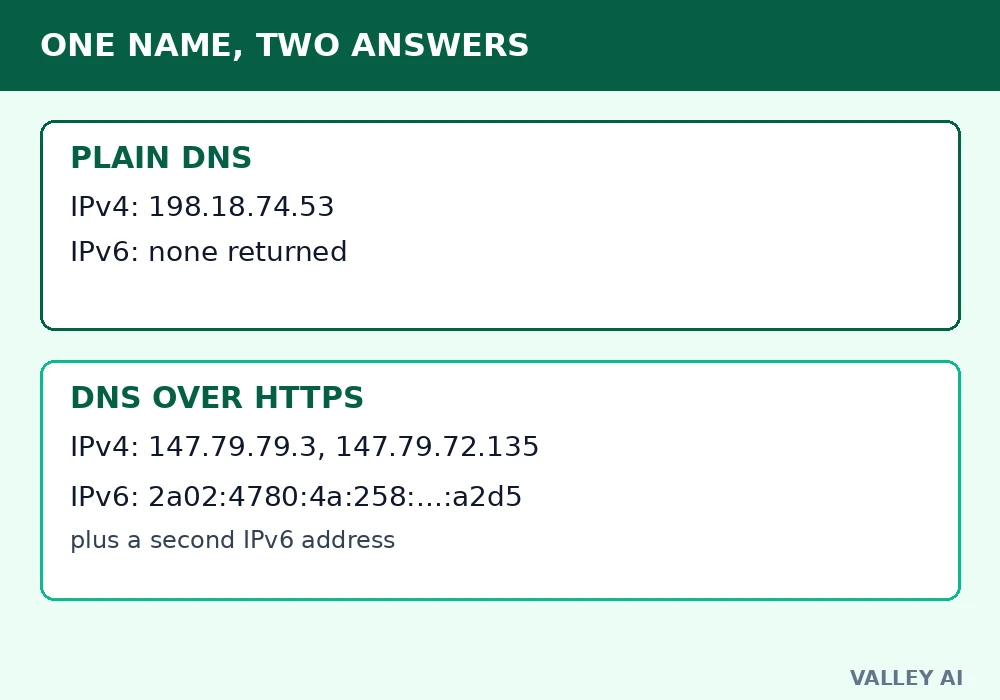
On 3 November 2026, one domain name returned two different sets of answers on the same machine. A plain DNS lookup for valleyai.net returned a single IPv4 address and no IPv6 address at all. A DNS over HTTPS query for the same name, sent in the same minute, returned two IPv4 addresses and two IPv6 addresses.
Treat a DNS lookup as traffic worth encrypting whenever it leaves your device on a network you do not control. That rule decides most of the choices in this page: which setting to turn on, which resolver to trust, and when a failed lookup should simply fail.
DNS over HTTPS, usually shortened to DoH, encrypts the lookup itself. It does not change the question. It changes the road the question travels on, from an open road anyone on the path can read to a sealed envelope inside an ordinary web connection.
One name, two answers: measured on a real machine
The measurement ran on 3 November 2026 at 21:42 PKT. The plain path used the machine’s normal resolver. The encrypted path used a DoH JSON query to dns.google. Both asked for valleyai.net. Both answered. The answers did not match.
| Lookup path | IPv4 answer | IPv6 answer |
|---|---|---|
| Plain DNS, local resolver | 198.18.74.53 | None returned |
| DNS over HTTPS, dns.google | 147.79.79.3 and 147.79.72.135 | 2a02:4780:4a:258:af36:43b8:5200:a2d5 and 2a02:4780:4b:883d:4184:11aa:8bc6:3e01 |
Measured over HTTPS, the DoH answers arrived in 0.60 seconds for the IPv4 query and 0.33 seconds for the IPv6 query. Those times measure the JSON lookup service, with its own cache and network path. They are not a speed contest against the plain lookup, which ran through a different resolver on a different path.
Why did the same name give different answers? Each resolver answers from its own cache, its own upstream path, and its own view of the zone. A DNS answer reflects the resolver asked. The disagreement matters because it shows the lookup is a live decision made by a third party.
One caution belongs with the numbers. The two paths used different resolvers, so the test proves a resolver-path difference, with both answers left standing. Readers who repeat the test from another network will see their own pair of answers, and that pair is the useful result: it names the resolvers their own traffic uses.
Plain DNS in the open
A plain DNS lookup travels over UDP port 53 in readable text. The name goes out as typed. The answer comes back the same way. Anyone positioned on the path between the device and the resolver can read the name, log it, block it, or answer it with a forged address. Public Wi-Fi, a school network, and an internet provider all sit on that path by design.
The lookup itself is simple. A browser asks a resolver for the address behind a name. An A record carries the IPv4 address, and an AAAA record carries the IPv6 address, as IP addresses work in both families. DNS then walks the chain from resolver to authoritative server when the answer is not cached. Every step of that walk, on the plain path, is readable to an observer on the link.
Readability causes two separate problems. The first is exposure: a list of looked-up names reveals browsing interests without any page ever loading. The second is tampering: a forged answer can send a browser to a copy of a site, since the browser trusts the address the resolver returns. Encryption of the lookup answers both problems at once, because an observer who cannot read the question cannot log it or rewrite it.
The DoH journey, step by step
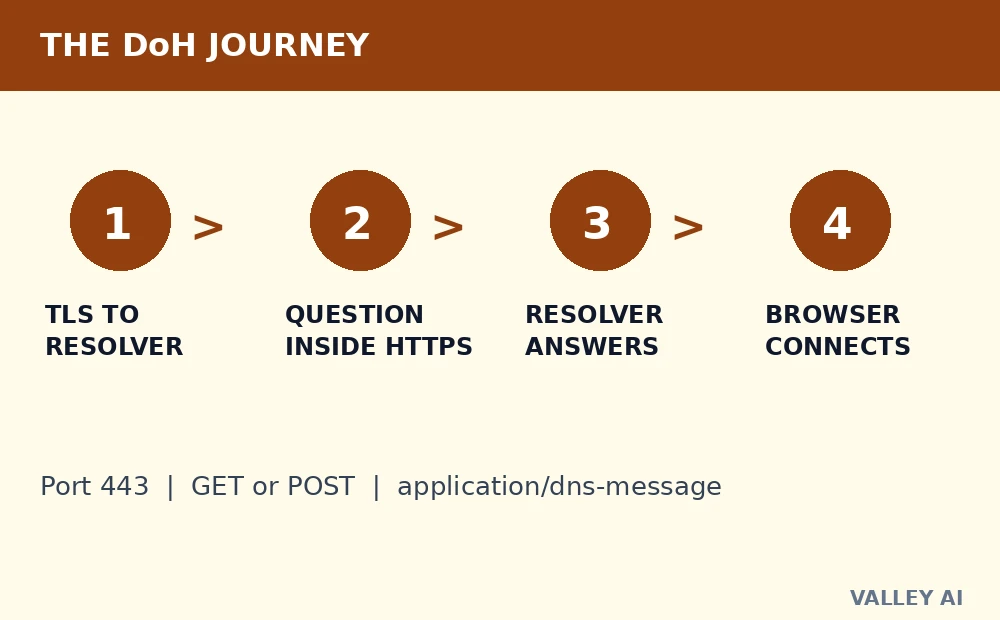
DoH is defined by RFC 8484, published in October 2018. It wraps a standard DNS message inside an HTTPS request. The browser or operating system opens a TLS connection to a DoH-capable resolver, the same kind of encrypted connection that protects a web page, as HTTPS does for site traffic. The DNS question travels inside that connection on TCP port 443, the port every web browser already uses.
- Step 1: the device opens a TLS connection to its chosen DoH resolver and verifies the resolver certificate.
- Step 2: the device sends the DNS question as an HTTPS request, using GET with the query encoded as a URL parameter or POST with the query in the request body.
- Step 3: the resolver unwraps the DNS message, resolves it like any DNS query, and returns the answer inside an HTTPS response.
- Step 4: the device reads the address from the answer and connects to the site, which is a separate connection from the lookup itself.
Does DoH change how DNS answers a question? The question format and the answer format stay standard DNS. The DNS message uses the application/dns-message media type either way. Only the transport changes, from readable text on port 53 to an encrypted web request on port 443. That single change is why DoH blends with ordinary browsing; to an observer on the path, a DoH lookup looks like one more HTTPS request among thousands.
Blending carries a practical consequence for networks. Blocking plain DNS takes one rule against port 53. Blocking DoH takes blocking the resolver’s HTTPS endpoint, which is harder to do cleanly without also breaking web traffic to the same host. Networks that want to keep control of DNS therefore tend to block known DoH endpoints by name, or to force devices onto the network resolver.
DoH, DoT, and plain DNS side by side
| Transport | Port | What an observer on the path can see |
|---|---|---|
| Plain DNS | UDP 53 | The name and the answer, in readable text |
| DNS over HTTPS | TCP 443 | An HTTPS connection to the resolver; the name and answer stay inside it |
| DNS over TLS | TCP 853 | A TLS connection to the resolver; the name and answer stay inside it |
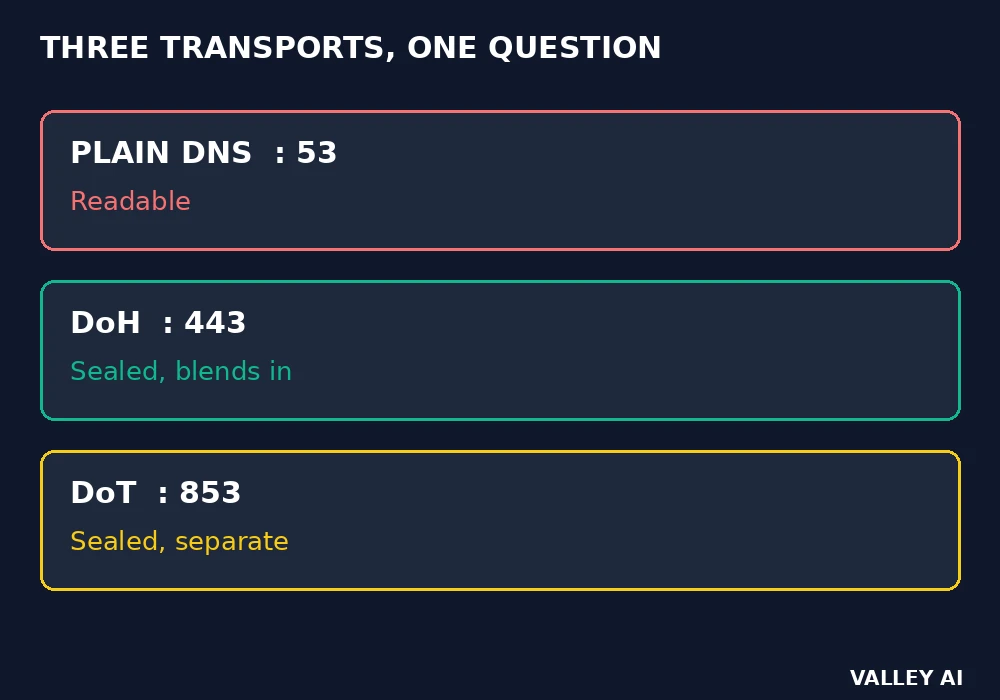
If the only goal is to hide the question from the local network, DoH and DoT both do the job. DoH has one practical edge: it rides the port browsers already use, so it is harder to block without collateral damage, and it needs no separate firewall rule on most networks.
What stays visible after encryption
- The resolver sees the name you asked for. That is unavoidable: it has to answer it.
- The network sees that you connected to the resolver, and how much data moved, even if it cannot read the question.
- The site you then visit sees your visit, and the address you arrived from, just as before.
- Anyone who controls the resolver, or who can compel it, can log the names it answers.
That is why DoH pairs well with a resolver you trust, and why a resolver change is a trust decision. DoH does not hide your browsing from the resolver, from the site, or from anyone who can see the connection after the lookup.
Turning it on without breaking the network
- In Chrome: Settings > Privacy and security > Security > Use secure DNS, then choose a provider or enter a custom resolver.
- In Firefox: Settings > Privacy & Security > DNS over HTTPS, then choose a provider or enter a custom resolver.
- In Windows 11: Settings > Network & internet, then the adapter’s DNS settings, and turn on DNS over HTTPS where the resolver supports it.
- On Android: Settings > Network & internet > Private DNS, then enter a DNS over TLS hostname.
- On iOS and macOS: install a configuration profile from a trusted resolver, since the system does not offer a built-in DoH toggle in the same way.
If lookups fail after you turn it on, turn it off, check the resolver and the network, and test again before you assume the browser is at fault. A failed encrypted lookup should fail visibly on a network you do not trust.
When DoH is not the answer
DoH does not make a bad site safe, and it does not replace a VPN for hiding traffic from a network. It encrypts only the lookup. For the wider picture, see the guide to internet safety.
- A network that must filter DNS for legal or safety reasons will still need to see it, so managed networks may block DoH.
- A captive portal, such as hotel or airport Wi-Fi, needs plain DNS to work before you sign in, so DoH can break the sign-in page.
- An enterprise that inspects traffic for malware may need the resolver it controls, so DoH to an outside resolver can break its controls.
What to check before you trust a setting
- The resolver you chose, and what its privacy policy says about logging.
- A test lookup, using the browser’s internal DNS page, such as chrome net-internals, to confirm the lookup actually went over HTTPS, and clear the DNS cache if an old answer is getting in the way.
- The browser’s fallback setting: if DoH fails, should it fall back to plain DNS, or fail closed?
The check that settles it
If the browser’s DNS page shows a secure lookup for valleyai.net, and a plain-DNS capture shows nothing readable, the setting is working. If either check fails, the lookup is not yet encrypted, whatever the toggle says.
Frequently asked questions
Does DNS over HTTPS hide the server name in the later TLS handshake?
No. DoH encrypts the lookup step only. The later connection to the site still starts with a TLS handshake that names the server in its Server Name Indication, unless Encrypted Client Hello is in use, so the handshake is a separate leak to check.
Can DNS over HTTPS be set once for a whole home network at the router?
Only when the router firmware includes a DoH client setting. Most stock routers forward plain DNS from devices, so a browser setting remains the reliable route on those networks, and each device needs its own setting.
Can a website tell that a visitor used DoH?
A site sees the visit and the connecting address. The lookup method does not travel with the web connection.
Is DNS over HTTPS slower than plain DNS?
The first lookup pays for one TLS handshake to the resolver, which plain DNS skips. Later lookups reuse the same connection, so the added cost shrinks to a small margin per query, and caching at the resolver often offsets it.

Kaleem
Kaleem is a Computer Science graduate (Virtual University of Pakistan) and the founder and editor of Valley AI, where he publishes in-depth, tested guides on computer hardware, artificial intelligence, and how the internet works. Every guide is researched from primary sources, tested hands-on where possible, and updated when the facts change.