
An IPv6 address holds 128 bits. IPv4 holds 32 bits. The extra 96 bits change how a device gets an address, how neighbors find each other, and how much sharing machinery a network still needs.
IPv6 is the network-layer protocol that identifies devices and carries packets across networks. The Internet Engineering Task Force defines it in RFC 8200. It runs beside IPv4 on most networks today, and a device often holds one address of each kind at the same time.
An IP address has two jobs: it names an interface, and it tells routers where to send a packet. IPv6 keeps both jobs and rebuilds the address format so the naming job stops running out of room.
Reading an IPv6 address: eight groups and one double colon
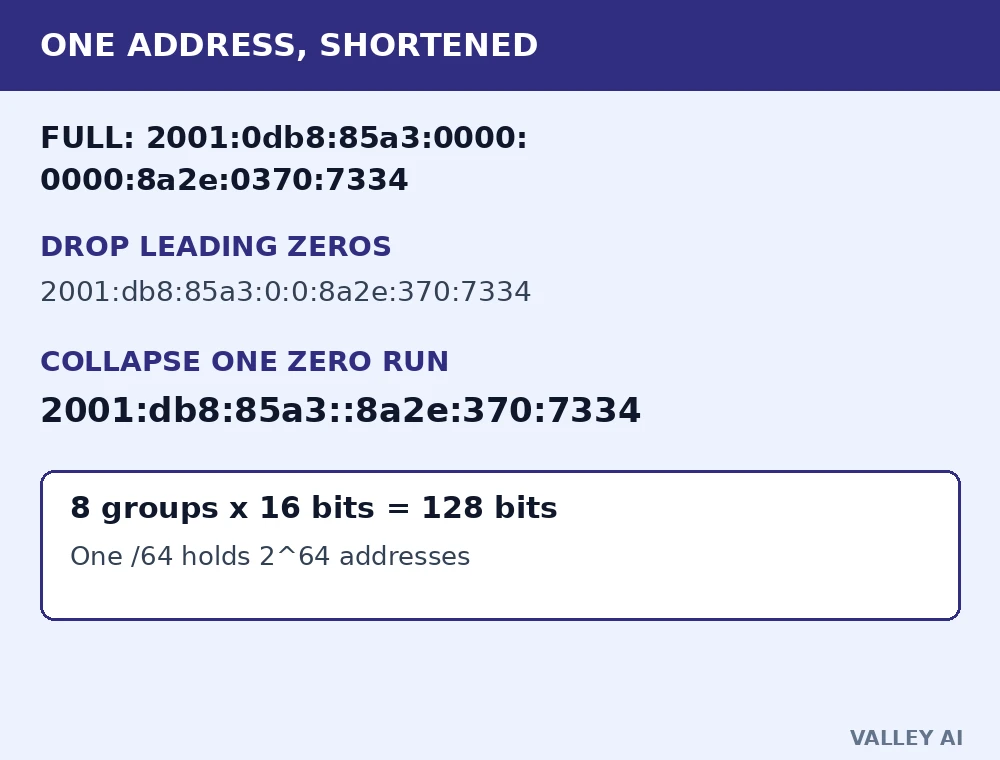
Eight groups of four hexadecimal digits, joined by colons, make up an IPv6 address. Hexadecimal digits run from 0 to 9, then a to f. Each group holds 16 bits, and eight groups of 16 bits make 128 bits. In bytes, that is 16 bytes per address.
| Item | Value |
|---|---|
| Groups in one address | 8 |
| Bits per group | 16 |
| Total bits | 128 |
| Total bytes | 16 |
| Addresses inside one /64 subnet | 18,446,744,073,709,551,616 |
| /64 subnets inside one /48 block | 65,536 |
The worked example below starts from a full address and shortens it with the two compression rules. Leading zeros drop inside each group. One run of zero groups collapses to a double colon. The double colon may appear once in an address, because two of them would hide how many zero groups each one stands for.
Why hex, and why colons? A 128-bit number in decimal would run to 39 digits, and nobody reads a 39-digit string off a screen with confidence. Hexadecimal packs four bits into one digit, so the same value fits in 32 digits. Colons mark the 16-bit boundaries, so each group can be read, copied, and compared on its own.
An address carries a scope as well. A global unicast address routes across the internet. A link-local address, starting in fe80::/10, works only on one link and never routes onward. A unique local address, starting in fd00::/8, stays private to an organization, much like the private ranges in IPv4. Reading the first group tells you which scope you are looking at.
A device builds its own address: SLAAC step by step
SLAAC stands for Stateless Address Autoconfiguration, defined in RFC 4862. Stateless means no server records the assignment and no lease tracks it. The device builds the address itself from a prefix the network supplies and an identifier the device creates.
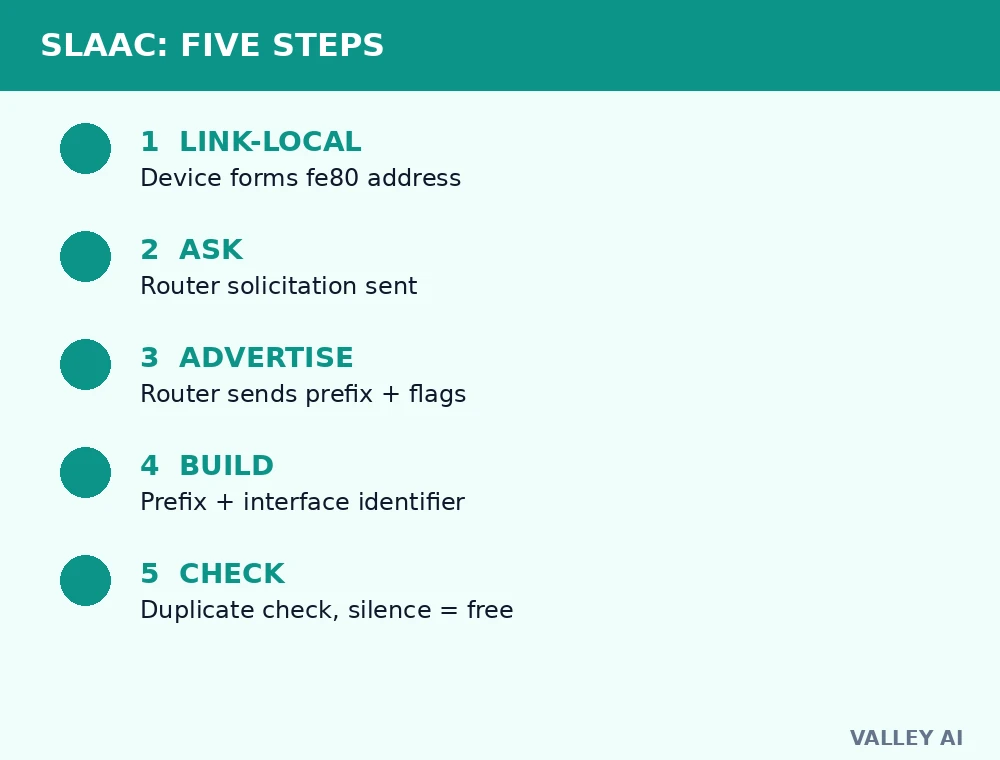
- The device forms a link-local address and checks that no neighbor already uses it.
- The device sends a router solicitation, asking for the local network prefix.
- The router answers with a router advertisement carrying the prefix, its length, and flags.
- The device appends an interface identifier it creates itself, normally 64 bits long.
- The device runs duplicate address detection on the result, and silence from the link means the address is free to use.
The prefix length matters. A normal IPv6 subnet is a /64, which leaves exactly 64 bits for the interface identifier. That split is not an accident. It gives SLAAC the room it needs, and it sets the standard subnet size for the rest of this article.
Phones and laptops on a home Wi-Fi network follow the same steps. The radio link changes, and the address-building logic stays the same.
DHCPv6, Neighbor Discovery, and the end of ARP
Some networks want central control over assignments, and DHCPv6, defined in RFC 8415, gives it to them. A DHCPv6 server hands out addresses from a pool and records each lease, so an administrator can track which device held which address and when. A network may run DHCPv6 beside SLAAC, with SLAAC supplying the address and DHCPv6 supplying the extra options, or it may run DHCPv6 alone.
A DNS lookup still needs a server address before the first name resolves. On a SLAAC-only network, that address arrives in the router advertisement, inside the recursive DNS server option. On a DHCPv6 network, it arrives with the lease. Either way, the address assignment and the name resolution stay separate jobs, and the device needs both before it can reach a host by name.
Neighbor Discovery, defined in RFC 4861, replaces ARP. It runs over ICMPv6 and uses five message types: router solicitation, router advertisement, neighbor solicitation, neighbor advertisement, and redirect. A device that needs a link-layer address sends a neighbor solicitation to a multicast group, and the owner answers with a neighbor advertisement. The exchange stays local, and it never needs a broadcast frame.
IPv6 has no broadcast. A neighbor solicitation goes to a solicited-node multicast group built from the last 24 bits of the target address, so only devices that share those bits need to process it. The rest of the link stays quiet, and the switch forwards the frame only where the multicast group lives.
IPv6 beside IPv4: header, fragmentation, NAT, and broadcast
The IPv6 header is a fixed 40 bytes. Options that IPv4 carried inside a variable header move into chained extension headers, added only when a packet needs them. The fixed size keeps the fast path simple, and the checksum disappears, because the link layer and the transport layer already check the data. Removing that per-hop recomputation is one less job for every router on the path.
| Area | IPv4 | IPv6 |
|---|---|---|
| Address size | 32 bits | 128 bits |
| Notation | Dotted decimal | Colon-separated hexadecimal |
| Header | 20 to 60 bytes, variable | 40 bytes, fixed |
| Header checksum | Yes, recomputed per hop | No |
| Fragmentation | Routers may fragment in transit | Sending host only |
| Neighbor resolution | ARP broadcast | Neighbor Discovery multicast |
| Broadcast | Yes | No, multicast instead |
| Autoconfiguration | DHCP or manual | SLAAC, DHCPv6, or manual |
| Subnet standard | Any CIDR size | /64 per subnet |
Fragmentation shows the same shift of work toward the edges. An IPv6 router never slices a packet that is too large for the next link. It drops the packet and returns a Packet Too Big message, and the sender splits the data and resends it. The router stays fast, and the sender keeps the fragmentation job.
Does a home still need NAT with IPv6? For sharing one address, no. A global IPv6 address can belong to one device, so the address-sharing job NAT performs for IPv4 has nothing left to share. The protection job is separate, and it stays. A firewall still blocks unsolicited inbound traffic, and the rule changes shape: it names a device address rather than a shared address.
That distinction matters on a switched home network too. The switch forwards frames inside one network by hardware address, while IPv6 addresses sit inside the packet header. Ethernet frames still carry the packets, whatever version the packet header declares.
Measured on a real machine: IPv6 in this network
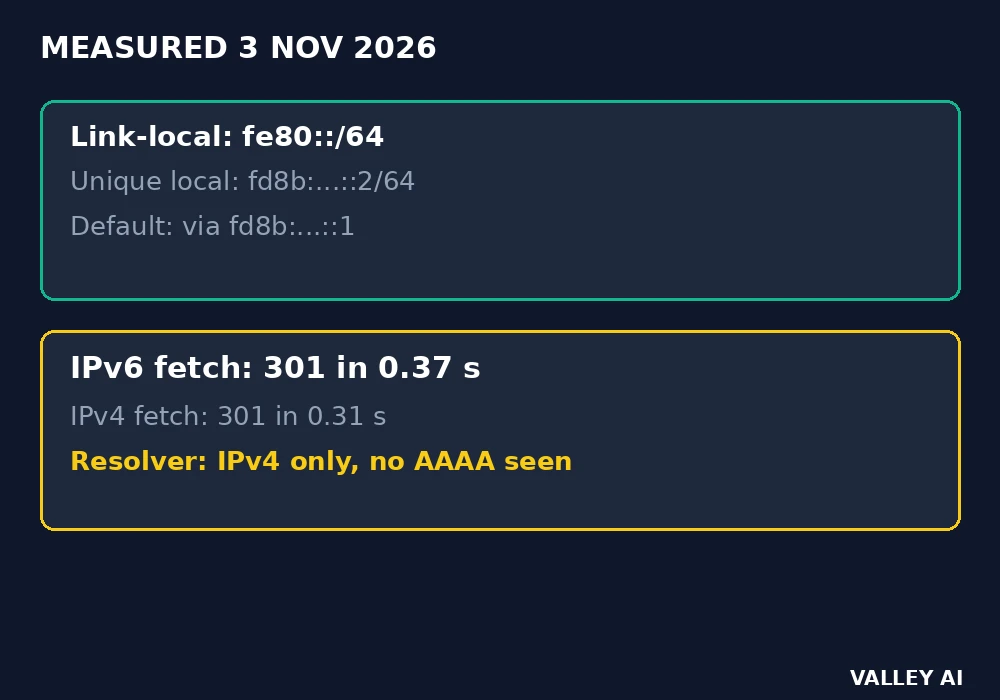
The measurement ran on 3 November 2026, on a Linux virtual machine, with standard tools and no special setup. The address listing showed two IPv6 addresses on one interface: link-local fe80::70dc:7cff:fe34:2ffd/64, and fd8b:4f84:7d32:99::2/64. The routing table showed a default route through fd8b:4f84:7d32:99::1. An IPv6 fetch of https://google.com/ returned 301 in 0.37 seconds, against 0.31 seconds over IPv4 on the same minute.
Two caveats belong with those numbers. The fd8b prefix sits inside fd00::/8, the unique local range, so it is a private-style address, and it proves a routed IPv6 path on this machine rather than a public address for it. The same minute, this resolver returned only IPv4 addresses for valleyai.net and google.com, so no AAAA record was visible here for either name.
- On Linux, run ip -6 addr and ip -6 route, and look for a global address beside the fe80 link-local entry.
- On Windows, run ipconfig and look for an IPv6 address line under the active adapter.
- On a router admin page, look for an IPv6 or prefix-delegation setting, and for a prefix handed to the local network.
- A global address starting outside fe80 and fd00, plus a default route, means the link has IPv6 service, and its absence means the service is local only.
What IPv6 does not fix
A new address format does not make a link faster. Packets cross the same fiber, the same radio, and the same congested hop, whatever version number the header carries. A speed gain after an IPv6 change points to a routing or middlebox difference on that path, and it needs a before-and-after test before anyone credits the version number.
IPv6 does not encrypt traffic on its own. IPsec support was part of the early IPv6 specification, and its presence in a stack is not encryption in use. Web traffic still needs TLS, and private traffic still needs a VPN, under IPv6 exactly as under IPv4.
Privacy needs its own handling. A stable interface identifier lets an observer link one device across networks, because the suffix stays put while the prefix changes. Privacy extensions answer that risk with temporary addresses for outbound connections, rotated on a schedule, while the stable address stays for inbound services that need a fixed target. The setting lives in the operating system, and turning it on is a one-line change on most systems.
Should a home switch IPv6 off when IPv4 works? Leave it on. Most systems try IPv6 first when both stacks answer, then fall back to IPv4 when the IPv6 path stalls, a behavior standardized as Happy Eyeballs in RFC 8305. Switching IPv6 off removes a working path and gains nothing on a network where IPv4 already works. The failure mode worth fixing is a broken IPv6 path that stalls before the fallback, and the checks in the previous part find it.
Conclusion
Leave dual stack on, and check that a router advertisement carries a prefix, that a global address sits beside the link-local entry, and that the firewall still blocks unsolicited inbound traffic. Turn on temporary addresses in the operating system when tracking across networks is a concern. Those four actions put the larger address space to work without touching the IPv4 service that still carries part of the internet.
Frequently asked questions
Can I type an IPv6 address into a browser address bar?
Yes, with square brackets around it, as in http://[2001:db8::1]/ . The brackets keep the colons inside the address apart from the colon that separates a port number, so a port goes after the closing bracket, as in http://[2001:db8::1]:8080/ .
Why did version numbers jump from 4 to 6?
Version 5 belonged to an experimental Stream Protocol that never became a public internet protocol. The number stayed reserved, and the next public version of IP took 6.
What is the address ::1?
It is the IPv6 loopback address, the counterpart of 127.0.0.1 in IPv4. Traffic sent to ::1 stays on the same device, which makes it useful for testing a local service without touching the network.
How does an IPv6-only network reach an IPv4-only site?
Through translation. NAT64 builds an IPv6 representation of the IPv4 destination, and DNS64 synthesizes an IPv6 answer for a name that only has an IPv4 record. The translation sits at the network edge, and the IPv6-only device never sees the IPv4 address directly.
Can two devices share one IPv6 address on purpose?
Yes, with anycast. The same address is assigned to several machines, and routing delivers a packet to the nearest one. DNS servers use anycast so a query reaches a close server without the client choosing between copies.

Kaleem
Kaleem is a Computer Science graduate (Virtual University of Pakistan) and the founder and editor of Valley AI, where he publishes in-depth, tested guides on computer hardware, artificial intelligence, and how the internet works. Every guide is researched from primary sources, tested hands-on where possible, and updated when the facts change.