

On 4 November 2026, a small test server sent one header to a client. The header read Set-Cookie: visitid=cookie-test-20261104; Path=/; Max-Age=3600. The client stored that line. On the next request, the client sent it back, and the server logged visitid=cookie-test-20261104. That round trip is the mechanism behind internet cookies.
A cookie is a short piece of text that a website asks your browser to keep. It holds a name and a value, plus rules about where it applies and how long it lasts. A site reads the value back on a later visit. That reading is how a site remembers a login, a cart, or a language choice.
Web requests carry no memory on their own. Each request arrives fresh, with no record of the request before it. Cookies supply that missing memory, one small label at a time.
| Step | Header | What it carried |
|---|---|---|
| Server reply | Set-Cookie | visitid=cookie-test-20261104, Path=/, Max-Age=3600 |
| Browser storage | Stored under 127.0.0.1 | The name, the value, and the expiry rule |
| Next request | Cookie | visitid=cookie-test-20261104 |
A cookie is a name, a value, and a set of rules
Every cookie starts with two parts. The name labels it. The value carries the information, often a random identifier that means nothing on its own. Around those two parts sit the rules: which domain may receive it, which paths it covers, when it expires, and which protections apply.
- Name: visitid, the label the site uses to find it again
- Value: cookie-test-20261104, the stored string itself
- Domain: which site may receive the cookie back
- Path: which pages on that site may receive it
- Expiry: a date, a lifetime in seconds, or no date at all
- Protections: flags that limit transport, script access, and cross-site sending
One cookie holds about 4 kilobytes. That ceiling keeps cookies small by design. A site that needs more room stores a short identifier in the cookie and keeps the bulk of its data on its own server.
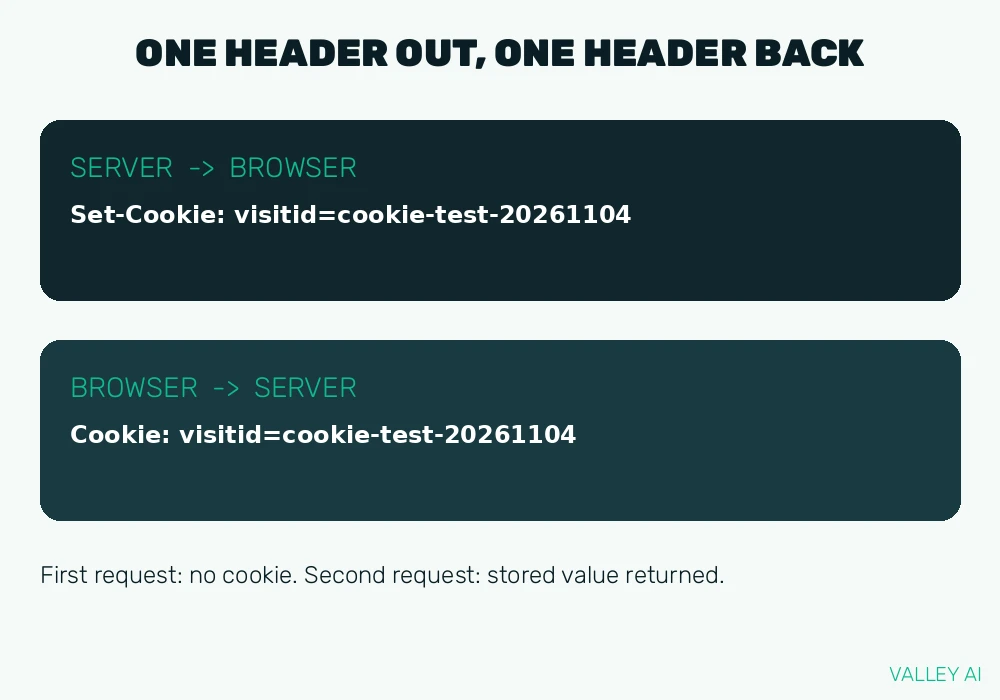
The round trip: one header out, one header back
The exchange follows the same four steps on every site. A browser visits a page. The server replies with the page and, when it needs memory, a Set-Cookie header. The browser stores the cookie under the rules in that header. On a later request that matches the domain and path, the browser sends the cookie back in a Cookie header, with no click and no extra step from the reader.
- Visit a page for the first time
- Read the Set-Cookie header in the server reply
- Store the cookie under its domain, path, and expiry rules
- Send it back in a Cookie header on the next matching request
A browser does the storing and the sending. The server matches the returned value against its own records. A matching record restores the session. A value with no match behaves like a first visit. In the measured test, the first reply carried no cookie at all, because no cookie existed yet. The second request carried the stored value, and the server logged it.
First-party and third-party: the domain decides the reach
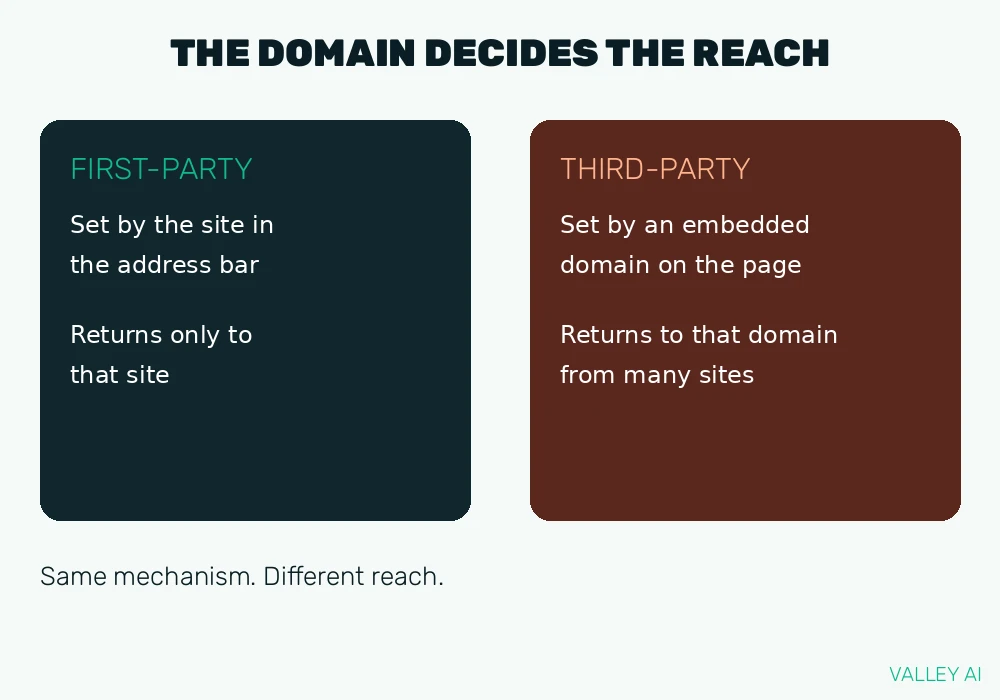
Origin is the one distinction that decides how far a cookie reaches. A first-party cookie comes from the domain shown in the address bar. It serves that site directly: a login, a preference, a cart. A third-party cookie comes from a different domain, one embedded in the page through an image, a video player, or a script. The browser stores it under the embedded domain. The site in the address bar holds no claim on that cookie.
That difference explains cross-site tracking. One advertising domain embedded on many sites receives its cookie from each of those sites. Over time, the pattern of those returns builds a picture of browsing across sites that share the same embedded domain. A first-party cookie never travels that way, because only its own domain receives it back.
Can one site read a cookie set by another site? A browser sends each cookie only to the domain that set it. A news site cannot read a cookie set by a video domain, and the video domain cannot read a cookie set by the news site. Each cookie stays inside its own domain boundary.
Session and persistent: how long a cookie lives
Lifetime is the second classification, and it turns on one question: does the cookie carry an expiry rule? A session cookie carries none. It lives until the browser session ends, which usually means closing the browser completely. Closing one tab leaves it in place. A persistent cookie carries an Expires date or a Max-Age lifetime in seconds. It survives browser restarts and stays until its date passes or the reader deletes it.
The two kinds suit different jobs. A session cookie fits a single visit: a cart that only needs to last until checkout, a form that spans several pages. A persistent cookie fits a return visit: a signed-in account that should still be signed in next week, a language setting that should survive a restart.
Why does clearing cookies log you out of sites? Clearing deletes the stored identifiers. The server then receives no matching value, so it cannot link the browser to the earlier session. The site treats the next visit as a new arrival, and the reader signs in again.
The flags that limit a cookie
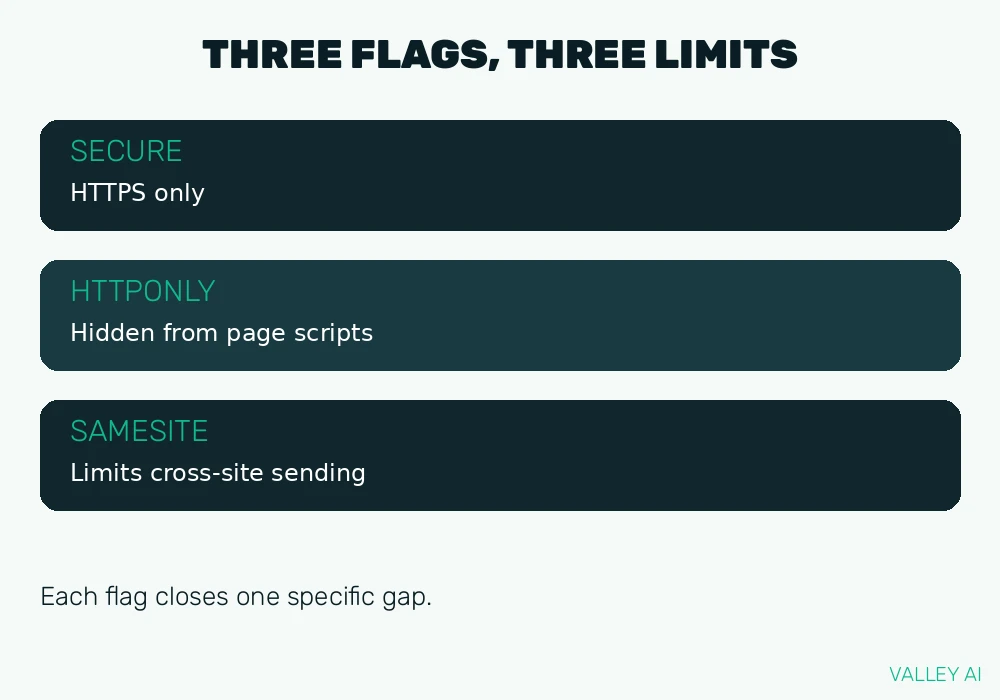
Flags are the rules a server attaches to a cookie at the moment it sets it. Each flag closes one specific gap. The Secure flag matters most on plain HTTP. On an unencrypted connection, a cookie travels in readable form, and anyone on the path can copy it. HTTPS encrypts the whole exchange, including the cookie header, which is why the flag pairs with it. The difference between the two connection types is laid out in the comparison of HTTP and HTTPS. HttpOnly matters against a different threat: a malicious script injected into a page cannot read a cookie marked HttpOnly, even though the browser still sends it to the server. SameSite matters against cross-site requests: a cookie that a site never needs on another site should never travel there.
| Flag | Rule it sets |
|---|---|
| Secure | Send the cookie only over an encrypted HTTPS connection |
| HttpOnly | Keep the cookie value out of reach of page scripts |
| SameSite=Strict | Send the cookie only on requests from the same site |
| SameSite=Lax | Allow the cookie on top-level navigation to the site, such as following a link |
| SameSite=None; Secure | Allow cross-site sending, only over HTTPS |
What a cookie cannot do
Cookies carry a reputation larger than their ability. Three limits keep that reputation in proportion. A cookie holds text only, and the browser never runs a cookie value as a program. A cookie cannot open files, read a hard drive, or inspect anything outside its own stored value. And a cookie on its own identifies a browser. A site learns a person’s name only when that person signs in or enters identifying details, and the site links the cookie to that account.
Does a cookie run code on your computer? No code sits inside a cookie. The value is text, stored and returned as text. The browser treats it as data, never as a program to execute.
Reading and controlling cookies in your own browser
Cookie controls sit in every major browser, and one inspection shows more than any description. Open developer tools, open the Application tab, and open the Cookies entry for the current site. The table there lists each cookie by name, value, domain, path, and expiry. That table is the live version of the anatomy above, filled with real entries from a real site.
- Open a site you use every day
- Open developer tools and go to the Application tab
- Open Cookies and select the current site
- Read one row: name, value, domain, and expiry
- Delete a single cookie there to test what the site forgets
Browser settings add the broader controls: block third-party cookies, clear cookies for one site only, or clear all cookies at once. Clearing for one site keeps other logins intact.
Privacy tools change only part of the picture. A VPN changes the visible IP address, while cookies still identify the same browser to each site. A proxy server sits between browser and site, and on plain HTTP it can see cookie headers passing through. DNS over HTTPS hides the name lookup, while the cookie still travels to the site after the connection opens. Each tool hides one layer, and none of them removes the cookie layer. Cookie controls, as a privacy step, belong alongside the wider steps in a guide to internet safety.
Conclusion
Start with one site you use every day. Open its cookie table, note which names belong to the site itself, and set third-party blocking on in your browser settings. Revisit the site and check what still signs in and what asks again. That single check turns cookie settings from a vague worry into a setting you have tested yourself.
Frequently asked questions
Why do cookie banners appear on nearly every site?
Privacy rules in the European Union and the United Kingdom require a site to ask permission before setting cookies that are not strictly needed for the site to work. Cookies needed for a login or for security usually fall outside that permission step. The banner is the site collecting that permission. It says nothing about whether a cookie is harmful.
Do cookies work the same way in a private or incognito window?
A private window accepts cookies during that window, then deletes them when the last private window closes. Cookies from normal browsing are not sent inside a private window, and private-window cookies do not survive into normal browsing. A site visited in a private window therefore starts fresh each time.
What happens to cookies when you switch browsers or devices?
Cookies live inside one browser profile on one device. A different browser starts with an empty cookie store, and a phone holds different cookies from a laptop. Signing in again on the new browser or device creates a fresh set of cookies there.
Can you block all cookies and still use the web?
Reading pages still works, because reading needs no stored state. Logins, carts, and checkouts usually break, because they depend on a session cookie to link one page to the next. Blocking third-party cookies only, while allowing first-party cookies, keeps most sites working while stopping cross-site tracking.
What is a supercookie?
A supercookie is a tracking value stored outside the normal cookie store, in a place that survives ordinary cookie clearing. Early examples used browser plugin storage, and later examples used network-level identifiers added by an internet provider. Modern browsers have closed most of these routes, which is why the term now appears mainly in older privacy writing.
How is a cookie different from local storage?
A cookie travels to the server automatically with every matching request. Local storage stays in the browser, and only page scripts read it, on demand. Local storage also holds far more data, around 5 megabytes, and carries no expiry header. A site uses a cookie when the server needs the value, and local storage when only the page itself needs it.

Kaleem
Kaleem is a Computer Science graduate (Virtual University of Pakistan) and the founder and editor of Valley AI, where he publishes in-depth, tested guides on computer hardware, artificial intelligence, and how the internet works. Every guide is researched from primary sources, tested hands-on where possible, and updated when the facts change.