

A barcode holds no product data. That one split decides everything about how it works. The stripes carry a number, and the number is a key. The price, the name, and the stock level live in a database on the other side of the scan. Judge every claim about barcodes against that split, and the rest of the mechanism falls into place.
Four steps run between the label and the beep. Light crosses the stripes, a sensor turns the reflections into a signal, a decoder reads the widths back into digits, and a check digit proves the reading is sound. Each step is mechanical. Each one can fail in a specific way.
The Anatomy of a UPC Barcode
A UPC-A barcode, the symbol on nearly every retail product in North America, holds 12 digits in 95 modules. A module is one narrow bar width, the smallest unit in the symbol. At full size that unit measures 0.33 millimetres, about a third of a millimetre, so the bars alone span roughly 31 millimetres, plus the blank margins at each end.
- Digit 1, the number system: tells the scanner what kind of item this is. 0 covers standard retail products. 2 marks variable-weight items such as meat and produce. 3 marks drugs and health products.
- Digits 2 to 6, the manufacturer prefix: five digits assigned to one company by GS1, the organisation that runs the global numbering system. The prefix never changes once issued.
- Digits 7 to 11, the product code: five digits the manufacturer assigns to one specific item. A 12-ounce can and a 16-ounce bottle of the same drink carry different codes.
- Digit 12, the check digit: computed from the other eleven by a fixed rule. It carries no product data. It proves the reading is sound.
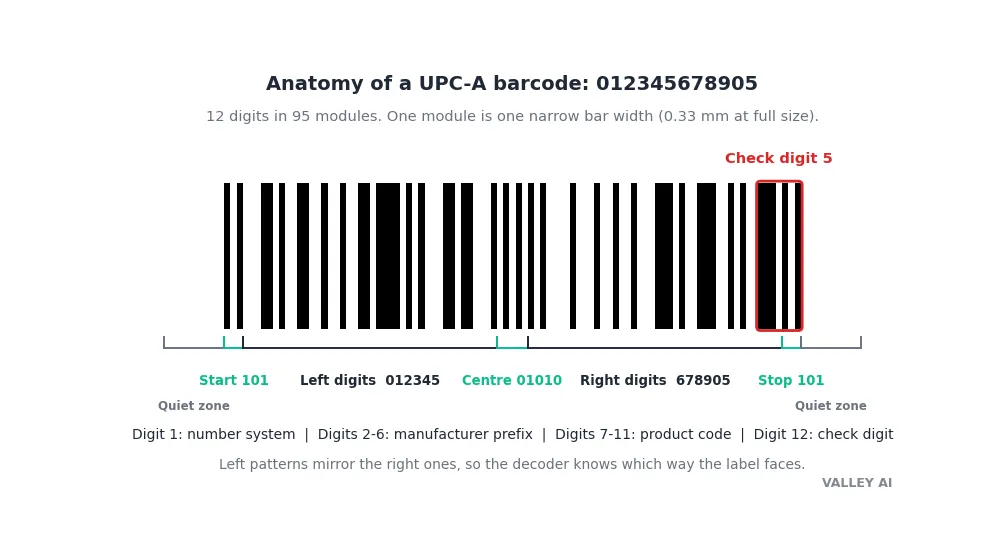
Each digit takes seven modules: two bars and two spaces in a fixed pattern. The digit 6, for example, is 0101111 on the left half and 1010000 on the right. The right pattern is the mirror image of the left, bit for bit. That mirroring tells the scanner which way the label faces, so a code read upside down still decodes.
Three guard patterns frame the digits. A 101 bar-space-bar marks the start, a 01010 pattern marks the centre, and a 101 marks the end. The scanner looks for those fixed patterns first, then reads the digits between them.
Blank space borders the symbol on both sides. The quiet zone must measure at least ten times the narrowest bar, about 3.3 millimetres at full size. A printer that trims into it removes the landmark the scanner uses to find where the code begins.
You can read a UPC by eye far enough to check the structure. Count the digits under the bars. Twelve means UPC-A. Thirteen means EAN-13, the international form, which adds a country prefix at the front.
Light In, Digits Out: Four Steps
A barcode reader runs four steps, and the first three happen in hardware. Encoding turns the number into bar widths when the label is printed. Scanning sweeps light across the symbol. Decoding measures the widths and recovers the digits. The lookup happens in software, after the digits leave the scanner.
- Illumination: a red laser diode or LED, near 650 nanometres, sweeps a line of light across the symbol. Red diodes are cheap, the beam is easy to aim, and black ink absorbs the light while white paper reflects it.
- Reflection: the returning light rises and falls as the beam crosses bars and spaces. A photodiode turns that rise and fall into an electrical waveform, high where the paper is white, low where the ink is black.
- Decoding: the decoder measures the time between changes in the waveform and rebuilds the bar widths. It matches each seven-module group against the symbology table, reads the digits, and checks the last one against the check digit.
- Lookup: the decoded number travels to the till or the warehouse system over USB or Bluetooth, usually typed in as keystrokes, and the system fetches the product record that matches the number.
Most checkout scanners pretend to be keyboards. The scanner sends the digits as keystrokes over USB, followed by an Enter, so any program that accepts typing accepts a scan. That behaviour is called a keyboard wedge, and it is why a scanner works with software written decades before it existed.
Does the barcode hold the price? No. It holds a number, nothing more. The till looks that number up and finds the price in its own database. Change the price in the database and the same barcode rings up a different amount, with no change to the label.
The symbol carries no store data, so the same code returns whatever price the local database holds. The lookup is the reason a barcode works the same in every store, and the reason a price change needs no new labels.
The Check Digit, Worked and Verified
Digit 12 carries no product data. It is a check on the other eleven, computed by a fixed rule. The scanner recomputes it from the digits it read and compares the result with the printed digit. A mismatch means the read went wrong, and the scanner refuses the scan. A bad number never reaches the till.
Take the chosen base 01234567890. Add the digits in the odd positions, first, third, fifth, seventh, ninth, and eleventh: 0, 2, 4, 6, 8, and 0 come to 20. Multiply by 3, which gives 60. Add the digits in the even positions, second, fourth, sixth, eighth, and tenth: 1, 3, 5, 7, and 9 come to 25. The total is 85. Take 85 modulo 10, which is 5, and subtract from 10: 10 minus 5 is 5. The check digit is 5, and the full number is 012345678905.
| Step | Arithmetic | Result |
|---|---|---|
| Odd positions, times 3 | (0 + 2 + 4 + 6 + 8 + 0) x 3 | 60 |
| Even positions | 1 + 3 + 5 + 7 + 9 | 25 |
| Total | 60 + 25 | 85 |
| Check digit | (10 – 85 mod 10) mod 10 | 5 |
The same rule works on the international form. For the chosen EAN-13 base 590123412345, number the digits from the right, add the odd positions as they stand and the even positions times 3, and the total comes to 73. Ten minus 3 is 7, so the full number is 5901234123457. A decoder read that symbol back in 4.48 milliseconds, which confirms the arithmetic from the other end.
Arithmetic alone proves nothing. I generated the UPC symbol from those twelve digits and ran it through a decoder. It read back 0012345678905, the EAN-13 form of the same number, with the leading zero made explicit. The check digit the arithmetic produced is the digit the decoder accepted. Then I changed the last digit to 6 and generated that symbol. The decoder refused it outright. A single wrong digit is enough to stop the scan.
The check digit catches every single-digit error and most cases of two digits swapped. It cannot fix the error, only detect it. A QR code can rebuild damaged data because its error correction carries spare copies. A barcode carries one spare digit, and that digit only says yes or no.
Four Scanners, Four Ways to Read Stripes
Scanners differ in how they gather the light. Every type ends at the same decoder, measuring widths and checking the last digit.
| Scanner | How it reads | Typical range | Reads |
|---|---|---|---|
| Laser | Oscillating mirror sweeps a red beam | About 60 cm at a checkout | 1D only |
| CCD reader | LED flood plus a row of sensors, one shot | About 30 cm | 1D only |
| 2D imager | Camera takes a photo, software finds the code | About 50 cm | 1D and 2D |
| Phone camera | Consumer camera plus decoding software | A few cm to arm’s length | 1D and 2D |
A laser scanner earns its range from a mirror that sweeps the beam across the symbol hundreds of times a second. Each sweep is a fresh attempt, so a code waved past the glass gets read on one of the passes. The mirror is the only moving part, and it is also the part that wears out.
CCD readers have no moving parts. A row of light sensors captures the brightness pattern across the whole symbol in one shot, which makes it cheap and durable. The price is range: the code has to sit within a few centimetres of the window.
An imager takes a photograph and lets software find the symbol inside it. Orientation stops mattering, because the software rotates the image before decoding. That is why a phone reads a barcode held sideways, and why the same camera reads QR codes too.
Can a scanner read a barcode upside down? Yes. The digit patterns on the left half mirror the patterns on the right, so the decoder knows which way the label faces from the pattern itself. A code turned 180 degrees reads the same as one held straight.
A barcode scanner is not a document scanner. One reads a single line of stripes and returns a number. The other reads a whole page and returns an image. The two machines share the word scanner and little else, and how a flatbed scanner works is a different mechanism from the one on this page.
The Decode Test: What a Real Decoder Reads
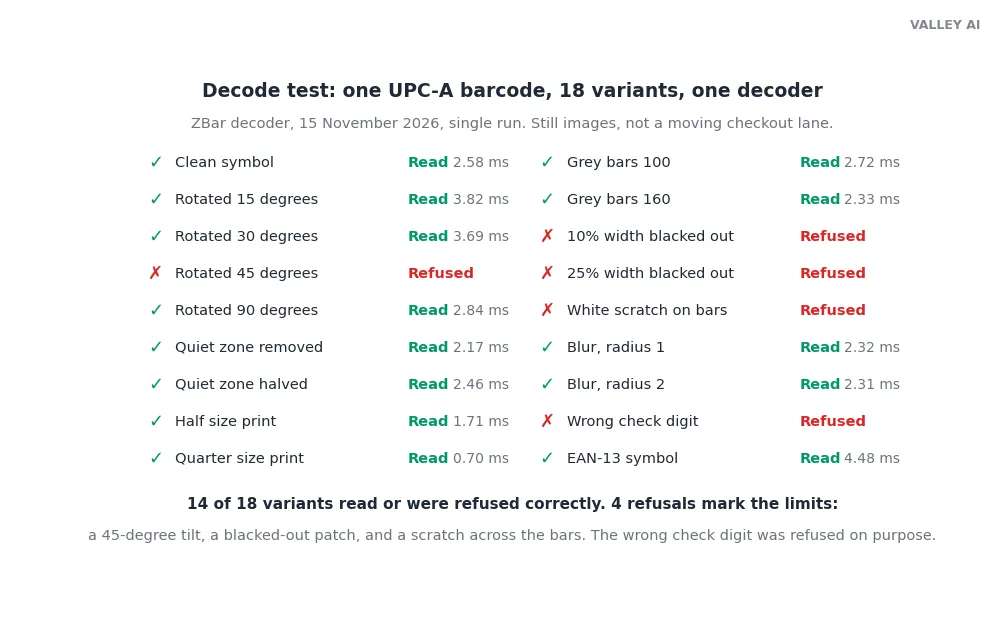
I ran the test on 15 November 2026 with ZBar, an open-source barcode decoder, through its Python binding. One UPC-A symbol, the number from the worked example, went through 18 variants in a single run. The images were still frames, not a moving checkout lane, and that limit matters for two of the results below.
The clean symbol decoded in 2.58 milliseconds. An EAN-13 symbol took 4.48 milliseconds. Both sit far inside the tenth of a second the vendors quote, and the decode itself is the fastest part of the chain. The database lookup after it takes longer.
| Variant | Result | Decode time |
|---|---|---|
| Clean symbol | Read | 2.58 ms |
| Rotated 15 degrees | Read | 3.82 ms |
| Rotated 30 degrees | Read | 3.69 ms |
| Rotated 45 degrees | Refused | No result |
| Rotated 90 degrees | Read | 2.84 ms |
| Quiet zone removed | Read | 2.17 ms |
| Quiet zone halved | Read | 2.46 ms |
| Printed at half size | Read | 1.71 ms |
| Printed at quarter size | Read | 0.70 ms |
| Grey bars, value 100 | Read | 2.72 ms |
| Grey bars, value 160 | Read | 2.33 ms |
| 10 percent of width blacked out | Refused | No result |
| 25 percent of width blacked out | Refused | No result |
| White scratch across the bars | Refused | No result |
| Blur, radius 1 | Read | 2.32 ms |
| Blur, radius 2 | Read | 2.31 ms |
| Wrong check digit (control) | Refused | No result |
| EAN-13 symbol | Read | 4.48 ms |
Two results cut against the usual advice. The symbol with no quiet zone at all still read, and the grey bars at value 160 still read. Both make sense on reflection: a still image gives the decoder a clean, square-on view, while a checkout scanner reads a moving label under store lights. The quiet zone and the contrast rules exist for the moving case. A still image is the easy case. Treat the passes as what a still image allows, and keep printing to the standard anyway.
Three refusals carry the real lesson. A 45-degree tilt stopped the decoder, while 15 and 30 degrees read. A black patch over 10 percent of the width stopped it, and so did a white scratch across the bars. A one-dimensional code has no spare data to rebuild from, so any damage that hides a digit hides the number. The check digit then does its job by refusing, which is the correct failure: silence beats a wrong number at a till.
The wrong-digit control confirms the refusal works. A symbol built with the check digit changed from 5 to 6 produced no result at all. The decoder did not guess. It returned nothing, which is the behaviour a checkout wants.
Why a Scan Fails: Five Physical Reasons
Most failed scans come down to five physical causes. The test measured each one.
- Damage: a tear, a smudge, or a sticker across the bars hides digits. A 1D code cannot rebuild them. The fix is a fresh label. A better scanner cannot read digits that are gone.
- Tilt: a code turned past about 30 degrees defeats the scan line. Hold the label square to the beam, or use an imager, which rotates the image before decoding.
- Quiet zone: a label trimmed into its margins removes the landmark the scanner searches for. Leave at least ten narrow-bar widths of blank space on each side.
- Contrast: faded thermal print, or coloured bars on a coloured background, shrinks the difference the photodiode measures. Black on white reads best. Red bars on white fail, because the red laser cannot tell them from the background.
- Print size and focus: a symbol printed too small packs the modules below what the sensor resolves, and a blurred print smears the edges the decoder measures.
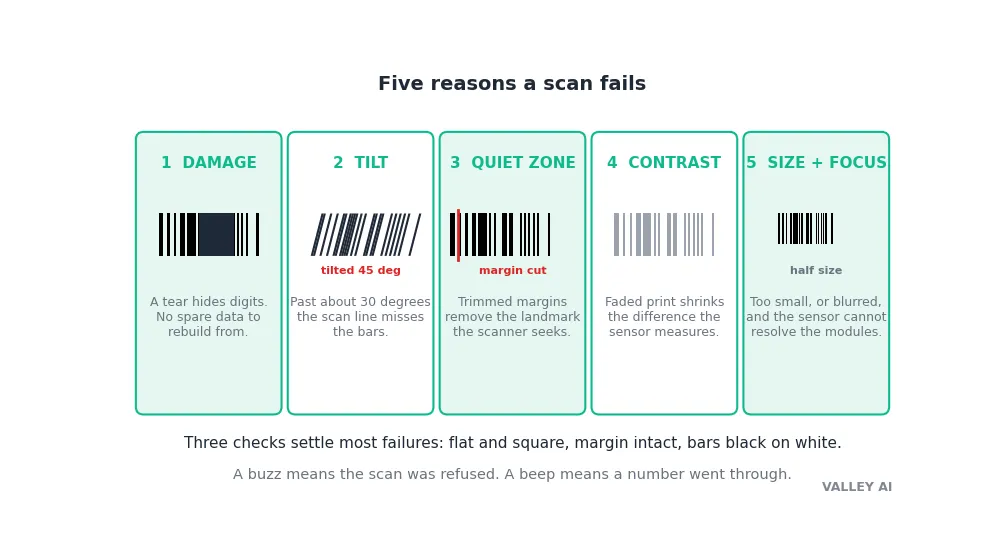
Three checks settle most failures without any tools. Hold the label flat and square to the scanner. Measure the blank margin with a ruler: less than ten bar widths means the label was trimmed. Photograph the code with a phone: if the camera app reads it, the symbol is sound and the scanner is at fault.
Why does the scanner buzz when a label fails? The buzz is the scanner telling the operator the read failed. The till hears nothing, because a refused scan sends no digits. A beep means a number went through. A buzz means try again with the label flat, or ask for a fresh label.
Print quality has its own grading scale. ISO/IEC 15416 scores a printed symbol from A to F on contrast, edge sharpness, and modulation, and a grade of B or higher keeps checkout lanes moving. A warehouse that prints its own labels runs a verifier against that scale before a carton ever leaves the dock.
Bars or Squares: 1D Against 2D
A linear barcode stores about 20 characters at most. A QR code stores about 7,000 numeric characters or 4,300 alphanumeric ones, because it writes in two directions at once. The extra capacity is the reason boarding passes, payment codes, and parcel labels moved to squares: a full web address or a unique serial number never fits in a line of bars.
The deeper difference is damage. A barcode carries one check digit, which detects an error and stops the scan. A QR code carries Reed-Solomon error correction, which rebuilds the missing pieces, so a code with up to 30 percent of its surface scratched out still reads. The trade is print: squares need a camera, while bars read under a ten-dollar laser.
Bars still win where cost rules. Printing a barcode costs nothing beyond the ink already on the package, while every radio tag carries a chip that costs cents. Warehouses that track thousands of cartons a day keep the bars for the same reason supermarkets do: the label is free, the readers are cheap, and the database does the heavy work.
The idea is older than the checkout. In 1948 a supermarket executive asked the Drexel Institute for help with checkout queues. Two graduate students, Norman Joseph Woodland and Bernard Silver, took the problem on. Woodland drew the first lines in the sand on Miami Beach, stretching Morse code dots and dashes down into wide and narrow bars. They filed their patent in October 1949, and it was granted as US Patent 2,612,994 in October 1952. The grocery industry chose the UPC symbol in April 1973. The first live scan ran at 8:01 in the morning on 26 June 1974, at a Marsh supermarket in Troy, Ohio, when cashier Sharon Buchanan scanned a ten-pack of Wrigley’s Juicy Fruit gum for shopper Clyde Dawson. The register rang up 67 cents. The scanner from that morning sits in the Smithsonian collection. The gum pack stayed with Dawson, which corrects a claim repeated across the web that the pack itself is on display.
What comes next keeps the same shape. Radio tags read without a line of sight and count hundreds of items at once. Invisible watermarks print the code across the whole package so any angle scans. Both cost more than ink, so bars hold the checkout for now. GS1, the body behind the numbering, puts the figure at about 5 billion barcode scans a day.
Try It: Print One Barcode and Break It on Purpose
Generate a barcode for any number with a free barcode generator. The generator computes the check digit, so any twelve digits will do. Print it, and scan it with a phone camera. It reads. Then print three more copies. Cut the blank margin off one, tilt the second to 45 degrees, and draw a black bar across the third. Scan all three. The first two test the quiet zone and the tilt limit the decoder test measured, and the third shows what a 1D code cannot survive. The failures teach the mechanism faster than the clean read does.
Keep the printed copy that still scans. The next time a label fails at a shop, the same three checks apply: flat and square, margin intact, bars black on white.
Frequently asked questions
Can a barcode be scanned from a phone screen?
Yes, with a camera-based imager. A phone camera reads the pattern off a screen the same way it reads print. A laser scanner struggles, because the glass reflects the beam and the screen’s own light washes out the contrast. Loyalty apps and boarding passes use screens for that reason: the reader at the gate is a camera, not a laser.
Do barcodes expire?
The symbol itself has no expiry date. The number stays valid as long as the company keeps its GS1 prefix and the product record behind it. A product withdrawn from sale keeps a readable barcode; the till simply finds no price for it. What expires is the product, not the pattern.
Why do some barcodes have no numbers printed under them?
The printed digits are a fallback for a human, not part of the code. The scanner reads only the bars. Some labels leave the digits off to save space, especially small shipping and warehouse labels. A code without digits still scans, but a damaged one cannot be keyed in by hand.
How small can a barcode be printed?
Retail UPC symbols print at 80 to 200 percent of the nominal size, so the narrowest bar runs about 0.26 to 0.66 millimetres wide. Below 80 percent the modules pack too tightly for most checkout scanners to resolve. Warehouse labels often print larger, since a forklift driver scans from further away.
What happens when a barcode is scanned twice by mistake?
The till treats each scan as a separate item and adds a second line to the sale. Most checkout software has no memory of the last scan, so a double beep means a double charge unless the operator voids one line. Self-checkouts warn about it for the same reason: the scanner cannot know the second beep was an accident.

Kaleem
Kaleem is a Computer Science graduate (Virtual University of Pakistan) and the founder and editor of Valley AI, where he publishes in-depth, tested guides on computer hardware, artificial intelligence, and how the internet works. Every guide is researched from primary sources, tested hands-on where possible, and updated when the facts change.