

If a product page says M.2 NVMe SSD, it is naming several different things at once. NVMe describes the storage communication protocol, SSD describes the physical storage device, M.2 describes the form factor, and PCIe describes the connection used by most consumer NVMe drives.
That distinction matters. An NVMe SSD can be much faster than a SATA SSD, but the upgrade only works when the computer supports the correct slot, protocol, size, and boot configuration.
What Is NVMe?
NVMe, short for Non-Volatile Memory Express, is a storage protocol and command interface designed to communicate efficiently with non-volatile memory, especially NAND flash-based solid-state drives. NVMe specifications are maintained by NVM Express, Inc..
NVMe is the language a computer uses to communicate with a modern high-speed SSD. The protocol was designed for flash storage and PCI Express rather than the older assumptions built into hard drives and SATA storage.
An NVMe SSD is still an SSD. Both NVMe SSDs and SATA SSDs store data on NAND flash memory. The major difference is how the computer communicates with the drive:
- A SATA SSD uses the SATA interface and typically communicates through the AHCI storage model.
- An NVMe SSD uses the NVMe protocol and usually communicates across PCIe.
- Both are solid-state storage devices with no spinning platters or moving read/write heads.
The SATA International Organization and PCI-SIG provide authoritative information about the respective storage and interconnect technologies.
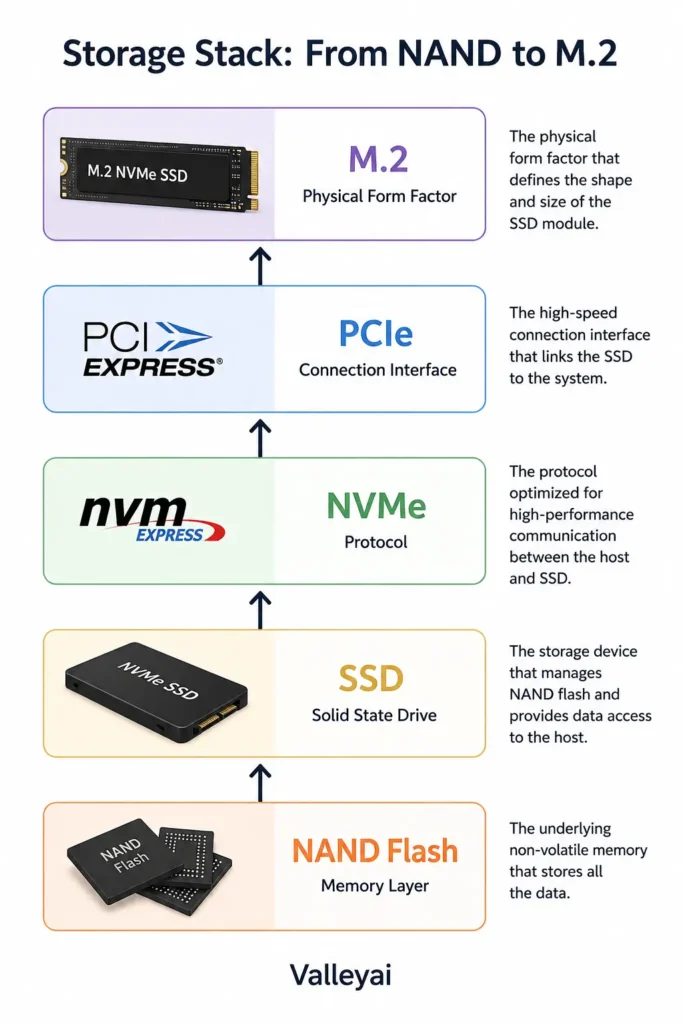
The Four Layers Behind an “NVMe SSD”
An NVMe product becomes easier to understand when you separate the storage medium, device, protocol, bus, and form factor.
| Layer | What it describes | Common example |
|---|---|---|
| Storage medium | Where the data is stored | NAND flash |
| Storage device | The physical product containing the storage | SSD |
| Protocol | How the computer sends commands | NVMe or SATA/AHCI |
| Bus or connection | The pathway carrying data | PCIe or SATA |
| Form factor | The physical shape and connector | M.2, 2.5-inch, U.2, or add-in card |
A typical consumer M.2 NVMe SSD therefore combines several layers:
NAND flash memory + SSD hardware + NVMe protocol + PCIe connection + M.2 form factor
That is why “NVMe,” “M.2,” and “PCIe” often appear together on a product listing. They describe related parts of the same storage setup, but they are not interchangeable terms.
NVMe vs a Regular SSD: What Actually Changes?
“Regular SSD” usually means a SATA SSD, although SSD is technically a broader category that includes NVMe drives. The main difference is the communication path and protocol, not the fact that one uses flash memory and the other does not.
| Feature | SATA SSD | NVMe SSD |
|---|---|---|
| Storage medium | NAND flash | NAND flash |
| Common protocol | SATA/AHCI | NVMe |
| Common connection | SATA data cable | PCIe |
| Common consumer shape | 2.5-inch | M.2 |
| Latency and command handling | Designed around older storage behavior | Designed for parallel flash storage |
| Sequential performance potential | Lower | Higher |
| Cable requirement | Usually requires data and power cables | M.2 versions connect directly to the motherboard |
| Best upgrade from | HDD or older SATA storage | SATA SSD, HDD, or an aging NVMe drive |
NVMe does not replace the concept of an SSD. NVMe improves how a compatible computer accesses an SSD.
The difference is often dramatic when replacing a hard disk drive. The difference between a SATA SSD and an NVMe SSD can be much less obvious during web browsing, email, and light office work. Storage speed is only one part of overall system responsiveness.
Is NVMe better than SSD?
NVMe is not directly “better than SSD” because NVMe and SSD describe different layers. An SSD is a storage device; NVMe is a protocol used by many high-speed SSDs.
Compared with a SATA SSD, an NVMe SSD usually offers higher potential throughput and lower command overhead. Compared with a hard drive, both types of SSD can feel substantially faster for booting, launching applications, and opening files.
NVMe vs PCIe: Protocol and Connection Are Different
PCIe is the high-speed expansion bus, while NVMe is the storage protocol that uses that bus. PCIe carries the data; NVMe defines how storage commands and responses are organized.
A useful analogy is a highway and a traffic system:
- PCIe is the highway with a certain number of lanes.
- NVMe is the traffic system designed to move storage requests efficiently.
- The SSD is the cargo being moved.
- The motherboard is the road network connecting the system components.
An NVMe SSD normally connects through one or more PCIe lanes. The supported PCIe generation and lane allocation affect the maximum bandwidth available to the drive. A newer SSD installed in an older system may operate at the older system’s supported level.
That does not necessarily make the drive unusable. It means the host system can limit the drive’s potential performance.
M.2 Is Not the Same as NVMe
M.2 is a physical form factor, not a storage protocol. An M.2 drive can use SATA signaling or PCIe signaling with NVMe, depending on the drive and the computer’s M.2 slot.
Two drives can look almost identical while using different electrical interfaces:
- M.2 SATA SSD: M.2 shape, SATA communication
- M.2 NVMe SSD: M.2 shape, PCIe communication
A slot may support:
- PCIe/NVMe drives only
- SATA M.2 drives only
- Both SATA and PCIe/NVMe drives
- A particular keying, length, or PCIe lane configuration
The most frustrating NVMe upgrade failures are often not installation mistakes. The drive fits, but the M.2 slot speaks the wrong electrical language.
Check the motherboard or laptop manual before buying. Look for terms such as PCIe x4, NVMe support, SATA M.2, Socket 3, or a statement that the slot supports both interfaces. The physical connector alone does not prove compatibility.
M.2 2230 and M.2 2280
M.2 size numbers describe the drive’s dimensions:
- 2230: 22 millimeters wide and 30 millimeters long
- 2280: 22 millimeters wide and 80 millimeters long
M.2 2280 is common in desktop computers and many laptops. Compact laptops, tablets, and handheld devices may use M.2 2230 or another length. A drive can use the correct protocol and still fail to fit because the physical size is wrong.
Why NVMe Can Be Faster Than SATA
NVMe can outperform SATA storage because NVMe was designed around the parallel nature of flash memory and communicates through the higher-bandwidth PCIe bus.
Older storage protocols were built around hard-drive behavior. Hard drives perform operations through mechanical movement, so the storage system traditionally handled a relatively limited number of requests at once. Flash storage has no moving head and can process many operations in parallel.
NVMe is designed to take advantage of that parallelism through features such as:
- Multiple command queues
- Large queue depths
- Lower protocol overhead
- Efficient command submission
- Direct PCIe connectivity
- Better handling of parallel input/output requests
The result is not simply “a faster cable.” NVMe changes how storage requests are organized between the operating system, CPU, controller, and flash memory.
Throughput, latency, and IOPS mean different things
Storage specifications often use three performance measurements:
- Throughput: How much data the drive transfers over time, usually measured in megabytes or gigabytes per second.
- Latency: How long the drive takes to begin or complete an operation.
- IOPS: How many input/output operations the drive can complete per second.
Sequential throughput matters during large file transfers, video projects, backups, and similar workloads. Random performance and latency matter more when the system is accessing many small files or handling numerous simultaneous requests.
A benchmark can make a storage upgrade look dramatic while everyday use barely changes. The workload matters more than the label on the box.
When an NVMe Upgrade Feels Noticeably Faster
An NVMe SSD provides the clearest advantage when the computer performs storage-heavy work or moves large amounts of data.
NVMe is especially useful for:
- Video editing and large media files
- Software development and large codebases
- Virtual machines
- Databases
- Frequent large backups
- 3D rendering and content creation
- Large application installations
- AI and machine-learning datasets
- Workstations handling multiple storage requests
Gaming can benefit from faster storage, particularly when installing games, loading large assets, or using newer technologies designed to stream data during play. The improvement from SATA SSD to NVMe SSD is not always as obvious as the improvement from hard drive to any SSD.
For browsing, email, document editing, and streaming, a SATA SSD may already remove most of the storage bottleneck. Spending more on NVMe can still make sense for capacity, newer hardware, or future upgrades, but maximum benchmark speed should not be the only buying criterion.
When NVMe Speed Does Not Match the Box
An NVMe SSD’s advertised sequential speed is a best-case result under specified test conditions, not a guarantee of the speed every computer or workload will achieve.
Actual performance can be limited by:
- The PCIe generation supported by the motherboard
- The number of PCIe lanes available to the M.2 slot
- The SSD controller
- NAND flash type and capacity
- DRAM or DRAM-less design
- Dynamic SLC cache behavior
- Drive temperature
- Queue depth and workload pattern
- The operating system and application
- Whether the transfer involves many small files or a few large files
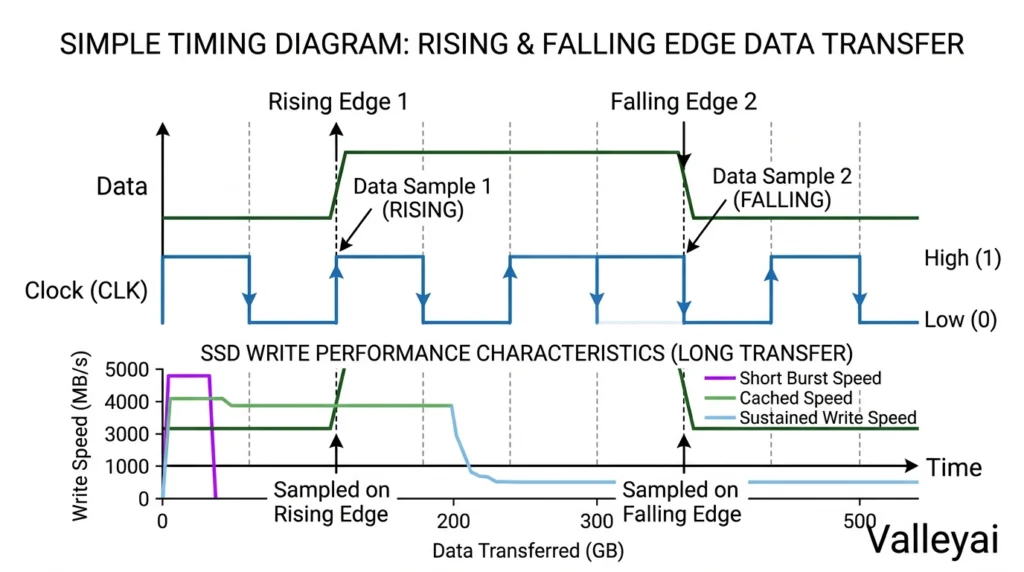
Thermal throttling can reduce performance when an NVMe SSD becomes too hot, especially during long writes. A heatsink or adequate airflow may help, but the correct solution depends on the drive, enclosure, motherboard, and workload.
Sustained write performance also deserves attention. Many consumer SSDs write quickly while their cache is available, then slow during very long transfers after the cache is exhausted. That behavior may never matter during normal office use but can matter during backups, video production, or repeated large file transfers.
How to Check NVMe Compatibility Before Buying
Use the following workflow before replacing a SATA drive or adding storage.
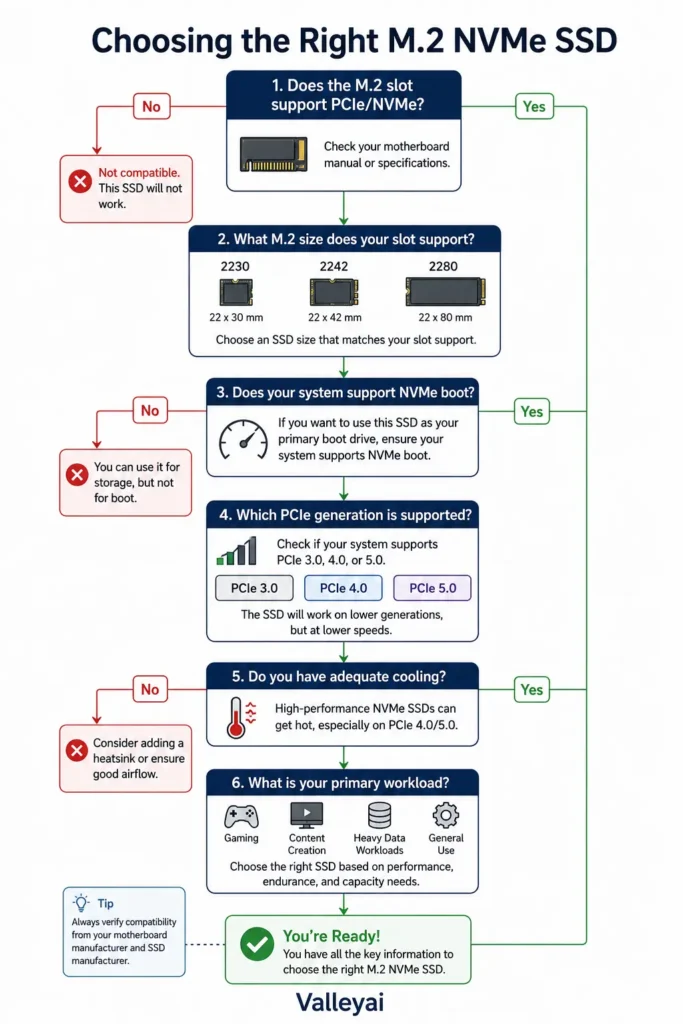
1. Identify the exact computer or motherboard model
Search the manufacturer’s support page for the precise model number. Desktop boards can have multiple M.2 slots with different capabilities.
2. Confirm the slot supports PCIe/NVMe
Do not rely on the phrase “M.2 slot.” Confirm whether the slot supports PCIe NVMe, SATA, or both.
3. Check the supported drive length
Verify whether the system accepts M.2 2230, 2242, 2260, 2280, or another size. Also check whether a heatsink or nearby component blocks the drive.
4. Check PCIe generation and lane allocation
A PCIe Gen 4 drive may work in a system designed for an earlier generation, but the host system can limit performance. Some M.2 slots share lanes with SATA ports or other expansion devices.
5. Verify boot support
A system may recognize an NVMe drive as secondary storage but lack the firmware support needed to boot from it. Older motherboards and laptops require special attention here.
6. Plan the operating-system migration
If the NVMe SSD will replace the boot drive, create a verified backup first. Cloning may involve partition style, UEFI settings, encryption, recovery partitions, and boot-manager changes.
7. Consider thermal clearance
Desktop M.2 drives may need a motherboard heatsink or aftermarket heatsink. Laptop upgrades must account for the manufacturer’s intended thermal pad and thickness.
Compatibility details vary by motherboard, laptop model, firmware, operating system, and drive. Manufacturer documentation is the final authority.
What to Check When an NVMe Drive Is Not Detected
An NVMe SSD that is not visible after installation may have a compatibility, firmware, configuration, or initialization problem.
Check these possibilities in order:
- The drive is fully inserted and secured with the correct screw.
- The M.2 slot supports PCIe/NVMe.
- Another device is not sharing or disabling the slot’s PCIe lanes.
- The motherboard firmware is current enough for the drive.
- The drive appears in BIOS or UEFI hardware information.
- Windows Disk Management or the relevant operating-system storage tool can see the uninitialized drive.
- The operating system has appropriate NVMe driver support.
- The drive is not disabled by a firmware setting.
- The laptop’s physical drive length and single-sided or double-sided clearance are suitable.
When an NVMe drive vanishes after installation, check the motherboard manual before returning the drive. Slot sharing and protocol support cause more confusion than many buyers expect.
Where Enterprise NVMe Fits
Consumer NVMe SSDs connect directly to a computer through PCIe, while enterprise systems can expose NVMe storage across a network using NVMe over Fabrics, commonly abbreviated NVMe-oF.
NVMe-oF carries NVMe commands over technologies such as Ethernet, Fibre Channel, or RDMA-based networks. The approach allows servers to access remote flash storage while preserving the command model developed for NVMe. It is relevant to data centers, virtualization, databases, AI workloads, and high-performance computing.
Home users generally do not need NVMe-oF to install an NVMe SSD. The enterprise concept matters because it shows that NVMe is more than a particular M.2 drive shape: NVMe is a storage protocol that can operate across different transport environments. The NVM Express specifications provide the appropriate standards context.
Is NVMe Worth It?
NVMe is usually worth choosing when the computer supports it, the price difference is reasonable, and the workload benefits from higher storage throughput or lower latency.
Choose NVMe when:
- You are building a new desktop or laptop.
- You regularly move large files.
- You edit video or high-resolution images.
- You run virtual machines or databases.
- You compile large software projects.
- You want a compact drive with no SATA data cable.
- The system’s M.2 slot supports PCIe/NVMe.
A SATA SSD may be the better value when:
- The computer lacks PCIe/NVMe support.
- The system has only a SATA M.2 slot.
- The workload is mostly browsing and office software.
- You are replacing a hard drive and want the largest improvement per dollar.
- You need a 2.5-inch drive for an older computer.
The right choice depends on the complete system, not the fastest number printed on the product page.
NVMe Questions Buyers Still Ask
Does NVMe replace SSD?
No. NVMe does not replace SSD as a category because NVMe and SSD describe different things. An SSD is the physical solid-state storage device, while NVMe is a protocol used to communicate with many flash-based SSDs. A SATA SSD and an NVMe SSD are both SSDs, but they use different communication technologies.
Can an NVMe SSD work in a SATA M.2 slot?
Usually, no. An NVMe SSD requires PCIe signaling, while a SATA M.2 slot provides SATA signaling. The drive may fit the connector physically and still remain undetected. Confirm the slot’s supported protocol in the computer or motherboard manual before purchasing an M.2 drive.
Does an NVMe SSD need a heatsink?
An NVMe SSD does not always need a heatsink for light workloads, but cooling can help maintain performance during sustained transfers. High-performance PCIe drives, compact systems with limited airflow, and repeated writes are more likely to benefit from a heatsink. A heatsink must fit the motherboard and should not interfere with the laptop’s enclosure or thermal pad.
Will an older laptop support NVMe?
An older laptop may support NVMe, but compatibility depends on the M.2 slot, firmware, physical drive size, operating system, and boot support. Some laptops accept only SATA M.2 drives even though the connector resembles an NVMe slot. Check the exact laptop service manual or tested upgrade list rather than assuming that an M.2 connector supports every M.2 protocol.
Does NVMe make games load instantly?
No. NVMe can reduce storage-related loading time, but games also depend on the CPU, graphics hardware, memory, game engine, asset design, and operating-system activity. The improvement is often largest when upgrading from a hard drive. Moving from a SATA SSD to NVMe may help in some games, but it rarely makes every loading screen disappear.
What is the difference between sequential and random NVMe performance?
Sequential performance measures the transfer of large, contiguous blocks of data, such as a large video file. Random performance measures many smaller accesses spread across the drive. Sequential speed is useful for large-file work, while random performance and latency often matter more for application behavior and multitasking. Neither measurement alone represents total system speed.
Should an NVMe SSD be used as a boot drive?
An NVMe SSD can be an excellent boot drive when the motherboard or laptop supports NVMe booting. Verify firmware compatibility before migrating the operating system. Back up important data, confirm that the system uses the expected UEFI or legacy mode, and make sure the cloned drive contains the required boot and recovery partitions.
Why is an NVMe drive not showing in Windows?
A newly installed NVMe drive may be absent from File Explorer because it has not been initialized or assigned a volume. If the drive is missing from Disk Management and BIOS/UEFI as well, investigate slot compatibility, lane sharing, firmware support, installation, and power or hardware problems. Do not format a drive that contains needed data.
NVMe is a modern storage protocol, an NVMe SSD is the physical drive using that protocol, PCIe is the connection pathway, and M.2 is only one possible form factor. Once those layers are separated, choosing or troubleshooting an NVMe upgrade becomes much less mysterious.

Kaleem
Kaleem is a Computer Science graduate and the founder of Valley AI (valleyai.net), where he publishes in-depth, tested guides on computers, AI, and internet technologies. Every guide is researched from primary sources and updated regularly.