

You’re halfway through a temperature log when you realize the degree symbol isn’t on any physical key. That’s normal no standard US layout places it there. The fastest universal fix is to copy the character ° and paste it. On Windows, the degree symbol (°) is typed with Alt+0176 if you have a numeric keypad. On Mac, the key chord is Option+Shift+8.
How to Type the Degree Symbol (°) on a Keyboard in Windows
On Windows, the degree symbol (°) relies on the numeric keypad through the Alt+0176 input method (per Microsoft’s keyboard documentation). Hold the Alt key, type 0176 on the numpad, and release Alt.
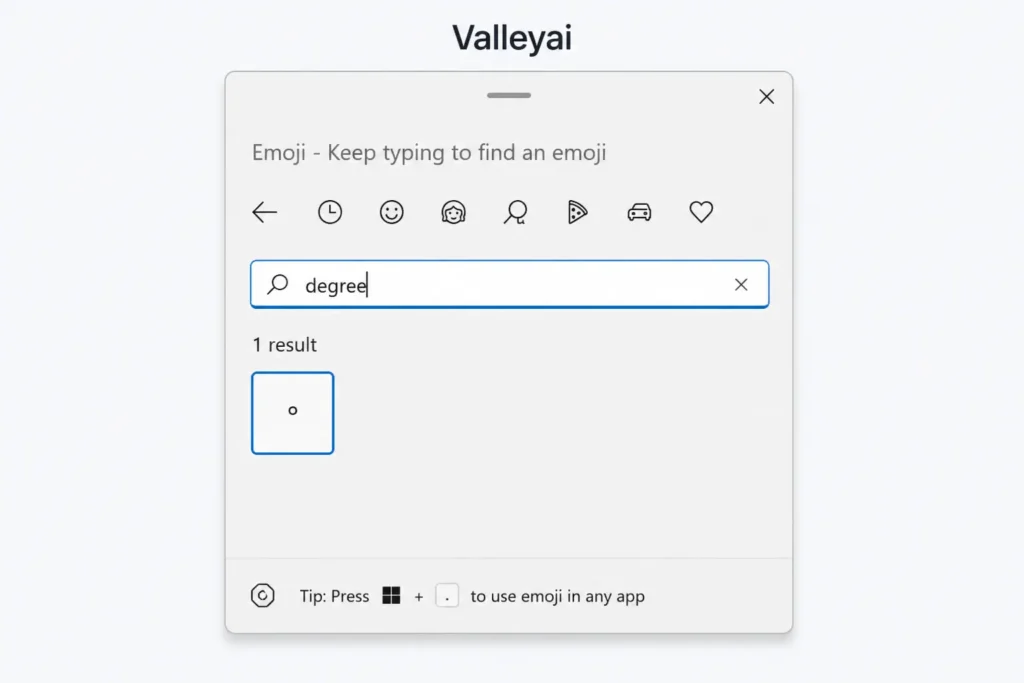
Most modern laptop keyboards omit a physical numeric keypad. On a 14-inch Windows laptop with no physical numpad, I’ve watched users hammer Alt+0176 on the top row and get nothing; the Win+. emoji panel is the fix they never knew existed.
For devices without a numpad, open the emoji panel with Win+. (Windows key plus period). Type “degree” in the search field. Alternatively, open the Character Map utility, select the degree symbol (°), and copy it.
Why Alt+167 Gives You the Wrong Character
The Alt+167 mistake is brutally common: in a temperature log, Excel treats º (ordinal) and ° (degree) as different characters, silently breaking sort order.
The degree symbol (°) is defined by the Unicode Standard as code point U+00B0. The character produced by Alt+167 is the masculine ordinal indicator (º), which lives at Unicode U+00BA. They look similar in some fonts but are distinct entities. Always use Alt+0176 for the true degree sign on Windows.
macOS: The Option+Shift+8 Key Chord
For macOS, the degree symbol (°) is typed using the Option+Shift+8 key chord. Hold Option and Shift, then press 8. Apple’s official documentation confirms this as the native input method for special characters.
No numeric keypad is required for this method. It works on every Mac keyboard layout, including compact laptops.
iPhone and Android: Long-Press the Zero Key
On iOS, the degree symbol (°) appears when you press and hold the 0 key on the numeric keyboard. A popup shows the degree symbol (°); slide your finger to it and release.
Android’s Gboard behaves the same way. Press and hold the 0 key in any text field to reveal the degree symbol (°). Third-party keyboards generally mirror this long-press behavior.
Chromebook and Linux: Hex Input via Ctrl+Shift+U
ChromeOS and Linux desktop environments use a hex input protocol for Unicode characters. Press Ctrl+Shift+U, release, then type 00B0 and press Enter. The degree symbol (°) renders immediately.
This method requires no external tools. It is the cleanest path for Chromebook users who lack a numeric keypad entirely.
The 10-Second Pick: Which Method Fits Your Device
Choosing the right input depends on your operating system and hardware. The table below maps device type to the fastest native method.
| Device | Numpad? | Fastest Method |
|---|---|---|
| Windows desktop | Yes | Alt+0176 |
| Windows laptop | No | Win+. panel |
| Mac | Any | Option+Shift+8 |
| iPhone/Android | N/A | Hold 0 key |
| Chromebook/Linux | No | Ctrl+Shift+U + 00B0 |
Use this matrix to avoid the Alt+167 trap entirely.
Unicode and HTML: The Encoding Behind the Symbol
The degree symbol (°) is defined by the Unicode Standard as code point U+00B0. In web markup, the degree symbol is represented by the HTML entity ° or the numeric character reference °. Both resolve to the same glyph in browsers.
Understanding this prevents confusion when copying symbols from PDFs. When formatting a lab report and copy-pasting the degree symbol from a PDF, you sometimes inherit a font-specific glyph that breaks in plain-text editors typing it via Unicode input is cleaner.
Frequently Asked Questions
How do you type the degree symbol on a Windows keyboard?
On a Windows keyboard with a numeric keypad, hold Alt and type 0176. Without a numpad, use the Win+. emoji panel and search “degree,” or use Character Map.
How do you type the degree symbol on a Mac?
On macOS, hold Option and Shift, then press 8. This key chord outputs the degree symbol (°) on any Mac keyboard without extra tools.
How do you type a degree symbol without a numeric keypad?
Use the Win+. emoji panel on Windows, Option+Shift+8 on Mac, or Ctrl+Shift+U then 00B0 on ChromeOS/Linux. Mobile uses the hold-0 long-press.
What is the Alt code for the degree symbol?
The correct Alt code for the degree symbol (°) is Alt+0176 on Windows with a numeric keypad. Avoid Alt+167, which produces the ordinal indicator º.
How do you type the degree symbol on an iPhone or Android phone?
On both iOS and Android (Gboard), press and hold the 0 key in the numeric keyboard. A popup reveals the degree symbol (°); slide to select it.
Why does Alt+167 produce the wrong character instead of a degree sign?
Alt+167 outputs the masculine ordinal indicator (º) at Unicode U+00BA, not the degree sign (°) at U+00B0. They look alike but break data sorting and encoding.

Kaleem
My name is Kaleem and i am a computer science graduate with 5+ years of experience in Computer science, AI, tech, and web innovation. I founded ValleyAI.net to simplify AI, internet, and computer topics also focus on building useful utility tools. My clear, hands-on content is trusted by 5K+ monthly readers worldwide.