
The main difference between ASCII and Unicode is their scope, capacity, and architectural design. ASCII is a legacy 7‑bit character set covering basic English letters, numbers, and control codes. Unicode is a universal standard covering the world’s languages, emojis, and symbols, typically implemented using variable‑length encodings like UTF‑8.
While standard web development often lumps these terms together, understanding the transition from strict character sets to abstract character encoding models is critical. Modern software architecture demands deep knowledge of how text is serialized, stored, and parsed to prevent security vulnerabilities, bloat, and database corruption.
What Is ASCII?
ASCII, the American Standard Code for Information Interchange, was first published in 1963 (Wikipedia) as a 7‑bit character encoding for teleprinters. With 7 bits, it can represent exactly 128 different characters uppercase and lowercase English letters, digits, common punctuation, and a set of control codes (like newline and carriage return).
A few everyday characters show how ASCII maps numbers to symbols:
| Character | Decimal | Hex |
|---|---|---|
| A | 65 | 0x41 |
| space | 32 | 0x20 |
| newline | 10 | 0x0A |
Limitations of ASCII
ASCII’s size is its biggest constraint:
- No room for accented letters, umlauts, or non‑Latin scripts.
- No symbols beyond basic punctuation (no €, £, or ©).
- Designed for American English teleprinters, not global computing.
What Is Unicode?
Unicode is a universal character encoding standard maintained by the Unicode Consortium. Instead of fixing a single bit‑width, Unicode assigns every character a unique number called a code point, written as U+ followed by a hexadecimal value (for example, U+0041 for ‘A’). The standard then leaves it to separate encoding schemes (UTF‑8, UTF‑16, UTF‑32) to turn those numbers into actual bytes.
As of version 17.0, released September 9, 2025, Unicode defines 159,801 characters spanning 172 scripts, plus symbols and emoji (Unicode Character Count). This decoupling of character identity from storage is what makes Unicode capable of representing virtually every writing system while preserving backward compatibility with ASCII.
Why ASCII Was Created, and Why It Wasn’t Enough
ASCII grew out of the need for a common way to exchange text between early computers and teleprinters. Seven bits gave enough room for the English alphabet plus control codes, and its simplicity made it easy to implement in hardware. Those 7-bit patterns are binary numbers underneath; our guide explains what binary code is and how it works.
As computing spread internationally, 128 characters quickly became a bottleneck. Languages like French, German, and Spanish needed accented letters, while scripts like Cyrillic, Arabic, and CJK were completely out of reach.
The Problem with Code Pages (ISO/IEC 8859)
Before Unicode took over, the industry tried to squeeze more characters out of the standard 8‑bit byte. Extensions like the ISO/IEC 8859 family often called code pages used the 8th bit to add another 128 slots. But every region needed a different mapping. A byte value 0xE9 meant “é” on a French machine and “щ” on a Russian one, making reliable cross‑language sharing impossible.
Unicode solved this by separating the abstract character (the code point) from the way it is stored as bytes (the encoding). This single, unified system replaced the patchwork of conflicting code pages.
ASCII vs Unicode: Key Differences Table
| Feature | ASCII | Unicode |
|---|---|---|
| Architecture | Direct map (character = byte) | Abstract (character → code point → byte via encoding) |
| Bit Space | 7‑bit (128 characters) | 21‑bit code space (1,114,112 theoretical slots) |
| Current Capacity | 128 characters | 159,801 characters (Standard Version 17.0) |
| Encoding Formats | Standard ASCII, Extended ASCII | UTF‑8, UTF‑16, UTF‑32 |
| Memory Efficiency | 1 byte per character (fixed) | Variable (1 to 4 bytes in UTF‑8) |
| Global Support | English only | Universal (Kanji, Cyrillic, Arabic, emoji, and more) |
The table distills the architectural split: ASCII maps characters straight to bytes, while Unicode maps characters to code points first and leaves bytes to the encoding. The next section shows why that indirection made ASCII a permanent subset of Unicode.
Why ASCII Is a Subset of Unicode
The first 128 code points of Unicode are identical to ASCII. For example, the letter ‘A’ is U+0041 in Unicode, and when encoded in UTF‑8 it produces the same single byte (0x41) as ASCII. UTF‑8, designed by Ken Thompson and Rob Pike (UTF‑8 History), is built so that any valid ASCII text is automatically valid UTF‑8 text: total backward compatibility is baked into the design.
This compatibility, combined with the fact that the high‑bit of an ASCII byte is always 0, lets UTF‑8 parsers instantly distinguish between a 1‑byte ASCII character and the start of a multibyte Unicode sequence. The moment a parser sees a 1 in the most significant bit, it knows it has encountered a character that needs more bytes.
That bit test runs inside the processor on every byte it reads. The fetch-decode-execute cycle is what turns encoded bytes into running programs.
UTF‑8 is used by over 90% of all websites (W3Techs), making it the de facto encoding for the web.
Practical Examples: JSON, Emojis, and Memory
Handling modern text requires understanding how characters translate to bytes. While standard English text uses 1 byte per character in both ASCII and UTF‑8, complex grapheme clusters like emojis require up to 4 bytes, directly impacting JSON serialization, database storage, and string manipulation logic. On the input side, typing emoji on any device starts with the keyboard handing those code points to the application.
Hex‑Editor Analysis: String Footprints
- Standard character (
A): 1 byte (0x41) - Basic Multilingual Plane character (
é): 2 bytes in UTF‑8 (0xC3 0xA9) - Emoji Plane 1 character (
🚀): 4 bytes (0xF0 0x9F 0x9A 0x80)
Performance Impact on JSON and APIs
If your application sends purely ASCII data, UTF‑8 adds no storage overhead. But if you encode JSON with UTF‑16 (the default internal string representation in Java and JavaScript), every standard English character expands to 2 bytes, potentially doubling your memory footprint in high‑volume APIs.
Why String Length Lies: Code Points Are Not Bytes
A string has two sizes. One is the number of characters a person sees. The other is the number of bytes a computer stores. The two agree for ASCII text and diverge everywhere else, and that divergence causes real bugs in input validation, truncation, and any API that bills by the byte.
The table below shows measurements run for this article on 2026-10-24 (Python 3). The same characters take different byte counts in each encoding, while len() reports code points:
| Character | Code points | len() | UTF-8 bytes | UTF-16 bytes | UTF-32 bytes |
|---|---|---|---|---|---|
| A | U+0041 | 1 | 1 | 2 | 4 |
| é (precomposed) | U+00E9 | 1 | 2 | 2 | 4 |
| é (e + combining accent) | U+0065 U+0301 | 2 | 3 | 4 | 8 |
| 🚀 | U+1F680 | 1 | 4 | 4 | 4 |
| 👨👩👧👦 (family) | 7 code points joined by U+200D | 7 | 25 | 22 | 28 |
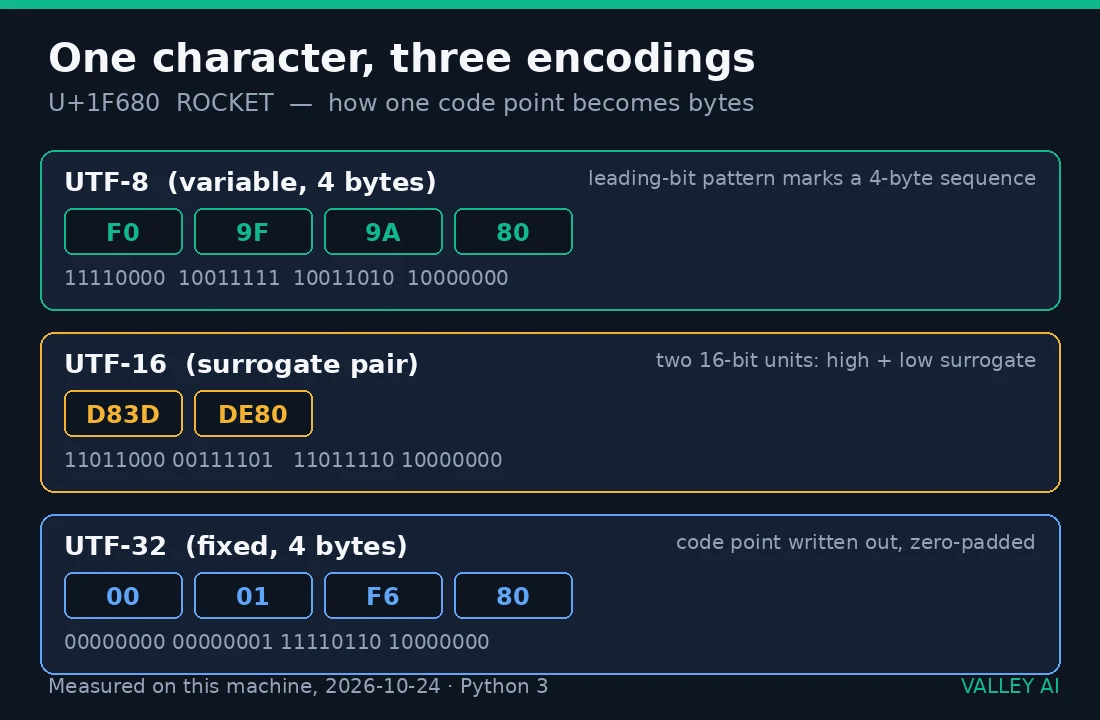
One visible glyph can hold many code points. The family emoji renders as a single picture but contains seven code points joined by zero-width joiners (U+200D), taking 25 bytes in UTF-8. Cutting such a string at a byte offset can split an emoji in half, and cutting at a code point boundary can still detach a combining mark from its letter. Length checks on user input should use the program’s own unit of measurement: code points for logic, bytes for storage.
If ‘🚀’ is one character, why does JavaScript report its length as 2?
JavaScript strings are sequences of UTF-16 code units, and .length reports the unit count. The rocket sits above U+FFFF, so UTF-16 stores it as a surrogate pair (measured here as D83D DE80), which is two units. Python’s len() counts code points instead and reports 1. A separate Node.js check confirmed '🚀'.length === 2 while codePointAt(0) returned 0x1F680. Neither answer is wrong; each measures a different thing. When length drives logic, count code points ([...'🚀'].length in JavaScript) rather than storage units.
Normalization: When Two Identical-Looking Strings Are Not Equal
Unicode allows the same visible character to be built more than one way. The letter ‘é’ can be a single precomposed code point (U+00E9) or the letter ‘e’ followed by a combining acute accent (U+0065 U+0301). Keyboards, operating systems, and web forms produce both forms, and a program comparing them byte by byte sees two different strings.
Tested side by side, the two forms compare as unequal. In the test run for this article, precomposed ‘é’ == decomposed ‘é’ evaluated to False, with UTF-8 byte lengths of 2 and 3 respectively. Applying NFC normalization (Normalization Form C, which composes characters into their precomposed form) made the comparison return True. The practical fix: normalize user input to NFC before comparing, hashing, or deduplicating it.
Can a login form or a search box break because of this?
Yes. When a username is stored in one normalization form and typed in another, a direct string comparison rejects a correct entry. Systems that normalize text on write avoid the problem; systems that compare raw bytes inherit it. Deduplication carries the same hazard: two visually identical records coexist because their bytes differ.
Security and Migrations: Homograph Attacks to Database Collation
Unicode’s vast character set introduces specific security and database challenges. Homograph attacks exploit visually identical but distinct Unicode characters to spoof domains, while database migrations demand careful handling of collation, Byte Order Marks (BOM), and character set configurations.
Security Implications (Homograph Attacks)
Because Unicode covers thousands of scripts, many characters look identical. A malicious actor can register paypal.com using the Cyrillic ‘а’ (U+0430) instead of the ASCII ‘a’ (U+0061). To browsers, these are entirely different destinations.
This example is for educational purposes, so test any security scenario in a controlled environment.
Defense strategy: Modern browsers use Punycode to convert Unicode URLs into ASCII sequences (e.g., xn--pypal-4ve.com), immediately alerting users to the spoof.
Database Migration: The utf8mb4 Mandate
If you are migrating legacy MySQL databases, avoid the utf8 character set. Historically, MySQL’s utf8 was limited to 3 bytes per character, causing failures when users inserted 4‑byte emojis.
Production fix: Always alter legacy tables to use utf8mb4 to support the full Unicode range.
Troubleshooting: How to Fix Mojibake
Mojibake occurs when text encoded in one format is decoded using another, resulting in garbled characters (like é instead of é). The root cause is almost always a mismatch between the encoding your database expects and what your application sends.
Identify the original encoding (usually ISO‑8859‑1 or Windows‑1252) and explicitly re‑decode it before applying strict UTF‑8 rules.
# Simulating Mojibake
broken_text = "café"

# 1. Encode back to raw bytes using the incorrect assumption
raw_bytes = broken_text.encode('windows-1252')

# 2. Decode properly as UTF-8
fixed_text = raw_bytes.decode('utf-8')
print(fixed_text)  # Output: café
Frequently Asked Questions
UTF-8, UTF-16, or UTF-32: which one should a new project use?
UTF-8. It stores ASCII text at one byte per character and covers the full Unicode range, which is why it became the default for the web. Choose UTF-16 only where the platform requires it, such as Windows APIs or Java and JavaScript internals. UTF-32 is rarely worth its fixed four-bytes-per-character cost outside specialized text processing.
What is a byte order mark, and should my files have one?
A byte order mark (BOM) is the invisible character U+FEFF placed at the start of a file to signal its encoding and byte order. In UTF-8 it serves no purpose and often causes harm: a BOM at the start of a PHP file, shell script, or JSON payload can break shebangs and strict parsers. Save text as UTF-8 without BOM unless a specific tool demands one.
How can I tell which encoding a mystery text file uses?
Check the explicit signals first: the HTTP Content-Type header, the tag, or a BOM at the start of the file. When those are missing, a detector such as Python’s chardet or the file command guesses from byte patterns, and short texts are frequently guessed wrong. The reliable fix is to declare the encoding when the file is created instead of detecting it later.
Do I need to declare the encoding of my HTML pages?
Yes. Place as the first element inside so the browser never has to guess. Without an explicit declaration, browsers fall back to legacy heuristics, and a single misguessed page is where mojibake begins.
Is Windows-1252 the same thing as Unicode?
No. Windows-1252 is an 8-bit code page: a regional extension of ASCII that assigns the upper 128 byte values to Western European characters. Unicode replaced that entire family of code pages with one global mapping. Text stored as Windows-1252 must be decoded with that same code page and re-encoded as UTF-8 before modern systems handle it correctly.
Why do two files with the same text have different sizes?
Because the encoding shapes the file size together with the characters. Pure ASCII text takes the same space in ASCII and UTF-8, but accented characters and emoji expand: ‘é’ needs two bytes in UTF-8 and each emoji needs four. Line endings add their own difference (CRLF versus LF). Compare encodings before blaming the content.
Further Reading
- The Absolute Minimum Every Software Developer Absolutely, Positively Must Know About Unicode and Character Sets (Joel Spolsky)
- Unicode Standard
- UTF‑8 Specification (RFC 3629)

Kaleem
Kaleem is a Computer Science graduate (Virtual University of Pakistan) and the founder and editor of Valley AI, where he publishes in-depth, tested guides on computer hardware, artificial intelligence, and how the internet works. Every guide is researched from primary sources, tested hands-on where possible, and updated when the facts change.