
The two-symbol system running every computer on earth. Every piece of software you’ve ever used every photo, every message, every transaction reduces to a sequence of two symbols: 0 and 1. Not because engineers lacked imagination, but because the physics of silicon gave them no better option. Understanding why those two symbols work, and how they scale into everything digital, changes how you see computing entirely. Most people treat binary as trivia. It’s actually the reason your computer is reliable at all.
Binary Code: The Language Computers Actually Speak
Binary code is a base-2 number system that represents information using only two digits 0 and 1. Every number, letter, image, and instruction inside a computer is ultimately stored and processed as a sequence of these two values.
The term “binary” comes from the Latin binarius, meaning “consisting of two.” In computing, each 0 or 1 is called a bit (short for binary digit) the smallest unit of information a computer can store. Eight bits grouped together form a byte, which is the standard unit for measuring data storage and file sizes.
Binary isn’t a programming language or a file format. It’s the foundational number system that all digital hardware operates on. Everything above it programming languages, operating systems, applications is an abstraction built on top of this two-symbol foundation.
Why Two Symbols? The Physics That Made Binary Inevitable
Most explanations stop at “computers use 0 and 1 because switches are on or off.” That’s accurate but incomplete. The real answer lives in semiconductor physics.
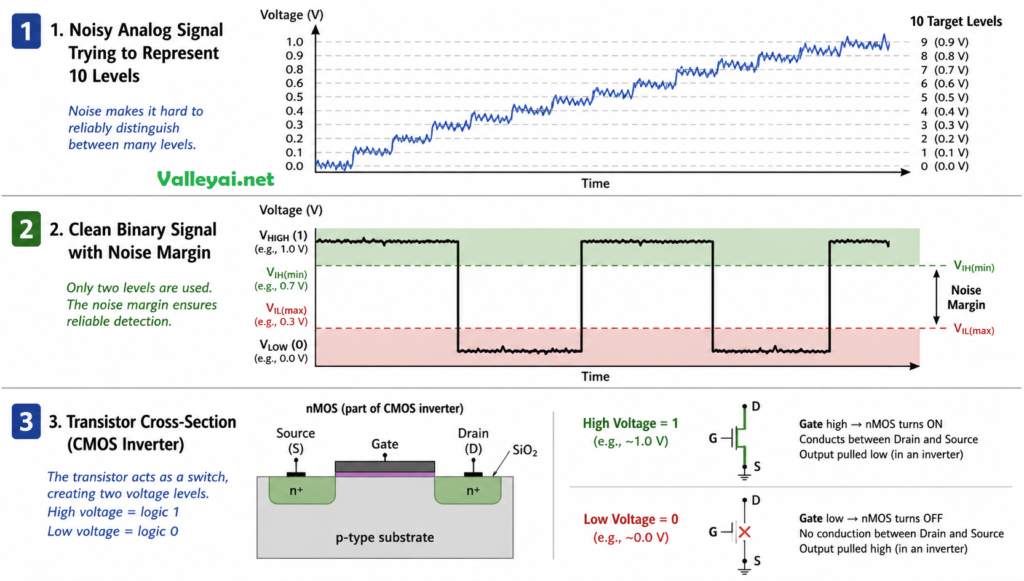
Modern processors contain billions of transistors microscopic voltage-controlled switches etched into silicon. A transistor has two stable electrical states: a high voltage (typically representing 1) and a low voltage (representing 0). These aren’t arbitrary design choices. Transistors are fundamentally bistable they’re engineered to snap cleanly between two states, not drift across a continuous range.
Here’s why this matters for reliability. Imagine trying to distinguish ten voltage levels (0.5V, 1.0V, 1.5V… up to 5.0V) to represent base-10 digits. A signal at 2.3V — is that a “2” or a “3”? Electrical noise, temperature variation, and manufacturing tolerances make that distinction unreliable at scale. With binary, a signal anywhere above the threshold is a 1; anything below is a 0. The noise margins are enormous. Error detection becomes almost trivial.
This is the insight most people miss: binary isn’t a limitation of computers it’s the optimal design for silicon-based computing. Ternary (base-3) processors have been built experimentally. They’re consistently less reliable, harder to manufacture, and offer no practical advantage over binary at the transistor level. The two-state system won because physics favored it, not because engineers settled for it.
I’ve seen people argue passionately that ternary computing is the future because base-3 is theoretically more information-dense per digit. What they’re usually missing is that information density per digit is not the bottleneck in modern computing. Transistor switching speed, heat dissipation, and manufacturing precision are. Ternary doesn’t help with any of those it makes all three worse. The argument sounds compelling until you’ve spent any time with semiconductor physics.
How Binary Numbers Actually Work: Positional Value
Binary follows the same positional logic as the decimal system you’ve used your whole life. In decimal, each position represents a power of 10. In binary, each position represents a power of 2.
Take the decimal number 13. In binary, it’s written as 1101. Here’s why:
| Position | 2³ | 2² | 2¹ | 2⁰ |
|---|---|---|---|---|
| Value | 8 | 4 | 2 | 1 |
| Bit | 1 | 1 | 0 | 1 |
Reading left to right: (1×8) + (1×4) + (0×2) + (1×1) = 13.
The rightmost position is always 2⁰ = 1. Moving left, each position doubles: 2, 4, 8, 16, 32, and so on. A bit of 1 means “include this value”; a bit of 0 means “skip it.”
This part trips up a lot of people. The key insight is that each position represents a power of 2, not just a placeholder. Once that clicks, reading binary becomes mechanical.
Converting Decimal to Binary: The Division Method
To convert decimal 45 to binary:
- Divide 45 by 2 → quotient 22, remainder 1
- Divide 22 by 2 → quotient 11, remainder 0
- Divide 11 by 2 → quotient 5, remainder 1
- Divide 5 by 2 → quotient 2, remainder 1
- Divide 2 by 2 → quotient 1, remainder 0
- Divide 1 by 2 → quotient 0, remainder 1
Read the remainders bottom to top: 101101
Verify: (1×32) + (0×16) + (1×8) + (1×4) + (0×2) + (1×1) = 32 + 8 + 4 + 1 = 45 ✓
A standard byte (8 bits) can represent values from 0 (00000000) to 255 (11111111). That 256-value range (2⁸) is why you see it everywhere color channels in images (0–255 for red, green, blue), ASCII character codes, network subnet masks.
From 1s and 0s to Words on Your Screen: Tracing the Full Stack
Knowing that “A” equals binary 01000001 is one thing. Understanding the chain that gets you from that bit pattern to a visible character on your screen is another and it’s where most explanations stop too early.
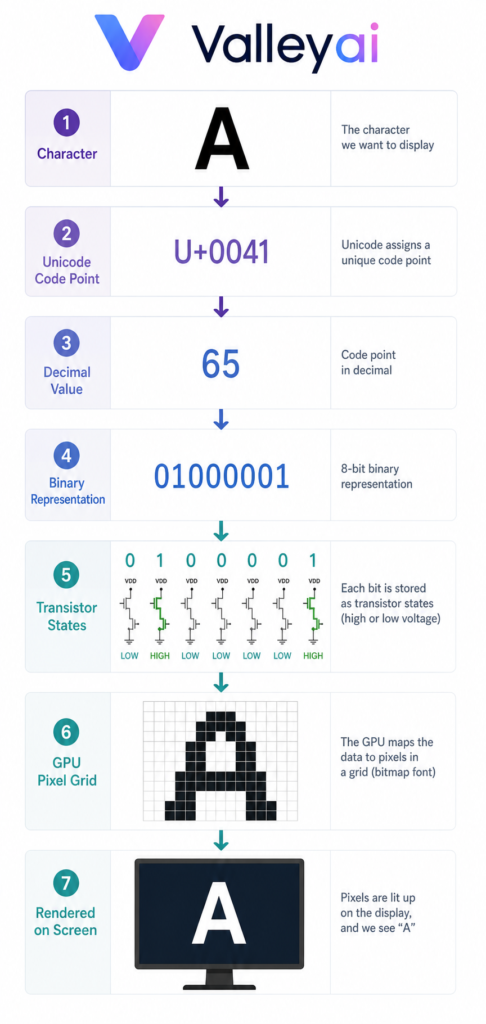
Here’s the complete path for the letter “A”:
Step 1 — You press the key.
Your keyboard sends a signal to the operating system identifying which key was pressed.
Step 2 — The OS assigns a code point.
The letter “A” maps to Unicode code point U+0041, which in decimal is 65.
Step 3 — The value is encoded in binary.
Decimal 65 in 8-bit binary: 01000001
Step 4 — The CPU processes the bits.
The processor evaluates those 8 bits through logic gates AND, OR, NOT operations executed by transistors switching between high and low voltage states billions of times per second. The same components that the integrated circuit combined onto a single chip.
Step 5 — The GPU renders the glyph.
The OS passes the character code to the graphics system, which looks up the “A” glyph in the active font file (itself stored in binary), calculates the pixel positions, and writes color values to the screen buffer.
Step 6 — Pixels light up.
Your display converts those pixel values to light. You see “A.”
The entire chain from keypress to visible character completes in milliseconds. Every step is binary underneath. The ASCII standard, first established in 1963, defined the original 128-character mapping using 7 bits. Unicode extended this to cover over 140,000 characters across all human writing systems, with UTF-8 as the dominant encoding format on the modern web.
Read also: ASCII VS UNICODE
Where Binary Shows Up in Practice
Binary isn’t just an academic concept. It’s the operational reality underneath every digital system.
Data storage. Every file on your drive is a sequence of bits. A 1 MB file contains roughly 8 million bits. Hard drives store these as magnetic polarities; SSDs store them as electrical charges in flash memory cells. The unit system kilobytes, megabytes, gigabytes is built on powers of 2 (2¹⁰ = 1,024, not 1,000, which is why “gigabyte” means slightly different things in different contexts).
CPU arithmetic. Your processor performs addition, subtraction, multiplication, and comparison operations entirely in binary. Logic gates — AND, OR, NOT, XOR are the physical implementation of Boolean logic, and they operate on binary inputs. A modern CPU executes billions of these gate operations per second.
Digital communication. WiFi, Bluetooth, and cellular networks transmit binary data as modulated radio signals. The underlying information is always binary; the modulation scheme (AM, FM, QAM) determines how 0s and 1s are encoded into electromagnetic waves. Error-correcting codes like those used in QR codes and deep-space communication exploit binary’s noise immunity to detect and fix transmission errors.
Image and audio encoding. A 24-bit color image stores three 8-bit values (red, green, blue) per pixel. A pixel at full red is (255, 0, 0) binary (11111111, 00000000, 00000000). Audio samples are stored as binary integers representing amplitude at each moment in time. The “bit depth” of audio (16-bit, 24-bit) directly determines how many distinct amplitude levels can be represented.
Security and encryption. Cryptographic algorithms AES, RSA, SHA-256 operate on binary data at the bit level. The security of these systems depends partly on the mathematical properties of binary operations: XOR, bit shifting, modular arithmetic. When you hear “256-bit encryption,” that’s describing the length of a binary key.
Why Modern Developers Rarely See Raw Binary
Here’s something worth being honest about: if you’re learning to code in Python, JavaScript, or most modern languages, you’ll almost never look at raw binary directly. The abstraction layers are doing the work invisibly.
When you write name = "Alice" in Python, the interpreter handles encoding, memory allocation, and binary representation automatically. You’re operating five or six abstraction layers above the transistors. That’s intentional design it reduces cognitive load and lets you focus on logic rather than bit manipulation.
But the abstraction has limits. When debugging a buffer overflow or examining a memory dump in a debugger, you’re suddenly looking at raw hexadecimal (a shorthand for binary each hex digit represents exactly 4 bits). Most debuggers display memory in hex rather than binary because it’s more compact, but understanding why the values appear in that format is the difference between knowing what you’re looking at and actually understanding what went wrong.
The first time you open a hex dump in a debugger and actually understand what you’re looking at not just these are memory addresses. but the actual byte values of your variables, the null terminators at the end of strings, the padding bytes the compiler inserted something clicks that no tutorial can manufacture. It’s one of those moments where the abstraction becomes transparent and you see the machine underneath. Worth chasing deliberately, even if your day job never requires it.
A Python developer writing web applications might go an entire career without manually manipulating bits. A firmware engineer writing code for a microcontroller might pack multiple sensor readings into a single byte using bit masking and shifting operations that require fluent binary thinking. Neither is more “real” programming. The abstraction layer appropriate to your work is the right one.
The honest take on “should you learn binary”: understand it conceptually deeply enough to reason about encoding, data sizes, and bitwise operations. You probably don’t need to memorize conversion tables. You absolutely need to know why a byte holds 256 values and what happens when it overflows.
Binary and Negative Numbers: The Two’s Complement Trick
One thing every introductory binary explanation skips: how computers handle negative numbers.
The naive approach using one bit as a “sign” flag creates two representations for zero (positive zero and negative zero) and complicates arithmetic circuits. Two’s complement solves this elegantly.
To find the two’s complement of a positive number:
- Write the positive value in binary
- Flip all the bits (0→1, 1→0)
- Add 1 to the result
Example: -5 in an 8-bit system
- Positive 5: 00000101
- Flip bits: 11111010
- Add 1: 11111011
The payoff: a CPU can subtract any number by adding its two’s complement. No separate subtraction circuit required. In an 8-bit signed system, values range from -128 to +127 — still 256 distinct values, just shifted. This is why signed and unsigned integers matter in programming, and why integer overflow bugs can produce large positive numbers when you expected a small negative one.
Two’s complement is one of those designs that looks arbitrary until you understand the constraint it was solving, and then it looks like the only possible answer. That pattern “this seems weird until you understand the problem” shows up constantly in computing. Binary itself is the same. The weirdness isn’t the system being poorly designed. It’s you not yet seeing the constraint that made it inevitable.
The Right Mental Model Going Forward
Binary isn’t a low-level curiosity you graduate past once you learn “real” programming. It’s the load-bearing structure underneath every abstraction you’ll ever use.
When you understand why a byte holds exactly 256 values, why integer overflow wraps around, why bitwise AND can act as a mask, and why file sizes are measured in powers of 2 you’re not thinking like someone who memorized facts. You’re thinking like someone who understands the system.
Most developers treat binary knowledge as a checkbox on a computer science curriculum. The ones who actually internalize it debug faster, write more efficient code, and make fewer assumptions about how data behaves at the boundaries. That gap is wider than most people expect, and it opens up earlier than most people plan for.
Frequently Asked Questions
How many bits are in a byte?
A byte contains 8 bits. This became the dominant standard during the 1960s and 1970s as computing hardware converged on 8-bit groupings for character encoding. The byte as an 8-bit unit is now defined in international standards including IEC 80000-13.
What’s the difference between binary and hexadecimal?
Hexadecimal (base-16) is a compact shorthand for binary. Because 16 = 2⁴, each hexadecimal digit represents exactly 4 binary bits. The binary sequence 1010 1111 becomes AF in hex much shorter to write, easier to read, and trivially convertible back to binary. Programmers use hex in memory addresses, color codes (#FF5733), and debugging outputs precisely because of this clean relationship with binary.
Can binary represent decimal fractions?
Yes, using a system called floating-point representation. The IEEE 754 standard defines how computers store decimal fractions in binary, using separate bits for the sign, exponent, and mantissa. This is why floating-point arithmetic can produce results like 0.1 + 0.2 = 0.30000000000000004 in many programming languages the conversion between decimal fractions and binary fractions isn’t always exact.
Is binary the same as machine code?
Related but not identical. Machine code is the set of binary-encoded instructions that a specific CPU can execute directly it’s binary with a specific structure (opcode + operands) that the processor’s instruction decoder understands. Raw binary is the broader concept; machine code is a specific application of binary encoding for CPU instructions.
Did binary start with computers?
No. Gottfried Wilhelm Leibniz developed binary arithmetic mathematically in 1679, publishing his findings in 1703 in Explication de l’Arithmétique Binaire. He was partly inspired by the I Ching’s binary-like hexagrams. Binary remained a mathematical curiosity for over two centuries until transistor technology made it the foundation of practical computing.
Going further: bits vs qubits and how stack and heap memory actually differ.

Kaleem
My name is Kaleem and i am a computer science graduate with 5+ years of experience in Computer science, AI, tech, and web innovation. I founded ValleyAI.net to simplify AI, internet, and computer topics also focus on building useful utility tools. My clear, hands-on content is trusted by 5K+ monthly readers worldwide.