
A popular PC manufacturer’s support glossary claims the Command key ships on Windows computers. That state is flatly wrong. The Command key (⌘) is an Apple construct, born on the Macintosh in 1984, and no standard Windows keyboard has ever carried that specific modifier.
The Command Key Is a Mac-Exclusive Modifier, Not a Windows Key
The Command key (⌘) is a modifier key found only on Apple Mac keyboards, used to trigger macOS keyboard shortcuts like ⌘+C for copy. A standard Windows keyboard does not contain a physical Command key; the Windows key and Ctrl key serve different but partially overlapping roles in the Windows OS.
Apple introduced the Command key alongside the original Macintosh in 1984. The ⌘ symbol, formally encoded as Unicode U+2318 by the Unicode Consortium, was designed by Apple iconographer Susan Kare. Apple’s own historical archives confirm the 1984 debut.
The Command key belongs to the broader “modifier key” category. On macOS, it pairs with letter keys to execute system-level commands. Windows keyboards split those duties between the Ctrl key (for copy/paste shortcuts) and the Windows key (for OS-level launches).
Does Your Windows Keyboard Contain a Command Key? A Scenario Check
| Your Setup | Physical Command Key Present? | Key You Actually Use |
| Native Windows PC | No | Ctrl or Windows key |
| Mac with Windows keyboard attached | No (but Windows key maps nearby) | Windows key (after remap in macOS) |
| Mac with Apple keyboard | Yes (labeled ⌘) | Command key |
The table above settles the core ambiguity. A native Windows keyboard has no Command key stamped on its deck. Some vendors publish misleading glossaries suggesting otherwise, but hardware specs from Microsoft’s official documentation confirm the Windows keyboard ships with Ctrl, Alt, and Windows keys never a Command key.
Why the Windows Key Gets Mistaken for the Command Key
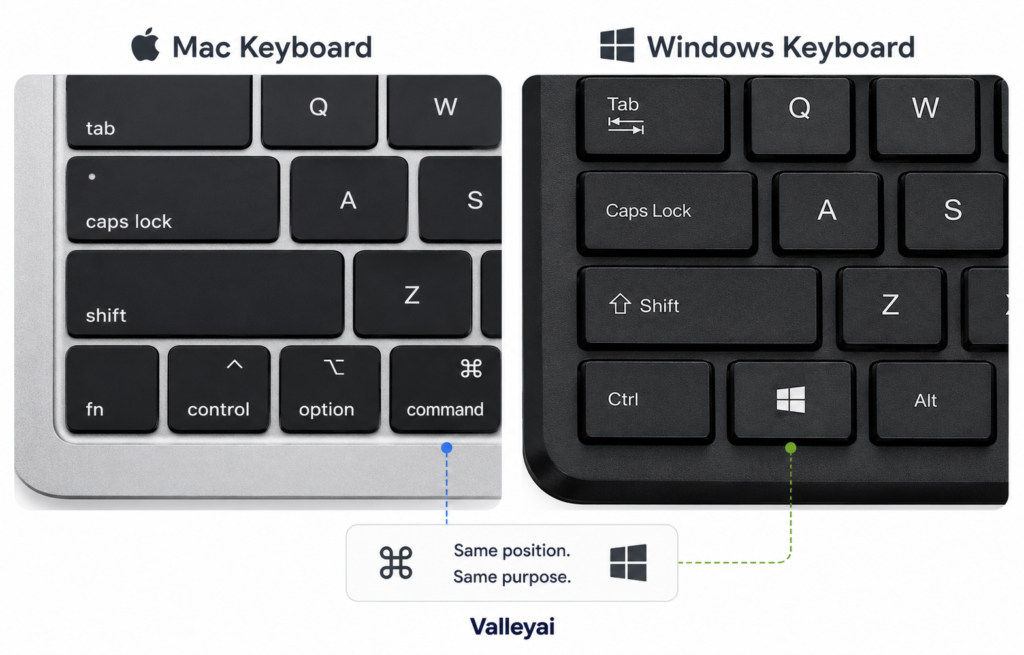
The Windows key sits in the same bottom-left spatial zone on a Windows keyboard where the Command key lives on a Mac keyboard. This physical proximity creates the false impression of equivalence. The Windows key (also called the Start key on some layouts) triggers Windows OS functions, while the Command key triggers macOS functions.
Most cross-platform users initially assume the Windows key and Command key are identical rather than functionally mapped substitutes. They are not the same scan code, and they do not send the same signal to an operating system without remapping.
Which Physical Key Stands In for Command on a Windows Keyboard (and Remap Logic)
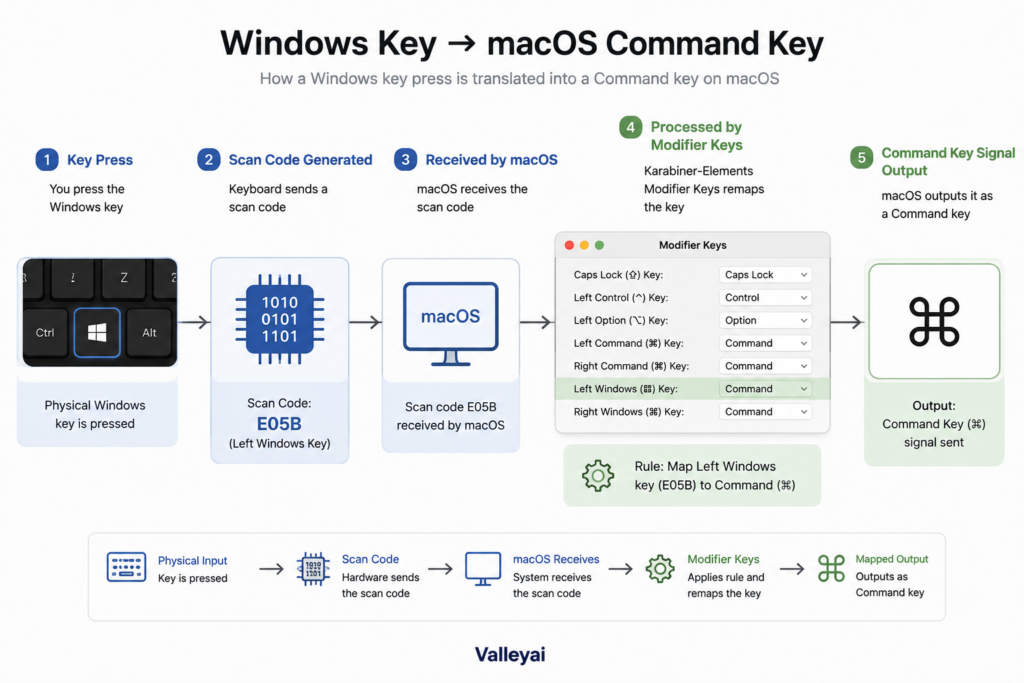
If you run a Windows keyboard on a Mac, the Windows key acts as a de facto Command key substitute once macOS recognizes the peripheral.
- Open System Preferences on your Mac.
- Select Keyboard, then click Modifier Keys.
- Choose your attached Windows keyboard from the target dropdown.
- Set the Windows key action to “Command” and confirm.
When you plug a Windows keyboard into a Mac for the first time, the Windows key physically sits where the Command key would be on Apple’s layout but macOS reads it as a separate scan code until you open System Preferences and assign it. I’ve watched first-time switchers mash the Ctrl key for ten minutes before realizing the logo key was right there.
Shortcut Translation: Command Key Functions vs Windows Equivalents
| Mac Command Shortcut | Windows Keyboard Equivalent | Function |
| ⌘+C | Ctrl+C | Copy |
| ⌘+V | Ctrl+V | Paste |
| ⌘+Z | Ctrl+Z | Undo |
| ⌘+Space | Win+Space | Language/Search toggle |
The Ctrl key handles the bulk of text-manipulation shortcuts that Mac users perform with the Command key. The Windows key handles system triggers. You do not need a physical Command key to replicate Mac workflows on Windows; you need the right modifier translation.
The Mapping Trap Most Cross-Platform Guides Get Wrong
Most forums tell Windows-on-Mac users to just map Alt to Command. Bad advice. The Alt key on a Windows keyboard is the direct hardware equivalent of the Mac Option key, not the Command key. If you map Alt to Command, you erase your Option modifier and break symbolic character entry.
In practice, Karabiner Elements handles this better than the built-in Modifier Keys panel when you run a Windows peripheral full-time on Mac, because it persists across reboots without the occasional reset the native macOS panel suffers. Keep Alt as Option. Map only the Windows key to Command.
Frequently Asked Questions About the Command Key and Windows Keyboards
What is the Command key on a keyboard?
The Command key (⌘) is a modifier key exclusive to Apple Mac keyboards, introduced in 1984. It triggers macOS shortcuts such as ⌘+C for copy. Windows keyboards do not include a physical Command key; they use Ctrl and Windows keys for similar tasks.
Where is the Command key on a Windows keyboard?
The Command key does not exist on a native Windows keyboard. If you use a Windows keyboard on a Mac, the physical Windows key occupies the same bottom-left position where Apple places the Command key, and macOS can remap that Windows key to serve as Command.
What is the Windows equivalent of the Command key?
The closest functional equivalent is the Ctrl key for text shortcuts (Ctrl+C vs ⌘+C) and the Windows key for system commands. Neither is identical, but together they cover the Command key’s role when you work in Windows or remap a PC keyboard onto Mac hardware.
Does Windows actually have a Command key?
No. Microsoft’s hardware documentation confirms Windows keyboards ship with Ctrl, Alt, and Windows keys. The Command key is an Apple trademarked modifier. Any source claiming Windows natively includes a Command key is factually incorrect.
Is the Windows key the same as the Command key?
No. The Windows key sends a unique scan code to the Windows OS to open Start menus and shortcuts. The Command key sends a different code to macOS. They share physical placement but not function or identity until software remapping aligns them.
How do you press Command key shortcuts on a Windows keyboard?
On a Windows PC, use Ctrl instead of Command (e.g., Ctrl+C). On a Mac with a Windows keyboard attached, open System Preferences > Keyboard > Modifier Keys and assign the Windows key to Command, then use Win+C as you would use ⌘+C.
Can I remap the Windows key to act as Command?
Yes, using macOS System Settings or third-party software like Karabiner-Elements.
Conclusion
Before you blame your keyboard for missing a “Cmd” label, check which ecosystem you’re actually in. If you’re on Windows natively, use Ctrl for shortcuts and ignore the Command key myth. If you’re on a Mac with a Windows keyboard, remap the Windows key to Command in System Preferences and keep Alt as Option.

Kaleem
Kaleem is a Computer Science graduate (Virtual University of Pakistan) and the founder and editor of Valley AI, where he publishes in-depth, tested guides on computer hardware, artificial intelligence, and how the internet works. Every guide is researched from primary sources, tested hands-on where possible, and updated when the facts change.