
A DDR4 system can still feel fast in 2026 until you price a new CPU, motherboard, and RAM kit and realize DDR5 is not really a “RAM upgrade.” For most existing PC owners, DDR4 vs DDR5 is a platform decision shaped by the workload, the bottleneck, and how much memory capacity the system actually needs.
DDR5 is technically the faster, higher-bandwidth memory generation. DDR4 can still be the smarter purchase when a working DDR4 platform has enough RAM and the budget would make a larger difference elsewhere.
DDR4 vs DDR5 at a glance
DDR4 and DDR5 are generations of DDR SDRAM used as system memory. DDR5 raises available transfer rates and bandwidth, while DDR4 remains the required memory type for many existing desktop platforms.
| Factor | DDR4 | DDR5 | What it means in practice |
|---|---|---|---|
| Common consumer speeds | DDR4-3200 to DDR4-3600 | DDR5-5600 to DDR5-6000 and beyond | DDR5 offers more bandwidth at mainstream settings. |
| DIMM architecture | One 64-bit data channel per DIMM | Two independent 32-bit subchannels per DIMM | DDR5 can handle smaller memory accesses more efficiently. |
| Motherboard support | DDR4-specific motherboard required | DDR5-specific motherboard required | The two memory types cannot share a motherboard. |
| Existing AMD desktop platforms | AMD AM4 uses DDR4 | AMD AM5 uses DDR5 | Moving from AM4 to AM5 means replacing the platform. |
| Intel desktop platforms | Available on selected 12th–14th Gen boards | Available on selected 12th–14th Gen boards | Intel CPU support depends on the motherboard design. |
| Best fit | Existing systems, budget-focused builds | New builds, bandwidth-sensitive tasks, platform longevity | Capacity and total system cost still matter more than the label alone. |
DDR5 architecture is defined through industry standards maintained by JEDEC. The generational improvement is real, but the improvement a person feels depends on the software and system bottleneck.
Why DDR5 has more bandwidth without always feeling faster
DDR5 provides higher memory bandwidth than DDR4 because DDR5 memory kits run at higher transfer rates, measured in MT/s, and use two independent 32-bit subchannels on each DIMM.
A higher MT/s number does not automatically mean every task finishes faster. Web browsing, office apps, and many GPU-limited games often spend little time waiting on system RAM. CPU-heavy games, integrated graphics, large datasets, and some creative workloads can be much more sensitive to memory bandwidth.
MT/s matters, but CAS latency matters too
Memory speed labels such as DDR4-3600 and DDR5-6000 describe transfer rate, not the full latency story. CAS latency, shown as CL16 or CL30, also affects how long memory waits before responding to a request.
That is why DDR4-3600 CL16 and DDR5-6000 CL30 cannot be judged by one number alone. DDR5 usually delivers much more bandwidth, while real latency can be closer than the marketing labels suggest.
For a normal PC build, avoid choosing a kit solely because it has the highest MT/s rating. A stable, compatible 32GB kit at sensible settings is usually more valuable than a faster kit that forces compromises elsewhere.
DDR4 and DDR5 cannot share a motherboard
DDR4 and DDR5 desktop DIMMs are physically and electrically incompatible. A motherboard has slots and memory circuitry designed for one generation only, so DDR4 RAM cannot be installed in a DDR5 motherboard, and DDR5 RAM cannot be installed in a DDR4 motherboard.
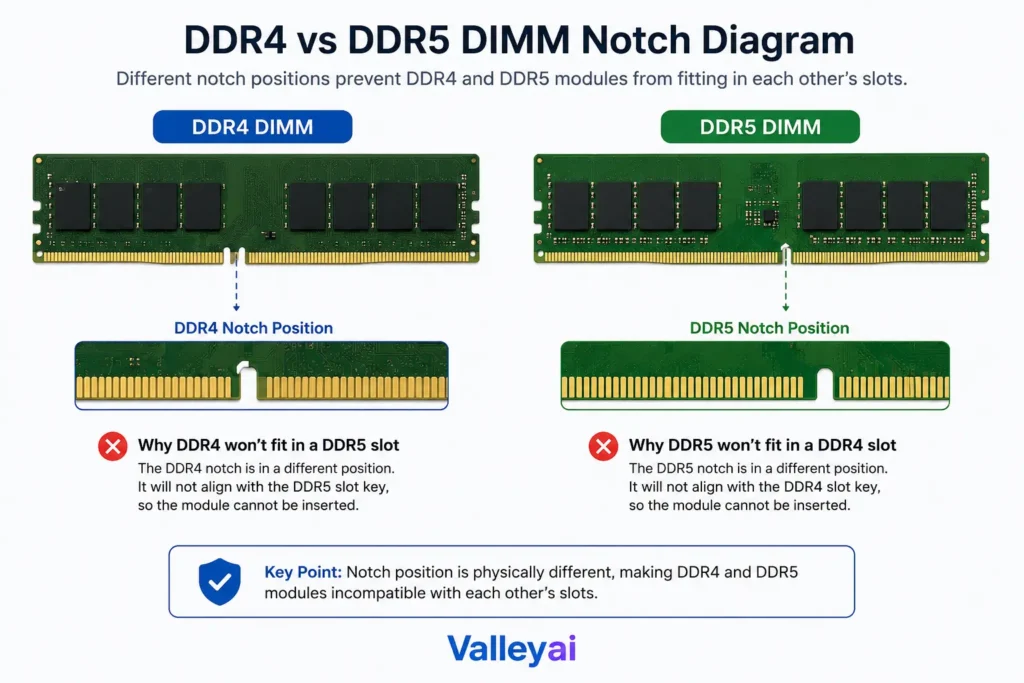
The compatibility question becomes simple once the platform is identified.
| Platform | DDR4 support | DDR5 support | Practical recommendation |
|---|---|---|---|
| AMD AM4 desktop | Yes | No | Keep DDR4 or plan a full platform migration. |
| AMD AM5 desktop | No | Yes | Buy DDR5; AM5 is a DDR5-only desktop platform. |
| Intel 12th Gen Core | Motherboard-dependent | Motherboard-dependent | Confirm the motherboard type before buying RAM. |
| Intel 13th Gen Core | Motherboard-dependent | Motherboard-dependent | A DDR4 board and DDR5 board are separate choices. |
| Intel 14th Gen Core | Motherboard-dependent | Motherboard-dependent | One motherboard supports one memory generation, never both. |
AMD’s current desktop platform documentation distinguishes AM5 Ryzen processors from prior AM4 systems, while Intel processor specifications should be confirmed through Intel ARK.
An Intel processor may support either DDR4 or DDR5 at the platform level, but the motherboard decides which RAM can be installed.
Gaming performance depends on the bottleneck
DDR5 can improve gaming performance, but the biggest gains usually appear when the CPU and system memory not the graphics card are limiting frame rate.
A high-refresh esports game running at lower settings can become CPU-bound. In that situation, DDR5 may improve average FPS, 1% lows, or both. A demanding 4K game with ray tracing often becomes GPU-bound, which makes faster system memory much less visible.
| Gaming scenario | Likely DDR5 impact | Why |
|---|---|---|
| Competitive esports at high frame rates | Moderate to high | CPU and memory can become the limiting factors. |
| CPU-heavy simulation or strategy games | Moderate | Large simulations can be sensitive to CPU and memory throughput. |
| GPU-limited 1440p gaming | Small to moderate | Faster memory may help, but the GPU often remains the main limit. |
| GPU-limited 4K gaming | Usually small | The graphics card is typically doing most of the waiting. |
| Integrated graphics gaming | Often meaningful | Integrated GPUs use system RAM instead of dedicated VRAM. |
| Older PC with weak GPU | Usually small | A GPU upgrade may produce a bigger improvement. |
DDR5 is more likely to improve 1% low FPS than transform average FPS in a GPU-limited game. The 1% low metric reflects lower-end frame-rate consistency, which can reveal stutter or uneven frame times that an average FPS number hides.
Chasing memory speed while a GPU is pinned near full utilization in the games you actually play is one of the easiest ways to spend money without feeling much difference.
A discrete graphics card’s VRAM is separate from DDR4 or DDR5 system memory. Faster system RAM cannot fix a GPU VRAM shortage.
Don’t sacrifice capacity just to get DDR5
Memory capacity can matter more than memory generation when the PC is running out of RAM. A 32GB DDR4 system is often a better real-world experience than a 16GB DDR5 system for gaming with background apps, video editing, virtual machines, large browser sessions, and modded games.
| If your current situation is… | Prioritize… |
|---|---|
| 16GB is regularly full | More capacity first |
| You edit large projects or run virtual machines | 32GB or 64GB, depending on workload |
| You game with lots of browser tabs, Discord, mods, and launchers | 32GB before extreme memory speed |
| You use integrated graphics | Capacity and DDR5 bandwidth |
| You are building a new AM5 PC | DDR5 with adequate capacity |
| You own a stable AM4 PC with 32GB DDR4 | Keep DDR4 unless another platform upgrade is justified |
When browser tabs, game launchers, voice chat, mods, and a game are competing for 16GB, additional capacity tends to feel more meaningful than a minor memory-speed improvement.
DDR4-3600 vs DDR5-6000: a realistic comparison
DDR4-3600 and DDR5-6000 are common comparison points because both are widely used in mainstream enthusiast systems. DDR5-6000 generally provides substantially higher available bandwidth, but that does not make it a drop-in replacement for DDR4-3600.
DDR4-3600 remains a sensible configuration for many AMD AM4 systems. DDR5-6000 is a common starting point for many AMD AM5 builds, provided the motherboard, BIOS/UEFI version, processor memory controller, and kit profile are compatible.
For a new build, DDR5 usually makes sense because modern platforms increasingly center on DDR5. For an existing AM4 system, DDR4-3600 can remain perfectly adequate if the PC already has enough capacity and the GPU or CPU is the more important constraint.
Check these settings before replacing DDR4 RAM
Before buying DDR5 hardware, confirm whether the current DDR4 system is configured correctly. A memory kit can run below its advertised speed if its profile was never enabled or was reset after a BIOS update.
- Check total RAM capacity. Look for sustained high memory usage during the tasks that feel slow.
- Verify active memory speed. Check BIOS/UEFI or a reliable system-information tool rather than assuming the kit runs at its box rating.
- Confirm dual-channel configuration. Two matched DIMMs in the correct motherboard slots usually provide better bandwidth than one DIMM.
- Check Intel XMP or AMD EXPO settings. Intel Extreme Memory Profile and AMD EXPO can apply validated memory settings on compatible hardware.
- Monitor CPU and GPU utilization. High GPU usage points toward a graphics bottleneck; high CPU usage can make memory performance more relevant.
- Update BIOS/UEFI only when needed. Newer firmware can improve compatibility, but it does not guarantee stability with every memory kit.
- Test stability after changes. A system that boots is not necessarily stable during long gaming sessions, shader compilation, or large exports.
A surprising number of “my DDR4 is too slow” cases are really profile issues: the memory kit is running at a safe default setting because XMP or EXPO was never enabled after a build or BIOS reset.
The DDR5 upgrade reality check
DDR5 is worth paying for when the PC is already moving to a new platform, when the workload benefits from bandwidth, or when integrated graphics rely heavily on system memory.
| Question | If the answer is yes | Best direction |
|---|---|---|
| Are you replacing the CPU or motherboard anyway? | Platform cost is already part of the plan. | Choose DDR5 for most new builds. |
| Is your current DDR4 system limited by RAM capacity? | Capacity is the immediate problem. | Add DDR4 capacity if the platform is otherwise healthy. |
| Is gaming GPU-limited at target settings? | The graphics card limits performance. | Consider a GPU upgrade before a DDR5 migration. |
| Are you playing CPU-limited, high-refresh games? | Memory performance may matter. | DDR5 is more likely to earn its cost. |
| Does the system use integrated graphics? | System memory is also graphics memory. | Favor DDR5 when the platform supports it. |
| Is XMP or EXPO disabled? | Current RAM is underconfigured. | Fix the configuration before replacing hardware. |
The RAM kit is rarely the expensive part of a DDR5 move. Once a motherboard and often a CPU enter the cart, the decision changes from “Which RAM is faster?” to “Which upgrade removes the real bottleneck?”

The better choice for existing PCs and new builds
Existing AMD AM4 owner: Keep DDR4 if the system has enough capacity and still meets performance goals. Move to DDR5 only as part of an AM5 CPU and motherboard upgrade.
Existing Intel DDR4 owner: Check whether a CPU upgrade, GPU upgrade, or RAM-capacity increase solves the actual problem first. Switching to DDR5 normally requires a DDR5 motherboard.
New AMD desktop build: Choose DDR5 because AMD AM5 requires DDR5 memory.
New Intel desktop build: DDR5 is usually the better long-term option, but a discounted DDR4 motherboard can still make sense when the saved budget funds a noticeably stronger GPU, CPU, or larger memory capacity.
High-refresh gamer: DDR5 is more likely to help when games are CPU-limited and the graphics card is powerful enough to expose that limit.
4K or graphics-heavy gamer: Prioritize the GPU unless testing shows the CPU or system memory is holding performance back.
Creator, multitasker, or virtual-machine user: Buy enough RAM first. A larger DDR4 kit can be more useful than a smaller DDR5 kit.
Compatibility note: Confirm motherboard memory support, CPU specifications, BIOS/UEFI version, and the memory kit’s qualified compatibility information before buying. DDR4 and DDR5 modules are not interchangeable, and advertised XMP or EXPO speeds are profile-based settings rather than guarantees for every system.
DDR4 vs DDR5 FAQs
Is DDR5 better than DDR4?
DDR5 is technically more advanced than DDR4 because DDR5 supports higher transfer rates, more available bandwidth, and a newer DIMM architecture. DDR5 is not automatically the better purchase, though. A healthy DDR4 system with sufficient capacity can still be the smarter value when moving to DDR5 would require a new motherboard and CPU.
Is DDR5 worth it for gaming?
DDR5 is most worthwhile for CPU-limited, high-refresh gaming, memory-sensitive games, and integrated graphics systems. GPU-limited gaming at demanding 1440p or 4K settings often shows smaller gains because the graphics card limits frame rate first. Check the bottleneck before treating DDR5 as a guaranteed gaming upgrade.
Does DDR5 increase FPS?
DDR5 can increase FPS in some games, especially when the CPU and system memory limit performance. DDR5 can also improve 1% low FPS, which may make frame times more consistent. The size of the gain depends on the processor, GPU, game engine, memory configuration, resolution, and graphics settings.
Is DDR4 still good for gaming?
DDR4 is still good for gaming when paired with a capable CPU, GPU, and sufficient memory capacity. A 32GB DDR4 system can remain highly effective for modern games, especially when the graphics card is the main performance bottleneck. Replacing a GPU or adding RAM capacity may offer more value than migrating platforms.
Can I use DDR4 RAM in a DDR5 motherboard?
No. DDR4 RAM cannot be used in a DDR5 motherboard because DDR4 and DDR5 DIMMs have different physical key positions and electrical requirements. Consumer desktop motherboards are designed for one memory generation only, so the motherboard must match the RAM type.
Can DDR4 and DDR5 be used together?
No. DDR4 and DDR5 cannot be mixed in the same consumer desktop motherboard. The DIMM slots, memory signaling, and board layout differ between the two standards. Even Intel platforms that support either generation require a motherboard built specifically for DDR4 or DDR5.
Is 32GB DDR4 better than 16GB DDR5?
For a RAM-constrained workload, 32GB DDR4 is often the better choice. Running out of memory can cause stutter, paging to storage, slower multitasking, and reduced responsiveness. A smaller DDR5 kit has more bandwidth, but bandwidth does not compensate for insufficient capacity during memory-heavy tasks.
Does DDR5 help integrated graphics?
DDR5 can help integrated graphics because an integrated GPU uses system memory instead of dedicated graphics memory. Higher memory bandwidth can improve graphics performance more noticeably than it would in a system with a discrete GPU and dedicated VRAM. Capacity still matters, especially for games and creative applications.

Kaleem
My name is Kaleem and i am a computer science graduate with 5+ years of experience in Computer science, AI, tech, and web innovation. I founded ValleyAI.net to simplify AI, internet, and computer topics also focus on building useful utility tools. My clear, hands-on content is trusted by 5K+ monthly readers worldwide.