
A builder cracks open a new motherboard box, sees a memory slot, and assumes their old Double Data Rate 4 (DDR4) stick will drop right in. It won’t and the reason goes deeper than the plastic notch. The direct answer is no: DDR4 and Double Data Rate 5 (DDR5) memory modules cannot be combined in one system because they require different motherboard slots, different CPU memory controllers, and different voltage regulation architectures.
Why DDR4 and DDR5 Cannot Share a Motherboard Slot
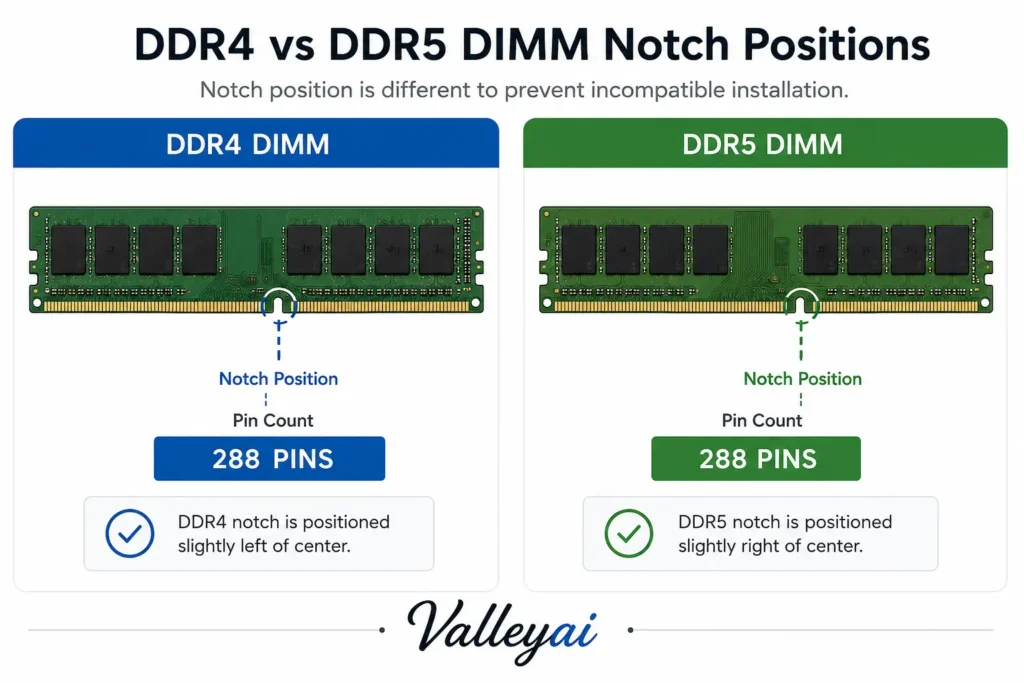
The DDR4 and DDR5 memory standards use incompatible slot keying and pin functionality that physically and electrically prevent cross-generation installation. Both modules use a 288-pin Dual In-line Memory Module (DIMM) form factor, but the notch position is shifted on DDR5 to block accidental insertion into a DDR4 slot.
| Specification | DDR4 (Double Data Rate 4) | DDR5 (Double Data Rate 5) |
|---|---|---|
| Pin count | 288-pin DIMM | 288-pin DIMM |
| Notch position | Offset toward center-left | Shifted closer to center |
| Nominal voltage | 1.2V (motherboard VRM) | 0.9V (on-die PMIC) |
| Standard body | JEDEC | JEDEC |
The Joint Electron Device Engineering Council (JEDEC) defines these keying differences to enforce electrical isolation. A DDR5 motherboard is wired for the DDR5 signal layout and the DDR5 on-die Power Management IC (PMIC). The CPU memory controller integrated into modern processors only communicates with the generation it was built for. AMD’s AM5 socket requires DDR5 memory exclusively, as documented in AMD’s official platform specifications. Intel’s LGA1700 platform shipped transitional boards supporting either DDR4 or DDR5, but never both simultaneously.
What Happens If You Force DDR4 Into a DDR5 Slot?
Forcing a DDR4 module into a DDR5 slot risks permanent damage to the motherboard and the RAM module because the offset key misaligns power contacts near the DDR5 PMIC. The plastic notch exists as a mechanical warning, not a soft suggestion.
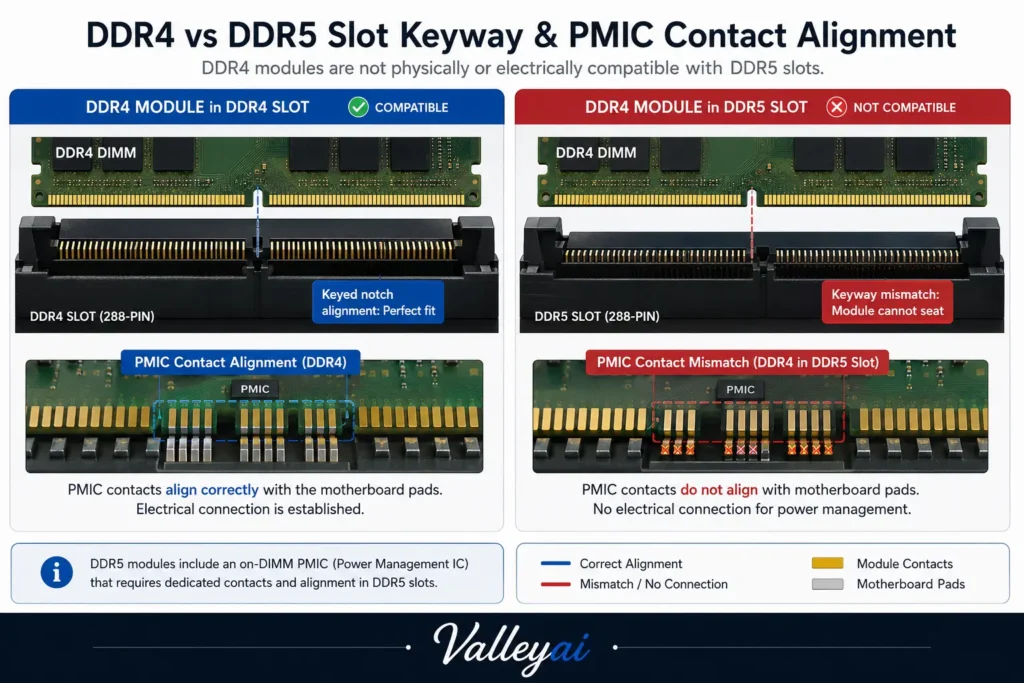
When a builder tries to force a DDR4 module into a DDR5 slot, the offset notch doesn’t just block seating it misaligns the 12V auxiliary contact near the PMIC, which is why we’ve seen scorched slot housings rather than clean non-boots. That scorched plastic means the board’s trace layout received voltage in an unintended path.
DDR5 moves voltage regulation on-die via the PMIC, while DDR4 relies on the motherboard’s voltage regulator module. JEDEC’s DDR5 standard specifies 0.9V nominal with strict on-die control. The DDR4 module expects 1.2V from the board edge. Mismatched insertion attempts bypass the intended power delivery design entirely.
Most forum advice to “just try it gently” is how $200 motherboards die. There is no safe partial insertion that grants cross-generation access.
Mixing RAM Speeds vs Mixing RAM Generations
Mixing RAM speeds within the same memory generation is supported by modern controllers, but mixing DDR4 with DDR5 remains physically impossible. Most compatibility confusion starts when builders confuse “can’t mix generations” with “can’t mix speeds.”
You cannot mix DDR4 with DDR5, but you can often mix different DDR4 speeds like 3200MHz and 3600MHz within the same generation. The CPU memory controller downshifts to the slowest module’s rated speed when mismatched kits share a channel. Extreme Memory Profile (XMP) on Intel or EXPO on AMD only applies if both sticks support the overclock profile; otherwise the system defaults to JEDEC baseline frequencies. In practice, I’ve seen a 3200MHz and 3600MHz DDR4 pairing run stable at 3200MHz with zero performance loss in gaming.
The DDR5 hype cycle oversold bandwidth to gamers who bottleneck on GPU, not memory. Generation jumps are architectural walls. Speed gaps within a generation are just yield grades.
The DDR4-to-DDR5 Upgrade Reality Check
Deciding whether to abandon DDR4 for DDR5 requires evaluating platform cost, CPU socket, and actual workload gains rather than chasing spec sheets. The table below frames the real tradeoff for a builder holding DDR4 today.
| Factor | Stay on DDR4 | Move to DDR5 |
|---|---|---|
| Platform cost | Low (existing board/CPU) | High (new board+CPU+RAM) |
| Gaming gain (1080p/1440p) | Sufficient for mid-range GPU | 0–8% marginal |
| Productivity gain | Limited on heavy renders | 10–20% on memory-bound tasks |
| Future CPU support | AM4/LGA1700 end-of-life | AM5/LGA1851 forward path |
In a 2024 client rebuild, staying on DDR4 with a discounted LGA1700 board outperformed a tight-budget AM5 DDR5 kit in render times because the DDR5 kit was low-frequency binned. DDR4 continues to satisfy the majority of gaming workloads without bottlenecking mid-range GPUs.
If your current system posts acceptable frame rates, the upgrade tax to DDR5 is a lateral move dressed as progress. Spend the money on a better GPU instead.
Platform-Specific DDR4 and DDR5 Support
Intel’s LGA1700 motherboards shipped in both DDR4 and DDR5 variants, while the newer LGA1851 platform moves exclusively to DDR5. AMD’s AM5 socket dropped DDR4 entirely, unlike the prior AM4 platform that only supported DDR4. This platform split means your CPU choice dictates memory compatibility more than the RAM itself.
Frequently Asked Questions
Is DDR5 backwards compatible with DDR4?
No. DDR5 is not backwards compatible with DDR4 because the memory modules use different DIMM notch positions and require separate CPU memory controller support. A DDR5 motherboard physically blocks DDR4 insertion, and the DDR5 on-die PMIC voltage design prevents electrical interoperability with DDR4’s motherboard-based regulation.
Can you use DDR4 RAM in a DDR5 motherboard?
You cannot use DDR4 RAM in a DDR5 motherboard. The DDR5 slot is keyed to prevent DDR4 seating, and the CPU memory controller integrated into modern processors only initializes the generation matched to the socket. Forcing the module risks permanent motherboard damage.
Can you mix different RAM speeds like 3200MHz and 3600MHz?
Yes, you can mix different RAM speeds within the same generation, such as DDR4 3200MHz with DDR4 3600MHz. The system runs both modules at the slower kit’s JEDEC baseline speed unless both support the same XMP or EXPO profile. Stability varies by memory controller quality, but speed mixing is safe unlike generation mixing.
Is DDR4 still viable for modern PC builds?
DDR4 remains viable for most modern PC builds focused on gaming or general use through 2025 and beyond. Mid-range GPUs rarely saturate DDR4 bandwidth, making the DDR4-to-DDR5 cost jump unjustified for budget-conscious builders. Productivity users handling large datasets see clearer DDR5 benefits.
The unexpected takeaway is that DDR4’s obsolescence is a marketing narrative, not an engineering mandate your old RAM is fine until your CPU forces the issue.
New to RAM? Start with our complete guide: Random Access Memory (RAM): What It Is, How It Works, and Why It Matters

Kaleem
Kaleem is a Computer Science graduate (Virtual University of Pakistan) and the founder and editor of Valley AI, where he publishes in-depth, tested guides on computer hardware, artificial intelligence, and how the internet works. Every guide is researched from primary sources, tested hands-on where possible, and updated when the facts change.