
DDR5 RAM is the fifth generation of Double Data Rate Synchronous Dynamic Random-Access Memory (DDR SDRAM) used as a computer’s short-term working memory. DDR5 stores the data that active applications need so the processor can access that data quickly.
DDR5 is newer than DDR4 and supports higher transfer rates, greater memory-module capacity, and lower standard operating voltage. The upgrade is not universal, though: a DDR5 module requires a compatible processor platform and motherboard.
What does DDR5 RAM actually do?
DDR5 RAM temporarily holds data for the operating system, applications, and games. When a computer runs out of available RAM, the system may use much slower storage as virtual memory, which can cause noticeable slowdowns.
The term DDR5 describes the memory technology, not the amount of memory installed. A computer might have 16GB, 32GB, or 64GB of DDR5 RAM, just as a DDR4 computer can have different capacities.
DDR5 belongs to the SDRAM family:
- RAM is the broad category of temporary computer memory.
- DRAM stores each bit of data in a memory cell that must be refreshed.
- SDRAM synchronizes memory operations with the system clock.
- DDR SDRAM transfers data on both the rising and falling edges of each clock cycle.
- DDR5 is the fifth major generation of that DDR SDRAM technology.
The JEDEC Solid State Technology Association defines memory standards and terminology used across the industry.
Why the “double data rate” name matters
Double Data Rate memory transfers data twice during each memory-clock cycle: once on the rising edge and once on the falling edge. That design increases the effective transfer rate without requiring the physical clock frequency to double.
For example, a DDR5 module advertised as DDR5-6000 is rated for approximately 6,000 million transfers per second, normally written as 6,000 MT/s. Retail listings often call this 6,000 MHz, but MT/s is the more precise term because the clock itself runs at roughly half that effective transfer figure.
That distinction sounds picky until you compare memory kits. Mixing clock frequency, transfer rate, and bandwidth can make one specification appear faster than another when the labels are simply using different measurements.
DDR5 is also different from two similarly named technologies:
| Memory type | Main purpose | Typical form |
|---|---|---|
| DDR5 | General computer system memory | Desktop DIMM or laptop SO-DIMM |
| GDDR5 | Graphics memory for certain dedicated GPUs | Soldered directly to a graphics card |
| LPDDR5 | Low-power memory for mobile and thin devices | Often soldered to the motherboard |
DDR5 system memory and GDDR5 graphics memory are not interchangeable, even though both names include “DDR.”
DDR5 vs DDR4: the differences that affect a real PC
DDR5 improves the memory standard in several areas, but the practical gain depends on the complete system.
| Specification | DDR4 | DDR5 | What the difference means |
|---|---|---|---|
| Standard generation | Older DDR generation | Newer DDR generation | DDR5 belongs to a newer platform ecosystem |
| Typical starting data rates | Lower | Higher | DDR5 can provide more memory bandwidth |
| Standard voltage | About 1.2V | About 1.1V | DDR5 can reduce memory operating voltage at baseline settings |
| Module architecture | Traditional DIMM design | Two independent 32-bit subchannels per standard DIMM | Improves access granularity and efficiency |
| Power management | Mainly handled by the motherboard | PMIC placed on the memory module | Moves part of power regulation closer to the DRAM |
| Module capacity | Lower density was common | Higher-density modules are available | Larger capacities can be installed as memory technology advances |
| Compatibility | Requires a DDR4 motherboard | Requires a DDR5 motherboard | The generations cannot be mixed |
DDR5’s lower standard voltage and module-level Power Management Integrated Circuit (PMIC) are documented in technical resources from memory manufacturers such as Micron.
The biggest consumer-facing difference is usually bandwidth. A faster transfer rate gives the processor and integrated graphics more potential data throughput, but software performance does not increase in direct proportion to the number printed on the memory label.
Why DDR5 cannot fit in a DDR4 motherboard
DDR5 RAM cannot be installed in a DDR4-only motherboard because the modules use different electrical signaling, memory architecture, and key positions in the connector. The notch location prevents a DDR5 DIMM from being inserted into a DDR4 slot.
A DDR4 motherboard cannot become DDR5-compatible through a BIOS update. The motherboard, processor memory controller, and physical memory slots must all support DDR5.
That makes DDR5 an upgrade-platform decision, not just a memory-stick replacement.
What DDR5 specifications mean in daily use
DDR5 specifications describe different parts of memory behavior. No single number tells the whole performance story.
Transfer rate and bandwidth
Transfer rate measures how many data transfers the memory can perform per second. Memory bandwidth describes the potential amount of data that can move across the memory interface over time.
Higher bandwidth can help when:
- Integrated graphics share system memory with the CPU
- Applications process large datasets
- Video editing or rendering workloads move substantial data
- Multiple CPU cores access memory heavily
- A game engine benefits from faster memory on a particular processor platform
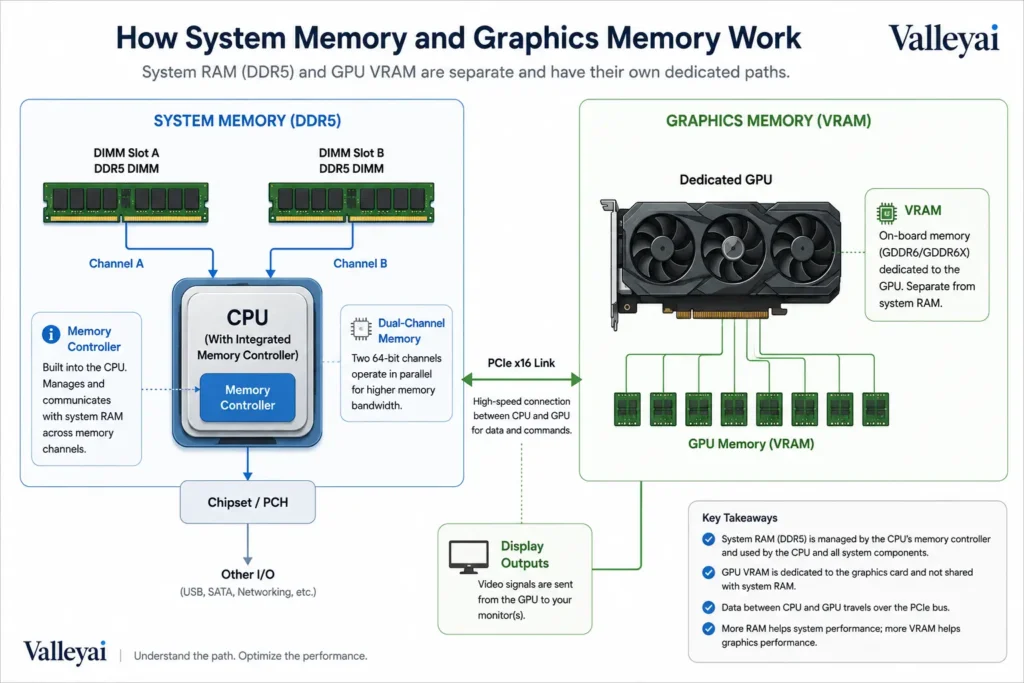
A dedicated graphics card usually has its own high-speed graphics memory, so the gaming benefit from system DDR5 can be smaller than the specification difference suggests.
CAS latency and timings
CAS latency, often shown as CL, represents the number of memory cycles between a read request and the point when the memory begins returning data. A higher CL number does not automatically mean a DDR5 kit is slower because the memory may also operate at a higher transfer rate.
Approximate first-word latency can be estimated with:
Latency in nanoseconds ≈ (CAS latency × 2000) ÷ transfer rate in MT/s
For example:
- DDR5-6000 CL30: approximately 10 nanoseconds
- DDR5-6000 CL36: approximately 12 nanoseconds
- DDR4-3200 CL16: approximately 10 nanoseconds
The calculation is only one part of system behavior. Memory subtimings, the processor’s memory controller, motherboard firmware, and workload also affect measured performance.
When comparing two memory kits, I check capacity and platform compatibility before chasing a small timing difference. A kit that cannot run reliably is slower than a slightly less aggressive kit that completes every workload without errors.
Capacity
Capacity determines how much active data a computer can keep in memory before relying more heavily on storage.
Capacity usually matters more when a computer runs:
- Many browser tabs and communication tools
- Large spreadsheets
- Photo or video projects
- Virtual machines
- Game development software
- Local databases
- Multiple professional applications at once
A faster 16GB kit cannot compensate for a workload that regularly needs more than 16GB. Paging data to an SSD is much slower than keeping the data in RAM.
Channels, ranks, and subchannels
A memory channel is a data path between the processor’s memory controller and the installed memory. Dual-channel operation can provide more available bandwidth than single-channel operation when the motherboard and module arrangement support it.
A standard DDR5 DIMM also uses two independent 32-bit subchannels instead of one 64-bit channel inside the module. The subchannels allow smaller data requests to be handled more efficiently, while the motherboard’s channel configuration still determines the broader connection between the CPU and memory.
The terminology is easy to muddle. A DDR5 DIMM’s subchannels are not the same thing as installing two DIMMs in a motherboard’s dual-channel configuration.
The compatibility check that prevents an expensive mistake
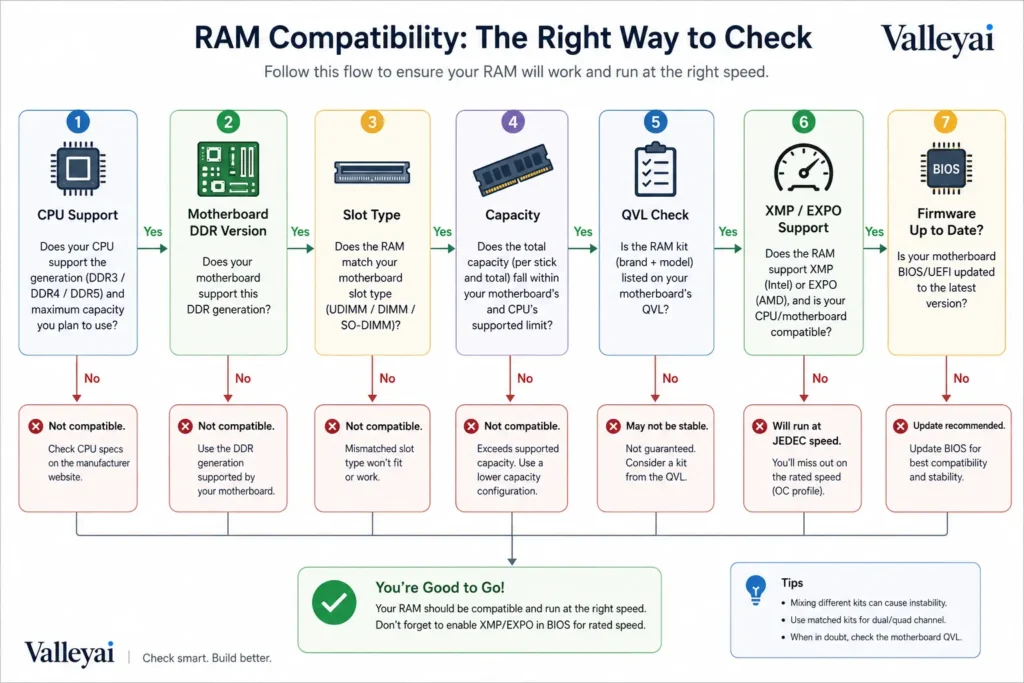
DDR5 compatibility depends on the processor, motherboard, memory slots, firmware, and selected memory kit.
Use this order before buying:
- Identify the exact processor.
Check the processor manufacturer’s specifications for supported memory types and official transfer rates. Intel Support and AMD Support provide platform documentation, but the exact processor model matters. - Confirm the motherboard memory standard.
A motherboard is designed for DDR4 or DDR5 memory. Some processor families were released with separate DDR4 and DDR5 motherboard versions. - Check the physical slot type.
Desktop DDR5 uses DDR5 DIMM slots. Laptop systems may use DDR5 SO-DIMMs or soldered LPDDR5, which are different installation formats. - Review the motherboard’s memory support list.
Manufacturers often publish a Qualified Vendor List, commonly called a QVL. The QVL is useful for checking tested memory kits, although absence from the list does not automatically mean a kit will fail. - Check maximum capacity and module arrangement.
Verify the maximum total memory, supported capacity per slot, and recommended two- or four-module configuration. - Treat the advertised speed as a target setting.
A DDR5 kit may boot initially at a conservative default speed. Intel XMP and AMD EXPO are memory-profile technologies that can apply tested performance settings when the platform supports them. See Intel’s XMP guidance and AMD’s EXPO information. - Update firmware only when appropriate.
A BIOS or UEFI update can improve memory compatibility on some platforms, but firmware procedures vary by motherboard. Follow the board manufacturer’s instructions.
If a system fails memory training after adding four DDR5 modules, test the system with two modules first, confirm the slots recommended by the motherboard manual, and then try a less aggressive memory profile. Four-DIMM configurations can be harder for the memory controller to run at the kit’s top rated speed.
Does DDR5 improve performance in every workload?
DDR5 does not deliver the same performance improvement in every computer or application.
Gaming performance depends on the processor, graphics card, game engine, resolution, and memory configuration. A system using integrated graphics may benefit more from additional system-memory bandwidth because the graphics processor shares that memory. A system limited by a dedicated GPU may show a smaller difference between comparable DDR4 and DDR5 platforms.
Content creation, compiling, virtual machines, simulation, and large data workloads can benefit from higher bandwidth or greater capacity. The benefit becomes more visible when the workload is memory-bound rather than limited by the processor, graphics card, or storage.
For a new computer, DDR5 often makes more sense when the platform already requires it or when the system is intended to receive future CPU and memory upgrades. For an older DDR4 computer, replacing the entire platform solely to gain DDR5 may provide less value than adding capacity, improving storage, or upgrading the graphics card.
When DDR5 is worth choosing
DDR5 is usually the stronger choice in these situations:
- You are building a new PC on a DDR5-compatible platform.
- You need large memory capacity for professional applications or virtual machines.
- You use integrated graphics and want more system-memory bandwidth.
- You want access to newer processors and later platform upgrades.
- The total cost difference between comparable DDR4 and DDR5 platforms is acceptable.
DDR4 may remain reasonable when:
- You already own a stable DDR4 motherboard and processor.
- Your workload fits comfortably within the current capacity.
- A DDR4 upgrade costs far less than changing the motherboard and processor.
- Your applications do not benefit meaningfully from additional memory bandwidth.
- You are assembling a budget system from existing components.
A practical buying order is:
- Confirm platform compatibility.
- Choose enough capacity for the workload.
- Select a sensible transfer rate supported by the processor and motherboard.
- Compare latency and memory timings.
- Verify the number of modules and profile support.
- Consider price and upgrade plans.
Capacity comes before decorative heat spreaders, extreme memory ratings, and tiny timing differences.
DDR5 misunderstandings that cause bad upgrades
“DDR5-6000 means the memory clock is 6,000 MHz”
DDR5-6000 describes an effective transfer rate of about 6,000 MT/s, not a 6,000 MHz physical clock. The informal MHz label is common in retail marketing, but MT/s more accurately describes the transfers occurring each second.
“On-die ECC makes every DDR5 module server-grade ECC memory”
DDR5 on-die ECC detects and corrects certain errors inside the DRAM chip. On-die ECC does not automatically provide end-to-end error correction for the entire memory path.
Full ECC memory requires compatible memory modules, a processor memory controller, and motherboard support. A standard consumer DDR5 kit with on-die ECC is not automatically equivalent to an ECC UDIMM or registered ECC memory system.
“Higher CAS latency makes DDR5 slower than DDR4”
CAS latency must be considered alongside transfer rate. A DDR5 module can have a higher CL number but similar or lower calculated first-word latency than a lower-speed DDR4 module.
“Four DDR5 sticks always run at the advertised speed”
A memory kit’s rated speed is not guaranteed in every four-module configuration. The processor’s memory controller, motherboard layout, firmware, module density, and memory profile all influence stability.
“DDR5 is the same as GDDR5”
DDR5 is general-purpose system memory. GDDR5 is graphics memory designed for use with certain graphics processors. The two standards serve different purposes and cannot replace one another.
Frequently asked questions about DDR5 RAM
Is DDR5 better than DDR4?
DDR5 offers higher potential transfer rates, greater memory-module density, newer subchannel architecture, and lower standard voltage than DDR4. DDR5 is not automatically faster in every application, though. Performance depends on memory capacity, timings, processor design, graphics hardware, and the software workload.
Can I upgrade a DDR4 computer to DDR5 RAM?
You cannot replace DDR4 modules with DDR5 modules in the same DDR4 motherboard. DDR4 and DDR5 use different electrical designs and slot keying. A DDR5 upgrade normally requires a compatible motherboard and, depending on the platform, a processor that supports DDR5 memory.
Is DDR5 good for gaming?
DDR5 can improve gaming performance on some platforms, especially when a processor benefits from higher memory bandwidth or when integrated graphics use system RAM. Gains are usually smaller when a dedicated graphics card is the main performance limit. Game, resolution, CPU, GPU, and memory configuration all affect the result.
How much DDR5 RAM do I need?
The right DDR5 capacity depends on the applications you run. Everyday browsing and office work generally need less memory than video editing, software development, virtual machines, or professional 3D tools. Choose enough capacity to avoid paging first, then compare speed and latency within the remaining budget.
Do I need XMP or EXPO for DDR5?
XMP and EXPO are memory-profile technologies that can configure a compatible DDR5 kit for its tested settings. A computer may boot at a lower default speed without a profile. Enable a profile only when the processor, motherboard, firmware, and memory kit support the setting reliably.
Does DDR5 use less power than DDR4?
DDR5 has a lower standard operating voltage than DDR4, which can reduce memory-module power at baseline specifications. Actual system power depends on the number of modules, memory density, transfer rate, voltage profile, memory-controller behavior, and the rest of the computer. A high-speed DDR5 profile does not guarantee lower total system power.
The practical definition to remember
DDR5 RAM is newer system memory built around the fifth generation of Double Data Rate SDRAM. Its higher transfer-rate potential, increased capacity options, revised module architecture, and lower standard voltage make it valuable for newer computer platforms.
The correct upgrade question is not simply, “Is DDR5 faster?” Ask instead: Does the motherboard support DDR5, does the processor benefit from it, and does the system need more capacity or bandwidth for the work it performs?

Kaleem
Kaleem is a Computer Science graduate (Virtual University of Pakistan) and the founder and editor of Valley AI, where he publishes in-depth, tested guides on computer hardware, artificial intelligence, and how the internet works. Every guide is researched from primary sources, tested hands-on where possible, and updated when the facts change.