

You spot a laptop listing that reads 16GB memory, 512GB SSD. The spec sheet treats the words as separate line items, yet forum threads insist “RAM and memory are the same thing.” Both statements are partially true, and that contradiction is exactly why the terminology trips people up.
Random Access Memory (RAM) is the volatile workspace the Central Processing Unit (CPU) uses to hold active program instructions and temporary data. The word memory in casual PC-building context usually points to this exact component.
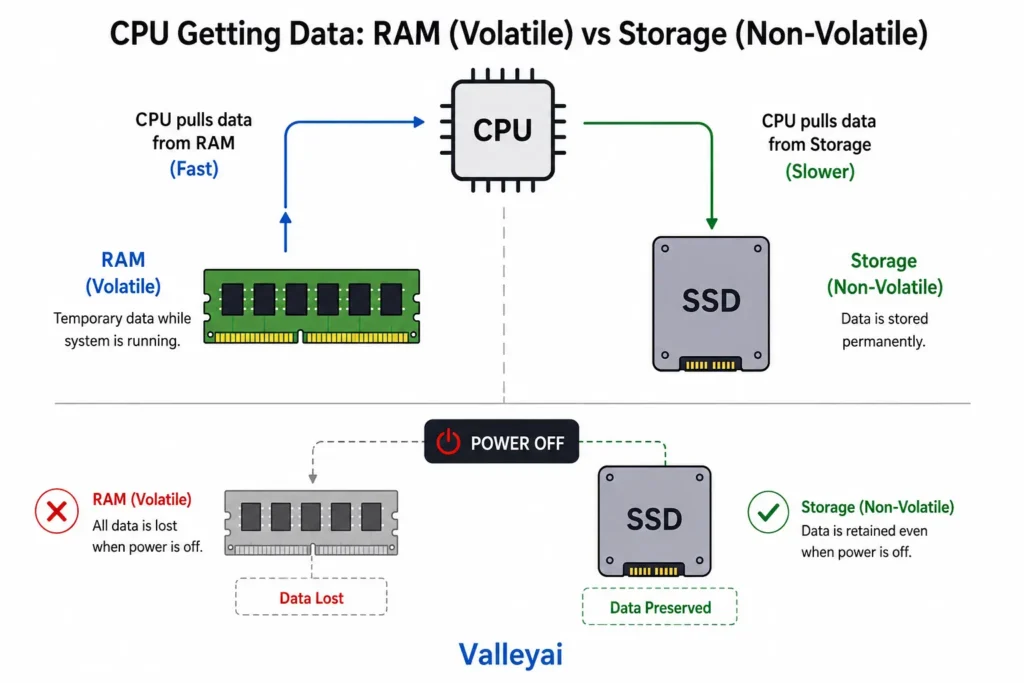
What Random Access Memory Means Beside Storage
The confusion survives because “memory” is a broad computing category, while Random Access Memory (RAM) is a specific volatile subtype. Storage drives solid-state drives (SSD) and hard disk drives (HDD) are non-volatile memory. They keep your files when the power cuts out. RAM empties instantly.
Most modern consumer laptops use SSDs rather than HDDs for primary storage. That shift made the memory vs storage line sharper, because SSDs feel fast enough to mimic RAM’s responsiveness, even though they serve a different role.
RAM vs Storage vs Memory Card: The Naming Mess
Here is the clean breakdown most buyers never see:
| Component | Volatility | Role | Common Label in OS |
|---|---|---|---|
| Random Access Memory (RAM) | Volatile (loses data on power loss) | Active task workspace for CPU | “Memory” in Windows Task Manager |
| SSD / HDD Storage | Non-volatile | Long-term file archive | “Disk” or “Storage” |
| SD / microSD Card | Non-volatile | Portable storage expansion | “Removable Disk” |
An SD card or microSD card is non-volatile storage, not Random Access Memory (RAM), despite the “memory card” naming convention. The label is a historical artifact from early portable flash products, not a hardware equivalence.
Honestly, the hardware marketing industry benefits from this confusion, so don’t expect box labels to clarify it for you.
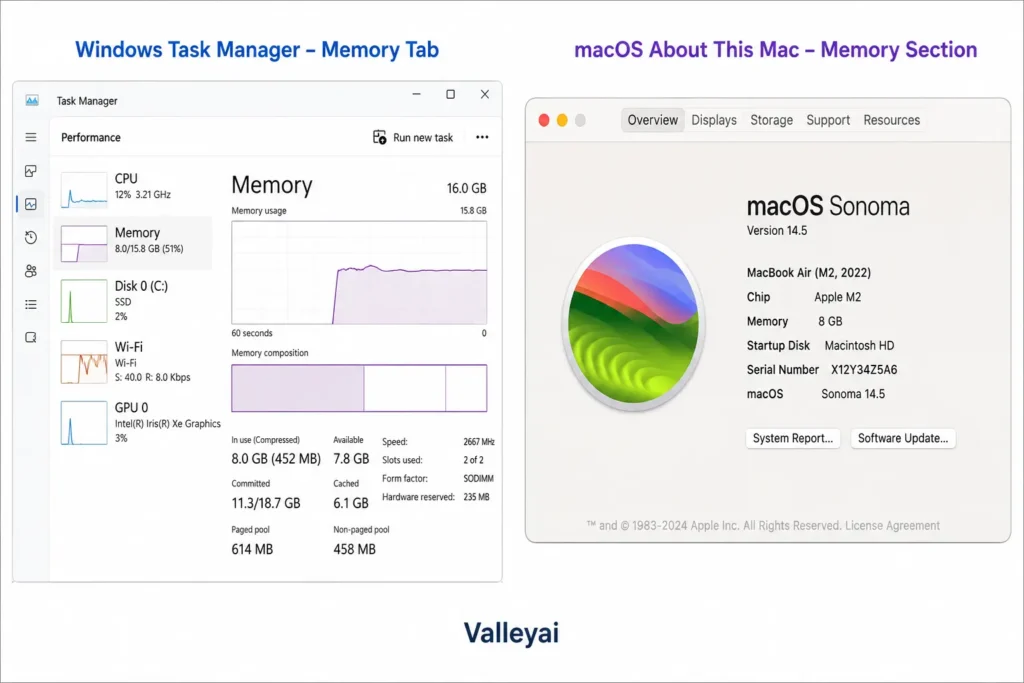
Why Windows Calls RAM ‘Memory’ (And macOS Shows Something Else)
Windows Task Manager labels Random Access Memory (RAM) as “Memory” in the Performance tab to simplify user-facing diagnostics. Microsoft’s own support documentation confirms this tab reflects RAM capacity and speed, not storage allocation.
When diagnosing a slow laptop, I check the Task Manager ‘Memory’ tab before anything else if it’s saturated while disk activity is low, the fix is more RAM, not a faster drive. macOS takes a different route: the “About This Mac” panel lists “Memory” as a separate hardware spec, which maps directly to physical RAM modules or Unified Memory.
Unified Memory on Apple Silicon: When the Lines Blur
Unified Memory Architecture on Apple Silicon Macs merges traditional Random Access Memory (RAM) and graphics memory into one shared physical pool. Apple’s developer documentation describes this as a single memory space accessible by both CPU and GPU without copying data between separate pools.
This collapses the old “RAM vs VRAM” split that existed in Intel-based and discrete-GPU PCs. For an M-series Mac, asking “is RAM the same as memory” gets a deeper answer: the physical RAM is the system memory, and there is no separate graphics memory entity to contrast.
DDR5 memory modules follow JEDEC-defined transfer rate standards starting at 4800 MT/s, a spec body that keeps these generations interoperable across vendors.
I’d argue soldered RAM is the worst trend for repairable computing, because it forces users to buy max specs upfront instead of upgrading later.
Is Memory and RAM the Same in a Laptop?
In a laptop, “memory” in the sales spec almost always means Random Access Memory (RAM) capacity. The exception is storage-labeled memory like SSDs. If the laptop uses Apple Silicon, that RAM is Unified Memory; if it uses Intel or AMD with discrete graphics, the RAM is separate from video memory.
I’ve watched first-time upgraders buy a 1TB SSD to fix browser-tab crashes when the actual bottleneck was 4GB of soldered RAM. The terms cost them money.
FAQs
Is RAM and memory card the same?
No. A memory card (SD or microSD) is non-volatile storage that retains files without power, while Random Access Memory (RAM) is volatile workspace the CPU uses for active tasks. The “memory” in memory card refers to flash storage, not the RAM module inside your computer.
Unified memory vs RAM?
Unified Memory on Apple Silicon is a specific implementation of RAM where CPU and GPU share one physical pool. Traditional RAM in Windows PCs is often separate from dedicated video memory. Both are volatile Random Access Memory, but Unified Memory removes the data-copy bottleneck between processors.
What is the difference between RAM and storage?
RAM is volatile memory that holds active program data and clears on power loss. Storage (SSD or HDD) is non-volatile and keeps files long-term. RAM determines how many tasks run smoothly at once; storage determines how much data you can keep.
Why does Task Manager call it memory instead of RAM?
Windows Task Manager uses “Memory” as a user-friendly label for the RAM module’s real-time usage. Microsoft designed the Performance tab to show “Memory” so non-technical users associate the bar with the system’s short-term workspace, not the permanent disk.
Is memory and RAM the same in a laptop?
In laptop spec sheets, “memory” typically means RAM capacity. The term is used interchangeably by manufacturers for the volatile workspace component. Storage is listed separately. On Apple Silicon laptops, that memory is Unified Memory rather than traditional discrete RAM.

Kaleem
Kaleem is a Computer Science graduate (Virtual University of Pakistan) and the founder and editor of Valley AI, where he publishes in-depth, tested guides on computer hardware, artificial intelligence, and how the internet works. Every guide is researched from primary sources, tested hands-on where possible, and updated when the facts change.