

For most people, 16GB of RAM is the practical baseline, while 32GB is the better choice for modern gaming, heavy multitasking, and longer ownership. Basic browsing can work with 8GB, but 8GB leaves little room for many browser tabs or demanding apps. Most everyday users do not need 64GB.
The right answer depends on what runs at the same time not just the game, browser, or software listed on the box.
The short answer by workload
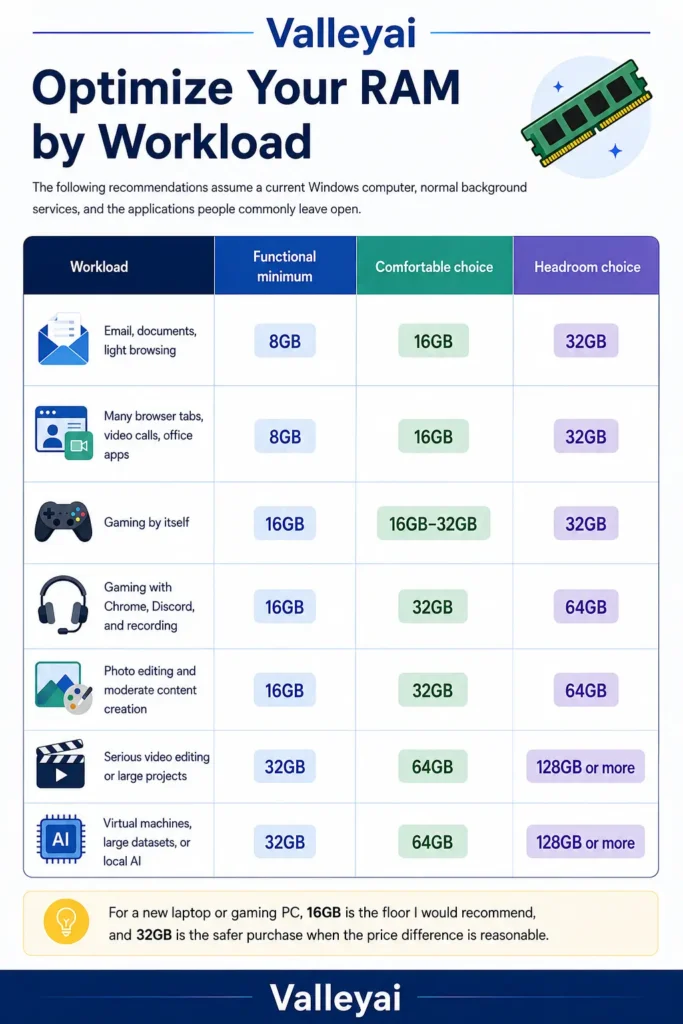
The following recommendations assume a current Windows computer, normal background services, and the applications people commonly leave open.
| Workload | Functional minimum | Comfortable choice | Headroom choice |
|---|---|---|---|
| Email, documents, light browsing | 8GB | 16GB | 32GB |
| Many browser tabs, video calls, office apps | 8GB | 16GB | 32GB |
| Gaming by itself | 16GB | 16GB–32GB | 32GB |
| Gaming with Chrome, Discord, and recording | 16GB | 32GB | 64GB |
| Photo editing and moderate content creation | 16GB | 32GB | 64GB |
| Serious video editing or large projects | 32GB | 64GB | 128GB or more |
| Virtual machines, large datasets, or local AI | 32GB | 64GB | 128GB or more |
For a new laptop or gaming PC, 16GB is the floor I would recommend, and 32GB is the safer purchase when the price difference is reasonable.
8GB, 16GB, 32GB, or 64GB: what changes in practice?
RAM capacity determines how much active data a computer can keep immediately available for the operating system and running applications.
8GB RAM
8GB RAM is suitable for light browsing, email, word processing, streaming video, and simple school or office tasks. The experience becomes less comfortable when many browser tabs, video calls, cloud applications, and background utilities remain open together.
An 8GB laptop can still be usable. The problem is flexibility. A few large web applications or an operating-system update running in the background can leave little working space.
Choose 8GB only when:
- The computer is inexpensive and used for basic tasks.
- The laptop cannot be upgraded but has a limited role.
- You usually run one or two lightweight applications at once.
- You are willing to close tabs and background programs.
16GB RAM
16GB RAM is enough for most browsing, office work, college tasks, general productivity, and a large share of PC gaming.
It is also the sensible starting point for a mainstream laptop. Windows itself has an official minimum requirement of 4GB for Windows 11, but a minimum requirement only means the operating system can run not that the computer will feel comfortable under a real workload. Check Microsoft’s current Windows 11 requirements before applying any operating-system specification to a purchase.
For gaming, 16GB often works well when the game is the main active workload. The margin gets thinner when Chrome, Discord, a launcher, recording software, mods, and overlays stay open.
32GB RAM
32GB RAM is the sweet spot for people who game while multitasking, keep large browser sessions open, edit photos or video, use creative applications, or want more room for future software.
The important distinction is comfort. A game may run on 16GB, but 32GB can reduce the need to close other applications and makes task switching less restrictive.
In practice, I have seen perfectly usable 16GB systems feel cramped for one simple reason: the owner was treating a gaming PC like a single purpose console while also running a browser, chat, recording, RGB utilities, and several launchers.
64GB RAM
64GB RAM is worthwhile for demanding video editing, professional creative work, software development with multiple virtual machines, large datasets, simulation tools, and certain local AI workflows.
64GB is not a requirement for ordinary browsing or standard gaming. Installing more RAM does not automatically make a computer faster when the workload already fits comfortably in the available memory.
How much RAM do you need for gaming?
For most gaming PCs, 16GB is workable and 32GB is the more comfortable target.
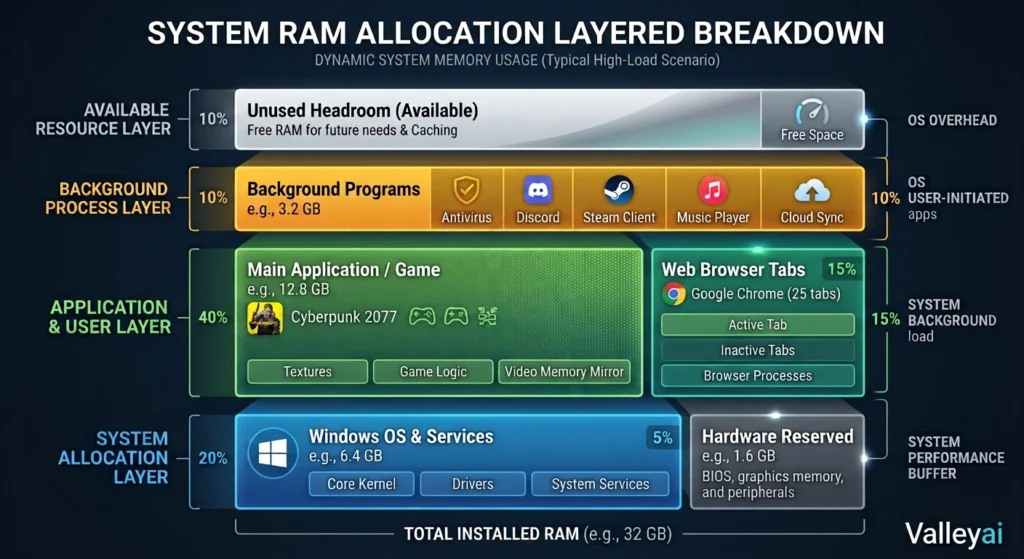
A game’s published memory requirement describes the game’s expected needs under specified conditions. Your computer also has to run Windows, graphics drivers, launchers, security tools, voice chat, browser tabs, overlays, and any recording or streaming software.
Choose 16GB for gaming if:
- You mainly play one game at a time.
- You close most browser tabs before launching a game.
- You do not run heavy recording, streaming, or creative software simultaneously.
- Your preferred games have moderate memory requirements.
- You are building to a strict budget and can upgrade later.
Choose 32GB for gaming if:
- Chrome or another browser stays open while you play.
- Discord, music, recording, or streaming tools run in the background.
- You play heavily modded games or large open-world titles.
- You want smoother task switching between the game and other applications.
- Your desktop motherboard supports a straightforward future upgrade.
Consider 64GB for gaming if:
- Gaming is combined with demanding production work.
- You use extensive mod packs, simulators, or development tools.
- You stream, edit footage, and keep other memory-heavy applications active.
- You are buying a system with no practical upgrade path and want substantial headroom.
RAM is only one gaming limit. Stutter can also come from GPU memory, CPU load, shader compilation, slow storage, thermal throttling, or poor game optimization. Adding RAM will not fix every type of frame-time problem.
Is 8GB enough for browsing and everyday use?
8GB RAM is enough for light everyday use, but 16GB is a better choice for regular browsing and multitasking.
A browser session can include ordinary pages, web-based office tools, video, cloud storage, extensions, messaging, and multiple background tabs. The total memory demand comes from the entire session, not from the active tab alone.
Choose 8GB for browsing when your usage is limited to:
- Email and a few websites
- Documents and spreadsheets
- Streaming video
- Basic social media
- One application at a time
Choose 16GB when you regularly combine:
- Many browser tabs
- Video meetings
- Documents and spreadsheets
- Music or streaming video
- Messaging applications
- Cloud storage and collaboration tools
Browser memory usage also changes with the sites involved. A simple text page and a web-based design editor are not equivalent workloads.
Why RAM capacity matters before RAM speed
RAM capacity answers how much active data fits in memory. RAM speed and latency describe how quickly the memory communicates with the processor and other components.
When a computer has enough capacity, faster memory can sometimes improve performance depending on the processor, graphics hardware, and application. When the computer runs short on capacity, speed is not the first problem to solve.
A useful buying order is:
- Choose enough RAM capacity for the workload.
- Confirm that the memory is compatible with the computer.
- Check whether the system uses the intended memory channels.
- Compare speed and latency after capacity is sufficient.
Integrated graphics can make capacity more relevant because integrated graphics share system RAM. A computer with a dedicated graphics card generally uses separate video memory for graphics, although system RAM still supports the game and operating system.
Laptop RAM changes the buying decision
Laptop buyers should confirm upgradeability before choosing a lower-memory configuration.
Some laptops use soldered RAM, which cannot be removed or expanded. Other laptops provide memory slots, while some combine soldered memory with one available slot. The exact design varies by model, so check the manufacturer’s specifications or service manual rather than assuming every laptop can be upgraded.
For a laptop:
- 8GB: acceptable only for light, short-term use when the price is the priority.
- 16GB: the practical baseline for most buyers.
- 32GB: a strong choice for gaming laptops, creative work, development, and long ownership.
- 64GB: useful for specialized workloads, if the laptop supports it.
A cheap laptop with soldered 8GB RAM can become a permanent frustration. Spending more at purchase time may be cheaper than replacing the entire machine later.
Laptop memory may also use low-power designs such as LPDDR memory. Low-power memory can support thin designs and battery efficiency, but the key buying question remains capacity and upgradeability not the label alone.
How to tell whether you need more RAM
The best RAM test reproduces the heaviest workload that causes the slowdown.
- Open the applications you normally use together.
- Start the game, project, or task that exposes the problem.
- Open Windows Task Manager and inspect memory usage.
- Watch whether storage activity rises sharply during slowdowns or task switching.
- Close background applications and repeat the same workload.
- Compare the behavior before deciding on an upgrade.
High memory usage by itself does not prove that RAM is the bottleneck. Operating systems may use available memory for caching, and a system can remain responsive with a high percentage of RAM occupied.
Look for a pattern:
| Symptom during a heavy workload | Possible interpretation |
|---|---|
| Memory remains near its limit and storage activity spikes | RAM pressure may be involved |
| Closing browser tabs improves the slowdown | Combined workload may exceed comfortable capacity |
| GPU memory is full while system RAM remains available | VRAM may be the limiting resource |
| CPU stays near full use | A processor limit may be responsible |
| Slowdowns appear as temperatures rise | Thermal throttling may be involved |
| The application crashes at one specific task | Software requirements or stability issues may matter |
When you are debugging a slowdown late at night, the error message is often less useful than the timing: if the system becomes sluggish exactly when you switch between several large applications, check memory and storage activity before buying a faster processor.
RAM is one possible cause of slowdowns, stuttering, or crashes. Check memory pressure alongside CPU usage, GPU or VRAM usage, storage activity, temperatures, and application requirements.
Should you buy 16GB or 32GB?
Buy 16GB when your work is mostly browsing, office tasks, schoolwork, streaming, and moderate gaming with limited multitasking.
Buy 32GB when you game with background applications, use creative software, keep large browser sessions open, run development tools, or cannot upgrade the device later.
The decision is especially straightforward for laptops. If the memory is soldered, favor the capacity you are likely to need across the device’s ownership period. If the computer has open upgrade slots, 16GB may be a reasonable starting point but verify the supported configuration first.
Do not pay for 32GB solely because a specification sheet looks better. Pay for 32GB when the extra capacity changes how you work or protects a system with no realistic upgrade path.
RAM questions people ask before upgrading
Does more RAM make a computer faster?
More RAM can improve responsiveness when the computer is regularly short on memory and begins relying heavily on storage-backed virtual memory. More RAM will not produce a major benefit when the existing capacity already handles the workload comfortably. Check memory and storage activity during the actual slowdown rather than using idle memory as proof.
Is 32GB RAM overkill for gaming?
32GB is more than necessary for some gaming setups, but it is not excessive for every gamer. It makes more sense when Chrome, Discord, recording software, mods, launchers, or streaming tools remain open. For a gaming PC that will be upgraded later, 16GB can work; for a non-upgradeable laptop, 32GB offers more flexibility.
Who needs 64GB of RAM?
64GB is aimed at people running demanding creative applications, large video projects, multiple virtual machines, simulation software, large datasets, or certain local AI workloads. Standard browsing, office work, and ordinary gaming rarely require 64GB. The purchase makes sense when the workload repeatedly approaches 32GB, not simply because the computer supports it.
Can low RAM cause gaming stutter?
Low RAM can contribute to stutter when the game and background applications exhaust available system memory, especially if storage activity rises while the game pauses or loads data. Stutter also comes from GPU memory limits, CPU saturation, shader compilation, heat, drivers, and game optimization. Test the system before treating RAM as the confirmed cause.
Should you upgrade RAM or replace the SSD?
Upgrade RAM when memory pressure appears during your normal workload and storage activity rises because the system is paging. Replace or add an SSD when storage capacity, file transfers, application load times, or drive health are the problem. An SSD improves storage responsiveness, but an SSD does not provide the same working capacity as additional RAM.
Is 16GB enough for a laptop?
16GB is enough for most laptop browsing, office work, school tasks, video calls, and moderate gaming. A laptop with 32GB is a better fit for creative work, development, heavier multitasking, or long ownership without upgrades. Confirm whether the laptop uses soldered RAM before assuming an 8GB or 16GB configuration can be expanded later.
The practical RAM rule
Choose 8GB only for light, budget-focused use; 16GB for mainstream computing; 32GB for comfortable gaming and multitasking; and 64GB for specialized workloads.
Then check the upgrade path. A desktop with replaceable memory gives you more room to start smaller. A laptop with soldered RAM deserves a more careful decision on day one.
New to RAM? Start with our complete guide: Random Access Memory (RAM): What It Is, How It Works, and Why It Matters

Kaleem
Kaleem is a Computer Science graduate (Virtual University of Pakistan) and the founder and editor of Valley AI, where he publishes in-depth, tested guides on computer hardware, artificial intelligence, and how the internet works. Every guide is researched from primary sources, tested hands-on where possible, and updated when the facts change.