
When a laptop specification lists an NPU, the label can sound more useful than it is clear. An NPU does not replace the processor or graphics card. It is a specialized part of a computer designed to handle certain artificial intelligence tasks efficiently, especially when those tasks run directly on the device.
What Is an NPU?
An NPU, or neural processing unit, is a specialized processor built to accelerate neural-network operations. An NPU is a type of AI accelerator: hardware designed for the repeated mathematical calculations used by machine-learning models.
An NPU is a processor optimized for supported AI inference workloads, such as speech recognition, image analysis, video effects, and other on-device machine-learning tasks.
Neural networks perform large numbers of operations involving model weights, inputs, and numerical values. NPUs are designed to process many of those operations in parallel while using less power than a general-purpose processor might use for the same supported workload.
Modern NPUs commonly appear inside a system-on-chip alongside a CPU and GPU. Smartphones, laptops, AI PCs, cameras, embedded systems, and industrial devices may all include NPU hardware.
The term does not describe one universal chip design. An NPU from Apple, Qualcomm, Intel, AMD, or another manufacturer may use different architectures, data types, software interfaces, and performance targets.
IBM describes NPUs as processors focused on the mathematical operations used by artificial intelligence and neural networks. Microsoft also presents NPUs as hardware for accelerating supported AI tasks on compatible Windows devices. The exact capabilities still depend on the device and software involved.
Everything an NPU accelerates traces back to machine learning models — systems that learned their behaviour from data instead of being coded rule by rule.
What Does an NPU Actually Do?
An NPU accelerates the repetitive calculations inside a neural network. Those calculations often involve matrix multiplication, tensor operations, and other forms of parallel numerical processing.
A neural network may use millions or billions of learned values, called weights, to classify an image, transcribe speech, enhance a video, or generate a response. An NPU can process suitable parts of that model in a specialized execution path rather than sending every operation through the CPU.
The practical advantages can include:
- Lower power use for supported AI workloads
- Reduced latency for local AI features
- Less CPU demand during inference
- Faster response for certain real-time tasks
- Better battery efficiency in mobile devices
The word supported matters. An NPU does not automatically accelerate every calculation in an AI application. The model, operators, numerical precision, driver, runtime, and application must all support NPU execution.
Inference is the NPU’s usual job
AI inference means running a trained machine-learning model to produce an output. For example, inference occurs when a device identifies objects in a camera image, removes background noise from a call, or converts spoken words into text.
AI training is different. Training adjusts a model’s parameters by processing data repeatedly. Training often demands substantial memory, high throughput, and long periods of computation. Large training workloads usually favor GPUs or specialized data-center accelerators.
Some accelerator architectures can support both training and inference. A consumer NPU, however, is generally positioned around efficient inference rather than replacing a high-end training GPU.
The layered networks behind this math are exactly where deep learning differs from classical machine learning, and that difference is what makes dedicated silicon worthwhile.
How Neural-Network Math Fits the Hardware
Neural-network workloads contain many operations that can run concurrently. An NPU uses specialized circuits and data paths to handle those operations efficiently.
The details vary by design, but common concepts include:
| Concept | Why it matters |
|---|---|
| Matrix operations | Neural networks use matrices to transform inputs into outputs. |
| Tensor operations | Tensors organize the multidimensional data used by many AI models. |
| Parallel processing | Many calculations can run at the same time. |
| Quantization | Models may use lower-precision numbers to reduce memory and power demands. |
| Model weights | Learned numerical values determine how a trained model responds. |
| Memory movement | Moving data between memory and the processor can limit real-world performance. |
NPUs may support numerical formats such as INT8, INT4, FP16, or other formats, depending on the architecture. Lower precision can improve efficiency, but the model and software must support the selected format without unacceptable accuracy loss.
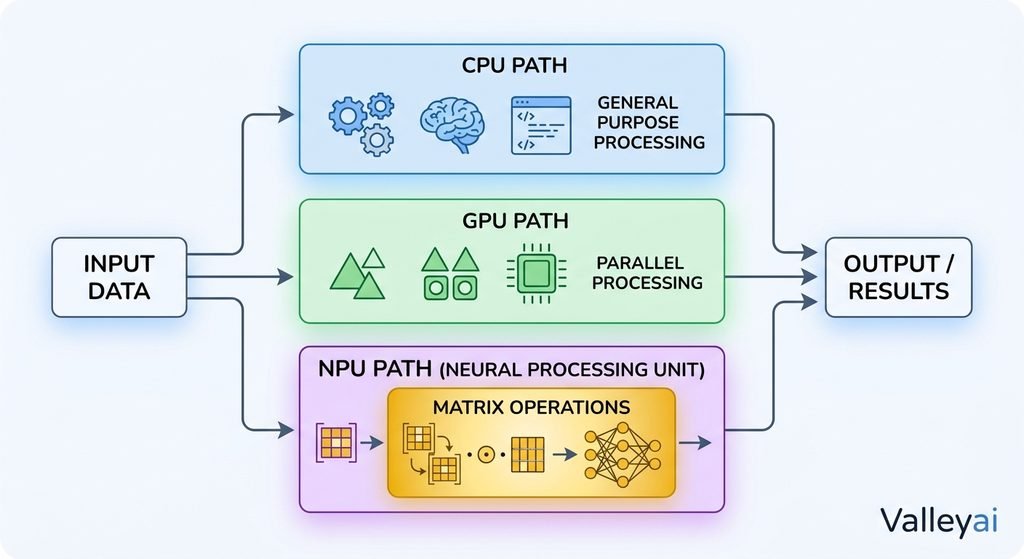
An NPU is therefore not “thinking” like a human brain. The neural-network comparison describes a class of mathematical models, not a literal biological simulation.
To see why the division of labour matters, it helps to understand how a CPU actually works before comparing it with anything else.
CPU, GPU, and NPU: Three Different Jobs
The clearest way to understand an NPU is to compare processor roles rather than ask which component is universally fastest.
| Processor | Primary role | Typical strengths |
|---|---|---|
| CPU | General-purpose computing | Operating-system tasks, application logic, control flow, and varied workloads |
| GPU | Highly parallel graphics and compute | Gaming, rendering, visual effects, scientific computing, and many AI workloads |
| NPU | Specialized neural-network acceleration | Supported AI inference with an emphasis on efficiency and low power |
A CPU remains the general manager of the device. It runs the operating system, coordinates applications, handles instructions that do not fit a specialized accelerator, and manages many forms of system logic.
A GPU contains many parallel execution units and is well suited to graphics, rendering, and large compute workloads. GPUs are also widely used for AI training and local AI models, especially when the workload needs substantial memory or broad software support.
An NPU targets a narrower class of neural-network calculations. That specialization can make an NPU more power-efficient for supported tasks, but specialization also creates limits.
Does an NPU replace a CPU?
No. An NPU does not replace a CPU.
The CPU handles general-purpose instructions and coordinates much of the software stack. An NPU may process one part of an AI feature while the CPU manages inputs, application logic, operating-system interaction, and unsupported operations.
The answer depends entirely on the workload, which we break down in our full NPU versus GPU comparison.
Does an NPU replace a GPU?
Usually, no. An NPU is not a general replacement for a GPU used for gaming, 3D rendering, graphics production, or many demanding training workloads.
An NPU may be preferable when the goal is efficient, supported inference at low power. A GPU may be preferable when the goal is maximum throughput, broad model compatibility, graphics performance, or access to a large amount of high-speed memory.
The useful question is not “Which processor is best?” It is “Which processor matches this workload?”
If you are still placing these chips in the wider system, our computer hardware guide shows how each component fits together.
Where You Find NPUs
NPUs are often integrated into the same system-on-chip as other processing components. Their presence is becoming more common in several device categories.
Smartphones
A smartphone may use an NPU for camera scene recognition, portrait effects, voice processing, face detection, image enhancement, or translation. These tasks benefit from low latency and low power because they run frequently and often need to respond immediately.
Laptops and AI PCs
AI PCs may use an NPU for background blur, eye-contact correction, noise suppression, local transcription, image tools, and other operating-system or application features. Microsoft’s support material connects NPUs with supported AI experiences in Windows devices.
An AI PC label does not guarantee that every AI application runs locally or uses the NPU. The application still needs an appropriate software path.
Cameras and embedded devices
Cameras, drones, robots, industrial inspection systems, and other edge devices may use NPUs to analyze data locally. Local processing can reduce the need to send every video frame or sensor reading to a remote server.
Edge and industrial systems
An edge device can use an NPU for object detection, anomaly detection, machine vision, or speech recognition near the point where data is collected. That can reduce network delay and bandwidth use.
Running generative AI models on the device instead of in the cloud is the single clearest reason consumer hardware started shipping NPUs.
Local AI Is Where an NPU Matters Most
On-device AI means that a device performs at least part of an AI workload locally instead of sending the entire workload to a remote service. An NPU can accelerate the local portion when the software supports it.
Local NPU processing may help with:
- Faster response for supported features
- Lower network dependence
- Improved privacy for certain data
- Offline or limited-connectivity operation
- Lower power use during repeated inference
A hybrid workflow is also common. For example, a device might use the NPU to detect speech activity, the CPU to manage the application, and a remote server to process a larger model.
Does an NPU work with cloud AI?
A local NPU does not automatically accelerate the main model behind a cloud AI service. Cloud services generally process their primary workloads on remote servers containing their own CPUs, GPUs, or AI accelerators.
A local application may still use the NPU for preprocessing, privacy-sensitive functions, or smaller local models before communicating with a cloud service. The application determines which path is used.
Why Software Support Matters More Than the Label
An NPU can exist in the hardware while remaining unused by a particular application.
The complete software path may include:
- The operating system
- A hardware driver
- An AI runtime or API
- The application
- The model format
- Supported model operators
- Compatible precision and quantization
- A compiler or graph-optimization process
If one part of that chain is missing, the application may run the workload on the CPU, GPU, or cloud infrastructure instead.
In practice, the frustrating case is not a weak NPU; it is an application that cannot address the NPU at all and quietly falls back to the CPU or GPU.
Frameworks and interfaces such as ONNX, TensorFlow, Core ML, DirectML, and OpenVINO can help applications deploy machine-learning models across supported hardware. Their presence does not mean every model will run on every NPU. Runtime support remains model- and device-dependent.
Do all AI applications use an NPU?
No. An AI application uses an NPU only when the application and its software stack support that hardware.
A program may use the GPU because the model needs more memory or broader operator support. Another program may use the CPU because its workload is small, irregular, or not optimized for NPU execution. Cloud software may send the main workload to remote servers.
This is the same trap buyers fall into with GPU specifications, where one headline number hides bandwidth, memory, and driver realities.
TOPS Does Not Tell the Whole Story
TOPS means trillions of operations per second. Manufacturers often use TOPS as a headline measure of theoretical AI-processing capability.
A higher TOPS rating can indicate greater potential throughput under particular conditions. It does not guarantee that one NPU will make every application faster than another.
Real-world results also depend on:
- Numerical precision
- Model architecture
- Supported operations
- Memory bandwidth
- Data transfer overhead
- Driver and runtime quality
- Thermal and power limits
- Whether the application uses the NPU at all
Two devices with similar TOPS ratings can produce different results in the same application. Conversely, a device with a lower advertised rating may feel faster for a workload with better software optimization.
Laptop silicon involves the same trade-offs you face when choosing between integrated, discrete, and external GPUs.
Is an NPU Useful in a Laptop or Smartphone?
An NPU can be useful when the device runs supported AI features frequently and efficiently. Smartphones may benefit from camera, voice, and image-processing tasks. Laptops may benefit from video-call effects, transcription, local assistants, and other on-device features.
The benefit is smaller when:
- The applications you use do not support the NPU
- Your main workload is gaming
- You perform graphics rendering
- You train large AI models
- Your AI services run entirely in the cloud
- The device has limited memory or poor software optimization
An NPU is a capability, not a guarantee. Check application support and measured workload behavior before treating an NPU specification as a buying reason by itself.
The Practical Meaning of “NPU in an AI PC”
In an AI PC, “NPU” usually means the computer includes dedicated hardware for supported local AI inference. The label does not mean that all AI runs locally, that every application uses the NPU, or that the NPU replaces the GPU.
The most useful interpretation is simple:
An AI PC with an NPU has an additional processing option for compatible AI workloads.
That option can improve efficiency for the right task. It does not change the CPU’s general-purpose role or eliminate the need for a GPU when a workload demands graphics performance, memory capacity, or broad parallel computing.
Apply the same reasoning used when choosing between a GPU and a CPU: start from the work you actually do, not the spec sheet.
Should You Need an NPU?
You may value an NPU if you regularly use local AI features, video-call effects, speech tools, image processing, or applications that explicitly support NPU acceleration.
You probably should not choose a device solely because it has an NPU if your priorities are gaming, 3D work, traditional productivity, or large-model training. Those workloads may depend more on CPU performance, GPU capability, memory capacity, or software compatibility.
The right decision depends on the workload, not the acronym.
The Short Version
A neural processing unit is a specialized AI accelerator for supported neural-network operations. NPUs are commonly optimized for efficient, low-power inference on phones, laptops, AI PCs, cameras, and edge devices.
An NPU works beside the CPU and GPU:
- The CPU handles general-purpose computing.
- The GPU handles graphics and many large parallel workloads.
- The NPU handles compatible AI inference efficiently.
The final benefit depends on software support, model compatibility, precision, memory behavior, and whether the workload runs locally rather than in the cloud.
Frequently Asked Questions
Are NPUs standardized across manufacturers?
No. “NPU” describes a category of neural-network acceleration hardware, not one universal architecture or performance standard. Different manufacturers can use different designs, supported precisions, runtimes, memory systems, and execution methods. A software feature that uses one company’s NPU may require separate support before it works on another company’s hardware.
Can you add an NPU to a computer later?
Usually, not in the same way you add a graphics card. Many consumer NPUs are integrated into a system-on-chip or processor package. Some desktops and industrial systems can use discrete AI accelerator hardware, but compatibility depends on the motherboard, operating system, drivers, application, and physical interface. An NPU is generally something to evaluate when selecting the platform.
Does an NPU improve battery life automatically?
No. An NPU can reduce power use for a supported AI workload, but the total device result depends on how the application is written and what other components are active. If the CPU, GPU, display, memory, or network connection remains heavily used, the device may not show a noticeable battery improvement.
Can a local NPU run a large language model?
Sometimes, but the answer depends on the model, memory capacity, quantization, runtime, and supported operators. An NPU may accelerate parts of a compatible language model, while the CPU or GPU handles other work. A high TOPS rating alone does not prove that a device can run a large language model quickly or entirely on the NPU.

Kaleem
My name is Kaleem and i am a computer science graduate with 5+ years of experience in Computer science, AI, tech, and web innovation. I founded ValleyAI.net to simplify AI, internet, and computer topics also focus on building useful utility tools. My clear, hands-on content is trusted by 5K+ monthly readers worldwide.