

Your laptop says four hours left. An hour later it reads 20 percent. Then it dies in the middle of a sentence, with work unsaved.
How does a laptop battery work? A sealed pack of lithium-ion cells stores energy as chemistry, and a small circuit board turns that chemistry into the percentage you see. That number on the screen is a guess. Runtime comes down to two numbers: how much energy the pack holds, and how fast the laptop spends it.
What a laptop battery holds
Open the case to see how a laptop battery works: a row of cylindrical cells wired together, with a thin circuit board at one end. The cells are 18650s, 18 millimeters wide and 65 long, and a typical laptop pack holds three, four, six, or eight of them. Wiring decides what the pack delivers. Cells in series add voltage, like batteries stacked in a flashlight. Cells in parallel add capacity, like two water tanks joined at the base.
A pack built from Samsung INR18650-35E cells shows how the wiring adds up. Each cell holds 3.6 volts and 3.5 amp-hours, and the table below puts the common arrangements side by side.
| Arrangement | Volts | Amp-hours | Watt-hours |
|---|---|---|---|
| 3 in series, 1 in parallel (3S1P) | 10.8 | 3.5 | 37.8 |
| 3 in series, 2 in parallel (3S2P) | 10.8 | 7.0 | 75.6 |
| 4 in series, 1 in parallel (4S1P) | 14.4 | 3.5 | 50.4 |
| 4 in series, 2 in parallel (4S2P) | 14.4 | 7.0 | 100.8 |
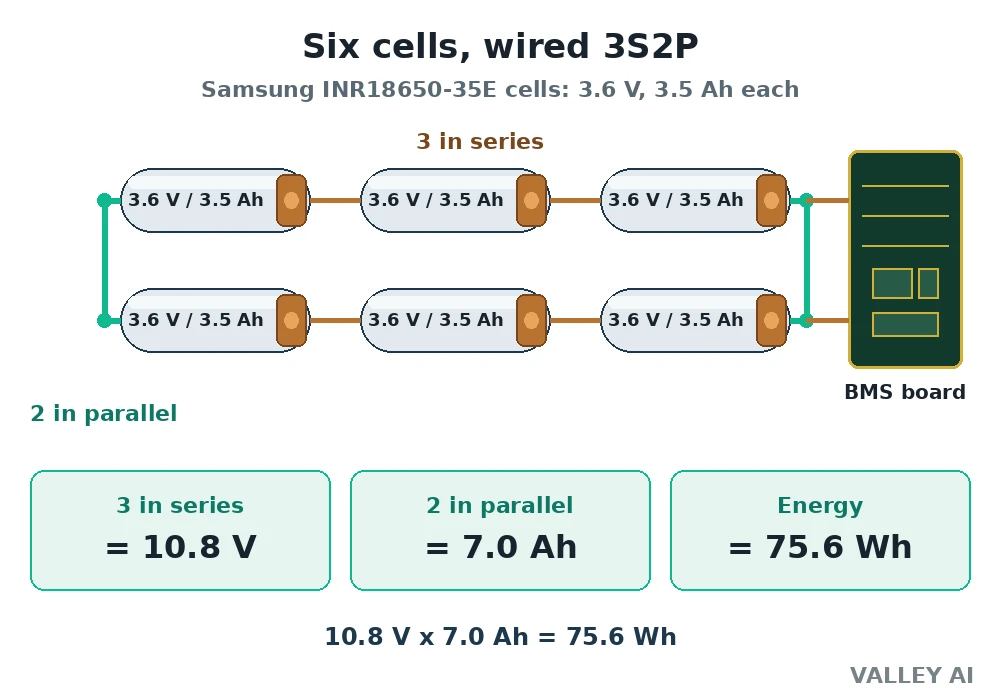
Labels on real packs tell the same story in different numbers. A pack marked 11.1 volts uses cells rated 3.7 volts instead of 3.6, three in series. The label voltage is nominal, a midpoint. A full pack reads higher, and an empty one reads lower.
Pouch cells are the other shape in current laptops. A pouch holds the same chemistry in a flat foil bag instead of a steel cylinder, which is how laptops got thin. The voltage is the same. A pouch shows damage differently: gas builds up inside the bag and the pack swells, which is the sign to stop using it.
Inside one lithium-ion cell
Each cell holds four parts. The anode is graphite. The cathode is a lithium metal oxide, usually lithium cobalt oxide or a nickel manganese cobalt blend. The electrolyte is a lithium salt, lithium hexafluorophosphate, dissolved in a solvent. The separator is a thin porous film between the electrodes.
Charging pushes lithium ions from the cathode to the anode, where they lodge between the layers of graphite. The electrolyte carries the ions across. The separator lets ions through and blocks electrons, so electrons take the long way around, through the charger circuit. The cell stores energy by holding the ions apart.
What pushes the ions across? Voltage. The charger holds the cell above its own voltage, and that difference drives ions from one electrode to the other. Take the charger away and the cell’s own voltage drives current the other way, through the laptop.
Discharging runs the same path backward. Ions drift back to the cathode. Electrons flow out of the anode, through the processor, the screen, and the storage, then back into the cathode. The flow of electrons is the current that powers the laptop.
The separator earns its place here. It keeps the electrodes from touching. A punctured separator lets the electrodes meet, and the cell shorts, heats, and can catch fire. That failure mode is why packs are sealed, and a damaged pack belongs in recycling.
Voltage marks the state of a cell. Full is 4.2 volts. Empty sits near 3.0 volts. Between those two numbers, voltage falls in a curve that stays flat through the middle and drops steeply at the end, which is one reason the percentage on screen can fall fast in the last stretch.
How long a charge lasts: the watt-hour calculation
Watt-hours are the unit that decides runtime. A watt-hour is volts times amp-hours, and the number on a pack tells how much energy it holds. Divide that number by the watts the laptop draws and the answer is hours.
Inputs for the calculation, run on 8 November 2026: the 75.6 watt-hour pack built from Samsung INR18650-35E cells at 3.6 volts and 3.5 amp-hours each; the MacBook Air M2, which Apple lists at 52.6 watt-hours; and four draw figures as labeled assumptions, 5 watts for light use with the screen dim, 8 watts for light work, 15 watts for mixed use, and 45 watts for heavy load.
| Draw | 75.6 Wh pack | 52.6 Wh MacBook Air M2 |
|---|---|---|
| 5 W, light use, screen dim | 15.1 hours | 10.5 hours |
| 8 W, light work | 9.5 hours | 6.6 hours |
| 15 W, mixed use | 5.0 hours | 3.5 hours |
| 45 W, heavy load | 1.7 hours | 1.2 hours |
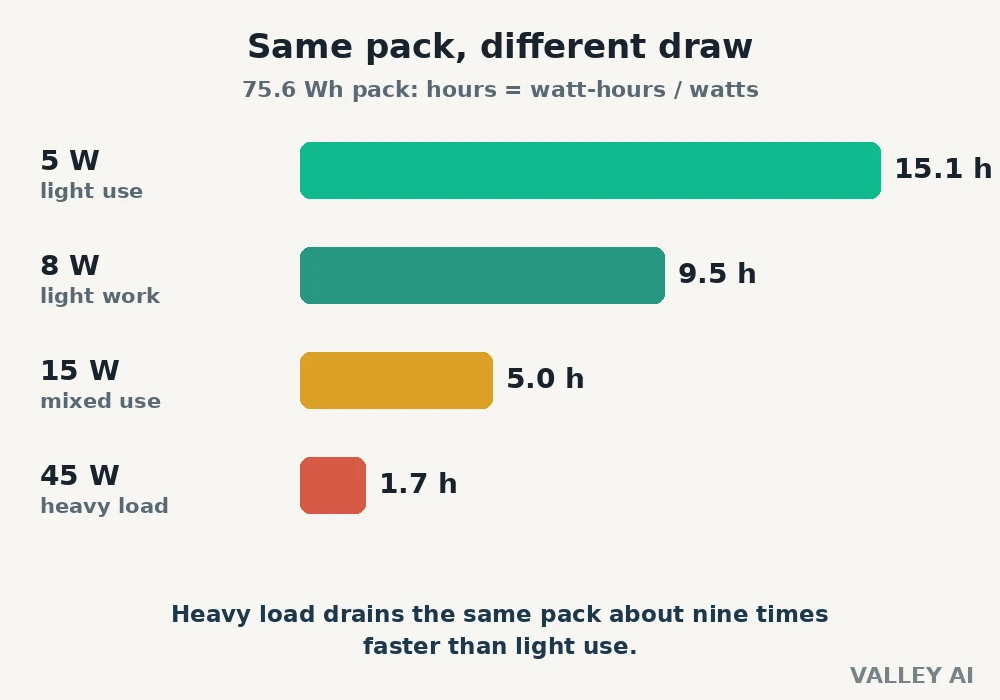
The spread is the point. The same pack stretches past nine hours at a light draw and empties in under two at a heavy one. The laptop’s appetite sets the runtime more than the pack size does.
A processor’s appetite is set by its design. A processor rated at 15 watts draws about that much running flat out, and its thermal design power is the number that says so. Storage adds its own draw: a solid-state drive uses little power, while a spinning hard drive keeps a motor turning the whole time it runs.
Does a bigger milliamp-hour number always mean longer runtime? No. Milliamp-hours without volts are half the story. A pack rated 5000 milliamp-hours at 11.1 volts holds 55.5 watt-hours. The same 5000 milliamp-hours at 7.4 volts holds 37.0 watt-hours. Judge a pack by watt-hours, and check the voltage behind the milliamp-hours.
Charging in two stages
Charging runs in two stages. Stage one pushes a steady current while the voltage climbs, and it covers roughly the first 80 percent. Stage two holds the voltage steady at 4.2 volts per cell while the current tapers down. The second stage is why the last fifth of a charge takes a disproportionate share of the total time.
- Stage one, constant current: full current in, voltage rising, up to about 80 percent.
- Stage two, constant voltage: voltage held at 4.2 volts per cell, current tapering to a trickle.
A bigger brick helps only up to a point. A 65 watt charger feeding a 56 watt-hour pack needs about an hour in theory, at 85 percent charging efficiency, and the constant-voltage taper stretches it past that. The cells take only what the battery management system allows. A laptop built for a 65 watt charger takes 65 watts from a 100 watt brick. The extra capacity sits unused.
The charger itself is the laptop’s power supply: it turns wall power into the direct current the battery takes. Many current laptops charge over USB-C Power Delivery, which lets one cable carry both data and charging power.
The battery management system
Every laptop battery carries a small circuit board, the battery management system, or BMS. It watches each cell’s voltage, the pack temperature, and the current flowing in both directions. Nothing charges or discharges without it.
Cells drift apart with age. One cell holds a little less than its neighbors, and the pack can only charge as far as the weakest cell allows. The BMS bleeds charge from the strongest cells to keep the pack even, so a single weak cell does not cap the whole pack.
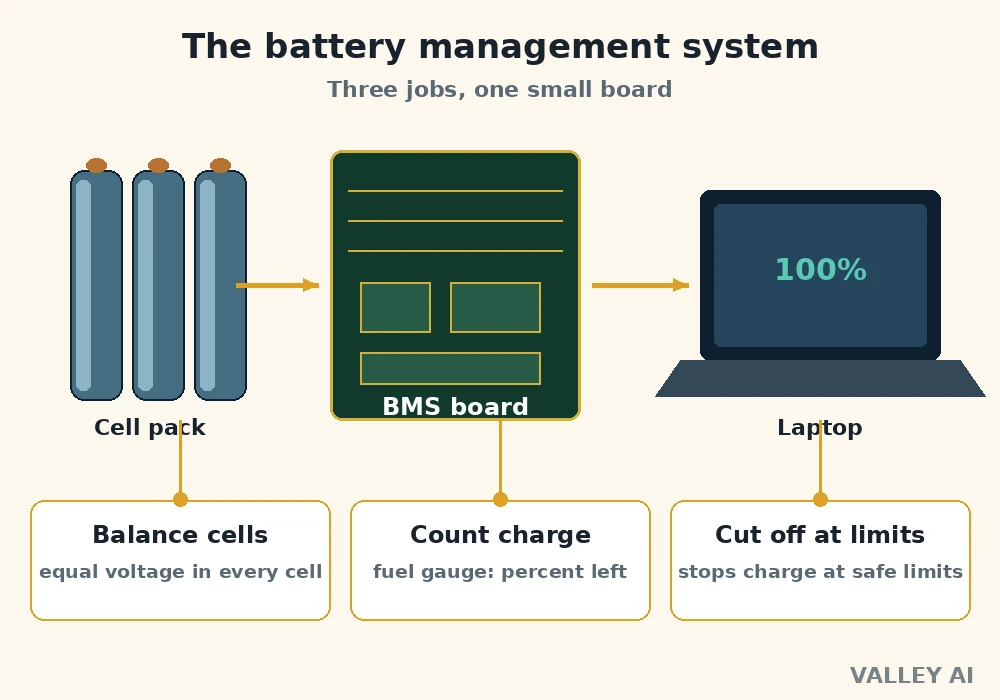
The percentage on the screen is an estimate the BMS builds from its measurements. It counts charge flowing in and out, a method called coulomb counting, and checks the result against cell voltage. The estimate drifts over time, and a stale estimate can read 20 percent when the pack is nearly empty.
Protection is the BMS’s third job. It cuts charging above 4.2 volts per cell, cuts discharge at the 3.0 volt floor, and cuts current when temperature climbs. The pack feeds the motherboard, where voltage regulators step the pack voltage down to what the processor needs.
Why batteries fade, and how to read your own
Three forces wear a pack down. Calendar aging eats capacity with time, even on a shelf. Heat speeds the chemistry that ages cells. Deep discharges wear more than shallow ones: Battery University puts a lithium-ion cell at 300 to 500 cycles for full discharges, and 1,200 to 1,500 cycles when discharges stop at half.
Apple rates current MacBook batteries to keep 80 percent of their original capacity at 1,000 complete charge cycles. Older models were rated at 500. A cycle counts as one full discharge, and partial discharges add up: two days at 50 percent make one cycle.
Habits change the wear rate. Keeping charge between 20 and 80 percent trims the worst stress. Storing a laptop for months at full charge in a hot room does the opposite. Battery University recommends storage near 40 to 50 percent charge, in a cool place.
Read your own battery before guessing at its health. On Windows, run powercfg /batteryreport from a command prompt and open the report it writes: design capacity against full charge capacity shows the wear. On a Mac, System Information lists cycle count and condition under Power.
When the numbers say the pack is done, run the watt-hour math on the replacement before buying. Compare the watt-hour rating of the original pack with the rating on the listing, and check the voltage matches. A listing with a bigger milliamp-hour figure at a lower voltage can hold less energy than the pack it replaces.
Start with the report. A pack at 500 cycles holding 70 percent of its design capacity has earned its replacement. A pack near full capacity with a short runtime points somewhere else: the charger, the settings, or a process burning power in the background.
Frequently asked questions
Can I leave my laptop plugged in all the time?
Yes, for the most part. The battery management system stops charging at full, and the laptop runs on wall power after that. Heat is the real cost, so keep the vents clear and the laptop off soft surfaces. Some makers offer a charge cap in their own software, Lenovo, Dell, and ASUS among them, which holds the battery near 80 percent. Use it when the laptop sits plugged in for weeks at a time.
Do I need to fully discharge my battery to calibrate it?
Not as a routine. Full discharges wear the pack, and the fuel gauge recalibrates from ordinary use. A full discharge helps only when the percentage reads wildly wrong, and once is enough. If the reading stays wrong after that, the pack is worn.
My laptop battery is swollen. Is it safe to keep using it?
Stop using the laptop right away. Unplug the charger, and do not press on the swollen pack or try to open it. Swelling means gas has built up inside the pouch. Take the laptop to a repair shop or a battery drop-off point for a replacement and safe recycling.
Can a laptop run without its battery?
Most laptops can, running on the charger alone with the battery removed. A few models lean on the battery for peak power, so performance may drop without it. Check the manual for the model before removing the pack.

Kaleem
Kaleem is a Computer Science graduate (Virtual University of Pakistan) and the founder and editor of Valley AI, where he publishes in-depth, tested guides on computer hardware, artificial intelligence, and how the internet works. Every guide is researched from primary sources, tested hands-on where possible, and updated when the facts change.