

A processor can show a 65-watt TDP, draw more or less than 65 watts in real use, and still run at different temperatures depending on its cooler and surroundings. That apparent contradiction exists because TDP is not a complete power-consumption or temperature measurement.
Thermal Design Power (TDP) is a watt-based reference used to help design the cooling system for a CPU, GPU, or other processor. It helps indicate the thermal load a system should be designed to handle under specified operating conditions.
TDP is useful, but it is not a universal score for performance, efficiency, electricity use, or temperature.
What Is TDP?
Thermal Design Power describes the cooling demand associated with a processor’s design target. The number is expressed in watts, such as 35W, 65W, or 125W.
A higher TDP generally signals a greater thermal-design requirement. A system may need a more capable heat sink, better airflow, a larger laptop cooling solution, or a different thermal-management approach.
The exact meaning of a TDP rating depends on the manufacturer and the specification method. Intel, AMD, GPU manufacturers, laptop makers, and server vendors may use related terminology under different conditions. For a specific component, the manufacturer’s own specifications take priority.
TDP is best treated as a cooling-design reference—not as a guaranteed maximum power draw or a direct temperature rating.
Reading the number correctly is easier once you understand how a CPU actually works and where its power budget goes.
What TDP tells you—and what it does not
| Metric | What it describes | What it does not tell you |
|---|---|---|
| TDP | A thermal-design reference expressed in watts | Exact real-world power use or temperature |
| Actual power draw | Electrical power the component uses at a particular moment | The component’s cooling requirement under every workload |
| Heat output | Thermal energy produced as electrical power is consumed | The final component temperature |
| Temperature | How hot the component becomes | How much power the component uses by itself |
| Cooling capacity | How much heat a cooler and system can remove | Whether the processor will use a fixed amount of power |
| PSU capacity | How much electrical power a complete system can receive | Whether a CPU or GPU cooler is adequate |
These measurements are connected, but they are not interchangeable.
A processor consumes electrical power. Much of that energy becomes heat. The cooling system removes the heat, while temperature reflects the balance between heat generation, cooling capacity, airflow, and ambient temperature.
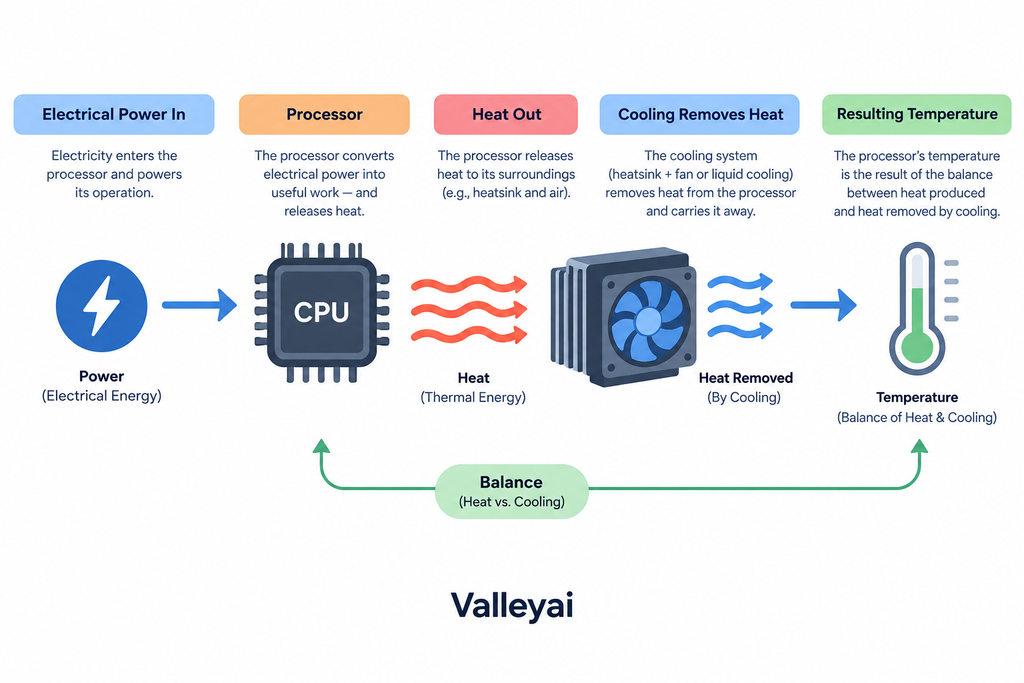
Actual draw also depends on the power delivery built into the motherboard, not just the chip itself.
Is TDP the same as power consumption?
No. TDP and actual power consumption are related, but they are not the same measurement.
Actual power draw changes with workload, clock speed, voltage, boost behavior, active cores, integrated graphics activity, and software instructions. A processor performing a light task may use far less power than it does during a sustained rendering or compilation workload.
A processor can also temporarily draw more power than its stated TDP when boost or turbo behavior is active, depending on the manufacturer’s limits and terminology. Intel’s processor documentation, for example, distinguishes Processor Base Power from other operating behavior and provides processor specifications through Intel ARK.
That means a TDP number should not be used as a precise electricity-use estimate. Someone planning a power supply or measuring energy consumption needs broader system specifications or measured power data.
Why can actual power exceed TDP?
Actual power can exceed a stated TDP because TDP may describe a sustained thermal-design condition rather than every short-duration operating state. Boost clocks, intensive instruction sets, configurable power limits, and workload duration can all affect power draw.
The practical rule is simple:
Use TDP to think about thermal design. Use power specifications or measurements to understand electrical consumption.
If heat is already causing problems, our triage guide for an overheating CPU walks through the root causes one by one.
Is TDP the same as heat output?
Not exactly.
Electrical power consumed by a processor largely becomes heat that the cooling system must remove. That relationship makes TDP relevant to thermal planning. However, a TDP label should not automatically be treated as a universal heat-output measurement for every workload.
The processor may operate below its design reference during light use or above it temporarily during demanding operation. Manufacturer measurement conditions also matter.
For cooling purposes, TDP helps answer a design question:
How much thermal load should the system be prepared to manage under the relevant operating conditions?
It does not answer a different question:
How many watts of heat will this component produce every second in every application?
Those questions sound similar, but they require different types of information.
Temperature depends on cooling and workload, so it helps to know normal CPU temperatures at idle, under load, and while gaming.
Is TDP the same as temperature?
No. TDP does not directly determine a CPU or GPU temperature.
Temperature depends on several factors:
- Actual power draw during the workload
- Cooler capacity
- Heat-sink design
- Airflow through the case or chassis
- Ambient room temperature
- Thermal interface material
- Fan or pump behavior
- The processor’s temperature sensors and control limits
- The physical design of the laptop, desktop, server, or graphics card
Two processors with the same TDP can run at different temperatures when installed in different systems. A compact laptop and a well-ventilated desktop may handle similar thermal loads in very different ways.
Thermal resistance is another useful concept. It describes how much temperature rises as heat moves through a cooling path. Lower thermal resistance generally means heat can move away from the component more effectively, but TDP alone does not reveal the complete thermal resistance of a system.
The same confusion surrounds overclocking, where a bigger number on paper does not automatically mean more real-world speed.
Does a higher TDP mean better performance?
Not automatically.
A higher TDP can give a processor or graphics component more thermal and power headroom, which may support higher sustained performance in some designs. But performance also depends on architecture, clock speed, core count, efficiency, memory, software, power limits, and workload.
A lower TDP can be valuable when the priorities are:
- Lower heat
- Reduced fan noise
- Longer laptop battery life
- A smaller or thinner system
- Easier cooling
- Lower energy use under comparable conditions
A higher TDP can be useful when the priority is sustained performance and the system has enough cooling capacity. Neither rating is inherently better. The right value depends on the intended system.
Is a 35W TDP good?
A 35W TDP can be appropriate for a laptop, compact desktop, quiet system, or other design where heat and power limits matter. It may not be the right choice for someone seeking the highest sustained performance in a system built for a larger cooler.
The number is not “good” or “bad” by itself. Evaluate it alongside the processor’s performance, workload, chassis, cooling solution, power limits, and intended use.
The two figures are not comparable because GPUs and CPUs do fundamentally different work, so their power budgets measure different things.
CPU TDP and GPU TDP are not interchangeable scores
Both CPUs and GPUs may use TDP-related specifications, but their ratings describe different components with different workloads and cooling designs.
A CPU may spend much of its time handling varied, bursty workloads. A GPU may sustain heavy parallel workloads for long periods. Laptop components may also operate within strict shared limits for the processor, graphics hardware, battery, and chassis cooling system.
For that reason, comparing a CPU’s TDP directly with a GPU’s TDP does not tell you which component is faster, hotter, or more efficient. The ratings are most useful within the context of the component and system they describe.
Why manufacturer terminology matters
TDP is not defined and measured identically across every manufacturer or product category. Processor specifications may include terms such as base power, boost power, configurable TDP, or other workload-specific labels.
Intel’s supplied documentation uses Processor Base Power and directs readers to Intel ARK for processor specifications. Other manufacturers may use different names or conditions. GPU and laptop specifications can also reflect product-specific power limits rather than a directly comparable CPU-style TDP.
When comparing components:
- Identify the exact power term being reported.
- Check the manufacturer’s stated conditions.
- Note whether the figure describes sustained operation, a base state, or a configurable limit.
- Avoid treating two numbers from different vendors as perfectly equivalent.
- Use independent power measurements when exact consumption matters.
A label becomes more useful when its measurement context is understood.
How to use TDP when choosing hardware
TDP is most useful as one input in a thermal-planning workflow.
A cooler rated well above your TDP still underperforms if the contact surface is poor, which is why cleaning and reapplying thermal paste matters as much as the rating.
For a CPU cooler
Start with the processor’s manufacturer specifications, then check the cooler’s stated compatibility and capacity. Consider case airflow, ambient temperature, sustained workload, and whether the processor can operate above its base power during boost behavior.
TDP alone does not prove that a particular cooler will deliver a desired temperature or noise level.
Graphics cards publish board power rather than chip power, so it helps to be clear on what a GPU actually is before comparing figures.
For a GPU
Use the graphics processor’s power and thermal specifications to assess the cooling design, case airflow, and connector requirements. Do not use TDP as a standalone performance score.
Portable machines trade sustained power for thermals, which is also the core difference between integrated, discrete, and external GPUs.
For a laptop
TDP helps indicate how the processor fits within the laptop’s cooling, battery, and chassis limits. A higher rating may support more sustained performance, while a lower rating may fit a thinner or quieter design. Actual results depend on the complete laptop implementation.
For a power supply
Do not calculate PSU capacity by simply adding the CPU and GPU TDP values. A power supply must support the complete system, including the motherboard, drives, memory, fans, peripherals, and short-duration power behavior.
For a small-form-factor system
TDP matters more when the case has limited airflow or a small cooler. The design has less room to absorb heat, so processor power behavior, cooler dimensions, fan noise, and case ventilation need to be considered together.
A practical TDP interpretation workflow
Use this five-step process when you encounter a TDP number:
- Identify the component.
Determine whether the number belongs to a CPU, GPU, laptop processor, server chip, or another device. - Find the manufacturer’s exact terminology.
Check whether the specification is called TDP, Processor Base Power, configurable TDP, boost power, or something else. - Separate thermal and electrical questions.
Use TDP to understand cooling design. Use power specifications or measurements to estimate actual electrical consumption. - Consider the operating conditions.
Workload, boost behavior, ambient temperature, chassis size, and cooling capacity all affect real operation. - Make the hardware decision using more than TDP.
Check cooler compatibility, system power requirements, airflow, performance targets, and the manufacturer’s limits.
This workflow prevents the most common mistake: treating one watt value as an answer to every thermal and power question.
Throttling is not a defect but a design choice, and it dates back to the thermal wall that reshaped processor design in the mid-2000s.
TDP and thermal throttling
Thermal throttling occurs when a component reduces performance to control temperature or remain within its thermal limits. Inadequate cooling, restricted airflow, high ambient temperature, or sustained heavy workloads can contribute to this behavior.
TDP does not specify the exact temperature at which throttling begins. It helps define the thermal-planning problem, while the component’s control logic and system design determine how the component responds.
A suitable cooling system should therefore be judged using the processor’s specifications and the complete system conditions—not TDP alone.
Closing the confusion around TDP
TDP is neither meaningless nor a complete description of a processor. It is a thermal-design reference that helps connect a component to the cooling system built around it.
When you see a TDP value, ask three questions:
- What thermal design condition does this number represent?
- How might actual power vary with workload and boost behavior?
- What additional specifications are needed for the cooler, system, or PSU decision?
That approach keeps TDP in its proper role: useful for thermal planning, but not a substitute for complete power, temperature, or performance data.

Kaleem
My name is Kaleem and i am a computer science graduate with 5+ years of experience in Computer science, AI, tech, and web innovation. I founded ValleyAI.net to simplify AI, internet, and computer topics also focus on building useful utility tools. My clear, hands-on content is trusted by 5K+ monthly readers worldwide.