
A new graphics card can leave a video editor, gamer, or machine-learning project almost exactly where it started. The reason is simple: performance depends less on which processor is “better” and more on where the workload spends its time.
The practical choice is usually not GPU or CPU. It is whether the task needs fast, flexible decisions; high-volume parallel calculations; or a balanced system that can coordinate both.
The real choice is latency versus throughput
A central processing unit (CPU) is designed to handle varied instructions, branching decisions, operating-system tasks, and workloads where individual responses need to happen quickly. On the other hand graphics processing unit (GPU) is designed to execute many similar operations at the same time.
The difference is best understood through two performance concepts:
- Latency: how long one operation takes to complete.
- Throughput: how much total work a processor completes over a period of time.
A CPU often wins when a program must make frequent decisions, jump between different tasks, or respond quickly to changing input. A GPU often wins when software can divide a large operation into thousands of similar calculations.
For example, updating one application window involves varied instructions and system coordination. Processing millions of pixels, matrix values, or lighting calculations can be divided into many parallel operations.
Amazon Web Services describes CPUs as suited to sequential processing and GPUs as suited to parallel workloads in its GPU and CPU processing comparison. The distinction does not mean that CPUs can never process parallel work or that GPUs cannot perform sequential steps. It means each processor is built around a different performance emphasis.
A CPU is usually the better tool for low-latency, varied work. A GPU is usually the better tool for high-throughput, highly parallel work.
Raw core counts do not settle the comparison. CPU cores and GPU execution resources are designed differently, so “more cores” is not a meaningful universal performance rule.
The numbering confusion starts with the CPU side itself: our guide to CPU cores vs threads decodes what those numbers mean and shows measured gains from real experiments.
Match the workload before choosing the component
The fastest way to choose between CPU and GPU priorities is to inspect the workload itself. Ask four questions:
- Are the operations mostly different or mostly repeated?
- Does the task need immediate responses or maximum batch throughput?
- Can the application divide the work across GPU execution units?
- Will memory capacity, data movement, or software support limit the gain?
The following table gives a practical starting point.
| Workload | Usually deserves priority | Why |
|---|---|---|
| Office software, browsing, and application logic | CPU | These tasks involve varied instructions, short operations, and system coordination. |
| High-refresh-rate gaming | Balanced CPU and GPU | The GPU renders frames, while the CPU handles game logic, simulation, input, and frame scheduling. |
| High-resolution gaming | GPU | More pixels and visual effects increase rendering demand. |
| Video editing | Balanced system | The CPU may handle decoding, timeline logic, and some effects; supported GPU acceleration can speed encoding, effects, and previews. |
| 3D rendering | GPU when the renderer supports it | Large numbers of similar lighting, shading, and geometry calculations can parallelize well. |
| Machine-learning training | GPU when supported | Matrix operations and other repeated calculations can benefit from massive parallel execution. |
| Data preparation and orchestration | CPU | File handling, preprocessing, branching logic, and pipeline coordination often remain CPU-oriented. |
| Scientific simulation | Depends on the algorithm | Regular, parallel calculations may favor a GPU; irregular dependencies may favor a CPU. |
The table is a decision aid, not a benchmark. A specific application can behave differently from its workload category because its engine, renderer, framework, drivers, and memory behavior determine how efficiently it uses hardware.
When the CPU deserves priority
CPU performance matters most when a task includes:
- Frequent branching and unpredictable instructions
- Operating-system and application coordination
- Game-engine logic and simulation
- Serial dependencies where one result affects the next step
- Data preparation or file processing
- Software with little or no GPU acceleration
A faster GPU will not fix a task that spends most of its time waiting on CPU-side logic.
When the GPU deserves priority
GPU performance matters most when a task includes:
- Large batches of similar mathematical operations
- Graphics rendering and visual effects
- Supported machine-learning calculations
- Video effects or encoding paths that use GPU acceleration
- Scientific or engineering calculations that parallelize efficiently
A GPU also needs enough memory for the workload. Compute capacity alone cannot compensate for a dataset, model, scene, or texture set that does not fit efficiently in available GPU memory.
GPU vs CPU for gaming: balance matters more than labels
For gaming, the GPU usually handles rendering: geometry, shading, textures, lighting, and resolution-dependent visual work. The CPU handles game logic, physics, artificial intelligence, input, asset scheduling, and communication between the game engine and the rest of the system.
For most visually demanding games, the GPU determines the achievable resolution and graphics settings. The CPU becomes more important when the game targets high frame rates or relies heavily on simulation and game logic.
Resolution changes the balance. Moving from 1080p to 4K generally gives the GPU far more pixels to render, which increases GPU demand. Raising the refresh-rate target from 60 Hz to 144 Hz or higher increases the number of frames the system must prepare each second, which can expose CPU limits in some games.
Strategy games, simulations, large multiplayer environments, and titles with complex world logic can become CPU-limited even when the graphics settings are moderate. A visually demanding single-player game may remain GPU-limited at high resolution.
A practical gaming interpretation
- High GPU usage with stable frame delivery: The GPU is probably doing the requested rendering work.
- High CPU usage with lower GPU usage: The CPU or game engine may be limiting frame production.
- Low CPU and GPU usage with a fixed frame rate: A frame cap, vertical synchronization, menu limit, background issue, or software restriction may be responsible.
- Stuttering with adequate average frame rate: Check frame time consistency, VRAM, asset streaming, thermals, and background processes rather than looking only at average frames per second.
In practice, a GPU utilization percentage is useful only alongside frame time, clock speeds, temperatures, VRAM use, and the game’s frame-rate target. A single percentage rarely identifies the root cause.
On recent laptops there is now a third contender for this workload — see how an NPU compares with a GPU for AI tasks.
Machine learning: GPU acceleration is powerful but conditional
Machine-learning workloads often favor GPUs because neural-network training and some inference operations involve large numbers of matrix and tensor calculations. IBM explains the role of CPUs and GPUs in machine learning through differences in parallel processing, model workloads, training, and inference in its CPU versus GPU machine-learning guide.
A GPU is not automatically the right choice for every machine-learning task.
GPU priority usually makes sense when:
- The framework supports the GPU and relevant acceleration libraries.
- The model contains operations that parallelize efficiently.
- The batch size is large enough to keep the GPU busy.
- The model and working data fit within available VRAM.
- Training or inference runs often enough to justify setup and hardware cost.
CPU priority may make more sense for small models, irregular workloads, lightweight inference, development, preprocessing, or software that lacks the required GPU support.
A common split is CPU for data loading and preparation, GPU for supported model computation, and CPU again for orchestration and output handling. The entire pipeline matters. A fast GPU can spend much of its time waiting if data preparation or transfers cannot keep pace.
External graphics add a third option, and the full comparison of iGPU vs dGPU vs eGPU covers where each one makes sense.
Integrated graphics versus a discrete GPU
An integrated GPU is built into the processor or system platform and generally shares system memory with the CPU. A discrete GPU is a separate graphics processor with dedicated video memory, commonly called VRAM.
Intel discusses integrated graphics, discrete graphics, and CPU/GPU combinations in its CPU and GPU comparison.
| Option | Best fit | Main limitation |
|---|---|---|
| Integrated graphics | Office work, web use, video playback, light creative work, and some casual gaming | Shared memory and lower sustained graphics capacity |
| Discrete GPU | High-resolution gaming, demanding 3D work, GPU rendering, and supported machine learning | Higher cost, power use, heat, and system complexity |
Integrated graphics can be sufficient when the workload is light and portability, price, or power efficiency matters most. A discrete GPU becomes more valuable when the application needs sustained graphics throughput, dedicated VRAM, advanced rendering features, or GPU compute acceleration.
Integrated graphics are not simply “bad discrete GPUs.” Shared memory, power limits, cooling, architecture, and software support all affect the result.
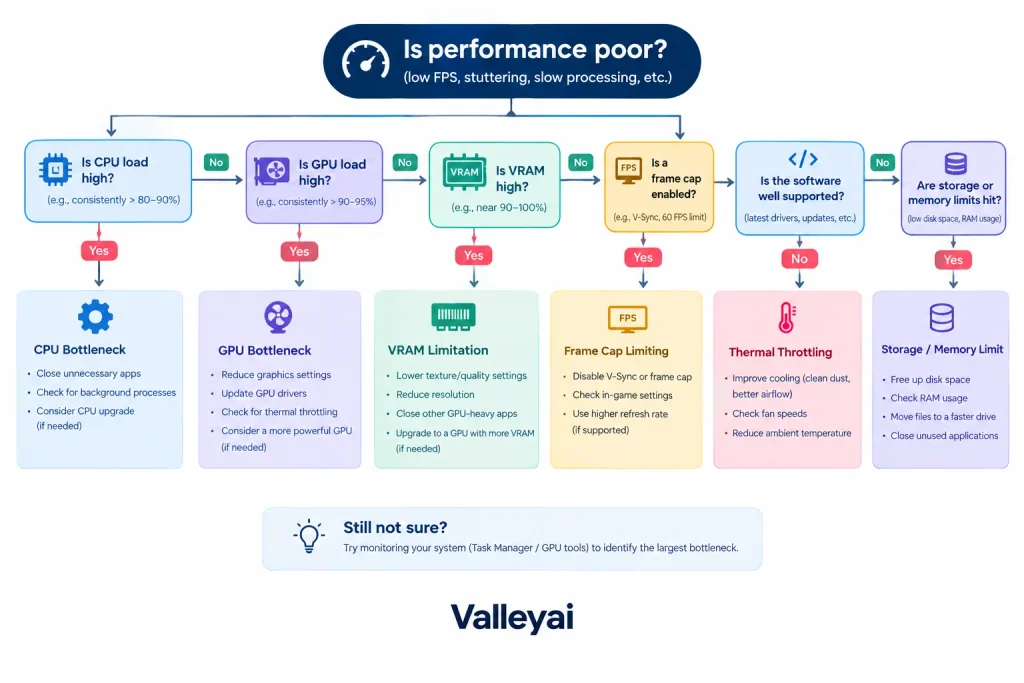
A five-minute CPU/GPU bottleneck check
Buying a stronger component before identifying the limit is an expensive way to preserve the same problem. Use this sequence instead.
1. Reproduce one consistent workload
Choose one game scene, export timeline, render, model, or project file. Record the same output target each time. Changing resolution, quality settings, input files, or background applications during testing makes the result difficult to interpret.
2. Monitor CPU and GPU behavior together
Record:
- CPU utilization by core, not only total utilization
- GPU utilization
- GPU clock speed
- VRAM usage
- System RAM usage
- Temperatures and power limits
- Frame time or application completion time
A total CPU reading can hide a limit on one heavily loaded core. A system may report moderate overall CPU usage while one thread controls the pace of the application.
3. Change one workload variable
For gaming, change resolution or graphics quality. If lowering resolution produces a large frame-rate increase, the GPU was likely carrying a significant part of the limit. If frame rate changes little, the CPU, game engine, frame cap, or another system constraint may be limiting performance.
For rendering or machine learning, reduce the output size or workload scale. A change in completion time helps reveal whether the processor is actually handling the expensive portion.
Reading these numbers correctly requires knowing how VRAM works, because a full graphics memory pool does not always mean the GPU is the limit.
4. Check VRAM and system memory
High GPU utilization does not prove that the GPU has enough memory. When VRAM is full, the application may stream data, reduce quality, or move assets through slower memory paths. The result can be stutter, pauses, or poor frame-time consistency.
More GPU memory does not always improve performance. Extra VRAM helps when the workload needs it; otherwise, compute speed, software support, cooling, or CPU performance may remain the real limit.
5. Check software support and transfer overhead
GPU acceleration requires an application, renderer, framework, or API that can use the GPU. AWS notes that GPU-oriented computing is tied to workloads designed for parallel execution, while IBM highlights the role of supported machine-learning software.
A workload can also lose much of its potential advantage when data repeatedly moves between system memory and GPU memory. Small or irregular jobs may finish before GPU launch, synchronization, and transfer overhead are repaid.
6. Test for external limits
Check for:
- Frame-rate caps
- Vertical synchronization
- Display refresh limits
- Thermal throttling
- Power limits
- Driver problems
- Background processes
- Storage or asset-streaming delays
- Network latency in online applications
Low GPU usage during poor performance does not automatically mean the GPU is underpowered. The application may be CPU-bound, waiting on storage, limited by a frame cap, stalled by memory transfers, or unable to use GPU acceleration.
When a stronger GPU does not help
A more powerful GPU may produce little improvement in five common situations:
- The software does not support GPU acceleration.
The application may continue using the CPU even though the system contains a discrete GPU. - The CPU limits the workload first.
A game engine, simulation, or data pipeline may be unable to prepare work quickly enough for the GPU. - The workload is too small or irregular.
Transfer, launch, and synchronization overhead can outweigh the benefit of parallel execution. - VRAM is insufficient.
A faster processor with inadequate memory can still stutter or reduce quality. - The display or application is already capped.
A monitor refresh limit or frame-rate cap can hide additional GPU performance.
The same principle works in reverse. A faster CPU will not substantially improve a GPU-limited game running at high resolution, and it will not accelerate a machine-learning operation that is already waiting on GPU computation.
Can a CPU replace a GPU, or can a GPU replace a CPU?
A CPU can perform many calculations that a GPU performs, but the CPU may take longer on workloads designed for massive parallelism. A GPU can accelerate selected general-purpose calculations, but a GPU is not a full replacement for the CPU’s operating-system control, branching logic, device coordination, and broad software compatibility.
Most systems use both because the processors perform complementary roles. The CPU prepares instructions and coordinates the application; the GPU handles suitable graphics or compute operations. Tufts Research Technology Services describes this distinction as general-purpose processing versus specialized processing in its CPU and GPU terminology reference.
The short decision rule
Choose based on the workload:
- Prioritize the CPU for varied application logic, simulation control, high-refresh gaming limits, data preparation, and software without GPU support.
- Prioritize the GPU for high-resolution rendering, supported machine learning, parallel simulations, and GPU-accelerated creative workloads.
- Choose a balanced system when the workload moves repeatedly between CPU coordination and GPU computation.
- Choose integrated graphics when the system handles everyday tasks, video playback, and light graphics work.
- Choose a discrete GPU when sustained graphics throughput, dedicated VRAM, or supported GPU compute justifies the added cost and power.
The correct upgrade is the component that limits the workload you actually run not the component with the most impressive specification label.

Kaleem
Kaleem is a Computer Science graduate (Virtual University of Pakistan) and the founder and editor of Valley AI, where he publishes in-depth, tested guides on computer hardware, artificial intelligence, and how the internet works. Every guide is researched from primary sources, tested hands-on where possible, and updated when the facts change.