

CPU Cores vs Threads: The One-Paragraph Answer
A core is a complete physical processor: its own execution units, registers, and cache. A thread is a stream of instructions a core can switch between. An 8-core, 16-thread chip has eight real processors, and each one keeps two instruction streams in flight, so your operating system sees sixteen logical CPUs. Threads squeeze more work out of each core. Cores add entirely new workers.
The rest of this article unpacks that paragraph: what each part physically is, how the juggling works inside the silicon, a measured scaling test on real hardware, and the five mistakes that trip up spec-sheet readers.
What Is a CPU Core?
A CPU core is one complete, independent processor built onto the chip. It has its own execution units for doing math and logic, its own registers for holding working data, and its own small L1 and L2 caches, so it can fetch, decode, and execute instructions without asking any other core for help. Read how a processor actually works at the pipeline level and a core stops looking like a magic box and starts looking like a factory floor.
When software runs, the operating system hands whole processes and threads of execution to individual cores. A core working alone can only do one thing at any given instant, but with billions of clock cycles per second, it finishes each slice of work so fast that everything feels simultaneous. Add a second core and you genuinely double the number of things the chip can do at once, because each core is a full worker with its own tools.
Cores on the same chip share the larger L3 cache, so one core can reuse data another core just fetched from memory. That shared pool is part of multi-core speed, and it is worth knowing how cores share L3 cache before comparing core counts across generations.
A core also carries a clock speed, and generation matters more than the count suggests. A modern 6-core chip routinely beats an older 8-core chip because each core does more per clock cycle. Core count only compares fairly within the same generation.
What Is a CPU Thread?
A CPU thread is a sequence of instructions the operating system can schedule as one unit. There are two kinds, and mixing them up causes most of the confusion. A software thread is a list of tasks your program creates, like the thread that renders a video frame while another saves your file. A hardware thread is the CPU’s ability to keep two of those instruction streams loaded and ready on a single core, switching between them in a single clock cycle when one stalls.
A concrete example makes the split vivid. Open a video editor and export a project. The program might spawn a dozen software threads: one decoding footage, one applying effects, one encoding the output, one writing the file. Your 8-core, 16-thread chip then maps those software threads onto its 16 hardware threads, two per core, and the operating system reshuffles the mapping hundreds of times per second as threads stall and wake. The software threads are the work. The hardware threads are the chairs the work sits in.
Your operating system counts every hardware thread as a logical processor. In Windows Task Manager, the Performance tab’s logical processors figure is the thread count, not the core count. On Linux, lscpu reports CPU(s) as the thread total while Core(s) per socket gives physical cores. That distinction is what the cloud machine in this article’s experiment hides in plain sight: lscpu showed two CPUs that were two physical cores with one thread each.
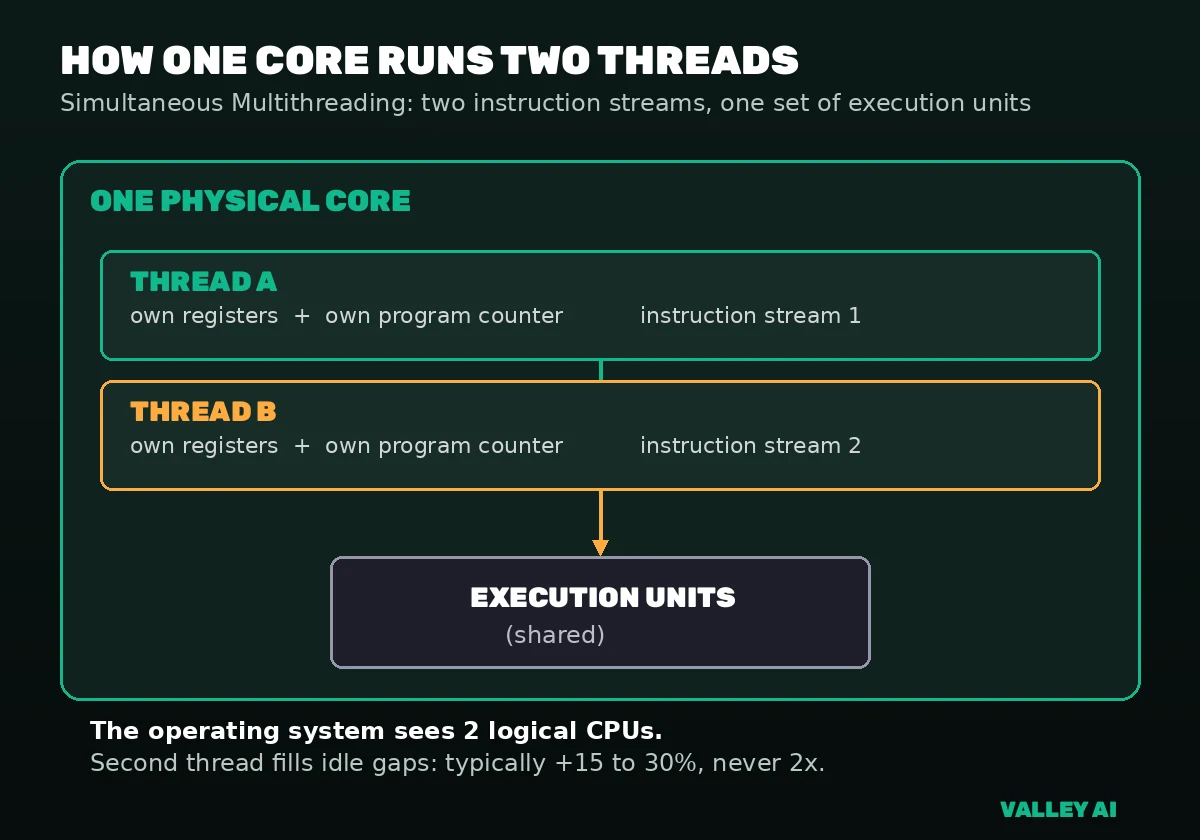
Each hardware thread carries its own architectural state, its own registers and program counter, so the core can pause one stream and resume the other without losing its place. The execution units stay shared. To see why that private state matters, read what a program counter in a CPU actually tracks: the per-thread program counter is the mechanism behind the whole trick.
The same rule explains virtual machines: in most hypervisors one vCPU is scheduled onto one hardware thread, so a 16-vCPU server on an 8-core, 16-thread host shares physical cores with its neighbors. If you rent virtual servers, learning what a vCPU actually is will save you from paying for threads you cannot fully use.
How Hyper-Threading (SMT) Actually Works
Simultaneous multithreading lets one physical core keep two instruction streams in flight at the same time. Intel’s brand name for it is Hyper-Threading. AMD and most of the industry just call it SMT. One name describes the general technique, the other is Intel’s implementation of it.
The trick is cheap because the core duplicates only the small stuff. Each hardware thread gets its own registers and its own program counter, so the core always knows exactly where both streams stand. The expensive parts stay shared between the two threads: the arithmetic and logic units inside the core that do the actual computing. When thread A stalls waiting on data from memory, the core does not sit idle: it feeds instructions from thread B into the empty execution slots that same cycle. Most of the speed gain comes from covering those memory stalls, not from doing twice the math.
That shared-units detail sets the ceiling. A second thread can only use execution slots the first thread left empty, so the realistic uplift is 15 to 30 percent on threaded workloads, and it drops toward zero on workloads that already keep the core fully fed. Two threads will never double a core, because there is still only one set of execution hardware underneath them.
Operating systems learned to be smart about the two threads on a core. The scheduler prefers to spread work across separate physical cores first and only doubles up threads on the same core when there is genuinely more work than cores. That policy exists because two threads on one core share everything, while two threads on two cores share nothing. It is also why disabling Hyper-Threading in the BIOS rarely helps on a modern system: the scheduler already avoids the pairing unless it pays.
Naming varies by vendor but the mechanism is one thing. AMD ships SMT on every Ryzen desktop chip, so threads always equal twice the cores on their spec sheets. Intel shipped Hyper-Threading on performance cores from 12th through 14th generation, then dropped it on Arrow Lake. Apple never adopted it. Normalize for this when comparing brands: Intel and AMD thread counts are built from different assumptions, and Apple’s thread count equals its core count.
Intel’s newest desktop chips prove the point. The Core Ultra 9 285K has 24 cores and 24 threads, 8 performance plus 16 efficiency cores running one thread each, because Intel removed Hyper-Threading entirely on Arrow Lake. Its predecessor, the i9-14900K, had the same 24 cores with 32 threads. That tradeoff only makes sense once you see how modest the threading gain is.
Do more threads make my computer faster?
Up to the number of hardware threads your chip has, usually yes, provided your software can split its work. Past that point, extra software threads just take turns on the same hardware and add scheduling overhead. The second hardware thread on a core is the one that pays: the 15 to 30 percent gain described above. Threads beyond your hardware count are queue management, not extra speed.
The Experiment: More Workers Than Hardware Threads
Adding workers helps only until you run out of hardware threads, and even matching the hardware thread count does not double speed. That is what a timed test on a small cloud server showed, with numbers instead of adjectives.
The test machine was a cloud VM with an AMD EPYC 9D25 processor. lscpu reported CPU(s): 2 with Thread(s) per core at 1 and Core(s) per socket at 2: the OS saw two CPUs, both physical cores running one thread each. nproc agreed: 2. A clean 2-thread laboratory for worker scaling. Note what this test is not: with one thread per core there is no simultaneous multithreading here. It measures worker scaling against a fixed hardware thread count, not SMT itself.
The workload was deliberately simple and CPU bound: Python multiprocessing workers, each computing 60 million square roots, timed over three runs at 1, 2, and 4 workers. No disk, no network, nothing to hide behind.
| Workers | Total operations | Time, 3-run average | Throughput | Speedup vs 1 worker |
|---|---|---|---|---|
| 1 | 60M | 6.57 s | 9.13M ops/s | 1.00x |
| 2 | 120M | 9.18 s | 13.07M ops/s | 1.43x |
| 4 | 240M | 17.53 s | 13.69M ops/s | 1.50x |
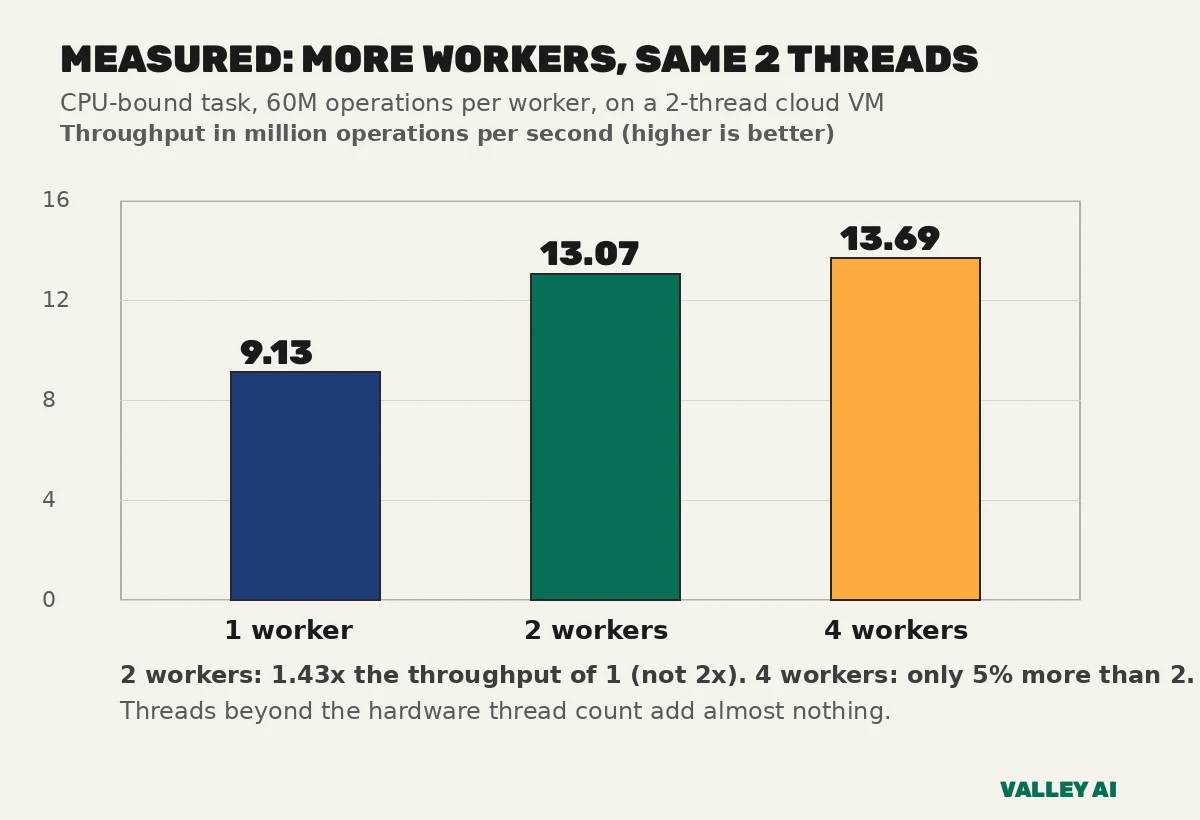
Two workers on two hardware threads finished 120 million operations in 9.18 seconds, a 1.43x throughput gain for twice the workers. Four workers managed only 1.50x, because the extra workers had no new hardware to run on and just added overhead. The pattern is what the silicon predicts: match the hardware thread count for real gains, overshoot it for almost nothing. Even the matched case fell well short of doubling, since the workers shared memory bandwidth and paid coordination costs. Scale workers to your hardware thread count, then stop.
This exact pattern shows up in real software tuning. Databases, web servers, and build tools all let you set a worker or thread pool size, and most documentation recommends matching it to your hardware thread count. Set it lower and you leave performance on the table. Set it far higher and threads fight over the same cores, which is the 4-worker row of the table above in different clothes. When a program asks how many threads to use, the honest default is your logical processor count, and now you know what that number physically means.
A word on measurement honesty: these timings come from three runs each, and individual runs varied by a few percent because a cloud VM shares its host with neighbors. The pattern survived every run: the jump from one worker to two was always large, and from two to four always tiny. Small numbers on a small machine still teach the real lesson, because the shape of the scaling curve is what generalizes, not the seconds.
Does Hyper-Threading double performance?
No. The measurement above shows why the doubling idea fails even in the easy case: two real workers on two real threads gained 43 percent, not 100 percent. A Hyper-Threaded second thread shares far more than two separate cores do, which is why its realistic gain sits at 15 to 30 percent. Treat the second thread as a meaningful bonus, roughly a quarter of a core, and you will read every spec sheet correctly.
How Many Cores and Threads Do You Actually Need?
Most people are well served by 6 to 8 cores with 12 to 16 threads, covering gaming, office work, and dozens of browser tabs with room to spare. Buy more when your workload can feed it: video editing, 3D rendering, compiling code, or streaming while you play. Buy faster cores when your workload cannot be split, which is still true of many games.
| Typical workload | Cores | Threads |
|---|---|---|
| Everyday browsing, office work, video calls | 4-6 | 8-12 |
| Gaming, most current titles | 6-8 | 12-16 |
| Gaming while streaming or recording | 8-12 | 16-24 |
| Video editing, 3D rendering, compiling code | 12+ | 24+ |
| Heavy workstation: simulation, large builds, VMs | 16+ | 32+ |
Gaming breaks the more-is-better reflex. Most game engines still lean on a few fast threads for the main loop, so a 6-core chip with strong single-thread performance beats an older 12-core in most titles. Extra cores earn their keep when you stream, record, run voice chat, and keep a browser open while playing.
Laptops play by tougher rules than desktops. A laptop chip with the same core count as a desktop chip holds lower sustained clock speeds because heat has nowhere to go, so per-core performance drops under long loads. Weight cooling and power budget as heavily as core count when comparing laptop and desktop spec sheets, or the bigger number will mislead you.
Is an 8-core CPU always faster than a 6-core CPU?
No. Generation, instructions per clock, clock speed, cache size, and thread count all vote. A current-generation 6-core routinely outperforms a five-year-old 8-core because each of its cores does substantially more work per cycle. Compare core counts only between chips of the same generation, and check single-thread benchmarks before you assume the bigger number wins.
Future-proofing has limits worth stating plainly. Two extra cores for software that might use them in three years is a reasonable hedge; eight extra cores is not, because a newer generation will do more per core by the time mainstream software catches up. Spend the middle of your budget on the chip, and the rest on fast storage and enough memory, which speed up everything you do today.
One more lever exists after you buy: overclocking raises the clock speed of the core itself, so every thread on the core runs faster, both hardware threads included. It is a multiplier on everything the core does, which is also why it raises heat and power draw across the whole chip. Read our CPU overclocking guide before changing any settings.
CPU Cores vs GPU Cores: Why the Numbers Look Weird
GPU core counts look absurd next to CPU counts because the two kinds of core do completely different jobs. A CPU core is a large, flexible generalist built to run any instruction fast, including the unpredictable branching of game logic. A GPU core is a small specialist built to run the same math on thousands of pixels at once. Comparing the two numbers directly is like comparing the horsepower of a truck with the horsepower of a freight train: the unit matches, the job does not.
A modern CPU ships with 6 to 24 big cores; a modern GPU ships with thousands of small ones, because rendering a frame means doing nearly identical arithmetic millions of times in parallel. Neither design is better in the abstract: the CPU wins at latency and flexibility, the GPU at throughput on uniform work. Our breakdown of how CPU cores differ from GPU cores covers the architectural split in more detail.
Engineers cannot simply stamp out more big CPU cores the way GPUs stamp out small ones. Each CPU core is large, power hungry, and needs fast access to shared cache and memory, so doubling cores quickly hits limits in heat, chip area, and memory bandwidth. GPU cores dodge all three problems because each one is tiny and they all march through the same data in lockstep. Different physics, different scaling, different numbers on the box.
This is also why a graphics card with 10,000 cores will not help your spreadsheet. Your spreadsheet needs a few very fast, very smart cores. Your game needs both: the CPU’s cores for logic and draw calls, the GPU’s cores for pixels.
Next time a spec sheet throws a thread count at you, decode the thread math the way the mistakes section below shows. Thirty seconds of arithmetic beats an hour of forum threads, and you will never again pay core prices for thread numbers.
5 Mistakes People Make Reading Core and Thread Specs
The five mistakes below account for nearly every misread spec sheet: assuming efficiency cores double their threads, treating threads as cores, expecting Hyper-Threading to double speed, reading logical processors as cores, and buying cores no software will ever feed.
| Processor | Core layout | Thread math | Total threads |
|---|---|---|---|
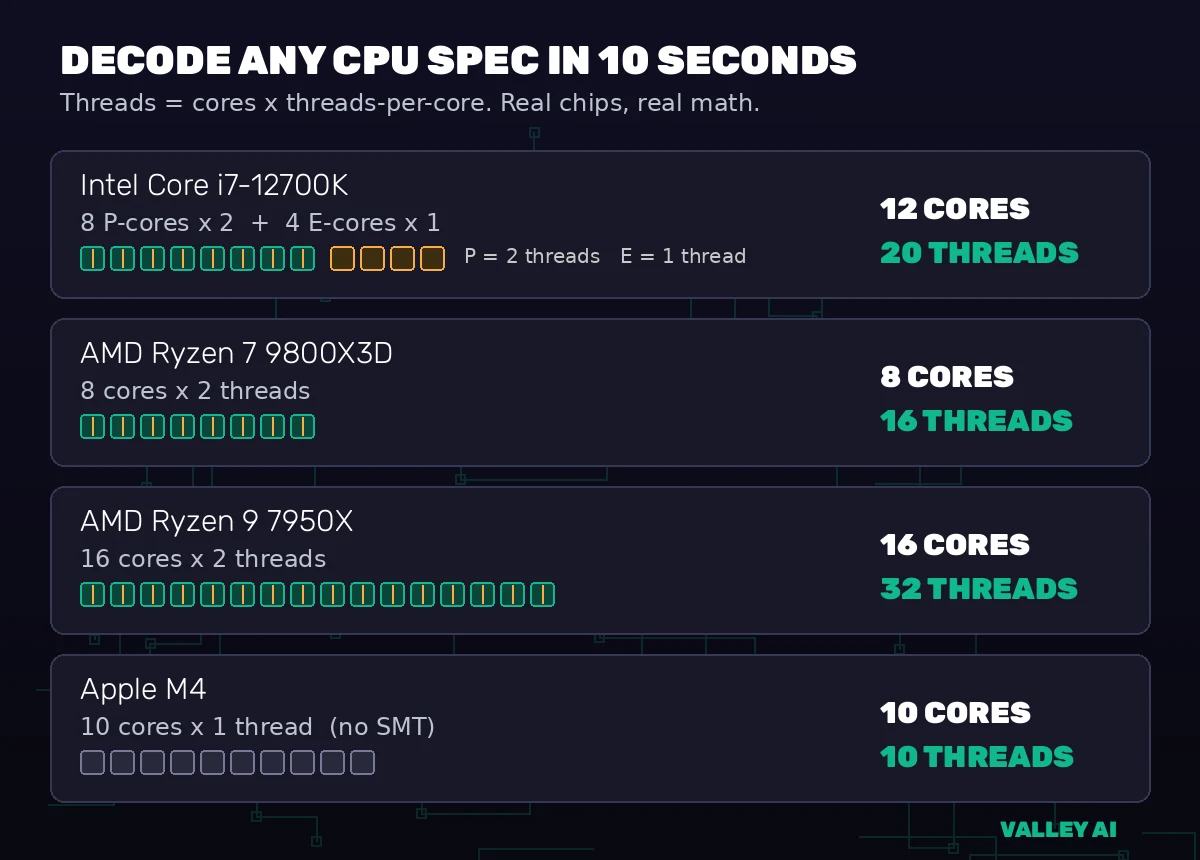
| Intel Core i7-12700K | 8 P-cores + 4 E-cores | 8 x 2 + 4 x 1 | 20 |
| Intel Core i5-13600K | 6 P-cores + 8 E-cores | 6 x 2 + 8 x 1 | 20 |
| AMD Ryzen 9 9950X | 16 cores, SMT on every core | 16 x 2 | 32 |
| Intel Core Ultra 9 285K | 8 P-cores + 16 E-cores, no Hyper-Threading | 24 x 1 | 24 |
| Apple M4 | 10 cores, no SMT | 10 x 1 | 10 |
Every count above matches the manufacturer’s own spec sheet, including AMD’s official Ryzen 9 9950X specifications, which list 16 cores and 32 threads with SMT enabled on every core. Apple takes the opposite approach: the M4 runs one thread per core and gets its throughput from wide execution and plenty of efficiency cores instead of threading.
- Assuming every core doubles its threads. On Intel hybrid chips, only performance cores carry Hyper-Threading; efficiency cores run one thread each, always. That is why the i7-12700K lists 12 cores and 20 threads instead of 24: 8 performance cores times 2 threads, plus 4 efficiency cores times 1. Read any Intel spec this way and the numbers stop looking strange.
- Treating 16 threads as 16 cores. Threads share execution hardware; cores do not. A 16-thread, 8-core chip has eight sets of execution units, and the extra eight threads just keep those units busier. For heavily parallel work like rendering, eight real cores beat sixteen threads on four cores every time.
- Expecting Hyper-Threading to double performance. Covered in the experiment above: the realistic gain is 15 to 30 percent, because the second thread only fills idle slots. Anyone promising 2x from threading is selling something.
- Reading Task Manager’s logical processor count as the core count. Windows counts threads, so a laptop showing 16 logical processors might have 8 cores, or 6 performance cores plus 8 efficiency cores. Always check the core breakdown in the spec sheet, not just the big number in Task Manager.
- Buying cores your software cannot feed. A 24-thread chip renders video beautifully and idles through web browsing exactly like a 6-core chip would. Match the chip to the heaviest work you actually do, using the sizing table above, and spend the savings on memory or storage speed.
Frequently asked questions
Does Hyper-Threading double a CPU’s performance?
No. Hyper-Threading typically adds 15 to 30 percent throughput on threaded workloads by filling execution slots that would otherwise sit idle during memory stalls. The second thread shares the core’s execution units, so it can never double performance.
How do I check how many cores and threads my CPU has?
On Windows, open Task Manager, go to the Performance tab, and read the logical processors figure for threads; the spec sheet gives you cores. On macOS, Activity Monitor shows CPU history per thread, or run sysctl hw.physicalcpu and hw.logicalcpu in Terminal. On Linux, lscpu shows both: CPU(s) is the thread total and Core(s) per socket is the physical core count.
Is an 8-core CPU always faster than a 6-core CPU?
No. Generation, instructions per clock, clock speed, cache, and thread count all matter. A newer 6-core chip often beats an older 8-core chip because each core does more work per cycle. Only compare core counts within the same generation.
Do I need more cores or faster cores for gaming?
Faster cores, in most cases. Game engines still depend heavily on a few fast threads, so single-thread performance decides most frame rates. More cores help when you stream, record, or run background apps while gaming.
Why does the Intel Core Ultra 9 285K have 24 cores but only 24 threads?
Intel removed Hyper-Threading on Arrow Lake. The 285K has 8 performance cores and 16 efficiency cores, each running one thread, for 24 threads total. Its predecessor, the i9-14900K, had the same 24 cores with 32 threads.
What does logical processors mean in Task Manager?
It means hardware threads, not physical cores. Windows counts every thread as one logical processor, so a 16-thread CPU shows 16 logical processors whether it has 16 cores or 8 cores with Hyper-Threading.

Kaleem
Kaleem is a Computer Science graduate (Virtual University of Pakistan) and the founder and editor of Valley AI, where he publishes in-depth, tested guides on computer hardware, artificial intelligence, and how the internet works. Every guide is researched from primary sources, tested hands-on where possible, and updated when the facts change.