
A processor can finish some operations faster than RAM can deliver the next piece of data. Without an intermediate memory layer, the CPU would spend more time waiting than calculating.
A CPU cache is a small, high-speed memory area inside or close to a processor. It stores recently used or frequently needed data and instructions so the CPU can retrieve them faster than it typically can from main memory, or RAM.
CPU cache is not a replacement for RAM. Cache is smaller, faster, more expensive per byte, and managed automatically by processor hardware.
Why CPUs Need Cache?
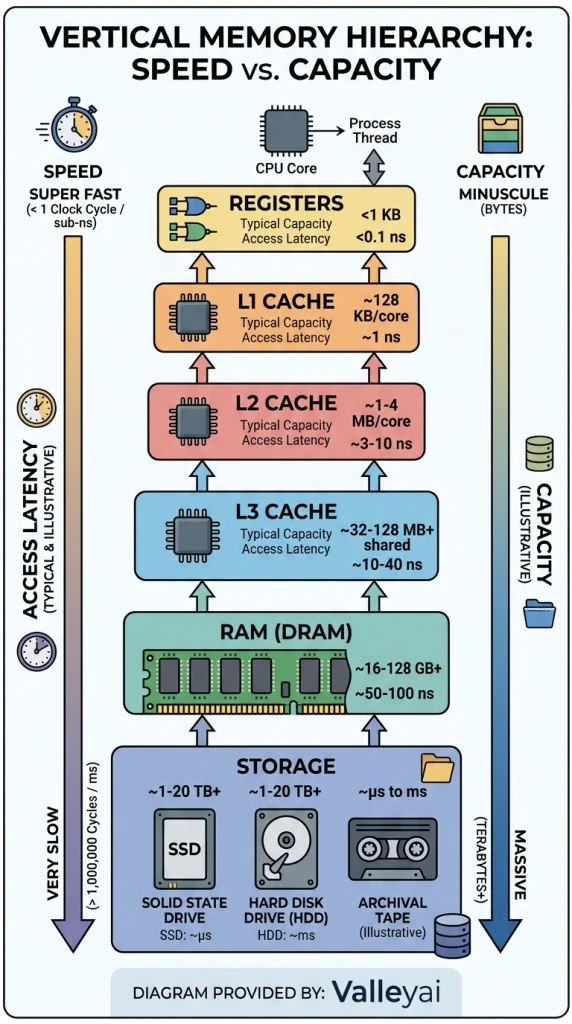
The CPU, cache, and RAM form part of a memory hierarchy:
- CPU registers hold values being used immediately.
- L1 cache provides very fast access close to each processor core.
- L2 cache offers more capacity with somewhat higher access latency.
- L3 cache usually provides still more capacity and may be shared across cores.
- RAM holds active programs and data but generally takes longer for the CPU to access.
- SSD or hard-drive storage provides much greater capacity but is far slower than RAM.
The hierarchy exists because fast memory is expensive and physically difficult to scale. A processor could not practically contain hundreds of gigabytes of ultra-fast memory. Instead, modern CPUs combine small, fast cache levels with larger, slower memory layers.
CPU cache improves performance by keeping useful data and instructions near the processor. When the CPU finds requested information in cache, the processor can avoid a slower trip to RAM.
The cache does not predict every future request perfectly. Its usefulness depends on whether programs repeatedly access the same data or nearby data.
CPU cache is different from other kinds of cache
The word cache also describes temporary storage used by browsers, applications, operating systems, DNS services, and storage devices. Those systems have a similar goal reuse data instead of retrieving or calculating it again but they are not the same as CPU cache.
- CPU cache: Hardware memory managed by the processor.
- Browser cache: Saved website files such as images, scripts, and stylesheets.
- Application cache: Temporary data maintained by a program.
- DNS cache: Recently resolved domain-name records.
- Operating-system file cache: Data kept in RAM to speed up file access.
- SSD cache: A memory area used internally by a storage device.
Clearing a browser cache does not increase the physical cache built into a processor.
One level above cache sits an even smaller and faster store — the CPU registers the core actually computes with.
How CPU Cache Works When a Program Runs
When a program needs data, the processor checks its cache hierarchy before requesting the data from RAM. The exact sequence varies by processor design, but the general process is straightforward.
- The CPU requests an instruction or data value.
- The processor checks the relevant cache level.
- If the data is present, the CPU records a cache hit and uses it.
- If the data is absent, the CPU records a cache miss and checks another memory level.
- The requested data is eventually supplied from a lower cache level or from RAM.
- The processor may place a copy in cache so a later request can be served more quickly.
A cache miss at L1 does not automatically mean the CPU reads from an SSD. The processor normally checks other cache levels and then main memory. Storage may become involved only if the required data is not currently in RAM and the operating system must retrieve it from a page file or another storage-backed mechanism.
What is a cache hit?
A cache hit occurs when the CPU finds the requested data or instruction in the cache level it checks. A cache hit avoids a slower lookup in a lower memory layer.
A high cache hit rate generally helps a processor spend more time executing instructions and less time waiting for data. Cache hit rate is not determined by cache capacity alone. Program behavior, data layout, access patterns, cache organization, and the processor’s architecture all influence the result.
What is a cache miss?
A cache miss occurs when the requested data is not present in the cache level being searched. The processor then looks in another cache level or in RAM.
A miss increases effective memory-access latency because the CPU must wait for information from a slower layer. Not all misses have the same cost. An L1 miss that finds the data in L2 is usually less expensive than a miss that continues through L3 and RAM.
Some processors can continue executing other work while waiting, especially when the architecture supports out-of-order execution and has independent instructions available. That can reduce the visible impact of a miss, but it does not make the memory request free.
Why locality makes a small cache useful
CPU cache works well because software often exhibits locality. Locality means that a program’s current memory access gives clues about its next accesses.
- Temporal locality: Data or instructions used recently are likely to be used again soon.
- Spatial locality: Data stored near a recently accessed address is likely to be used soon.
A loop that repeatedly updates the same small group of values demonstrates temporal locality. A program reading the elements of an array in sequence demonstrates spatial locality.
The Intel 64 and IA-32 Architectures Optimization Reference Manual discusses memory-access behavior and optimization principles related to locality. The underlying lesson is practical: data layout can affect performance because it changes how effectively the processor uses its cache hierarchy.
These three levels are one slice of a wider ladder; see how RAM, cache, and registers compare across the whole memory hierarchy.
L1 vs. L2 vs. L3 Cache
L1, L2, and L3 are levels within a processor’s cache hierarchy. They are not three interchangeable pools of memory.
| Cache level | Typical role | Relative speed | Relative capacity | Common sharing pattern |
|---|---|---|---|---|
| L1 | Holds immediately needed instructions and data | Fastest | Smallest | Usually private to a core |
| L2 | Provides a larger nearby cache for each core or processing unit | Slower than L1 | Larger than L1 | Often private, but designs vary |
| L3 | Supplies a larger cache layer shared across parts of the processor | Slower than L2 | Larger than L2 | Often shared across multiple cores |
These are general design patterns, not universal rules. Intel, AMD, ARM, and Apple Silicon processors can organize cache differently. Cache capacity, latency, inclusivity, sharing, and physical placement vary by processor generation and microarchitecture.
L1 cache
L1 cache is usually the smallest and fastest cache level. Many processors divide L1 into:
- Instruction cache, which stores recently used program instructions.
- Data cache, which stores recently used data values.
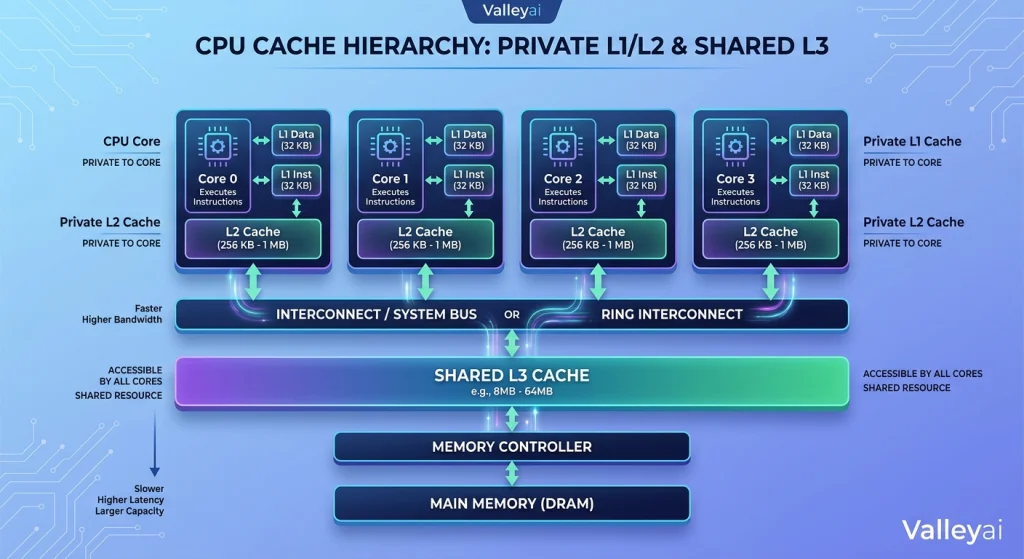
Keeping instructions and data in separate L1 structures can allow the processor to handle both kinds of access efficiently. L1 cache is commonly associated with individual processor cores, although the exact implementation depends on the design.
L2 cache
L2 cache is generally larger than L1 and has higher access latency. L2 cache acts as a nearby backup when a requested item is absent from L1.
Some processors provide a separate L2 cache for each core. Other designs use different arrangements. A specification that lists a total L2 capacity does not always tell you how much cache is directly available to each core, so the processor’s technical documentation matters.
L3 cache
L3 cache generally offers more capacity than L1 or L2 and often serves multiple processor cores. A shared L3 cache can help cores access common data, but sharing also introduces design trade-offs involving latency, bandwidth, and cache coherence.
AMD’s official information about 3D V-Cache demonstrates that cache capacity can be expanded through specialized three-dimensional stacking technology rather than only by making a conventional cache structure wider. That example also shows why a cache number must be interpreted in the context of processor architecture.
What is L4 Cache and eDRAM?
A small number of processor designs have included an L4 cache layer. Intel’s Broadwell-H and Skylake-H mobile processors used embedded DRAM (eDRAM) as a large, relatively fast L4 cache (up to 128MB) to reduce the power cost of accessing off-package RAM. This approach was discontinued as on-die L3 capacity grew and 3D V-Cache offered a more efficient stacking solution.
For desktop and server CPUs in 2024–2025, L3 remains the last on-die cache level in mainstream architectures. L4 is not a concept you need to account for in modern desktop CPU selection.
Per-core cache and shared cache
A per-core cache is assigned to one processor core. A shared cache can be accessed by multiple cores.
This distinction matters when comparing processors. Two CPUs may advertise similar total cache capacity while distributing that capacity differently. Total cache does not automatically equal the same cache access pattern for every core or thread.
How your data is laid out decides how well cache lines are used, which is why the difference between stack and heap memory has a direct performance cost.
Cache Lines: The Unit Cache Usually Moves
CPU cache generally does not transfer one isolated byte at a time. The processor moves data in fixed-size blocks commonly called cache lines or cache blocks.
When a program requests one value, the processor may load the surrounding memory region into cache as well. That behavior takes advantage of spatial locality. If the program soon requests nearby values, those values may already be available in the same cache line.
For sequential array processing, cache lines can be highly useful because adjacent elements are accessed together. For irregular pointer-based data structures, the next address may be far away, reducing the benefit of spatial locality.
Cache lines also explain why memory layout matters in performance-sensitive software. Two programs can perform the same logical task but generate different cache behavior because one stores related values close together while the other scatters them across memory.
Instruction cache and data cache
Instruction cache stores machine instructions that the processor is likely to execute. Data cache stores values those instructions read or modify.
Separating instruction and data access at the L1 level can help the processor fetch both streams without treating them as one undifferentiated sequence. Larger cache hierarchies may combine or organize these resources differently at later levels.
If the wider storage picture is still fuzzy, our breakdown of RAM and ROM explains where each type of memory sits and why it behaves the way it does.
CPU Cache vs. RAM
CPU cache and RAM both hold data used during program execution, but they serve different roles.
| Feature | CPU cache | RAM |
|---|---|---|
| Main purpose | Keep frequently needed data close to the CPU | Hold active programs and data |
| Capacity | Relatively small | Much larger |
| Access latency | Typically lower | Typically higher |
| Technology | Commonly SRAM-based | Commonly DRAM-based |
| Management | Managed by processor hardware | Managed by the operating system and memory controller |
| User control | Not normally cleared manually | Can be monitored and managed through the operating system |
CPU cache is faster and smaller than RAM, while RAM is slower and much larger. The processor uses cache to reduce how often it must wait for main-memory access.
CPU cache does not make RAM unnecessary. A computer needs RAM to hold operating systems, applications, and working data that cannot fit in the processor’s limited cache capacity.
DRAM itself has gone through several DDR generations, each one raising bandwidth to keep the cache fed.
SRAM versus DRAM
CPU cache commonly uses static random-access memory, or SRAM. SRAM can provide fast access without the same refresh process required by DRAM, but SRAM consumes more physical area and costs more per bit.
System RAM commonly uses dynamic random-access memory, or DRAM. DRAM provides much higher capacity at lower cost per bit, but its design involves different timing and storage trade-offs.
The difference helps explain the memory hierarchy: SRAM is well suited to small, fast cache structures, while DRAM is better suited to large system-memory capacities.
CPU cache versus virtual memory
Virtual memory is an operating-system and memory-management technique that gives programs an address space larger or more flexible than the immediately available physical RAM. When necessary, the operating system can move less-used memory pages between RAM and storage.
Virtual memory is not another CPU cache level. CPU cache is a small hardware-managed layer designed to reduce access latency. Virtual memory manages address spaces and memory capacity, with storage sometimes serving as an overflow location.
How Much Does CPU Cache Affect Performance?
Cache matters most when a workload repeatedly reuses data or accesses nearby memory addresses. Cache matters less when the main bottleneck comes from storage, network activity, graphics processing, synchronization, or calculations that do not reuse data effectively.
A larger cache can help a workload keep more of its active working set close to the processor. But larger capacity may involve trade-offs in physical area, power, latency, or cost. Cache size alone does not determine processor performance.
Four cache specifications that matter
When interpreting CPU cache, separate these concepts:
- Capacity: How much data the cache can hold.
- Latency: How long access to that cache level takes.
- Hit rate: How often requested data is found in the cache.
- Bandwidth: How much data can move through the memory path over time.
A processor with more cache capacity may perform worse on a particular workload than a processor with less cache if the second processor has a stronger architecture, better latency, higher clock behavior, or more efficient execution resources.
Cache capacity also cannot be compared blindly across different architectures. A processor’s cache policies, prefetching behavior, core design, memory controller, and software environment affect the result.
How many CPU cycles does cache access take?
There is no single cache-cycle number that applies to every CPU. L1, L2, L3, and RAM access times vary with processor architecture, clock frequency, cache design, contention, and the specific access pattern.
As a general pattern, L1 access takes fewer cycles than L2, L2 takes fewer than L3, and RAM generally takes more. Treat published cycle counts as processor-specific measurements or architectural examples rather than permanent rules.
A useful way to compare processors is to examine official documentation and independent benchmarks for the workload you care about. A latency figure without its processor model and testing conditions is incomplete.
Before tuning cache for a workload, it is worth knowing whether the GPU or the CPU is the real bottleneck for that task.
When Cache Size Matters in Real Workloads
Cache behavior depends on what the software repeatedly accesses.
Gaming
Games can benefit from cache when the processor repeatedly works with game-state data, simulation structures, or other frequently reused information. The benefit varies by game engine, resolution, graphics-card limitation, processor architecture, and software optimization.
A larger cache can help in some CPU-limited gaming scenarios, but it cannot compensate for every bottleneck. If the graphics processor is limiting frame rate, increasing CPU cache may have little visible effect.
Compiling and programming
Compilers repeatedly process source files, intermediate representations, symbol tables, and related data structures. Some compilation stages can benefit from good locality and a cache hierarchy that keeps active data close to the processor.
Compilation time also depends on disk performance, parallelism, compiler behavior, project structure, and the number of files being processed. Cache is one factor, not the complete explanation.
Video editing and rendering
Video editing and rendering workloads may involve CPU computation, GPU acceleration, storage throughput, codecs, memory capacity, and software-specific optimizations. Cache can help particular processing stages, especially where data is reused, but cache size alone is a weak predictor of total workflow performance.
Browsing and office applications
Web browsers, spreadsheets, document editors, and communication applications often involve many small tasks and background processes. CPU cache can contribute to responsiveness, but memory capacity, single-core performance, operating-system scheduling, browser design, and storage behavior may matter just as much or more.
Databases and data processing
Database and analytics workloads may repeatedly access indexes, records, and working sets. A larger cache can help when frequently used data fits more effectively into the processor’s hierarchy. Random access patterns, synchronization, memory bandwidth, and dataset size can reduce the benefit.
Cache budgets have grown enormously over the years, and how CPU designs evolved explains why manufacturers kept spending transistors on it.
How to Evaluate CPU Cache When Choosing a Processor
Use cache as one part of a processor decision, not as a scoreboard.
| Question | What the answer tells you |
|---|---|
| Which cache level is listed? | L1, L2, and L3 serve different roles |
| Is the capacity per core or shared? | Total cache may not describe each core’s available cache |
| Which architecture is used? | Cache numbers are not directly comparable across every design |
| What is your workload? | Reuse-heavy workloads may gain more from additional cache |
| What do benchmarks show? | Real tests reveal how the complete processor performs |
| What other specifications matter? | Cores, threads, clock behavior, memory support, and power limits also affect results |
The practical rule is simple: compare cache within a relevant processor class, then verify the result with workload-specific benchmarks.
A processor listing that says “more cache” may be technically accurate while still providing little useful decision information. The cache could be shared differently, tied to a different architecture, or paired with other design choices that change its real-world effect.
If performance is the real concern, there are far more effective ways to speed up a slow computer than touching the cache.
Can You Clear CPU Cache?
You generally do not clear CPU cache manually. The processor manages CPU cache automatically, replacing entries as programs request new data and instructions.
Restarting a computer may reset volatile processor state as part of the normal boot process, but restarting is not a routine CPU-cache maintenance procedure. Clearing CPU cache is also not a standard fix for a slow computer.
If a website displays outdated content, the relevant action may be clearing the browser cache. If a domain resolves incorrectly, flushing DNS cache may help. If an application behaves strangely, its own cache may be involved. None of those actions changes the physical cache capacity of the CPU.
What people usually mean by “clear cache”
| Symptom | Cache that may be relevant |
|---|---|
| A website shows old images or scripts | Browser cache |
| A domain points to an old address | DNS cache |
| An application shows stale temporary data | Application cache |
| The operating system reuses recently accessed files | System file cache |
| A processor has a fixed cache specification | CPU cache, which hardware manages automatically |
A common troubleshooting mistake is to treat every cache as the same system. Identify the application or device holding the data before clearing anything.
How to Check CPU Cache Size
You can find CPU cache information in several places:
- The processor manufacturer’s specification page
- The technical documentation for the processor model
- System-information utilities
- Hardware-monitoring applications
- Operating-system commands such as
lscpuon many Linux systems - Hardware tools such as CPU-Z on Windows
Check whether a tool reports L1, L2, and L3 separately. Also look for wording that identifies cache as per-core, per-cluster, or shared.
A system utility may show total cache without explaining the topology. For a purchasing decision, verify the processor model and consult the manufacturer’s documentation rather than relying on a single summary field.
The Practical Meaning of CPU Cache
CPU cache is a hardware-managed, layered memory system that helps a processor avoid slower trips to RAM. L1, L2, and L3 cache balance speed and capacity, while cache hits, cache misses, cache lines, and locality explain how software interacts with that hierarchy.
Cache matters, but cache size is not a complete performance rating. Processor architecture, cache latency, hit rate, sharing, memory behavior, workload, and the rest of the CPU design all shape the result.
If you are comparing processors, begin with your workload. Then examine cache alongside architecture, cores, clock behavior, memory support, power limits, and relevant benchmarks. That approach produces a better decision than choosing the largest cache number on a specification sheet.
FAQs
How does 3D V-Cache improve gaming performance?
AMD 3D V-Cache improves gaming performance by dramatically increasing L3 cache capacity (from ~32MB to 96MB+), keeping more game data on-die and reducing how often the CPU must wait for system RAM. Games with large, unpredictable data access patterns physics, AI, draw calls benefit most. The result is smoother frame times and higher 1% low FPS, particularly at CPU-limited scenarios.
Is more L3 cache always better?
Not always. For pure number-crunching tasks (like video rendering or Cinebench), the dataset is so large/linear that it streams predictably from RAM. In these cases, clock speed is king. However, for latency-sensitive tasks (Gaming, Database queries), Cache is king.
What is the difference between Inclusive and Exclusive Cache?
In an inclusive cache (historically common in Intel designs), data stored in L1 is also present in L2 and L3. This redundancy simplifies cache coherence across cores but wastes capacity.
In an exclusive (or non-inclusive) cache (common in AMD designs), each cache level holds unique data. If a line is promoted to L1, it is removed from L3. This maximizes total usable cache capacity but requires more complex tracking logic to locate data across cores. Neither is universally better the tradeoff depends on workload characteristics and die area constraints.
Does RAM speed matter if I have a large CPU Cache?
Yes. When a cache miss inevitably happens, you hit the RAM. Faster DDR5 RAM (e.g., 6000MHz vs 4800MHz) reduces the penalty of that miss. High-speed RAM complements high-capacity cache; it does not replace it.

Kaleem
My name is Kaleem and i am a computer science graduate with 5+ years of experience in Computer science, AI, tech, and web innovation. I founded ValleyAI.net to simplify AI, internet, and computer topics also focus on building useful utility tools. My clear, hands-on content is trusted by 5K+ monthly readers worldwide.