

A VRM is the circuit that turns 12 volts into CPU voltage
If you have ever wondered what is VRM, the short version is this: it is the cluster of power circuits on your motherboard that converts the 12 volts arriving from the power supply into the roughly 0.6 to 1.5 volts your CPU needs. It sits right next to the processor socket, usually under chunky aluminum heatsinks, and it splits the conversion work across multiple parallel channels called power phases. Every desktop CPU depends on it: without a VRM turning high-voltage supply power into chip-level power, the processor could never start.
What Is VRM Doing in Your PC? 12 Volts In, About 1.2 Volts Out
Your power supply delivers 12 volts to the motherboard through the 24-pin ATX connector and a dedicated 8-pin CPU cable. Our guide to what a PSU is covers how that 12 volts gets made in the first place. The processor, meanwhile, runs near 1.2 volts and can pull well over 150 amps under full load. Moving 200 watts at 12 volts takes under 17 amps, but delivering those same 200 watts at 1.25 volts takes 160 amps. That is the VRM’s whole job: perform the final step-down as close to the CPU as possible, where short, thick copper traces can carry the enormous current without wasting it as heat. Running 160 amps through a meter of PSU cable would need absurdly thick wires, which is why the final conversion sits millimeters from the socket.
The conversion uses a technique called buck conversion. Inside each phase, MOSFET transistors switch the 12-volt input on and off hundreds of thousands of times per second. When the switch is on 10 percent of the time and off 90 percent, the output averages out near 1.2 volts. That on-off percentage, called the duty cycle, is how the VRM dials in any voltage the CPU requests.
A single chip called the PWM controller conducts this switching. It measures the output voltage continuously and corrects the duty cycle fast enough to track the CPU as it jumps between idle and full load in microseconds. It also takes orders from the processor itself: AMD chips use the SVI protocol and Intel chips use SVID, so the CPU can request exact voltages for each power state and set current limits the VRM must respect. The VRM lives in the motherboard’s power delivery zone beside the socket; our complete motherboard guide maps where every section sits.
There is one more phenomenon the controller constantly fights: voltage droop. When the CPU’s current demand spikes, the voltage sags for an instant before the feedback loop catches up, a dip engineers call Vdroop. The VRM compensates by aiming slightly high at idle so the droop lands on target under load, and enthusiast BIOS menus expose this behavior as load-line calibration. It is a small detail, but it is the reason two boards can feed the same CPU at slightly different voltages.
Inside a VRM phase: the four parts that do the work
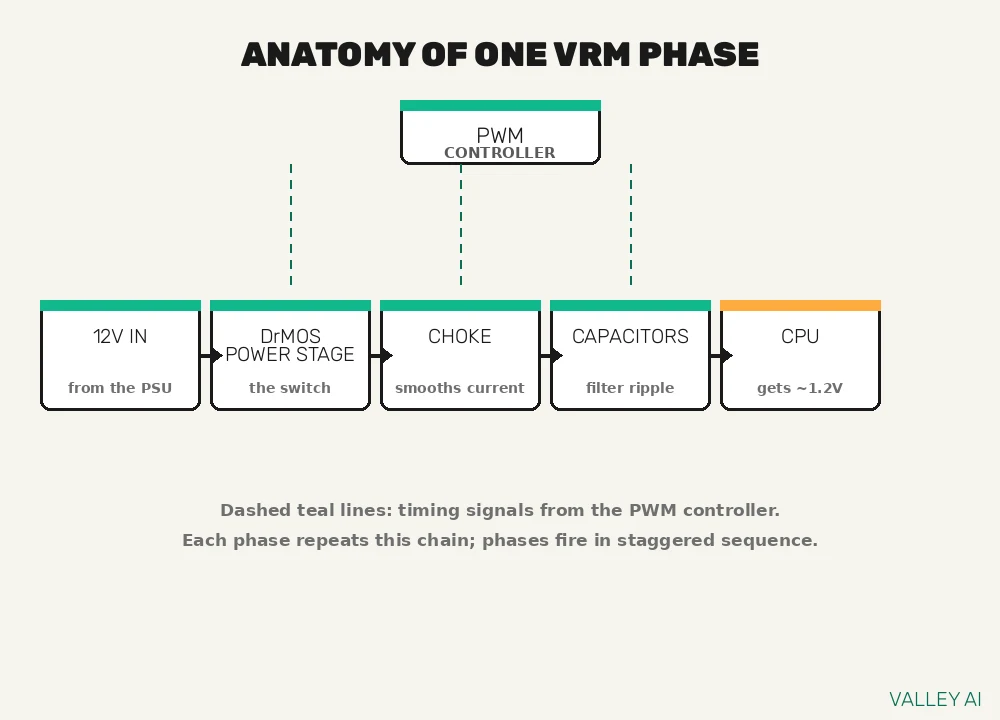
A power phase is one complete switching channel, and every phase contains the same four building blocks. Learning to spot them is the skill that lets you read any motherboard like an engineer.
- PWM controller. A single chip serves the whole VRM. It generates the timing signals, staggers the phases so they take turns, reads voltage and current telemetry, and enforces the CPU’s limits.
- Power stages (MOSFETs). The actual switches. Older designs used separate high-side and low-side MOSFETs plus a driver chip; modern boards use integrated power stages, often called DrMOS or smart power stages, that pack the driver and both switches into one package rated for 50, 60, 70, or 90 amps each. Board makers advertise that number as “70A power stages” or “90A DrMOS”.
- Choke (inductor). The small gray or black cube beside each phase. It stores energy in a magnetic field and smooths the chopped switching waveform into steady current.
- Capacitors. Banks of small cylinders, usually solid polymer types on modern boards, that filter out ripple and absorb sudden spikes when the CPU’s demand jumps.
Around the hottest of these parts sit the VRM heatsinks: finned aluminum blocks, sometimes joined by a heatpipe, that pull heat off the power stages. On budget boards the heatsinks may be small or mostly decorative, which matters more than most buyers expect. For a component-level reference on how these parts fit together, this voltage regulator module explainer walks through each one.
Does adding more VRM phases make a PC faster?
No. Phases add capacity and stability; the processor’s speed is set by the chip itself. The same CPU runs at the same clocks on an 8-phase board and a 16-phase board, as long as neither VRM is overloaded. The difference shows up in heat, in how hard the VRM works under sustained loads, and in how much room an overclocker has to push further.
Power phases: why the VRM splits the work
If one phase can switch 12 volts down to 1.2 volts, why do motherboards carry 6, 8, 12, or 16 of them? Splitting the current across phases solves three problems at once: heat, capacity, and ripple.
Start with heat. Electrical losses in a switch grow with the square of the current, so halving the current through each phase cuts each phase’s switching losses to roughly a quarter. A CPU drawing 160 amps forces 160 amps through a single phase; across 8 phases each one carries only 20 amps and stays far cooler. Cooler parts also live longer, since heat is what ages capacitors and MOSFETs.
Next, capacity. Each power stage has a maximum current rating, so the VRM’s ceiling is roughly the number of phases times that rating. Eight 70-amp stages can theoretically pass 560 amps, far beyond any desktop CPU. That headroom is what keeps the VRM relaxed instead of redlined.
Finally, ripple. Phases fire in a staggered sequence, each one taking its turn, so their small output ripples overlap and partially cancel. More phases also raise the effective switching frequency the output capacitors see, which makes the final voltage smoother. The staggered firing helps with sudden load changes too: when the CPU slams from idle to full power in microseconds, there is almost always a phase about to fire. Smoother voltage means the CPU needs less safety margin, and a smaller margin means slightly lower voltage does the same job. Overclockers chase exactly this effect: a cleaner supply lets a CPU hold higher clocks at a given voltage, as our CPU overclocking guide explains.
True phases vs doubled phases: reading past the marketing
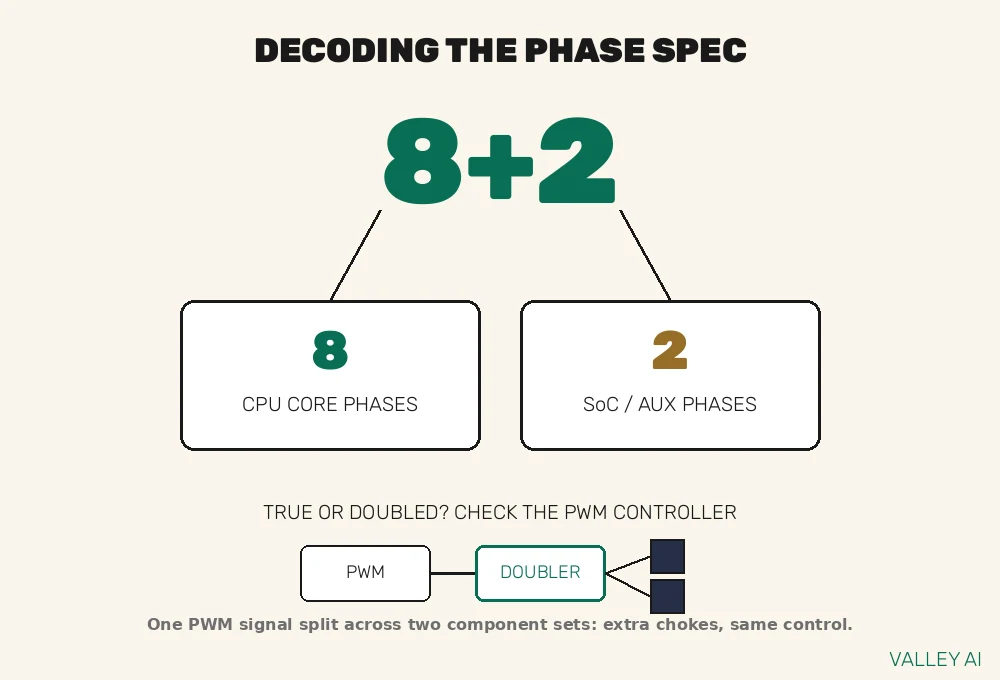
Motherboard boxes love big phase numbers, and this is where buyers need skepticism. A true phase is independently driven by its own output from the PWM controller. A doubled phase comes from a phase doubler chip that takes one PWM signal and alternates it between two sets of MOSFETs and chokes.
Doubling still helps: two interleaved component sets share the current and the heat, and the ripple improves. But a doubled 8-phase design built from a 4-output controller does not control current as finely as a native 8-phase design with eight independent controller outputs. The marketing rarely makes that distinction, which is why some “16-phase” boards hide an 8-output controller plus doublers.
There is also a cheaper variant called parallel or twinned phases, where two sets of components share one PWM signal without any doubler chip at all. It adds current capacity but none of the interleaving benefit. None of these designs is automatically bad; the advertised number alone tells you less than the combination of true phase count and the amperage rating of each stage.
How do you tell them apart? Counting chokes is a rough hint, since each phase needs its own choke, but doublers add chokes without adding true phases. The reliable way is a board teardown or review that identifies the PWM controller model and any doubler chips, then reads the part numbers off the power stages. Enthusiast VRM guides with board-level analysis walk through exactly this detective work on real boards.
Can I count VRM phases by counting the chokes?
Only as a rough guess. Every phase has one choke, so the choke count sets an upper bound, but doubled and twinned designs add chokes without adding independently controlled phases. Treat the visible count as a hint and confirm the true topology in a teardown or detailed review before comparing boards.
Worked examples: how much VRM does a real CPU need
Phase counts and amperage ratings turn into something concrete with a little arithmetic. Electric current equals power divided by voltage, so a CPU’s current draw is easy to estimate from two numbers you already know. The worked examples below use approximate real-world figures, and they show why VRM shopping is simpler than the marketing suggests.
Take a Ryzen 9 7950X drawing about 200 watts at roughly 1.25 volts pulls around 160 amps (200 divided by 1.25). On an 8-phase VRM, each phase carries about 20 amps. If the board uses 70-amp power stages, every phase runs at under 30 percent of its rating, and the eight stages together could theoretically pass 560 amps. The VRM is barely exercising.
Next, a Core i9-14900K at its 253-watt turbo limit at roughly 1.3 volts pulls about 195 amps (253 divided by 1.3). Across 8 phases that is roughly 24 amps per phase. Even with modest 50-amp stages, the 400-amp theoretical ceiling gives about double the needed headroom on paper. Electrically, mid-range boards handle flagship CPUs without strain; heat, rather than current capacity, is usually the binding constraint, which is why heatsinks and airflow matter so much.
Finally, the same 200-watt CPU on a 16-phase board with 90-amp stages. Each phase carries 12.5 amps against a 90-amp rating, and the theoretical ceiling reaches 1,440 amps. That is enormous overkill for stock operation, and it explains why flagship boards stay cool and quiet: their VRMs are loafing. Power climbs steeply with voltage and frequency, which is why our guide to how a CPU works treats power as a first-class topic.
| Power phases | Current per phase | Share of a 70A stage |
|---|---|---|
| 4 | 50.0 A | 71% |
| 8 | 25.0 A | 36% |
| 12 | 16.7 A | 24% |
| 16 | 12.5 A | 18% |
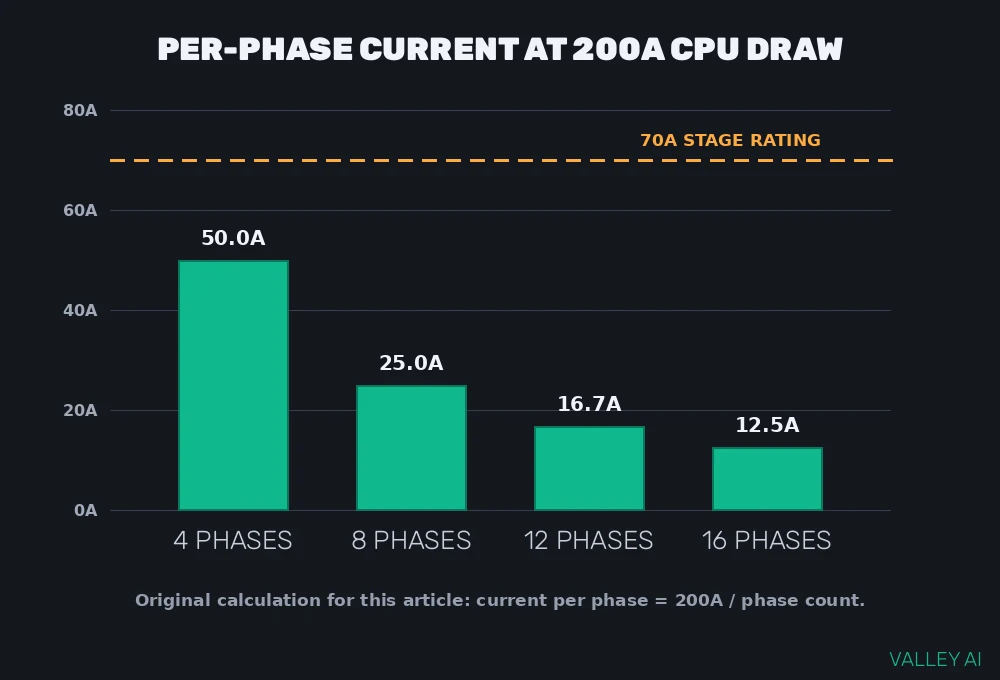
A practical rule of thumb falls out of this arithmetic: keep sustained per-phase current comfortably below the stage rating, ideally under about 60 percent for a board you want to run cool and quiet for years. The 4-phase row in the table above crosses 70 percent of a 70-amp stage, which is exactly why 4-phase boards pair fine with efficient 65-watt chips but get toasty under a 200-watt load.
| Board tier (illustrative) | Phases x stage rating | Theoretical max | Headroom vs 160A CPU | Headroom vs 195A CPU |
|---|---|---|---|---|
| Budget 6-phase, 50A stages | 6 x 50A | 300A | 1.9x | 1.5x |
| Mid-range 8-phase, 70A stages | 8 x 70A | 560A | 3.5x | 2.9x |
| Flagship 16-phase, 90A stages | 16 x 90A | 1,440A | 9.0x | 7.4x |
How to read the VRM spec on a motherboard product page
With the math in hand, the spec sheet stops being intimidating. Board makers describe the CPU VRM as X+Y: X phases feed the CPU cores, and Y phases feed auxiliary rails like the SoC and the memory controller. An “8+2” board therefore has eight core phases and two auxiliary phases, and only the first number matters for CPU power.
Read the power stage rating next. Spec sheets list it as “70A power stages” or “90A DrMOS”. Multiply phases by amps for the theoretical ceiling, then compare it with your CPU’s draw using the arithmetic from the previous section. Ignore the triple-digit phase count race and match the board’s capacity to your chip, plus thermal margin.
Then look at cooling. Real VRM heatsinks are finned aluminum blocks with thermal pads underneath, sometimes linked by a heatpipe. If the “heatsink” is mostly plastic shroud over a thin metal plate, treat the phase count with extra skepticism. The chipset wears a similar-looking heatsink elsewhere on the board, so do not mix the two up; our guide to what a chipset does covers that separate chip. Heatsinks only work with moving air, too: a case fan pushing air across the socket area can matter more than a slightly bigger heatsink sitting in dead air.
Check the CPU power connector as well. A single 8-pin EPS connector feeds roughly 300 watts and covers nearly every mainstream build. Boards aimed at extreme overclocking add a second 8-pin or an 8+4 arrangement, which only matters when you push far past stock limits.
When a board is a finalist, look for an independent review that measures VRM temperatures under sustained load. Teardown photos that identify the PWM controller and stage part numbers reveal the true topology, and thermal testing shows whether the heatsinks do their job. The same power-delivery idea shows up on graphics cards, which carry their own VRM clusters beside the GPU die; our guide on what a GPU is explains the chip all that power feeds.
Will a better VRM raise my gaming frame rates?
Only if your current VRM is holding the CPU back. The gain comes from removing a bottleneck: a weak VRM forces clock drops under sustained load, and a stronger one simply lets the CPU hold its rated speeds. If your board already feeds the CPU cleanly, buying a board for its VRM alone adds zero frames.
Do you need to care about the VRM?
For most builders, a quick glance at the VRM is plenty. Any compatible board from an established maker will run a stock CPU at its rated speeds without drama. The VRM only becomes the deciding factor in a few specific situations.
- Pairing a power-hungry chip, such as a Ryzen 9 or Core i9 past 150 watts, with a bargain board built for 65-watt processors.
- Sustained all-core workloads like rendering, compiling, or video encoding, where the VRM never gets a breather.
- Overclocking, which raises voltage and current together and multiplies VRM heat.
- Small or airflow-starved cases, where VRM heatsinks bake in their own exhaust.
If you already own a board with a light VRM, you are not stuck. Lowering the CPU’s power limit in the BIOS (PL1 and PL2 on Intel, PPT on AMD) trims peak current directly, and a modest undervolt cuts power draw without touching performance. Both reduce per-phase current, which has the same effect as giving the VRM more phases.
An overloaded VRM announces itself: clocks sag during long workloads even though CPU temperatures look fine, stress tests crash, or the system shuts down under load and boots straight back up. Those are protection circuits doing their job. The fix is better cooling, a calmer power limit in the BIOS, or a board with more capacity to spare.
Frequently asked questions
How efficient is a motherboard VRM?
Typically 85 to 92 percent at full load. The remaining 8 to 15 percent becomes heat in the power stages, chokes, and PCB traces, so a CPU drawing 200 watts leaves roughly 20 to 35 watts of heat in the VRM area. Efficiency is highest near the middle of the VRM’s rated range and drops when the VRM is barely loaded or pushed near its ceiling.
Can a weak VRM damage my CPU?
It is unlikely. Modern processors defend themselves with thermal and current limits: when the supply cannot keep up, the CPU drops its clocks or the board shuts down before anything breaks. What suffers is the VRM itself, because its capacitors and power stages age faster the hotter they run. Your performance suffers too, through throttling and crashes.
What is a digital VRM?
It is a VRM whose PWM controller is digital rather than analog, so it regulates switching with a digital control loop instead of analog circuitry. Digital controllers react faster and hold tighter voltage tolerances, and most boards sold today already use them. As a buying criterion it matters far less than the stage amperage and the cooling.
Does RAM have a VRM too?
Memory has its own smaller power circuitry, but it is far less demanding because a RAM kit draws a fraction of a CPU’s current. On DDR5 the voltage regulation moved onto the memory stick itself, into a chip called a PMIC, so the motherboard’s memory power circuitry plays a supporting role.
How long do VRM components last?
Longer than the platform, if kept cool. The solid polymer capacitors on modern boards are typically rated for 5,000 hours or more at 105 degrees Celsius, and every 10-degree drop in operating temperature roughly doubles their lifespan. Power stages are similarly durable inside their ratings. Chronic overheating is what shortens VRM life, which is one more reason cooling matters.
Should I add extra cooling to my VRM?
Usually there is no need. The stock heatsinks plus normal case airflow handle stock operation on any sensibly matched board and CPU. Direct a fan at the VRM area if you overclock hard, run sustained all-core loads in a cramped case, or measure VRM temperatures climbing past 90 degrees. Aftermarket VRM waterblocks exist but make sense only for extreme overclocking.

Kaleem
Kaleem is a Computer Science graduate (Virtual University of Pakistan) and the founder and editor of Valley AI, where he publishes in-depth, tested guides on computer hardware, artificial intelligence, and how the internet works. Every guide is researched from primary sources, tested hands-on where possible, and updated when the facts change.