

How does a GPU work? A graphics card renders one frame by splitting the work across thousands of small cores. Each core runs the same instruction on a different pixel at the same time. That split is the design. A GPU trades the few fast cores of a CPU for thousands of simple ones, and it finishes first on any job that breaks into many identical pieces.
That work runs through a fixed pipeline. Geometry goes in, pixels come out, and the finished frame waits in memory until the monitor reads it. Every stage has its own hardware, its own cost, and its own way to slow a frame down.
Thousands of simple cores beat a few fast ones
Two processors divide the work. The processor handles logic, files, and the operating system. What a GPU does is take the parallel half: the same small calculation, run thousands of times at once. A CPU core is a generalist. It runs one thread fast, jumps between branches, and keeps a large cache close by. A GPU core is a specialist. It runs one simple arithmetic step on thousands of pixels at once.
Compare the counts. A desktop CPU carries 4 to 24 large cores at 3 to 6 GHz. Nvidia’s GeForce RTX 5090 carries 21,760 small CUDA cores across 170 streaming multiprocessors, each running near 2.4 GHz. The CPU finishes one hard task fast. The GPU finishes thousands of easy tasks together. Neither replaces the other.
The names change by brand. Nvidia calls its shader cores CUDA cores. AMD calls them Stream Processors. Intel calls them Xe vector engines. The idea stays the same: many small units, one instruction, different data.
Core count alone does not set speed. A card with more cores can still lose to a card with fewer, faster cores fed by wider memory. Clock speed, memory bandwidth, and the work itself all move the result. The frame budget puts numbers on that work.
One frame gets 16.7 milliseconds at 60 fps
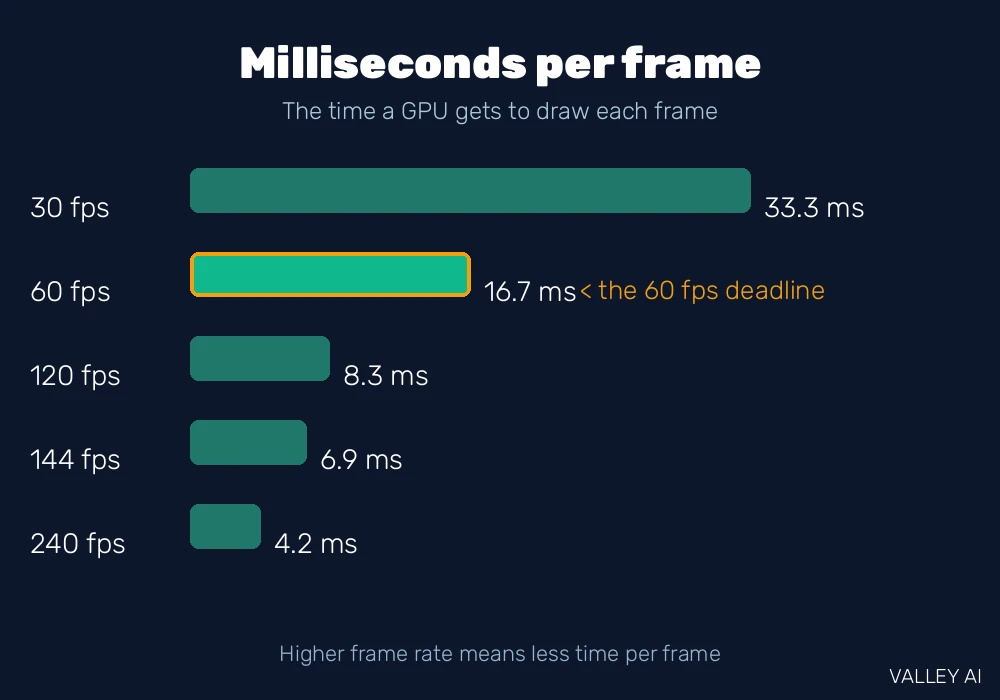
Frame rate is a deadline. At 60 frames per second, the GPU gets 16.7 milliseconds to build each frame. At 120, it gets 8.3. At 144, the budget falls to 6.9. Miss the deadline and the frame arrives late. The eye reads a late frame as a stutter.
| Frame rate | Time per frame | Pixels per second at 1080p |
|---|---|---|
| 30 fps | 33.3 ms | 62.2 million |
| 60 fps | 16.7 ms | 124.4 million |
| 120 fps | 8.3 ms | 248.8 million |
| 144 fps | 6.9 ms | 298.6 million |
| 240 fps | 4.2 ms | 497.7 million |
A 1080p frame holds 2,073,600 pixels. At 60 frames per second the GPU shades 124.4 million pixels every second. A 4K frame holds 8,294,400 pixels, four times as many, so the same 60 frames need 497.7 million pixels per second. Resolution is the fastest way to raise the workload: doubling each side of the picture quadruples the pixels.
How much time does one frame get?
At 60 frames per second, 16.7 milliseconds. That window covers the full pipeline: geometry, shading, and the write to memory. A frame that needs 20 milliseconds cannot hold 60 per second, so the rate falls to 50.
The deadline sets what the panel can show. A 60 Hz panel redraws 60 times per second, so with vertical sync on, frames past 60 wait for the next redraw. The panel’s refresh speed caps the visible rate even when the GPU renders faster.
The rendering pipeline turns triangles into pixels
Every frame travels the same five stages in the same order. A game hands the GPU a scene made of triangles. The pipeline moves those triangles through vertex shading, primitive assembly, rasterization, pixel shading, and output merging. Each stage does one job and hands its output to the next, the way stations on an assembly line pass a part along.
Vertex shading moves each corner of each triangle from 3D space onto the screen. A vertex shader runs once per corner, applies the camera angle and the perspective, and lights the corner. Primitive assembly groups the shaded corners back into triangles. Rasterization then fills each triangle with the pixel positions it covers, called fragments, and works out the depth and texture position of each one.
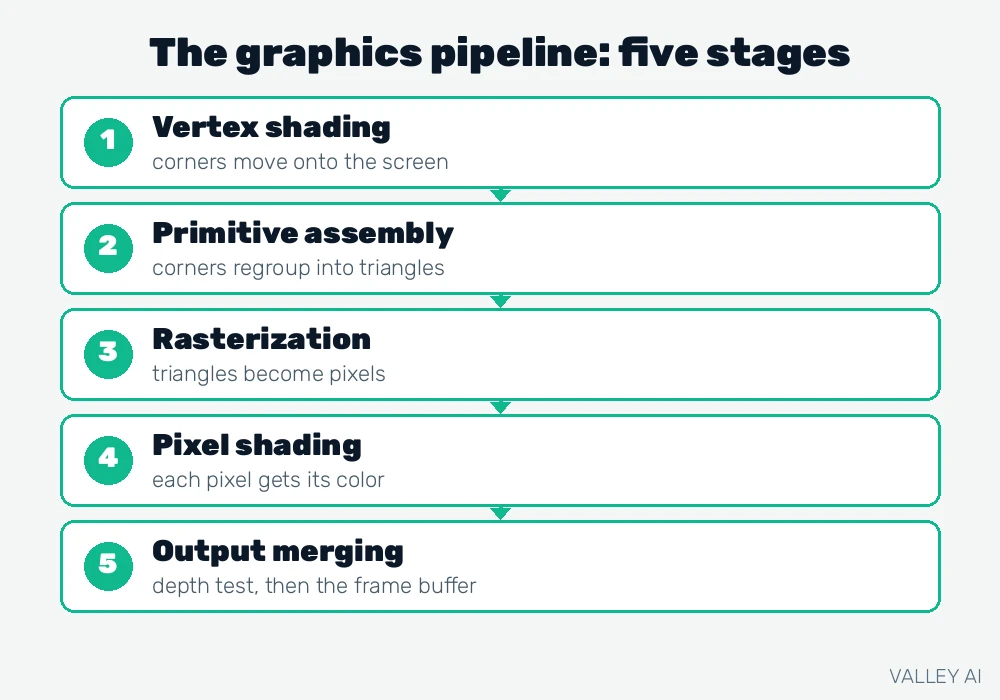
Pixel shading runs once per fragment. A pixel shader looks up the texture, works out the light, and sets the fragment’s color. Output merging tests each fragment against the depth buffer, blends it with what is already there, and writes the surviving pixel into the frame buffer. The display engine reads that buffer and sends it to the monitor.
Two optional stages add detail where the camera looks close. Tessellation splits a coarse triangle mesh into finer triangles near the viewer. A geometry shader can add or change vertices, which games use for effects such as grass, fur, or an explosion of debris. Both stages sit between vertex shading and rasterization, and both cost time, so games switch them on only where the detail shows.
The graphics API defines the stages. DirectX 12, Vulkan, and OpenGL define the same pipeline, and the shaders that run inside it are written in languages such as HLSL and GLSL. A card from any vendor runs the same stages in the same order.
Shader cores work in warps of 32
A shader core never works alone. Nvidia groups 32 threads into a warp, and every thread in the warp runs the same instruction at the same moment on different data. AMD groups 64 threads into a wavefront. The model has a name: SIMT, single instruction, multiple threads. It is the mechanism behind the core counts on the box.
The grouping hides waiting. When one warp stalls for data from memory, the streaming multiprocessor switches to another warp that is ready. An RTX 5090 holds 170 streaming multiprocessors with 128 cores each, which multiplies to 21,760 CUDA cores. The card stays busy by keeping many warps in flight. Any single core stays slow on its own. Nvidia lists these figures in its published specifications for the card.
That grouping sets a limit. Threads in one warp must run the same instruction, so a warp that splits into two different paths runs each path in turn. Code that branches heavily wastes the parallelism. That limit is one reason the GPU and CPU divide work the way they do: branchy logic stays on the CPU, and uniform math moves to the GPU.
An integrated GPU follows the same model with fewer cores and no card of its own. Integrated graphics borrow system memory and share the processor’s power budget, which is why they handle video and light games but not heavy 3D scenes.
Textures, depth, and the final pixel
A fragment gets its color from a texture. A texture mapping unit, or TMU, reads the texture from video memory and samples the right texel for the fragment’s position. The RTX 5090 packs 680 TMUs. A surface with a brick texture, a wood texture, or a face texture all pass through the same units, and a scene with more texture detail asks those units for more samples.
The raster operations pipeline, or ROP, finishes the pixel. It runs the depth test, blends transparent fragments, and writes the result into the frame buffer. The RTX 5090 ships with 176 ROPs. Anti-aliasing also runs here: the ROP blends the hard edge of a triangle with its neighbors so the stair-step edge softens.
Why does a nearer wall hide the wall behind it?
The depth test decides. Every fragment has a depth value, stored in the z-buffer. When two fragments land on the same pixel, the ROP keeps the nearer one and drops the farther one. Modern cards run the test early when they can, so hidden fragments skip the shading work.
That z-buffer is a frame-sized array in video memory. A 4K depth buffer holds 8,294,400 depth values, one per pixel. The card reads and writes it for every fragment, which is one more reason the memory bandwidth matters as much as the core count.
Measured: more fish, slower frames
The pipeline’s cost grows with the fragments it shades. A live test shows it. On 10 November 2026, the WebGL Aquarium demo ran in a browser session and rendered the same scene at three fish counts. The page reports the frame rate live, and each reading was taken after the scene had settled.
At 100 fish the scene ran at 17 frames per second, or 58.8 milliseconds per frame. At 500 fish it ran at 14 to 15 frames per second, near 69 milliseconds per frame. At 10,000 fish it fell to 5 frames per second, or 200 milliseconds per frame. The same triangles, the same shaders, more fragments: the frame time grew from 59 to 200 milliseconds as the fish count rose from 100 to 10,000.
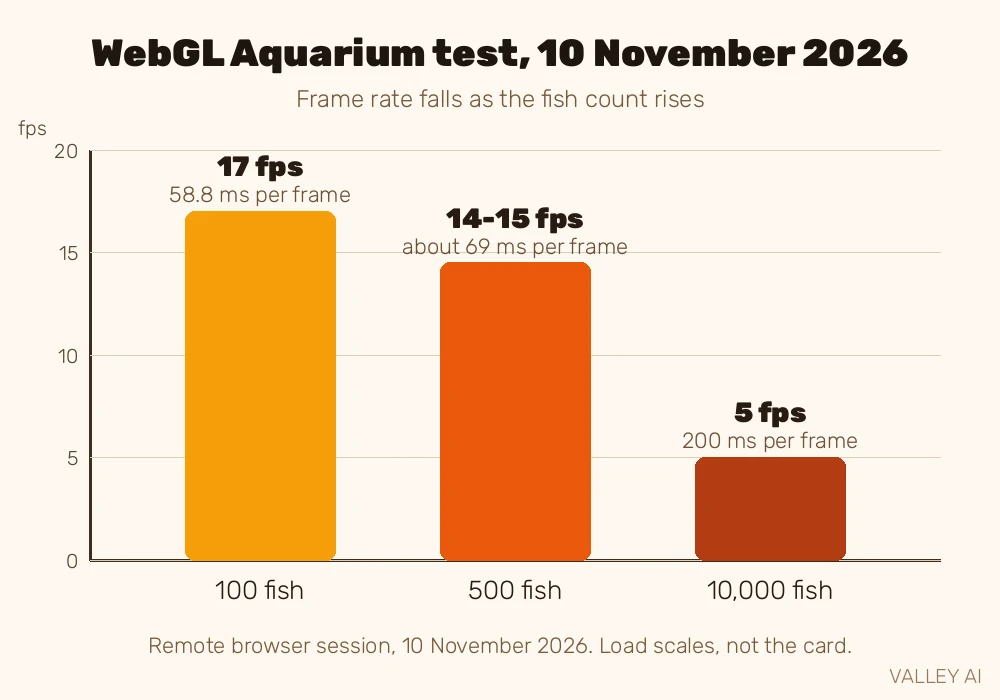
The absolute numbers belong to the session, not the hardware. The session’s renderer was an Nvidia GeForce RTX 5080, reported by WebGL Report with a maximum texture size of 16384, yet the scene ran slowly in this remote browser session. The direction is the finding: more fragments mean more pixel-shader work, and the frame rate falls as that work grows.
That test shows why the frame budget matters. At 5 frames per second, each frame consumed 200 milliseconds, twelve times the 16.7 millisecond budget of a 60 fps game. A real game keeps its fragment count in check for the same reason: every extra fragment is extra shading work inside the same deadline.
VRAM feeds the cores, and two ceilings bind the data
Shader cores starve without data. Video memory holds the textures, the geometry, and the frame buffers the cores read and write, and its bandwidth sets how fast that data moves. The formula is simple: bus width in bits times the data rate in gigabits per second, divided by eight. An RTX 4060 runs a 128-bit bus at 17 gigabits per second, which gives 272 gigabytes per second. An RTX 5070 runs a 192-bit bus at 28 gigabits per second, which gives 672. An RTX 5090 runs a 512-bit bus at 28 gigabits per second, which gives 1,792.
- Mainstream, RTX 4060: 272 GB/s
- Mid-range, RTX 5070: 672 GB/s
- Last-generation flagship, RTX 4090: 1,008 GB/s
- Current flagship, RTX 5090: 1,792 GB/s
Capacity matters beside bandwidth. One 4K texture at 4096 by 4096 pixels with four bytes per pixel takes 64 megabytes. Ten such textures take 640 megabytes. A 4K frame buffer takes 31.6 megabytes, and double buffering doubles it to 63.3. The numbers add up fast, which is why high-resolution texture packs ask for more memory before they ask for more cores.
What happens when video memory runs out?
The card spills data to system memory across the PCIe link. System memory is slower and the link is narrower, so the spill shows as stutter: frames that take far longer than the budget. Lowering the texture setting is the direct fix, because it shrinks the data the card must hold.
Two ceilings bind the data, and they bind different traffic. The PCIe link carries data between the system and the card: a PCIe 5.0 x16 slot moves about 64 gigabytes per second in both directions. Video memory carries data inside the card: the RTX 5090 moves 1,792 gigabytes per second, 28 times as much. A slow link starves the card when a scene loads. A slow memory starves the cores while a scene renders. The fix depends on which ceiling the workload hits.
Power sets a third limit. The slot itself supplies 75 watts. A hungry card draws the rest through dedicated connectors: an 8-pin cable delivers 150 watts, and the 12VHPWR connector carries up to 600. The card’s voltage regulation turns that 12 volts into the roughly 1 volt the silicon needs, and the power supply must feed the whole chain.
Ray tracing, tensor cores, and work beyond pictures
Ray tracing traces light the other way. A classic pipeline draws triangles and shades them. Ray tracing fires rays from the camera, follows each ray until it hits a surface, and works out the light from there. The expensive step is finding the hit. RT cores accelerate it by walking a bounding volume hierarchy, a tree of boxes that narrows the search from the whole scene to a few triangles. The RTX 5090 carries fourth-generation RT cores for that walk.
Tensor cores handle matrix math. A neural network is mostly matrix multiplication, so a tensor core runs AI work far faster than a shader core. Games use them for upscaling: DLSS renders a frame at a lower resolution, then the tensor cores rebuild it sharp at full resolution. DLSS 4 moved that rebuild to a transformer model and added multi-frame generation, which draws extra frames between rendered ones.
The same cores take work that has nothing to do with pictures. A compute API such as CUDA or OpenCL sends general math to the shader cores: AI training, video encoding, scientific simulation. An NPU does similar matrix work in a laptop or phone, tuned for low power instead of raw speed.
Read your own GPU: three numbers to watch
Task Manager shows the live load. Open it during a game and watch three numbers. GPU utilization shows how much of the card the game uses: near 100 percent means the card is the limit, and a low number with a slow frame rate points at the CPU instead. Dedicated GPU memory shows how much video memory the game holds: a number near the card’s total means the spill is close. Frame time, shown by most game overlays, shows the cost of one frame in milliseconds: a steady 16.7 means a steady 60 per second, and spikes mean stutter.
Two quick checks sort most slowdowns. If utilization sits near 100 and the frame time holds steady, the card is working at its limit and a lower resolution is the fix. If utilization sits low while the frame rate stays low, the CPU or the memory link is the limit, and the card is waiting. The numbers tell you which part to blame before you spend money on a new one.
Open Task Manager the next time a game stutters and read the three numbers before changing any setting. The card, the memory, or the processor will show itself as the limit, and the fix follows from that reading. Start with the utilization number: it names the bottleneck in one glance.
Frequently asked questions
Can a computer run without a graphics card?
Yes, when the processor carries integrated graphics. The motherboard’s video ports connect to that built-in GPU, and the machine shows a picture with no card installed. A server can also run with no GPU at all, managed over the network. A discrete card becomes necessary only for heavy 3D work, high-resolution gaming, or GPU compute.
Why do graphics cards cost more than the CPU in a gaming PC?
Three costs stack up. The silicon die is large and packs billions of transistors plus high-speed memory. The card adds its own memory chips, power delivery, cooling, and board. The market also prices the card by its frame rate, so the fastest tier sells at a premium the CPU tier does not. A mid-range card often costs as much as the processor beside it for those reasons.
How long does a graphics card last?
Five to eight years is a normal span for a desktop card. The silicon itself rarely fails first. Fans wear out, thermal paste dries, and driver support for very old models ends. A card kept cool and dust-free lasts longer than one that runs hot every day, and a card that still plays new games at the settings you accept has not reached its end.
Why does a GPU get louder during a game?
The fans follow the temperature. A game raises the power draw, the die heats up, and the fan curve spins the fans faster to move the heat out. A quiet desktop means the card is near idle. A loud card under load is working as designed, and the noise falls when the load falls.
Can two graphics cards work together in one PC?
Modern games rarely benefit from two cards. Nvidia dropped SLI support for new games and AMD ended CrossFire, so the second card mostly idles. Workstation software can still split compute jobs across two cards, and some renderers use both. For gaming, one stronger card beats two weaker ones in nearly every case.

Kaleem
Kaleem is a Computer Science graduate (Virtual University of Pakistan) and the founder and editor of Valley AI, where he publishes in-depth, tested guides on computer hardware, artificial intelligence, and how the internet works. Every guide is researched from primary sources, tested hands-on where possible, and updated when the facts change.