

CPU cooling air vs liquid starts with three checks: sustained watts, case space, and socket fit. A cooler rated well above the CPU sustained draw, mounted on the right bracket, inside a case with room for it, beats a larger cooler that cannot fit or a smaller cooler running at its limit.
Air cooling and liquid cooling move heat by the same route. Both pull heat off the processor, carry it to a larger surface, and hand it to case air. The difference sits in how far that heat travels and how much surface it gets.
Most builds run fine on air. Liquid earns its place at the top end, where sustained wattage passes what a tower cooler handles quietly. The mechanism, the rating math, and the fit checks that settle the choice follow.
What a CPU cooler does
A processor turns electrical power into heat while it works. That heat concentrates in a silicon die a few square centimeters in size. Without a cooler, the die reaches its temperature limit in seconds under load, and the processor slows itself to stay safe. That slowdown is thermal throttling.
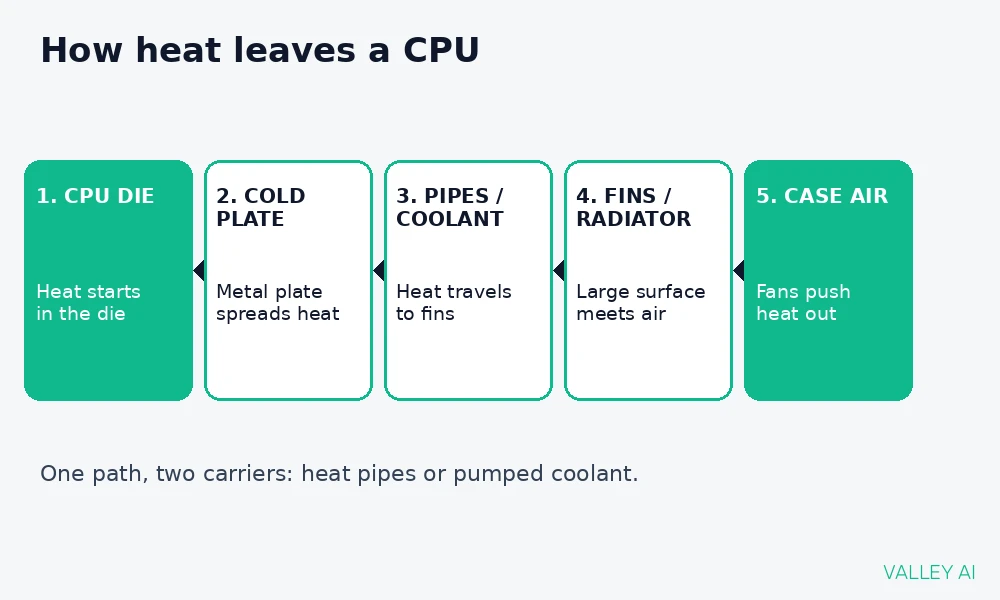
How does heat leave a CPU? Heat flows from the die into a metal cold plate pressed against it, then through heat pipes or coolant to fins or a radiator, where fans push it into case air and out of the chassis.
The cold plate matters because it spreads heat from a small die across a wider contact area. Thermal paste fills microscopic gaps between the die lid and the plate, so heat crosses the joint directly.
Every cooler ends at the same place: case air. A cooler inside a case with no fresh intake recycles its own warm exhaust, so intake and exhaust fans shape results as much as the cooler itself.
Air coolers: heat pipes and fin stacks
An air cooler stacks a cold plate, heat pipes, a fin tower, and one or two fans into a single unit. Heat pipes carry heat upward from the plate into the fins. Fans push air through the fins, and the fins give that air a large surface to carry heat away.
A heat pipe works like a relay team passing a baton. Liquid inside the pipe evaporates at the hot end, travels as vapor to the cool end, condenses, and returns as liquid to repeat the cycle. Evaporation and condensation move heat faster than solid metal alone.
Tower coolers dominate the category. A single tower with one fan handles mainstream CPUs quietly. A dual tower with two fans adds surface for hotter chips and stays quieter at the same wattage because each fan spins slower.
Fan size shapes noise directly. A 140mm fan moves the same air as a 120mm fan at lower speed, so larger fans run quieter at the same cooling load. Cooler makers list fan size in the spec sheet, and it belongs in the comparison alongside the wattage rating.
Air coolers carry no pump, no liquid, and no seals. The only moving parts are the fans, and a failed fan announces itself with noise or a stopped blade. Replacement means swapping a standard fan, a job that takes minutes with a screwdriver.
Low profile air coolers serve small cases where a tower cannot stand. They trade fin area for height, so they suit modest wattages and need good case airflow to compensate.
Liquid AIO coolers: coolant and radiators
An all-in-one liquid cooler replaces heat pipes with a loop. A pump on the cold plate circulates coolant through tubes to a radiator. Fans on the radiator push the heat into case air.
The radiator is the fin stack, moved to the case wall. A 120mm radiator holds one fan. A 240mm radiator holds two fans side by side. Calculation, radiator area: a 360mm radiator uses three 120mm fans, three times the fan area of a single 120mm radiator.
Liquid carries heat farther than a heat pipe can, which lets the radiator sit where case airflow is strongest. That distance is the real advantage at high wattage, more than the liquid itself.
An AIO arrives sealed from the factory. The buyer mounts the radiator, mounts the pump block, and connects fan and pump cables. No filling, no custom tubing, and no maintenance schedule beyond dust cleaning.
Radiator placement changes which air the radiator breathes. A front radiator pulls outside air through its fins first. A top radiator exhausts warm case air through its fins. Either works when the case has a clear intake path, and the choice often comes down to which mount the case offers.
Do liquid coolers cool better than air coolers? At the same wattage, a large air tower and a 240mm AIO often land close together. Liquid pulls ahead when sustained wattage climbs past what a tower handles quietly, roughly the top tier of desktop processors.
How to read a cooler rating
Cooler makers publish a TDP rating in watts. TDP names sustained heat output, and a cooler rating states the sustained watts it can move while keeping temperatures in a sane range. Treat the rating as a class marker. Test setups differ between brands, so the number is approximate.
Headroom is the gap between the CPU sustained draw and the cooler rating. A gap of 30 to 50 percent covers turbo bursts and warm rooms without forcing fans to full speed.
Calculation, mid-range build: an AMD Ryzen 7 9700X carries a 65W TDP and an 88W package power target. Pair it with a cooler rated at 180W. Headroom equals 180W minus 88W, which is 92W.
High-end build, same math: an Intel Core i9-14900K draws up to 253W under turbo. A cooler class rated above 253W fits that draw, which places the chip in 360mm AIO territory.
Package power target, found in the processor spec sheet, beats TDP for this math. TDP describes a design class, while package power states the watts the chip draws under load.
Ambient temperature sets the floor. A cooler cannot push a CPU below room temperature with air or liquid alone, because every watt ends in room air. A 30C room yields higher CPU temperatures than a 20C room on the same cooler, with no fault involved.
Ratings do not compare cleanly across brands. One maker tests in open air, another in a closed case, and fan noise limits differ between test rigs. Use the rating to pick a class, then confirm with reviews that measure noise at a fixed wattage.
A processor drawing 253W under turbo plus a graphics card draws heavily on the power supply, so checking the PSU rating alongside the cooler rating avoids a second weak point in the build.
CPU cooling air vs liquid: picking by CPU wattage
Match the row to sustained draw, then check fit before price. The table gives the starting class; the fit checks after it decide whether that class mounts in the case.
| CPU sustained draw | Suggested cooler | Why this class fits |
|---|---|---|
| Up to 125W | Quality single tower air cooler | One tower and one fan move this load quietly with room to spare |
| 125W to 200W | Dual tower air cooler or 240mm AIO | Extra fin area or a second fan keeps fan speed and noise down |
| Over 200W | 360mm AIO | Three fans of radiator area handle sustained top tier draw |
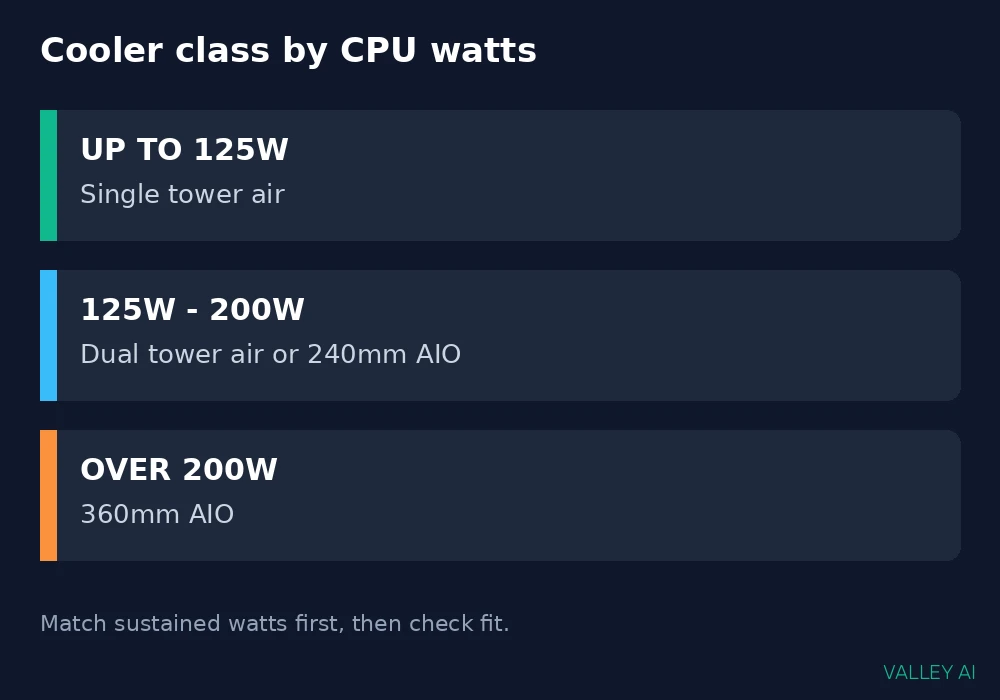
Use the table as a starting class, then run the fit checks before buying. A class that cannot mount is no class at all.
Fit and clearance checks
A cooler that cannot mount or cannot fit cools nothing. Four checks settle fit before purchase.
- Socket bracket: confirm the box lists the processor socket, such as Intel LGA1700 or AMD AM5, or that the maker offers a bracket kit for it.
- Tower height: measure from the motherboard surface to the side panel and compare with the cooler height in the spec sheet.
- Radiator mount: read the case spec sheet for radiator sizes per mounting position and confirm fan slots exist there.
- RAM clearance: check the cooler spec for RAM height limits when memory modules carry tall heat spreaders.
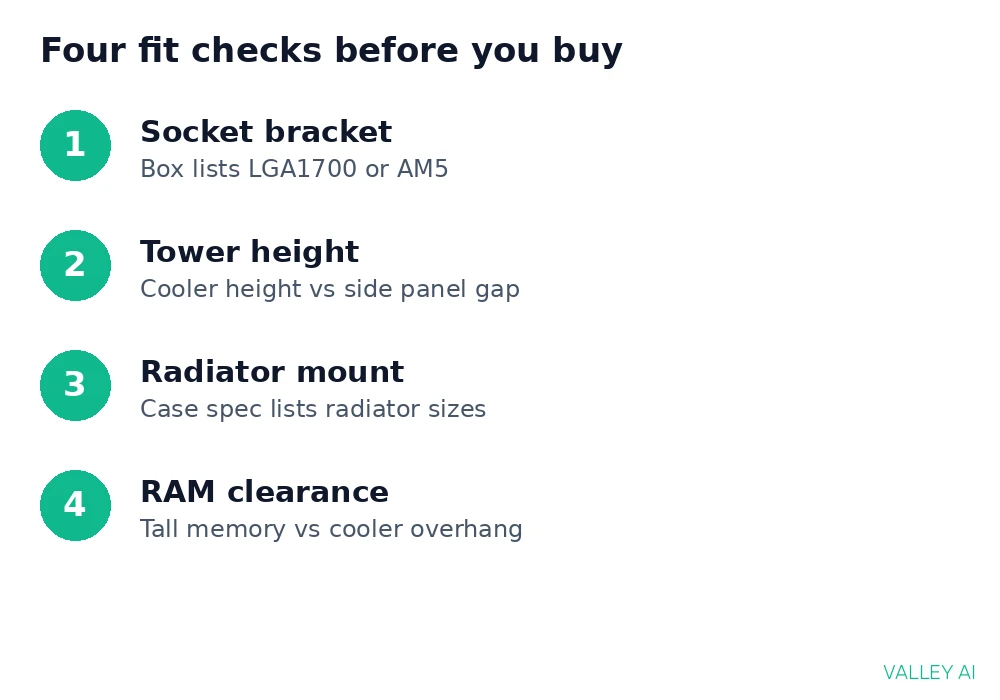
Case spec sheets list cooler height limits and radiator support directly. Reading those two lines before ordering prevents the most common fit failure.
The socket sits on the motherboard, so the board model decides which bracket family the cooler needs. Bracket kits cost little or ship free, but only when ordered before the build day.
Noise, reliability, and failure modes
Fans set the noise floor of any cooler. Fan speed rises with heat load, so a cooler with headroom stays quiet while a cooler at its limit screams. Fan curves in the BIOS let the builder trade a few degrees for a quieter room.
Pump noise is the liquid cooler extra sound source. A healthy pump hums faintly. Gurgling or grinding points to air in the loop or bearing wear.
Failure modes split by cooler type. Air cooler failure means a fan stops, and the system still cools weakly through the fin stack until replacement. Liquid cooler failure means a pump stops, and temperatures climb fast because coolant stops circulating.
Leaks from sealed AIO units are rare, and makers warranty against them, but the risk is nonzero. Coolant permeation over years is the slower, more common aging path, showing up as gradually rising temperatures.
Watching CPU temperatures under sustained load gives the earliest warning of any of these failures. A slow rise over months points to dust, aging paste, or permeation before any part fails outright.
If temperatures climb past the processor limit, the fixes for an overheating CPU start with airflow and mounting checks. Reseating the cooler and clearing dust solve the majority of sudden temperature jumps.
When an upgrade makes sense
How much cooler headroom do you need? Enough that sustained load keeps fans below full speed and temperatures below the throttling limit, with room for summer heat. A cooler rated near the CPU draw leaves no margin for a warm room.
Upgrade when sustained load pushes temperatures to the throttling limit, when fan noise under load grows intrusive, when a new processor draws more watts than the current cooler class handles, or when a move to a smaller case breaks fit.
Skip the upgrade when the current cooler already holds temperatures below the limit with quiet fans. The gain would show only in numbers on a monitoring screen, with no change in felt performance.
Conclusion
Buy the cooler class that matches sustained watts, confirm socket, height, and radiator fit from the spec sheets, then pick the quieter option inside that class.
Measure the case, read the cooler rating against package power, and order once. That order of operations prevents the two expensive mistakes: a cooler that cannot fit and a cooler class too small for the chip.
Frequently asked questions
Should the radiator sit above the pump in a liquid cooler?
Yes, when the case allows it. Air inside the loop collects at the highest point, so a radiator mounted above the pump keeps air away from the pump. A pump sitting at the loop’s highest point can draw air in, which adds noise and wears the pump faster.
Can you reuse a CPU cooler on a new processor?
Yes, when the cooler maker supplies the bracket for the new socket. Many makers ship bracket kits free on proof of purchase. Check the maker socket support page before ordering the processor, so the kit arrives with the build.
Does cooler weight risk bending a motherboard?
Backplates and mounting pressure spread the load across the board, and boards are built for tower weights. Sag shows up in poorly supported heavy graphics cards far more than in coolers, and a properly mounted tower does not bend a board in normal use.
Do stock coolers included with processors work for everyday use?
Yes for browsing, office work, and light loads, where sustained draw stays low. Sustained heavy loads push small stock coolers to high fan speeds, which is where an aftermarket tower earns its place with lower noise.
How long does an AIO liquid cooler typically last?
Several years of service is normal, with pump life as the limiting part. Rising noise or gradually climbing load temperatures signal the end of service, and replacement planning can start at that signal rather than at a fixed calendar date.

Kaleem
Kaleem is a Computer Science graduate (Virtual University of Pakistan) and the founder and editor of Valley AI, where he publishes in-depth, tested guides on computer hardware, artificial intelligence, and how the internet works. Every guide is researched from primary sources, tested hands-on where possible, and updated when the facts change.