

The panel inside a monitor sets its color, contrast, motion clarity, and viewing angle. Every other part of the spec sheet sits on top of that choice.
Buy IPS unless a specific need points elsewhere. VA wins dark rooms where deep blacks matter most. TN fits a tight budget built around maximum speed. OLED gives the best picture and costs the most, with burn-in care as part of ownership.
What a monitor panel does
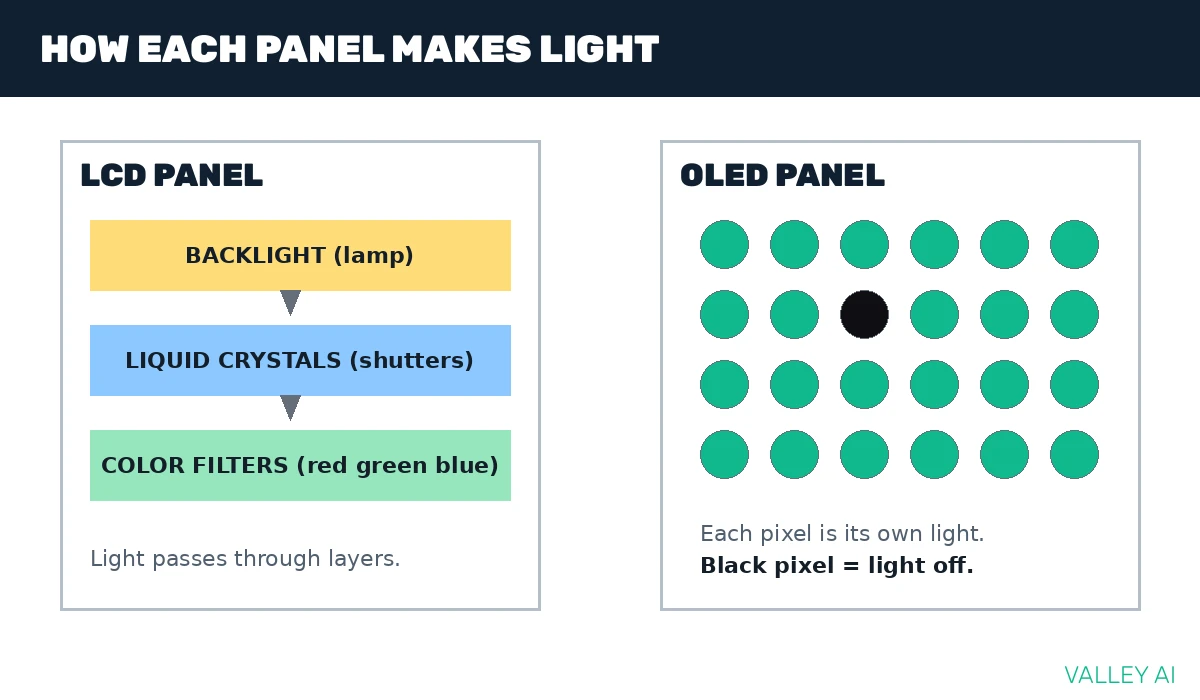
A monitor panel is the thin layer that turns a video signal into light you can see. In an LCD panel, a backlight shines through liquid crystals, and each crystal twists or tilts to let more or less light pass. A color filter over each subpixel tints that light red, green, or blue. An OLED panel drops the backlight entirely. Each pixel makes its own light and switches off fully for black.
An LCD panel works like a wall of tiny shutters in front of a lamp. The crystals open and close to control the light reaching your eyes. An OLED pixel is its own lamp, so switching it off gives true black.
A monitor is one of the output devices of a computer. The panel is the part that does the showing, while the stand, ports, and scaler sit around it.
Decision table: IPS vs VA vs TN vs OLED
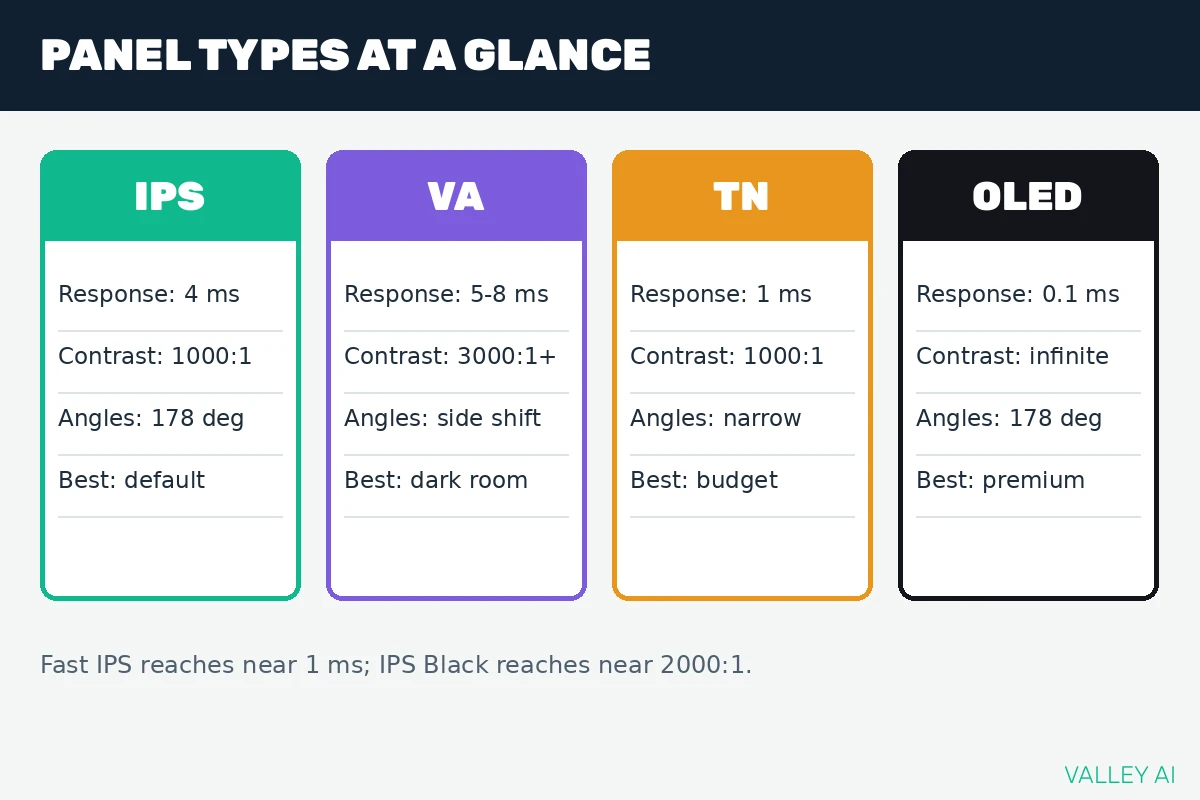
The table puts the four panel types side by side on the specs that change daily use.
| Attribute | IPS | VA | TN | OLED |
|---|---|---|---|---|
| Response time (typical) | Near 4 ms (Fast IPS near 1 ms) | Near 5 to 8 ms on dark transitions | Near 1 ms | Near 0.1 ms |
| Contrast ratio | Near 1000:1 | 3000:1 to 6000:1 | Near 1000:1 | Effectively infinite |
| Viewing angle | Near 178 degrees, steady at an angle | Shifts at sharp side angles | Shifts early, strong washout | Near 178 degrees, steady at an angle |
| Color | Wide gamut, steady at an angle | Good for movies and games | Limited, dithering fills gaps | Rich color, per-pixel light control |
| HDR consequence | Needs local dimming for strong HDR | Strong contrast helps HDR | Weak HDR | Per-pixel dimming gives strong HDR |
| Burn-in risk | None | None | None | Present, care features help |
| Best use | Default all-round pick | Dark-room media | Budget speed | Premium picture |
IPS explained
IPS crystals rotate in the same plane as the screen. Light passes evenly across that plane, so color stays stable when you move your head or share the screen with someone beside you.
The price of that uniform light is black level. A backlight always leaks a little through the crystal layer, so blacks in a dark room look gray at the corners. That corner glow is IPS glow.
Fast IPS panels cut response time with stronger overdrive and different crystal mixes. IPS Black variants raise contrast to around 2000:1 with a redesigned crystal layer.
VA explained
VA crystals stand upright when idle and tilt to pass light. The upright rest state blocks light well, which gives VA the strongest blacks of any LCD panel.
Why do dark scenes smear on a VA panel? Dark transitions on VA panels run slower than bright ones. A dark object moving across a dark background leaves a trail for a frame or two.
Viewed from a sharp side angle, VA color shifts more than IPS color. Straight-on viewing hides that weakness, which favors a single viewer at a desk.
Curved VA monitors are common because the panel structure suits a curved substrate. Ultrawide VA screens pair that curve with deep blacks for movie nights.
TN explained
TN crystals twist toward the viewer to control light. The twist is quick, which gave TN the first fast gaming panels and the cheapest prices.
Color shifts fast with viewing angle. A TN screen viewed slightly from below washes out, and 6-bit TN panels use dithering to fake shades they cannot produce directly.
Fast IPS panels shrank the speed gap, so TN survives mainly where every dollar and every millisecond counts.
OLED explained
OLED pixels generate their own light from organic compounds. A pixel showing black is off, so contrast has no ceiling in practice and no backlight bleeds into dark scenes.
Two OLED builds share the monitor market. QD-OLED pairs a blue light source with quantum dots for color. WOLED adds a white subpixel to lift brightness. QD-OLED usually shows richer color volume, while WOLED usually reaches higher full-screen brightness.
Does normal desktop use burn in an OLED panel? Varied content plus built-in care features keep the risk low. Pixel shifting moves the image by tiny steps, panel refresh cycles spread wear evenly, and dark mode with hidden taskbars reduces static load further.
G-Sync and FreeSync support is common on OLED gaming monitors, so a moving frame rate still paces smoothly.
How response time and frame time interact
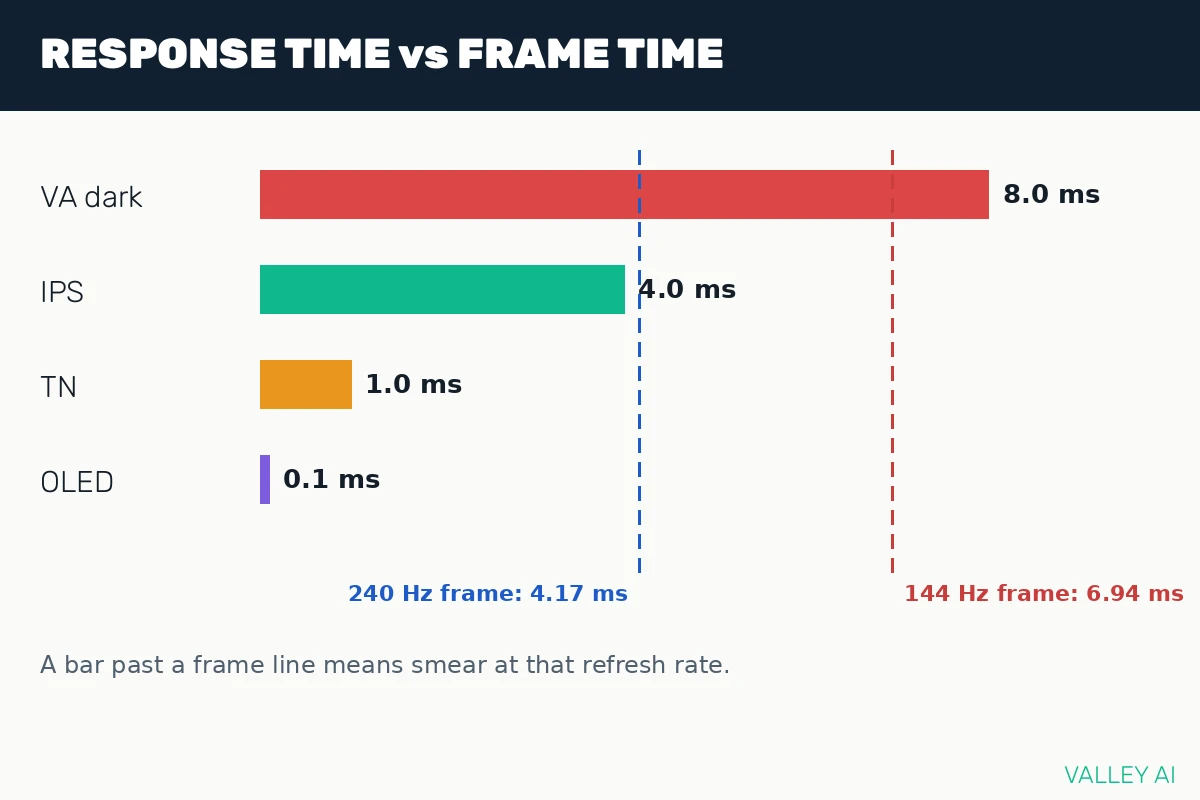
Refresh rate sets the frame budget, and response time decides whether pixels keep up. Response time measures how long a pixel takes to change from one shade to another. Refresh rate measures how often the screen draws a new frame. Frame time is the length of one frame.
Frame time comes from dividing 1000 milliseconds by the refresh rate. At 144 Hz, 1000 / 144 = 6.94 ms per frame. At 240 Hz, 1000 / 240 = 4.17 ms per frame. A VA dark transition near 8 ms runs longer than one 144 Hz frame. The pixel is still changing when the next frame arrives, and the eye reads that lag as smear. An IPS transition near 4 ms fits inside that frame. So do TN at 1 ms and OLED at 0.1 ms. At 240 Hz the frame shrinks to 4.17 ms, so a 4 ms IPS transition sits close to the limit.
A graphics card must feed frames at the panel refresh rate for high refresh to pay off. A 240 Hz panel fed 70 frames per second shows 70 frames per second.
Contrast arithmetic shows the VA advantage in numbers. At equal peak brightness, a VA panel at 3000:1 and an IPS panel at 1000:1 give a black-level ratio of 3000 / 1000 = 3. The VA black sits three times deeper.
Color depth follows the same arithmetic. An 8-bit channel holds 256 shades, and 256 x 256 x 256 = 16,777,216 colors. A 10-bit channel holds 1024 shades, and 1024 x 1024 x 1024 = 1,073,741,824 colors. Extra shades smooth gradients and cut banding in skies and skin.
What to check on a spec sheet and in the shop
Spec sheets hide their weakest numbers. These checks surface them fast.
- Sit off to the side and watch skin tones and sky gradients for shift.
- Play a dark-scene clip with fast camera pans and watch for trails behind objects in motion.
- Dim the room lights and open a black screen to spot corner glow or uneven light.
- Open the OLED care menu and confirm pixel shifting and panel refresh options exist.
- Check that the cable standard supports the refresh rate and resolution you plan to run.
Can a quoted response time be trusted at face value? Quoted figures come from favorable gray-to-gray transitions with heavy overdrive. Dark transitions run slower, so independent measurements matter more than the headline number.
VESA DisplayHDR tiers separate entry badges from strong HDR. An entry tier badge on an LCD panel says little about local dimming, while higher tiers demand measured brightness and dimming zones.
Which panel for your use
Competitive shooter players prize speed above all. Fast IPS covers nearly all of that need, and TN remains for the strictest budgets. Pair either one with a refresh rate your graphics card can feed.
Single-player games and movies in a dark room reward contrast above all. VA delivers its contrast strength at a moderate price, and OLED delivers true blacks at a premium price.
Office work rewards accurate color and a screen others can read from the side. IPS fits that room, with clean text and steady color at an angle.
Photo and video work rewards accurate color and a broad color range. IPS meets that demand without a premium price, and OLED suits grading suites where shadow detail is the job.
Conclusion
Pick IPS as the starting point. Dark-room movie nights favor VA or OLED. A strict speed budget keeps TN in play. A premium budget with care habits justifies OLED. Match refresh rate and size to the same budget after the panel pick.
Frequently asked questions
Is Mini-LED a fifth panel type?
Mini-LED names a backlight design used behind LCD panels. Thousands of small LEDs sit behind an LCD layer and dim in zones, so an IPS or VA panel with Mini-LED backlighting shows stronger contrast and brighter highlights than that panel with a plain edge backlight. The panel type still sets color behavior and viewing angle.
Can calibration fix a TN panel’s color?
Calibration improves gray balance and gamma on a TN panel, but it cannot widen the native color gamut or steady the viewing angle. Those limits sit in the crystal layer itself, so a calibrated TN panel shifts anyway when you move your head.
Does panel type change text sharpness?
Most text differences come from subpixel layout. WOLED and QD-OLED use subpixel layouts unlike LCD panels, which can fringe small text at close viewing distances. Windows ClearType tuning and a normal desk distance reduce the effect.
Why do two monitors with the same panel type look different?
Backlight quality, factory tuning, coatings, and panel-to-panel variation all shift the result. Two IPS monitors can differ in black level and color temperature even when their spec sheets match. Reviews with measurements beat spec sheets for that reason.
Does panel type affect eye strain?
Flicker behavior, brightness range, and viewing distance shape comfort more than panel type alone. Some panels dim by flickering the backlight at low brightness, which bothers sensitive eyes. A steady brightness setting, a matte coating, and regular breaks help more than switching panel types.
Should a bright room change the panel pick?
Bright rooms punish low peak brightness and glossy coatings. OLED panels can look dimmer under direct sun than a bright LCD, while IPS panels hold up well with a strong backlight. Matte coatings and placement away from windows count as much as the panel itself.

Kaleem
Kaleem is a Computer Science graduate (Virtual University of Pakistan) and the founder and editor of Valley AI, where he publishes in-depth, tested guides on computer hardware, artificial intelligence, and how the internet works. Every guide is researched from primary sources, tested hands-on where possible, and updated when the facts change.