
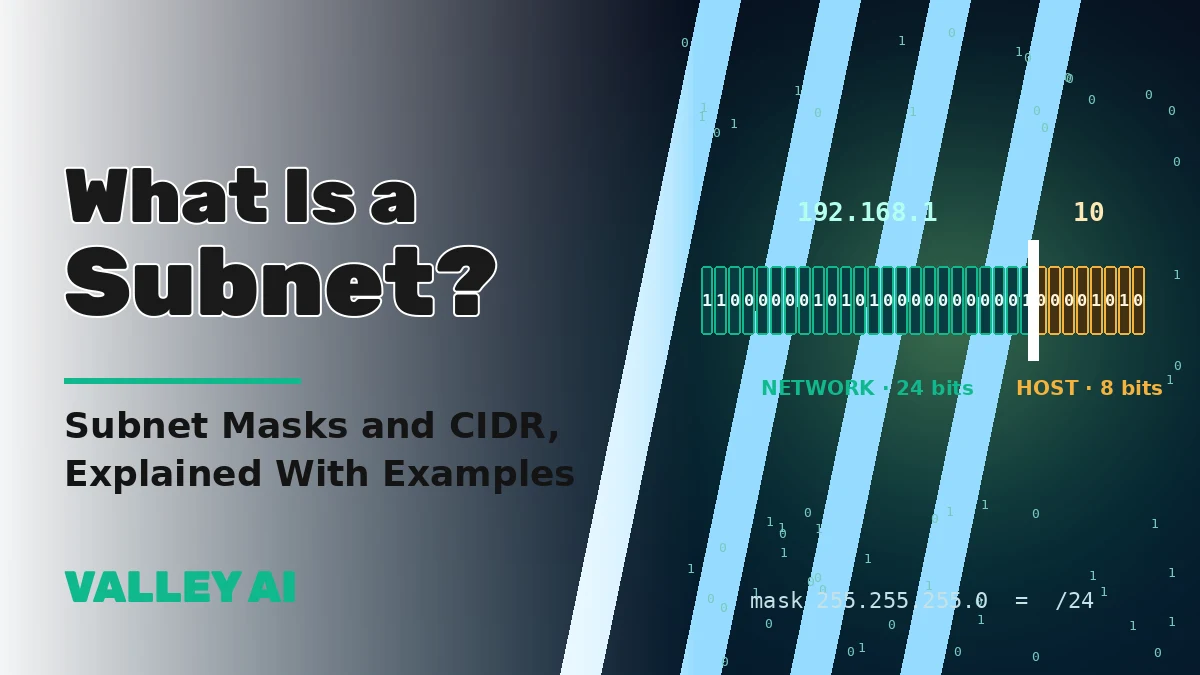
A subnet, short for subnetwork, is a subdivision of an IP network. Every IP address has two parts: a network part that identifies the network a device belongs to, and a host part that identifies the device itself. The subnet mask is the number that draws the line between those two parts. That single line decides something important: whether your device talks to a destination directly, or sends the traffic to your router first.
On your home network, the line sits right after the third number in addresses like 192.168.1.10. That is why your laptop, phone, and TV can reach each other directly, while anything outside that range goes through your router. Once you see how that line works, subnet masks, CIDR notation, and those /24 numbers in network settings all make sense. It helps to start from what an IP address actually is, then split one apart.
What Is a Subnet?
A subnet is a logical subdivision of a larger IP network. Instead of managing one giant pool of addresses as a single flat network, administrators split the pool into smaller groups. Every device inside one group shares the same network prefix: the same leading portion of its address.
Devices on the same subnet communicate directly with each other. No routing decision is needed because the destination is local. Traffic heading to a different subnet must pass through a router, which acts as the boundary between the two groups. That is the core idea: a subnet groups devices that belong together, keeps their everyday traffic local, and forces everything else through a controlled checkpoint.
Splitting networks this way solves three real problems. First, organization: departments, floors, or device types such as guest Wi-Fi, security cameras, and office computers each get their own address space. Second, security: a compromised device on one subnet cannot freely reach devices on another. Third, performance: broadcast messages, which every device on a network must process, stay contained inside one subnet instead of flooding the whole network.
That third benefit deserves a closer look because it is the one you feel without knowing it. When your laptop wants to talk to your printer, it first broadcasts an ARP request asking every device on the subnet, “who has this address?” Every device on the subnet must read and discard that message. On a /24 home network with twenty devices, that chatter is trivial. On a flat network of ten thousand devices, it becomes a storm of noise every device must process. Subnetting keeps each broadcast domain small, so the noise stays local and the network stays fast.
Subnet vs Subnet Mask: The Difference
This is where most beginners get tangled, so let us untangle it now. The subnet is the thing: the actual group of devices and its address range, like 192.168.1.0 through 192.168.1.255. The subnet mask is a number: 255.255.255.0, or /24 in shorthand. The mask defines the subnet the way a ruler defines where you cut a piece of wood. You need the number to describe the group, but the number is not the group.
What Is a Subnet Mask, Exactly?
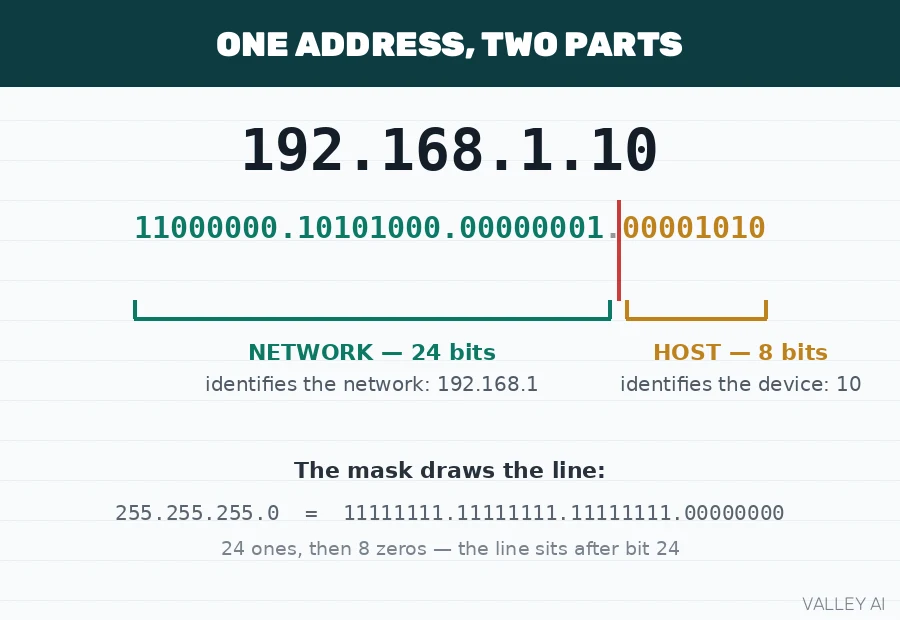
A subnet mask is a 32-bit number that sits alongside an IPv4 address and marks which bits belong to the network and which belong to the host. Think of it as a stencil: wherever the mask has a 1, that bit of the address is part of the network identifier; wherever it has a 0, that bit identifies an individual device. The 1s always group on the left and the 0s on the right, so the mask always describes one clean dividing line.
Take 192.168.1.10 with the mask 255.255.255.0. In binary, the address is 11000000.10101000.00000001.00001010 and the mask is 11111111.11111111.11111111.00000000. Lay them side by side and the split is obvious: the first 24 bits (the 1s) cover 192.168.1, which is the network portion, and the last 8 bits (the 0s) cover the number 10, which identifies this one device. Every device on this network shares the 192.168.1 prefix and differs only in that final number.
Your device uses this split every time it sends data. It applies the mask to its own address and to the destination address, compares the two network portions, and asks one question: same network, or different? Same means deliver directly. Different means hand the packet to the gateway and let the router deal with it. The mask turns that question into a simple comparison instead of a guess.
CIDR Notation: What Does /24 Mean?
Writing 255.255.255.0 everywhere gets tedious, so network engineers use CIDR notation as shorthand. CIDR stands for Classless Inter-Domain Routing. It writes the mask as a slash followed by one number: the count of network bits. 255.255.255.0 has twenty-four 1s, so it becomes /24. An address plus its mask reads as 192.168.1.10/24, which says: this device is host 10 on the network 192.168.1.0.
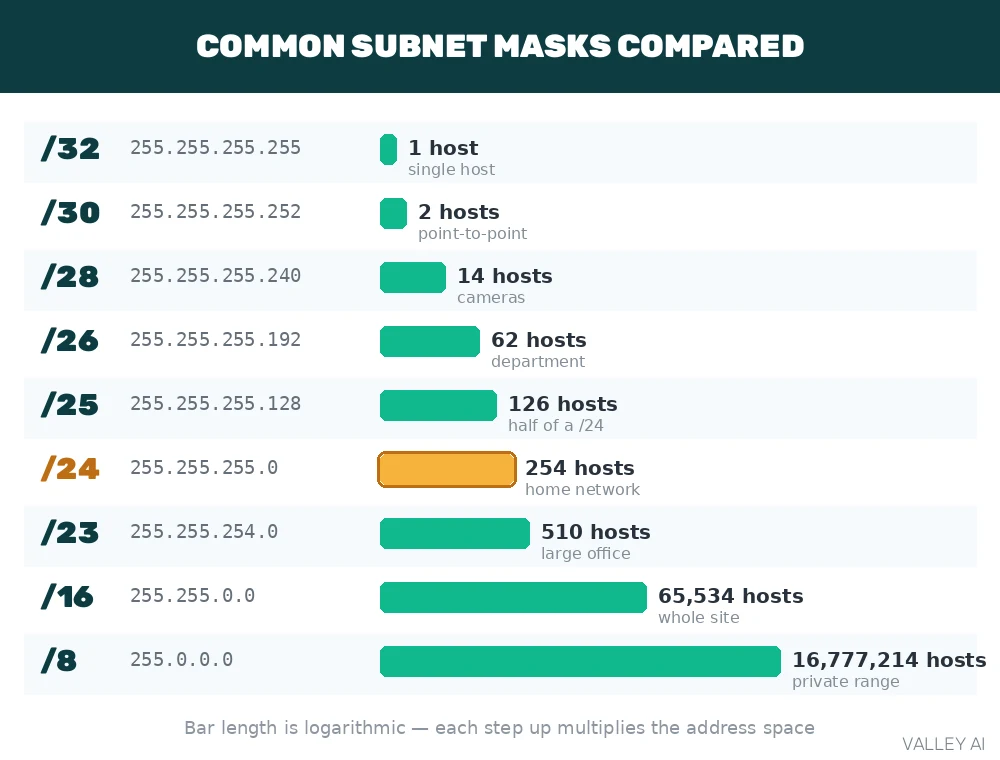
Here is the intuition that makes CIDR click. The slash number is where the dividing line sits in the 32-bit address. Move it one bit to the right, from /24 to /25, and the network owns one more bit while hosts lose one: the block splits into two subnets of 128 addresses each. Move it left, from /24 to /23, and the block doubles to 512 addresses. Because every prefix length is a power of two, you stop calculating and start recognizing.
Try it with real numbers. A small company owns the block 192.168.10.0/22: that is 10 host bits, or 1,024 addresses. Carve it at /24 and you get exactly four subnets: 192.168.10.0/24, 192.168.11.0/24, 192.168.12.0/24, and 192.168.13.0/24, each holding 254 usable hosts. One address block, four departments, zero waste. This is the everyday arithmetic of network planning, and it all flows from where you place the slash.
| CIDR | Subnet mask | Total addresses | Usable hosts | Typical use |
|---|---|---|---|---|
| /32 | 255.255.255.255 | 1 | 1 | A single host in a firewall rule |
| /30 | 255.255.255.252 | 4 | 2 | Point-to-point links between two routers |
| /28 | 255.255.255.240 | 16 | 14 | Small device segment, like cameras |
| /27 | 255.255.255.224 | 32 | 30 | Small office subnet |
| /26 | 255.255.255.192 | 64 | 62 | Mid-size department subnet |
| /25 | 255.255.255.128 | 128 | 126 | Two subnets carved from one /24 |
| /24 | 255.255.255.0 | 256 | 254 | The classic home and small-office network |
| /23 | 255.255.254.0 | 512 | 510 | Large flat office network |
| /16 | 255.255.0.0 | 65,536 | 65,534 | An entire site or cloud network |
| /8 | 255.0.0.0 | 16,777,216 | 16,777,214 | A whole private range, like 10.x.x.x |
Notice the pattern in the usable-hosts column: total addresses minus two. The two you lose are the network address itself (all host bits zero, like 192.168.1.0) and the broadcast address (all host bits one, like 192.168.1.255). Neither can be assigned to a device, which is why a /24 holds 254 usable hosts instead of 256.
How Your Device Decides: Is This Address on My Subnet?
Let us make this concrete. Your PC has the address 192.168.1.50 and the mask 255.255.255.0. You try to reach a printer at 192.168.1.90. Your PC applies the mask to both addresses and compares network portions: 192.168.1 matches 192.168.1. Same subnet, so it talks to the printer directly.
Now the printer moves to 192.168.2.15, perhaps on a different floor with its own subnet. Same comparison, different result: 192.168.1 does not match 192.168.2. Your PC no longer delivers directly. It sends the packet to its gateway, your router, which knows how to forward traffic between subnets. That single comparison is the moment-to-moment job of every subnet mask on your network. If you are deciding between a router and a modem for your home setup, remember that the router is the device holding this gateway address and doing this forwarding.
Zoom into the binary and you can see the decision happen. The third octet of your PC’s address is 1, written 00000001. The printer’s third octet is 2, written 00000010. After the mask zeroes the host bits, the network portions come out as 192.168.1.0 and 192.168.2.0. One bit differs in that third octet, so the comparison fails and the packet goes to the gateway. When the printer was at 192.168.1.90, every network bit matched, so the packet went straight to the printer. This is the whole mechanism, and it never changes no matter how large the network gets.
How does a device actually perform that comparison? It uses a bitwise AND operation: it lines up its own address with the mask, keeps every address bit where the mask has a 1, and zeroes the rest. Then it does the same to the destination address. If the two results match, the destination is local. Computers run this check in a fraction of a millisecond, which is why the decision feels instant.
Your Home Network Is Already a Subnet
Everything above is already running in your house. A typical home router creates the subnet 192.168.1.0/24: the router itself takes 192.168.1.1 as the gateway address, and every device that joins gets an address from 192.168.1.2 up to 192.168.1.254. That is 254 usable addresses, far more than any household needs, which is exactly why /24 became the default for home and small-office networks.
You never configured any of this because DHCP did it for you. When your phone joins the Wi-Fi, DHCP hands it an IP address, the subnet mask, and the gateway address in one package. The mask is one of the fields riding along in that automatic exchange, which is why your devices always know their subnet boundaries without you lifting a finger.
Two more familiar pieces sit at your subnet’s edges. When you type a website name, DNS resolves it to an address, and your mask then decides whether that address is inside your subnet or out on the internet. And the boundary where your private subnet meets your provider’s network is exactly where NAT translates your private addresses into your single public one.
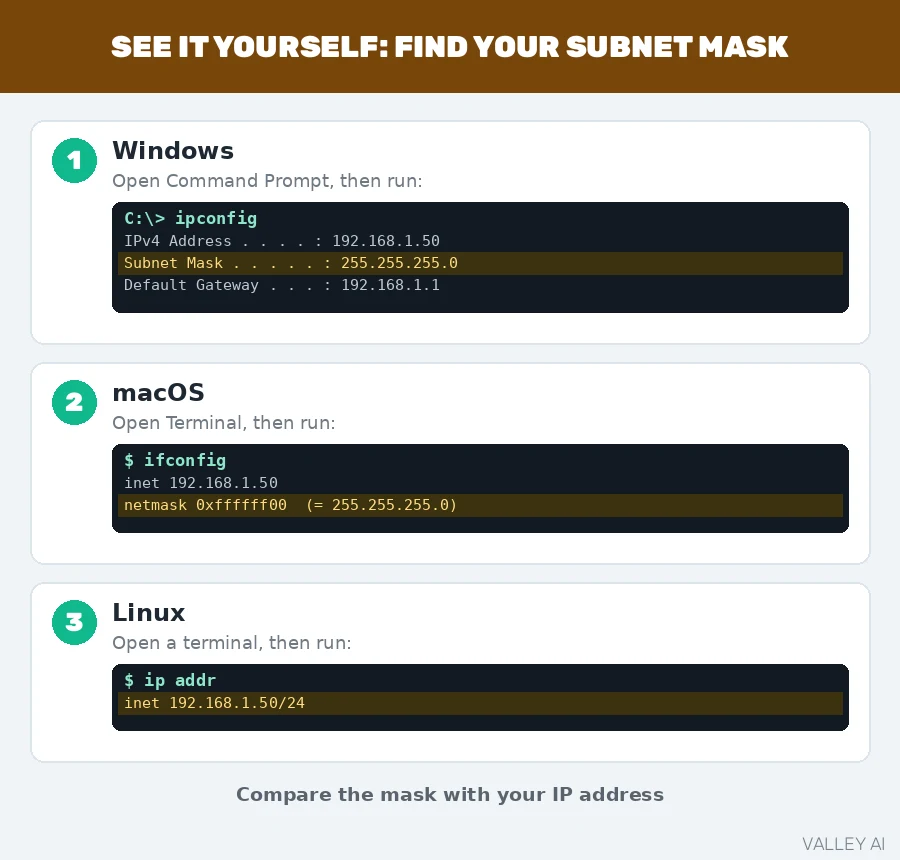
Can you see your own subnet mask right now? Yes, and it takes ten seconds. On Windows, open Command Prompt and run ipconfig, then look for Subnet Mask next to your IPv4 address. On macOS, run ifconfig in Terminal. On Linux, run ip addr. Compare the mask with your IP address, and you can read your own subnet exactly the way this article taught you.
Why Subnetting Exists
Subnetting is not a modern invention. In August 1985, J. Mogul and J. Postel published RFC 950, the Internet Standard Subnetting Procedure, which gave organizations a formal way to split one network number into several subnets instead of requesting a new network number for every cable. That document introduced the three-part view of an address that networks still use today: a network part, a subnet part, and a host part.
A few years later, CIDR replaced the rigid class A, B, and C system, where network sizes were fixed and often wasteful: an organization needing 300 addresses had to take a Class B block of 65,534 and waste the rest. CIDR let the dividing line sit anywhere, so a network could be cut to exactly the size it needed. That flexibility, plus route aggregation (grouping many subnets into one routing entry), is what kept IPv4 usable as the internet exploded. Cloudflare’s networking guide covers how this addressing structure underpins modern routing.
The payoff is the same today as it was in 1985: networks that are organized instead of flat, contained instead of exposed, and efficient instead of wasteful. Every time a company’s guest Wi-Fi cannot reach its payment systems, or your smart TV cannot see a work laptop on a separate subnet, that is subnetting doing its job. And if you ever capture traffic with a packet sniffer, you can watch subnet boundaries in action: packets to local addresses flow directly, while anything crossing to another subnet first hops to the gateway. The mask explains exactly why.
Do large companies really carve their networks into many subnets? Yes. A single office building might run separate subnets for staff devices, guest Wi-Fi, printers, security cameras, and servers, each with its own mask and its own rules about what it can reach. Subnetting scales from a four-device apartment to a multinational network without changing the concept.
Subnet vs VLAN: Clearing Up the Confusion
One last mix-up worth clearing. A subnet divides a network at layer 3, the network layer: it is about IP addresses and routing. A VLAN divides traffic at layer 2, the data-link layer: it is about which switch ports belong together, regardless of IP addresses. The two are complementary, not interchangeable. A common setup pairs one VLAN with one subnet, so the VLAN keeps the traffic separated on the switches while the subnet gives each group its own address space. Same neighborhood, different jobs.
What is a subnet in simple terms?
A subnet is a subdivision of a larger network. All devices in one subnet share the same network portion of their IP addresses, so they can talk to each other directly, while traffic to other subnets passes through a router.
What is the difference between a subnet and a subnet mask?
The subnet is the actual network segment: the group of devices and their address range, like 192.168.1.0 through 192.168.1.255. The subnet mask is the number that defines where that segment begins and ends, such as 255.255.255.0 or /24. The mask describes the subnet; it is not the subnet itself.
What does /24 mean in an IP address?
The /24 is CIDR notation meaning the first 24 bits of the address identify the network and the remaining 8 bits identify the device. It is shorthand for the subnet mask 255.255.255.0, and it gives the network 254 usable host addresses.
How many usable hosts are in a /24 subnet?
254. A /24 has 8 host bits, which gives 2 to the power of 8, or 256 total addresses. Two are reserved: the network address (all host bits zero) and the broadcast address (all host bits one). 256 minus 2 leaves 254 usable addresses.
How do I find my subnet mask?
On Windows, open Command Prompt and run ipconfig. On macOS, run ifconfig in Terminal. On Linux, run ip addr. Each shows the subnet mask or CIDR prefix next to your device’s IP address. Most home networks use 255.255.255.0, written as /24.
What happens if the subnet mask is set incorrectly?
The device misjudges which addresses are local. It may try to reach a remote address directly and fail, or send local traffic to the gateway unnecessarily. Symptoms include devices on the same network being unreachable and connections that work only sometimes. Setting the mask to match the rest of the subnet fixes it.

Kaleem
Kaleem is a Computer Science graduate (Virtual University of Pakistan) and the founder and editor of Valley AI, where he publishes in-depth, tested guides on computer hardware, artificial intelligence, and how the internet works. Every guide is researched from primary sources, tested hands-on where possible, and updated when the facts change.