
A consumer SSD can remain usable for many years under ordinary workloads, but no SSD has a guaranteed expiration date. Light desktop use may never reach the drive’s rated write limit. Heavy video editing, surveillance, virtual machines, or database workloads can consume endurance much faster.
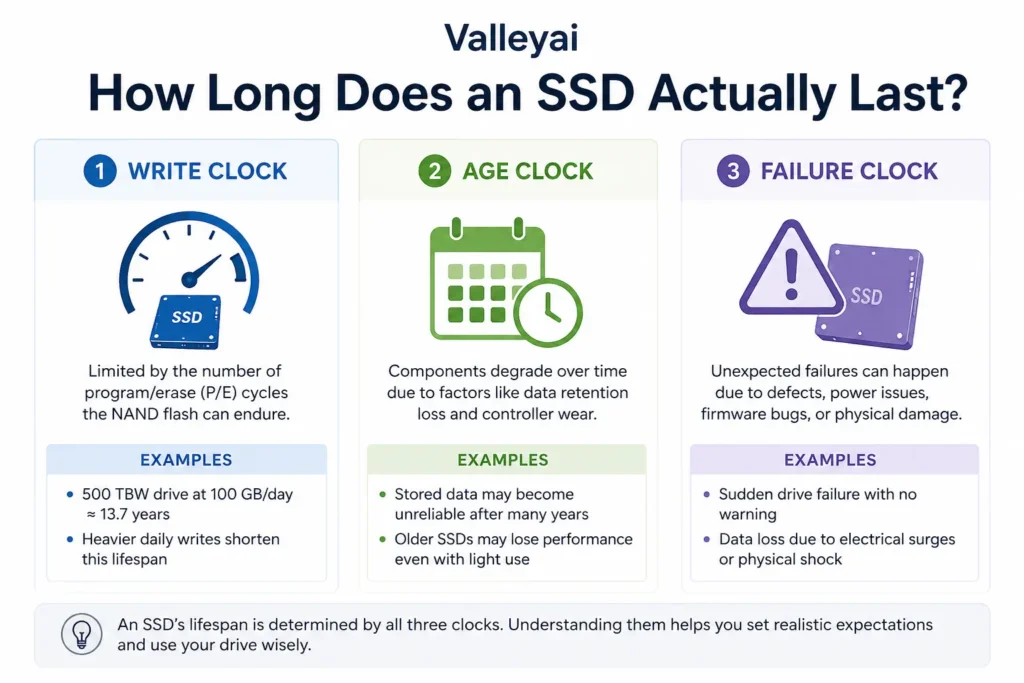
The practical answer is governed by three separate risks:
- Write endurance: how much data the NAND flash can absorb.
- Age and retention: how long stored data remains reliable, especially without power.
- Sudden failure: controller, firmware, power, thermal, or manufacturing problems that can occur with little warning.
An SSD with low written data can still fail. An SSD that exceeds its rated TBW can also continue working. That uncertainty is why backups matter more than any promised lifespan.
The “5–10 years” estimate needs context
The commonly repeated five-to-ten-year range is a rough consumer expectation, not a technical guarantee. Calendar age matters, but workload and failure mode matter more.
| Term | What it tells you | What it does not tell you |
|---|---|---|
| TBW | Rated amount of data written during endurance testing | The exact date the SSD will fail |
| Warranty period | How long the manufacturer provides coverage under stated conditions | The drive’s maximum usable age |
| SMART/NVMe health data | Reported wear, temperature, warnings, and errors | Whether sudden electronic failure is impossible |
| MTBF or MTTF | A statistical reliability measure for a population | When one individual SSD will stop working |
| Data retention | How long stored data may remain readable | How long the complete SSD will operate normally |
A five-year-old system SSD with low writes and clean health data may be perfectly serviceable. A two-year-old external SSD that has suffered heat, unstable power, or repeated disconnects may deserve more suspicion.
The three clocks behind SSD lifespan
SSD lifespan becomes easier to judge when you stop treating it as one countdown.
1. The write clock
NAND flash stores data in memory cells that tolerate a finite number of program/erase cycles. The SSD controller spreads writes across available cells through wear leveling, while error correction and bad-block management help maintain reliable operation.
A manufacturer’s TBW, or terabytes written, summarizes a rated write-endurance target. A 600 TBW rating means the drive has been specified for a defined amount of written data under the manufacturer’s test and warranty conditions. It does not mean the drive will fail at exactly 600 TB.
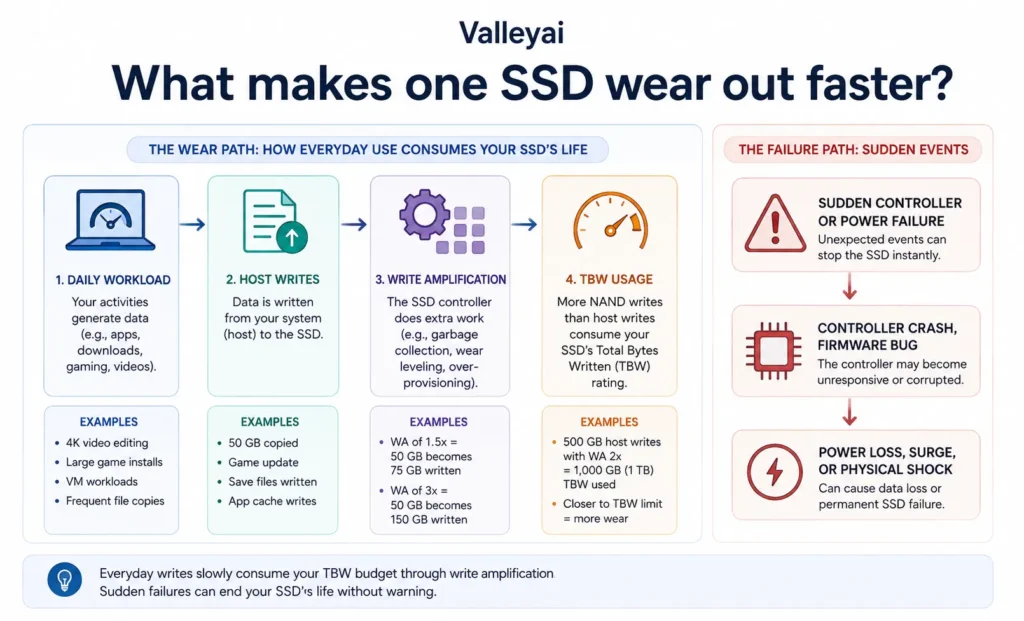
Host writes and internal NAND writes are not always equal. Garbage collection, overprovisioning, and write amplification can cause the flash to process more data than the operating system reports.
2. The age clock
An SSD can experience component aging even when the drive receives little use. Unpowered storage also introduces a separate data-retention question: stored electrical charge in NAND cells can become harder to interpret over long periods, particularly when the drive is worn or kept in unfavorable temperatures.
Data retention is not the same as active-use endurance. A lightly used SSD may have plenty of remaining write life but still be a poor choice for a single, forgotten archive stored in a drawer for years.
Formal endurance and retention terminology is covered by JEDEC standards, while exact requirements vary by drive class and operating conditions. Check the applicable JEDEC standards documentation when a retention requirement is business-critical.
3. The failure clock
The SSD controller, firmware, power circuitry, NAND packages, and interface can fail independently of flash wear. A firmware fault or failed controller may make a drive disappear even when its health percentage looks excellent.
That is the uncomfortable part of SSD ownership: wear is measurable, but every failure mechanism is not predictable from one number.
In practice, a drive that suddenly becomes read-only or disconnects repeatedly is more urgent than a drive with a moderately reduced health percentage but no errors. Copy important files before running benchmarks or lengthy scans.
How to estimate SSD life from TBW
A basic planning formula is:
Approximate years to rated TBW = rated TBW ÷ estimated terabytes written per year
For example, suppose an SSD has a 600 TBW rating and your computer writes approximately 20 GB per day:
- 20 GB × 365 days = 7,300 GB per year
- 7,300 GB = approximately 7.3 TB per year
- 600 TB ÷ 7.3 TB = approximately 82 years to reach the rated TBW
That result is not a prediction that the SSD will last 82 years. The calculation ignores write amplification, component aging, firmware failure, temperature, power events, and changing workloads. It only shows that a light desktop workload may be very unlikely to wear out the NAND through ordinary writes.
A video editor, security recorder, or virtual-machine host may write hundreds of gigabytes per day. For those systems, TBW becomes a more meaningful planning metric.
Check the manufacturer’s official product page or datasheet for the exact model and capacity. TBW can vary substantially between a 500 GB, 1 TB, and 2 TB version of the same product family.
What makes one SSD wear out faster?
SSD endurance depends on several connected variables rather than NAND type alone.
Workload intensity
Reading data generally creates far less NAND wear than writing and rewriting data. An operating-system drive used for web browsing may receive modest writes, while a scratch disk for video rendering can experience sustained write activity.
Common high-write workloads include:
- Video editing and proxy generation
- Virtual machines
- Local databases
- Security-camera recording
- Large compilation trees
- Scratch files and temporary render output
- Continuous downloads or logging
NAND type
SLC, MLC, TLC, and QLC describe how many bits each NAND cell stores. Higher-density designs can reduce cost per gigabyte, but rated endurance depends on the complete drive design, including the controller, firmware, spare area, and error correction.
QLC SSDs often carry lower write-endurance ratings than comparable TLC SSDs, making workload suitability more important. A QLC drive can be a sensible choice for games, media libraries, and read-heavy storage. A sustained write workload may favor a higher-endurance model.
Capacity and spare area
Larger SSDs often have higher TBW ratings because more NAND cells are available to distribute writes. Capacity alone does not guarantee longer service life, though. Compare the official endurance rating for the exact model rather than assuming a larger drive is automatically better.
Heat and airflow
Sustained heat can trigger thermal throttling and may increase stress on storage components. NVMe drives installed beneath a graphics card can face more heat than their SATA counterparts, depending on the computer’s layout.
A heatsink can help a drive maintain performance during sustained transfers, but cooling cannot repair a failing controller or compensate for poor firmware.
Power and firmware
Power interruptions, unstable connections, firmware defects, and failed USB bridge components can all create SSD problems unrelated to TBW. Enterprise SSDs may add power-loss protection and higher endurance ratings, but those features do not make data backups optional.
Does NVMe last longer than SATA?
NVMe does not inherently last longer or shorter than SATA. NVMe is a storage protocol commonly used over PCI Express, while SATA is an interface and protocol family; durability depends more directly on the SSD’s NAND, controller, firmware, capacity, thermal conditions, and workload.
The NVM Express specifications define NVMe behavior and health information, while SATA-IO specifications cover the SATA standard. Neither interface automatically determines the quality or endurance of the flash memory.
A SATA SSD can outlast an NVMe SSD, and an NVMe SSD can outlast a SATA SSD. Compare model-level TBW, warranty terms, temperature behavior, and health telemetry instead of using interface type as a durability shortcut.
How to tell whether an SSD should be replaced
Replace an SSD proactively when it reports serious warnings, produces errors, or stores data that cannot be recreated and lacks an independent backup.
Use this sequence:
- Back up irreplaceable files first. Start with documents, photos, project files, and credentials.
- Verify the backup. A copy that cannot be opened is not a reliable backup.
- Check SMART or NVMe health data. Look for critical warnings, media errors, unsafe shutdown patterns, temperature problems, and percentage-used indicators.
- Watch for behavior changes. Repeated disconnects, read-only mode, boot failures, corrupted files, freezes, or sharply declining performance deserve attention.
- Clone or replace the drive. If the drive is unstable, minimize unnecessary writes and avoid repeatedly power-cycling it.
Health percentage is useful, but it is not a guarantee. Monitoring tools report the data exposed by the drive. A controller or power-circuit failure may provide little warning.
SSD lifespan by common use case
| Use case | Typical write pressure | Practical guidance |
|---|---|---|
| Office and operating-system drive | Low to moderate | Usually limited more by sudden failure or age than by TBW |
| Gaming library | Low to moderate | Game downloads and updates matter more than game reads |
| Laptop SSD | Low to moderate | Heat, physical damage, and lack of backups are key concerns |
| External SSD | Variable | Protect the enclosure, cable, USB bridge, and drive from heat and impact |
| Video-editing scratch drive | High | Select for endurance and replace based on workload and telemetry |
| Surveillance or logging drive | High and continuous | Calculate annual writes and use a model designed for the workload |
| Backup drive | Depends on backup frequency | Maintain another copy; a backup is not protection if it is the only copy |
| Cold archive | Low writes, long unpowered periods | Use multiple copies and periodically verify stored data |
An external SSD deserves separate attention. A failed USB cable, enclosure bridge, power connection, or connector can look like internal SSD failure. Copy data before assuming the flash memory itself is damaged.
Is an SSD safe for long-term storage?
An SSD can serve as one part of a long-term storage system, but a single unpowered SSD should not be treated as a permanent archive. Retention depends on drive condition, temperature, time without power, and the quality of the original data.
For important archives:
- Keep at least two independent copies.
- Store one copy in another location or with a reputable cloud provider.
- Periodically connect the archive and verify that files open correctly.
- Replace aging media before the archive becomes your only surviving copy.
- Record checksums for files where silent corruption would be costly.
The 3-2-1 backup approach three copies, on two types of media, with one copy stored elsewhere provides a stronger safety margin than choosing SSD or HDD based on lifespan claims alone.
FAQ: SSD lifespan questions that cause confusion
Can an SSD fail before reaching its TBW rating?
Yes. TBW describes rated NAND write endurance, not every component inside the SSD. A controller, firmware problem, power event, failed NAND package, or manufacturing defect can make the drive unusable before the rated TBW is reached. TBW is helpful for workload planning, but it cannot guarantee a failure-free service life.
Can an SSD keep working after exceeding its TBW rating?
Yes, an SSD may continue working after its published TBW value. The rating is generally tied to endurance testing and warranty conditions, not a command that disables the drive at a specific total. Once the rating is exceeded, continued operation should not be treated as dependable for important data, especially under a heavy write workload.
Does a larger SSD usually last longer?
A larger SSD often has a higher TBW rating because more NAND is available for distributing writes, but capacity does not guarantee longer life. Controller quality, NAND type, firmware, temperature, and workload still matter. Compare the manufacturer’s TBW and warranty for the exact capacity rather than assuming that every larger model is more durable.
How long can an unused SSD keep data?
There is no universal retention period that applies to every unused SSD. Retention depends on NAND wear, storage temperature, drive design, and time without power. A disconnected SSD may preserve data for a long period, but it should not be the only archive. Periodic verification and multiple independent copies reduce the risk of discovering unreadable data years later.
Is TLC better than QLC for every user?
No. TLC commonly offers higher rated write endurance than QLC, but QLC can work well for read-heavy uses such as game libraries, media collections, and general storage. TLC becomes more attractive when the workload involves frequent rewriting, sustained transfers, virtual machines, or heavy scratch use. The manufacturer’s model-specific TBW is more useful than the NAND label alone.
Should an SSD be replaced after five years?
Not automatically. Replace the SSD when health warnings, media errors, unstable behavior, or an unsuitable workload make continued use risky. Age should influence your planning, especially when the drive contains irreplaceable data, but age alone does not prove that the NAND is worn out. Maintain a verified backup and replace older drives before they become a single point of failure.
Do SSDs slow down as they age?
An SSD may slow down when it is nearly full, handling sustained writes, thermally throttling, or performing garbage collection. Age alone does not guarantee a steady decline in speed. A sudden performance change combined with errors, disconnects, or read-only behavior is more concerning than a small benchmark variation.
Is an HDD safer than an SSD for archival storage?
Neither medium is safe as a single archival copy. HDDs can suffer mechanical failure, while SSDs can face controller failure and long-term retention concerns when unpowered. Archival safety comes from redundant copies, different storage locations, periodic verification, and planned media replacement not from trusting one drive type indefinitely.
The practical answer
An SSD may last many years, and ordinary users often will not exhaust the drive’s TBW through normal daily activity. That does not make the SSD permanent storage.
Judge an SSD using four signals together: workload, TBW, health telemetry, and the value of the data. Keep independent backups, replace drives showing warnings or unstable behavior, and treat long-term archives as a system of verified copies rather than a single device.

Kaleem
My name is Kaleem and i am a computer science graduate with 5+ years of experience in Computer science, AI, tech, and web innovation. I founded ValleyAI.net to simplify AI, internet, and computer topics also focus on building useful utility tools. My clear, hands-on content is trusted by 5K+ monthly readers worldwide.