
The short answer is simple: DDR stands for Double Data Rate.
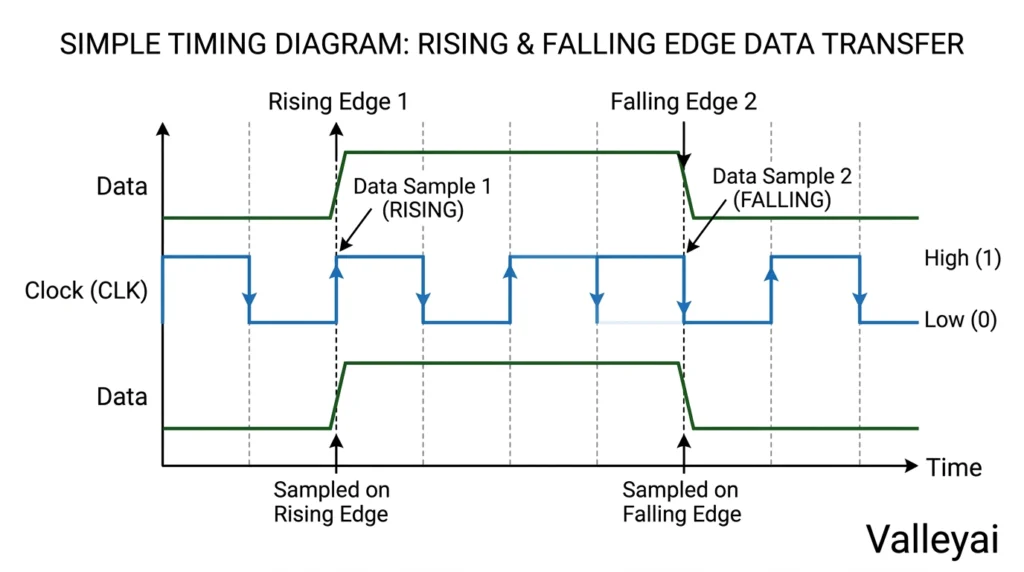
In computer memory, DDR usually means DDR SDRAM a type of synchronous dynamic random-access memory that transfers data twice during each clock cycle. One transfer occurs on the rising edge of the clock signal, and another occurs on the falling edge. That double-transfer design is where the name comes from.
DDR does not mean “Double Data RAM,” “Double Date Rate,” or twice as much memory. The term describes how memory communicates data, not how much storage capacity a computer has.
Why “Double Data Rate” Is the Right Name
DDR memory transfers data on both edges of a clock cycle instead of using only one edge.
Traditional single-data-rate memory transfers data once per clock cycle. DDR memory uses the same basic clock signal but moves data during two timing points:
- The clock signal rises.
- DDR memory transfers data.
- The clock signal falls.
- DDR memory transfers data again.
That arrangement doubles the number of data transfers without requiring the clock frequency itself to double.
A useful distinction: DDR doubles the transfer opportunities, not necessarily every measure of performance. Memory bandwidth also depends on the memory bus width, the transfer rate, the number of channels, the processor, and the workload.
DDR Is a Type of RAM, Not a Replacement for RAM
DDR is a memory technology within the broader category of RAM.
The terminology becomes easier to follow as a hierarchy:
RAM
└── DRAM
    └── SDRAM
        └── DDR SDRAM
- RAM, or random-access memory, is the broad category of short-term working memory used by computers.
- DRAM, or dynamic random-access memory, stores data in memory cells that must be refreshed regularly.
- SDRAM, or synchronous dynamic random-access memory, operates in sync with a system clock.
- DDR SDRAM transfers data on both the rising and falling edges of that clock. (JEDEC, 2000).
So when someone says “DDR RAM,” the phrase is understandable but slightly redundant. DDR memory is already a type of RAM. The more complete technical name is DDR SDRAM.
The distinction matters when reading hardware specifications. “16GB” describes capacity. “DDR5” describes the memory generation. “6000 MT/s” describes the effective transfer rate. Those labels describe different properties of the same memory module.
How DDR Generations Changed From DDR1 to DDR5
DDR generations are successive versions of the DDR SDRAM standard, with changes to signaling, transfer rates, capacity, power use, and module design.
| Generation | What changed historically |
|---|---|
| DDR | Established the double-transfer approach for mainstream system memory. |
| DDR2 | Increased transfer potential and introduced design changes that supported higher operating speeds. |
| DDR3 | Continued the move toward higher density, higher transfer rates, and lower operating voltage. |
| DDR4 | Improved density and transfer capability while using a different electrical and physical standard from DDR3. |
| DDR5 | Increased transfer potential and introduced further changes to module architecture, power management, and memory organization. |
The number after DDR is a generation identifier, not a multiplier. DDR5 does not mean five data transfers per clock cycle. DDR5 remains a Double Data Rate technology; the “5” indicates its place in the generation sequence.
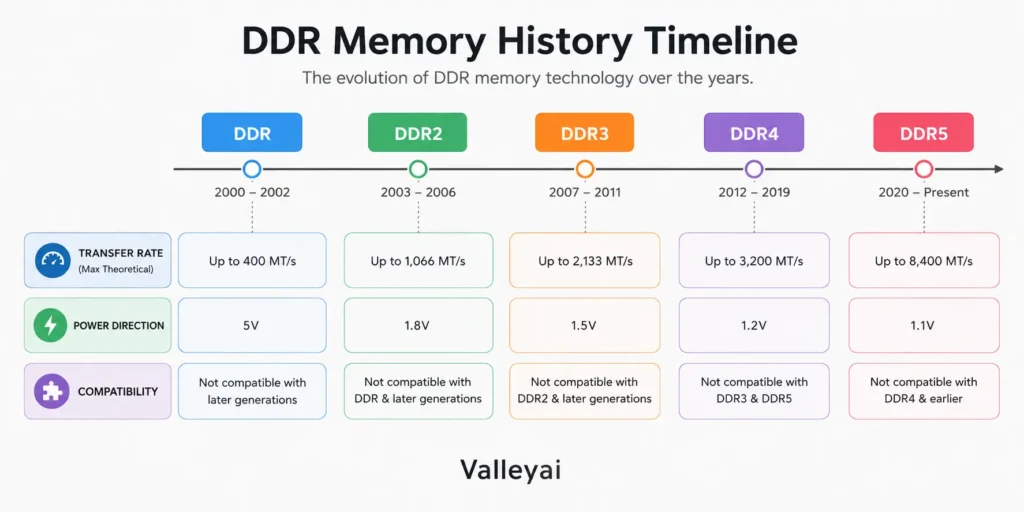
Each generation is developed around a different electrical and architectural specification. As a result, DDR3, DDR4, and DDR5 modules are not ordinary drop-in replacements for one another.
The history in practical terms
The progression from DDR to DDR5 reflects a recurring engineering trade-off: computers need more memory throughput, but higher speed alone can create power, heat, signal-integrity, and latency challenges.
Newer generations address those challenges through more than raw frequency. Memory controllers, module layouts, power management, signaling methods, and internal organization also change.
That is why a newer DDR generation can improve platform capability without making every application dramatically faster. A browser-heavy system may benefit more from additional capacity than from moving from one supported generation to another.
What DDR4 and DDR5 Labels Actually Tell You
A label such as DDR5-6000 CL30 contains several separate pieces of information.
| Label element | Meaning |
|---|---|
| DDR5 | The memory generation |
| 6000 | The advertised effective transfer rate, normally expressed as MT/s |
| CL30 | CAS latency expressed in memory clock cycles |
| DIMM | A desktop-sized memory module format |
| SO-DIMM | A smaller module format commonly used in laptops |
| 16GB or 32GB | The capacity of the module or kit |
MT/s means megatransfers per second. It measures how many data transfers the memory can make in one second. MHz measures clock frequency, so the two units are related but not identical.
Because DDR memory transfers data twice per clock cycle, a module’s effective MT/s figure is often roughly twice its underlying memory clock frequency. Packaging and retailer listings sometimes call the MT/s rating “MHz,” but technically that usage is imprecise.
CAS latency adds another layer. A lower CL number can indicate fewer clock cycles of delay, but latency should not be judged independently from the memory’s transfer rate. A DDR5-6000 CL30 kit and a slower kit with a different timing profile require a broader comparison.
In practice, the label is only the beginning. A module rated for DDR5-6000 may run at a lower setting if the processor, motherboard, firmware, or memory configuration does not support the advertised profile.
Can DDR4 Work in a DDR5 Slot?
DDR4 memory generally cannot work in a DDR5 memory slot because the generations use different physical and electrical specifications.
The module notch is positioned differently, and the pin arrangement, signaling, power design, and memory-controller requirements also differ. A DDR4 module should not be forced into a DDR5 slot, even if the module appears similar at a glance.
The reverse is also true: a DDR5 module is not a substitute for DDR4 memory.
| Check before buying | Why it matters |
|---|---|
| DDR generation | The motherboard and module must use a compatible generation. |
| DIMM or SO-DIMM format | Desktop and laptop modules usually have different physical sizes. |
| Maximum capacity | The platform may limit total memory or capacity per slot. |
| Supported transfer rate | The system may not operate the module at its advertised rating. |
| Processor and motherboard support | The memory controller and board determine compatibility. |
| Firmware support | Some systems require updated firmware for specific memory configurations. |
Memory compatibility depends on the computer’s motherboard or laptop design, processor memory controller, firmware, module format, and supported DDR generation. Check the manufacturer’s specifications before purchasing an upgrade.
When an upgrade fails, the DDR generation is often the first thing people check and the wrong thing to check alone. Module format, capacity limits, mixed kits, and firmware support can cause trouble even when the DDR number looks correct.
What DDR Means in a Laptop
DDR in a laptop identifies the memory generation, but the physical memory may use a different format from desktop RAM.
Desktop computers commonly use DIMMs, or dual in-line memory modules. Laptops often use smaller SO-DIMMs. Some thin laptops use LPDDR, meaning Low-Power Double Data Rate memory, which may be soldered directly to the motherboard and unavailable for normal upgrades. (JEDEC).
A laptop specification might therefore mention:
- DDR4 SO-DIMM
- DDR5 SO-DIMM
- LPDDR4X
- LPDDR5
- Soldered system memory
The DDR generation and the module format are separate questions. A laptop using DDR5 does not necessarily accept a desktop DDR5 DIMM, and a laptop with LPDDR may not have removable memory at all.
Laptop upgrade mistakes often happen because a buyer matches “DDR5” but misses “SO-DIMM” or “soldered.” The generation can be correct while the upgrade remains physically impossible.
DDR vs GDDR: Same Acronym Family, Different Job
DDR is commonly used for general-purpose system memory, while GDDR is specialized graphics memory used with GPUs.
GDDR stands for Graphics Double Data Rate. GDDR memory is designed for the high-throughput demands of graphics processors and is commonly used as dedicated video memory, or VRAM. (NVIDIA).
| Memory type | Typical role | Common connection |
|---|---|---|
| DDR SDRAM | Main system memory for operating systems and applications | CPU and motherboard memory subsystem |
| LPDDR | Lower-power system memory for mobile hardware | Mobile processors or compact laptop designs |
| GDDR | Dedicated graphics memory | GPU memory subsystem |
| HBM | High-bandwidth memory for specialized systems | GPU, accelerator, or high-performance package |
GDDR is related to DDR in name and broad signaling principles, but a GDDR graphics chip is not a replacement for a DDR desktop memory module. The components, interfaces, packaging, and intended workloads differ.
Does Newer DDR Always Mean Better Performance?
Newer DDR generations can provide higher transfer rates and improved platform capabilities, but newer memory does not automatically make every computer task faster.
Real-world performance depends on:
- Memory capacity
- Number of memory channels
- Transfer rate
- Latency
- Processor architecture
- Integrated graphics requirements
- Application workload
- Motherboard and firmware settings
A system that runs out of memory may benefit more from adding capacity than from purchasing a faster kit with the same capacity. Gaming performance may also depend heavily on the graphics processor, while compiling software, editing media, or running virtual machines can respond differently to capacity and bandwidth.
The biggest performance gain usually comes from fixing the actual bottleneck. Replacing adequate DDR4 with faster DDR5 is not automatically a better investment than adding memory to a system that is already paging to storage.
Common Questions About DDR Memory
What does DDR stand for in RAM?
DDR stands for Double Data Rate. The term refers to memory that transfers data twice per clock cycle, once on the rising clock edge and once on the falling clock edge. DDR is a type of RAM, not a separate category outside RAM.
Is DDR5 twice as fast as DDR4?
DDR5 can support higher transfer rates than DDR4, but DDR5 is not automatically twice as fast in every real-world task. Application performance also depends on latency, capacity, memory channels, processor design, and whether the software benefits from additional bandwidth.
Does DDR mean MHz?
No. MHz measures the memory clock frequency, while MT/s measures data transfers per second. DDR memory transfers data twice per clock cycle, so the effective MT/s figure is commonly about twice the underlying clock frequency. Consumer packaging sometimes uses MHz as informal shorthand.
Can DDR4 and DDR5 be used together?
DDR4 and DDR5 should not be mixed in a standard memory system. The generations use different physical layouts, electrical requirements, and memory-controller support. A motherboard designed for DDR4 generally requires DDR4 modules, while a DDR5 motherboard requires DDR5 modules.
What does LPDDR stand for?
LPDDR stands for Low-Power Double Data Rate. LPDDR is designed for mobile devices and power-sensitive computers. Laptop LPDDR is frequently soldered to the motherboard, so identifying the memory generation does not guarantee that the memory can be removed or upgraded.
What is the difference between DDR and GDDR?
DDR usually refers to general-purpose system memory used by a CPU. GDDR means Graphics Double Data Rate and is designed for graphics processors. GDDR commonly serves as dedicated VRAM, while DDR memory is installed through the computer’s system-memory interface.
The Short Version
DDR stands for Double Data Rate. DDR SDRAM transfers data twice per clock cycle by using both the rising and falling edges of a clock signal.
The number after DDR such as DDR4 or DDR5 identifies the memory generation. It does not indicate the number of transfers per cycle. DDR is a type of RAM, while DIMM and SO-DIMM describe physical module formats. LPDDR is a low-power DDR family used widely in mobile devices, and GDDR is a graphics-focused version used with GPUs.
When reading a memory label, verify all four items:
- DDR generation
- Module format
- Capacity
- Platform-supported transfer rate

Kaleem
Kaleem is a Computer Science graduate (Virtual University of Pakistan) and the founder and editor of Valley AI, where he publishes in-depth, tested guides on computer hardware, artificial intelligence, and how the internet works. Every guide is researched from primary sources, tested hands-on where possible, and updated when the facts change.