

A fingerprint sensor answers one narrow question. It checks whether the finger on the reader matches a finger enrolled earlier. That check now opens phones, laptops, door readers, and time clocks.
The sensor belongs among modern computer input devices, and the right type depends on the conditions it must read through. Moisture, dirt, screen layers, and skin damage change the signal before matching starts. A reader that works in a dry office can struggle with wet hands on a rainy day.
A fingerprint is a pattern, not a picture
Match the sensor to what it must read through. Start with daily conditions. A reader chosen for dry hands will disappoint a user who works outdoors with damp skin.
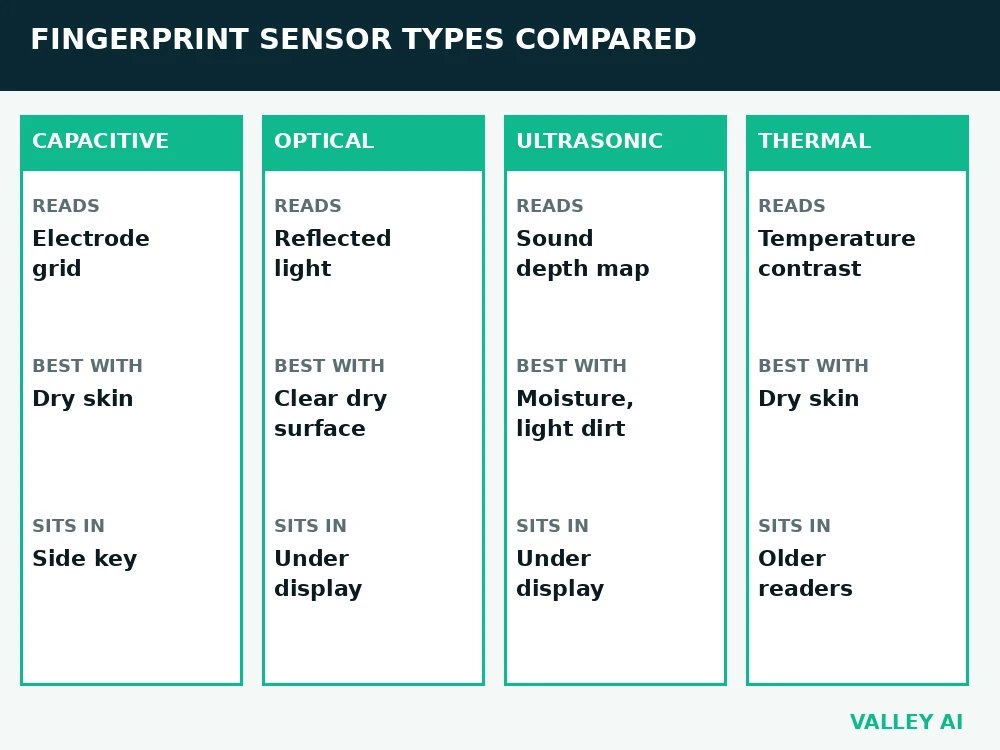
The table sorts the main reader types by reading method, reading conditions, and placement. Use it to narrow the choice before reading the mechanism behind each type.
| Type | How it reads | Reads best with | Where it sits |
|---|---|---|---|
| Capacitive | Electrode grid measures capacitance | Dry skin | Side key, laptop palm rest |
| Optical | Light image from reflected light | Clear dry surface | Under display, standalone reader |
| Ultrasonic | Sound pulses map surface and depth | Moisture, light dirt | Under display on premium phones |
| Thermal | Temperature contrast at contact | Dry skin at room temperature | Older standalone readers |
Ridges rise from skin. Valleys sit between ridges. A reader records ridge endings and splits in the pattern. Those points form a template. A template holds numbers for point positions and angles. It holds no image of a finger. A stolen template cannot rebuild a full print from numbers alone.
Does a sensor store a photo of your finger? It stores a template of numbers. Enrollment converts ridge points into those numbers. Matching compares numbers against numbers.
Minutiae give matching its precision. Ridge endings mark points where a ridge stops. Bifurcations mark points where a ridge splits into two. Position plus angle makes each point distinct within a small area.
Capacitive: the grid that feels ridges
A capacitive reader holds a grid of tiny electrodes under its surface. A fingertip conducts a small charge. A ridge touches an electrode and changes capacitance at that point. A valley leaves an air gap above the electrode and changes capacitance far less. The chip reads the grid and builds a ridge map from the pattern of values.
The grid reads a ridge the way a keypad reads a pressed key. Contact at one point changes the signal at that point. Points with no contact keep their baseline signal.
Capacitive touchscreens run on an electrode grid. A capacitive fingerprint reader runs on a finer grid tuned to ridge detail. Fingerprint grids pack electrodes far closer together, because ridge detail needs a finer grid.
Readers of this type respond fast and draw little power. Sweat can bridge the air gap above a valley and blur the grid values. A thick screen layer also weakens the signal, which limits capacitive readers under displays.
Optical: a photograph of the pattern
An optical reader shines light onto the finger and captures the reflected pattern with an image sensor. Ridges reflect light back toward the sensor. Valleys scatter light away from it. Bright and dark areas in the captured image trace the ridge pattern.
Older optical readers used a glass prism and a camera behind it. Under-display optical readers use a small camera beneath the screen. The camera uses light from the display to light the finger, then captures the pattern through the screen.
Optical readers need a clear light path. Dirt on the surface blocks light. A scratched cover spreads light and softens the captured pattern. Strong ambient light can wash out contrast in a poorly shielded reader.
Ultrasonic: sound that maps depth
An ultrasonic reader sends high frequency sound pulses toward the finger. Ridges return echoes from the skin surface. Pores and tissue below the surface return later echoes. The reader times every echo and builds a depth map of the ridge pattern.
Trusted Reviews describes ultrasonic readers as under-display sensors on premium Samsung handsets that keep working with wet fingers. Sound passes through moisture that blocks a light based reading. A thin screen layer passes sound with little loss.
Depth data helps liveness checks. A flat copy gives a shallow echo pattern. Live skin gives echoes from multiple depths.
Thermal and the older types
A thermal reader measures temperature contrast at contact. A ridge touches the sensor and warms it. A valley leaves an air gap and stays cooler at the sensor surface. The reader builds a pattern from warm and cool points.
Thermal readers faded from consumer devices. A finger at the same temperature as the sensor gives almost no contrast. Cold rooms and warm hands both shrink the difference the reader needs.
Swipe readers belong to the same older generation. A user dragged a finger across a narrow strip. Motion speed changed the captured pattern. Area readers replaced swipe strips, because a single touch captures the full pattern at once.
From scan to match: enrollment, template, threshold
Enrollment captures the same finger several times from different angles and pressures. The system merges those captures into one template. More captures cover more of the finger edge. Edge coverage matters during later sign in, when placement varies.
TelecomTrainer explains minutiae points and template creation as the basis for matching.
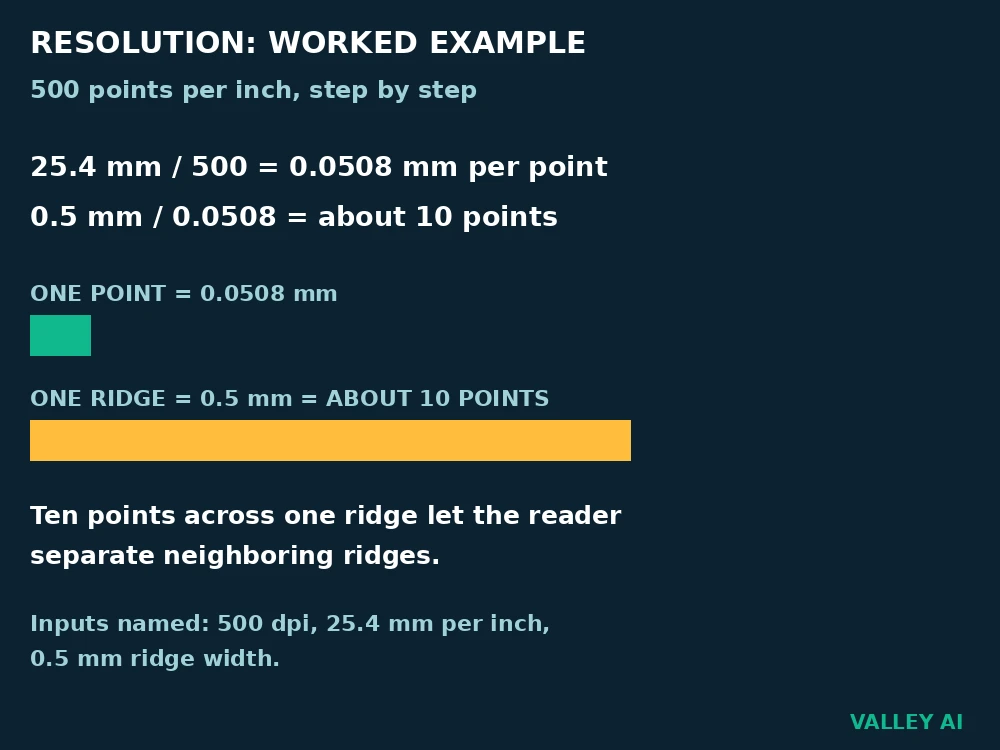
Resolution check, worked with named inputs. A consumer reader resolves 500 points per inch. One inch equals 25.4 millimeters. One point covers 25.4 divided by 500, which equals 0.0508 millimeters. A ridge about 0.5 millimeters wide spans 0.5 divided by 0.0508, about 10 points. Ten points across one ridge let the reader separate neighboring ridges.
Threshold check, worked with named inputs. An enrollment template holds 40 minutiae points. A fresh scan matches 32 of those points. Agreement equals 32 divided by 40, which equals 80 percent. A threshold set at 80 percent accepts the scan. A threshold set at 90 percent rejects the scan. The threshold decides borderline scans.
Why does the same finger fail on some days? Skin moisture, pressure, placement, and temperature shift the fresh scan. A shifted scan can fall under the threshold. The finger itself has not changed.
A low threshold accepts more scans, and more wrong fingers with them. A high threshold rejects more wrong fingers, and more correct fingers with them. False acceptance rate and false rejection rate move in opposite directions. Makers set the threshold to balance the two error rates for the device use.
Liveness checks test for a live finger. A pulse signal shows living tissue. Blood flow adds a second living signal.
Phone templates stay on the device in secure storage. A match decision happens on the device. The template does not travel to a server during sign in.
Why a scan fails, and what fixes each failure
Water on a finger fills valleys and flattens contrast. Dry skin gives weak contact with the sensor surface. Dirt films the surface and blocks the reading signal. A scratch scatters the signal across neighboring points. A deep cut changes the print until skin heals.
Can a lifted print open a phone? A printed copy fails liveness checks. Live skin gives signals a copy lacks. The copy problem explains why readers test for life in addition to pattern.
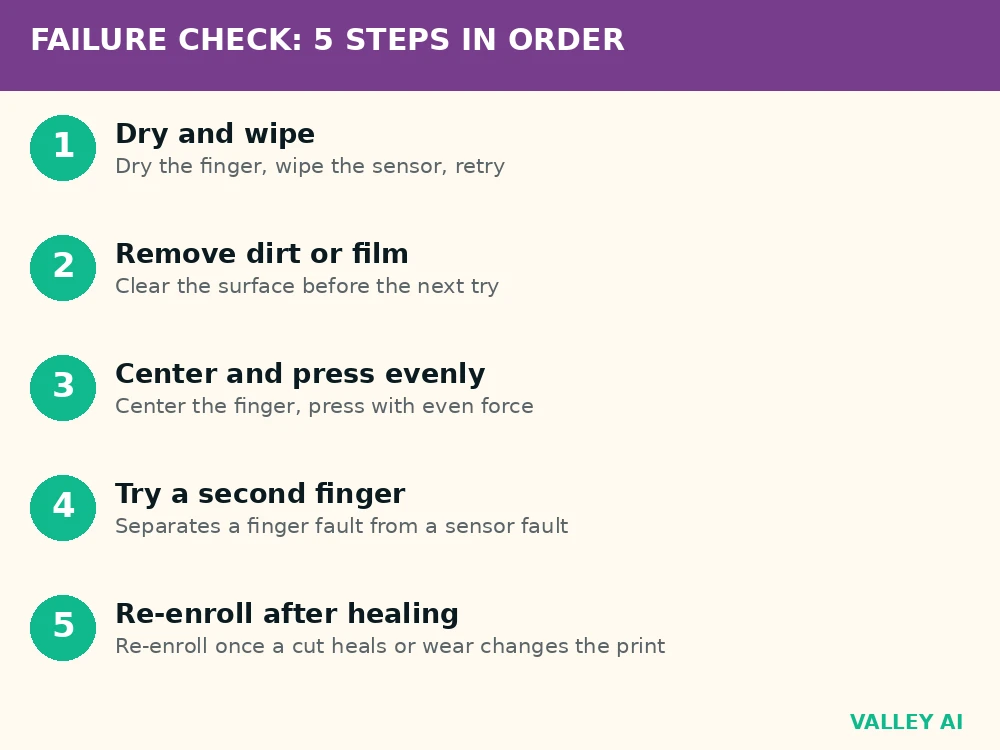
Five observable checks separate finger problems from sensor problems. Work through them in order.
- Dry the finger and wipe the sensor surface with a soft cloth, then try again.
- Remove visible dirt or film from the sensor surface before the next try.
- Center the finger on the reader and press with even pressure.
- Try a second enrolled finger to separate a finger problem from a sensor problem.
- Re-enroll the finger after a deep cut heals, or after heavy skin wear changes the print.
For a clean comparison, test the same finger before and after wiping the sensor surface. A sensor that fails every check needs service or replacement. Record which check failed before seeking service, since that detail speeds diagnosis.
Which sensor fits which device
Side keys and laptop palm rests suit capacitive readers. The finger touches the reader directly. Direct contact gives the grid a clean capacitance signal.
Under-display phones use optical or ultrasonic readers. The reader must work through a display layer. A phone used with wet hands favors ultrasonic placement. A phone used mainly indoors on dry hands works with either placement.
How a stylus works involves sending a fine signal through a screen surface, a problem under-display readers meet from the reading side.
Standalone readers and door units suit optical area readers. The finger rests on an open surface. Open placement avoids display layers and keeps the light path short.
Check the reader type on the specification sheet before buying. Check placement on the device. A reader that fits daily conditions saves repeated failures later.
Conclusion
Start from the conditions you face each day. Pick the reader type that fits those conditions. Enroll two fingers on the device you buy. Test sign in with wet and dry hands before you depend on the reader alone.
Frequently asked questions
Does a screen protector affect an under-display fingerprint sensor?
A thin protector usually leaves reading unchanged, while a thick protector can weaken the signal through the display. Ultrasonic readers tolerate added layers better than optical readers in most cases. Test sign in after fitting a protector, and remove it for a trial if failures start right after fitting.
How many fingerprints can a phone store?
The limit varies by maker and operating system, and the settings screen shows the limit on each device. Enroll the fingers you use most for sign in, plus one spare finger from the other hand.
Can a fingerprint sensor tell identical twins apart?
Yes, in most cases. Twins share DNA, but ridge patterns form through random growth in the womb, so twin prints differ. A sensor that reads fine ridge detail can separate twin prints, though a low quality scan can still fail for either twin.
Does a fingerprint sensor keep working after a software update?
Sign in usually keeps working after an update. An update that changes the sensor driver can require a fresh enrollment in rare cases. Re-enroll if failures start right after an update and cleaning and repositioning find no other cause.
Is a fingerprint enough for banking apps, or do banks ask for a second check?
Many banking apps accept a fingerprint for sign in, then ask for a password or a one-time code for transfers and new payees. The fingerprint proves the device holder, while the second check protects money movement. Treat the fingerprint as convenience sign in, and keep the second check active.

Kaleem
Kaleem is a Computer Science graduate (Virtual University of Pakistan) and the founder and editor of Valley AI, where he publishes in-depth, tested guides on computer hardware, artificial intelligence, and how the internet works. Every guide is researched from primary sources, tested hands-on where possible, and updated when the facts change.