
If you look at the screen you are reading this on, you see text, images, and colors. But beneath the software, your computer sees only a massive, rapid-fire sequence of high and low electrical voltages. To bridge the gap between human language and physical electrical currents, computers use binary.
This comprehensive guide moves past the standard “powers of two” mathematical explanations. Instead, we will explore the physical mechanics of hardware from voltage states in semiconductors to complex character encoding to show you exactly how binary code works.
What is Binary Code?
Binary code is the fundamental machine language of all digital computers, representing data and instructions using only two symbols 0 and 1. These symbols correspond to physical electrical states “off” and “on” allowing hardware components to process, store, and transmit complex information through simple high and low voltage signals.
The Simplest Way to Understand Binary
What is the simplest way to understand binary? Think of a light switch. A light switch has only two physical states Off and On. If you were trying to communicate with someone across a field at night using only a flashlight, you could create a language based purely on flashes of light (On = 1) and moments of darkness (Off = 0).
Historically, this system traces back to mathematician Gottfried Wilhelm Leibniz, who refined the Base-2 number system. Centuries later, Claude Shannon published his foundational paper, A Mathematical Theory of Communication, proving that electronic relays and switches could execute Boolean algebra, permanently cementing binary as the language of the digital age.
How Does the Base-2 System Work?
The Base-2 system is a mathematical method of counting that uses only two digits (0 and 1) instead of the ten digits used in our standard Base-10 decimal system. Each position in a binary number represents a power of two, doubling in value as you move from right to left, which precisely maps to the digital logic circuits inside a computer.
Binary to Decimal Value (Truth Table Visualization)
Before exploring the physical hardware, we must look at the mathematical logic. Here is how a 4-bit sequence converts to decimal values:
| Binary Position | $2^3$ (Eights) | $2^2$ (Fours) | $2^1$ (Twos) | $2^0$ (Ones) | Decimal Equivalent |
|---|---|---|---|---|---|
| 0001 | 0 | 0 | 0 | 1 | 1 |
| 0010 | 0 | 0 | 1 | 0 | 2 |
| 0101 | 0 | 1 | 0 | 1 | 5 |
| 1010 | 1 | 0 | 1 | 0 | 10 |
When calculating binary to decimal conversion manually, you simply add the value of the columns where a “1” is present. For example, 1010 has an “On” state in the Eights column and the Twos column. $8 + 2 = 10$.
Why is Binary the Language of Computers?
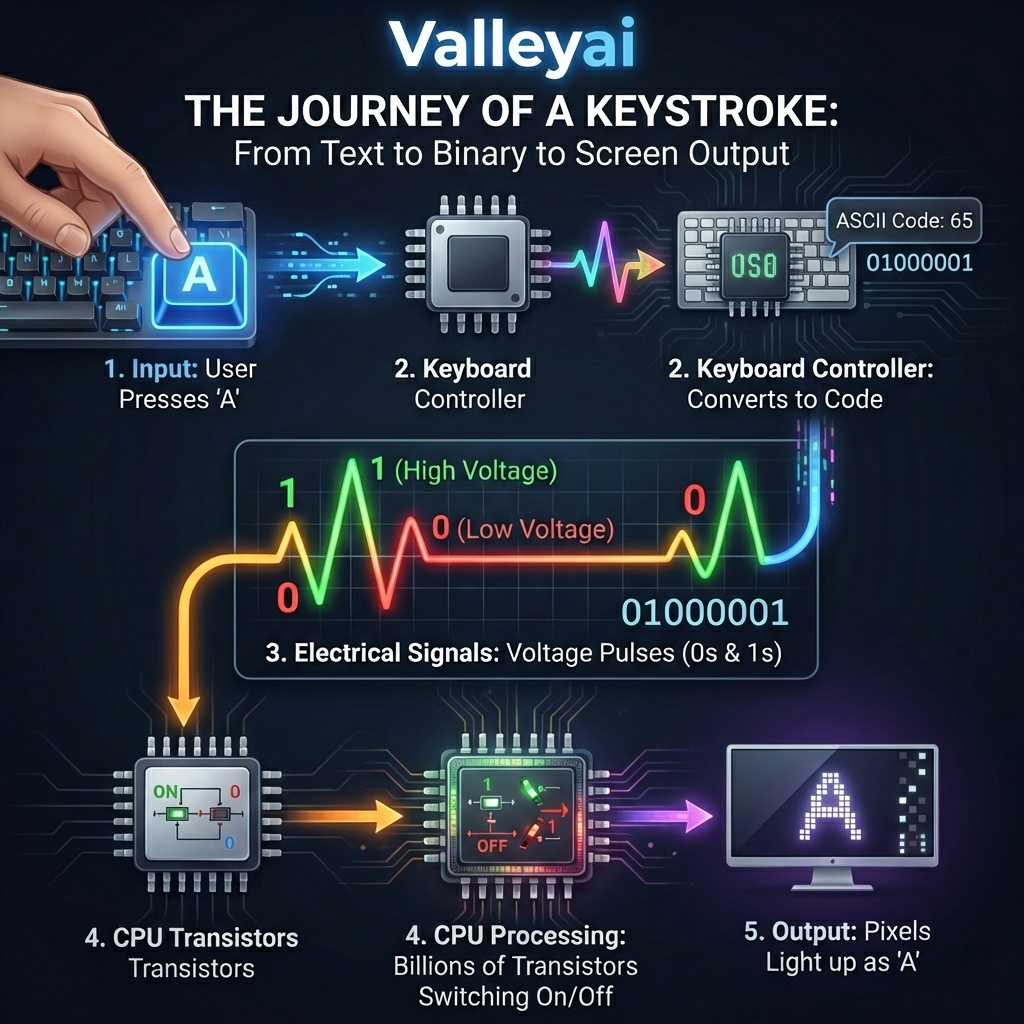
Computers use binary because it perfectly aligns with the physical and electrical constraints of computer hardware. Digital systems rely on microscopic switches called transistors, made from semiconductors, which reliably operate in only two states: conducting electricity (1, high voltage) or not conducting (0, low voltage).
How Do Computers Turn Electricity into Binary?
A computer does not naturally know math. It only knows electricity. Inside the Central Processing Unit (CPU), there are billions of microscopic components called transistors. Most modern computers use CMOS (Complementary Metal-Oxide-Semiconductor) technology.
How Does a Transistor Switch Represent Binary Code?
A transistor acts as a gatekeeper for electrical current.
- High Voltage Signal (e.g., ~1.2 to 3.3 Volts): The transistor opens, allowing current to flow. The system reads this as a 1.
- Low Voltage Signal (e.g., ~0 Volts): The transistor closes, blocking current. The system reads this as a 0.
By relying on only two distinct voltage extremes, engineers eliminate the risk of electrical interference or signal degradation causing miscalculations.
How is Data Structured? Bits, Bytes, and Translation
Binary data is structured in microscopic units called bits (a single 0 or 1) and grouped into bytes (a sequence of eight bits). While a bit represents a single electrical state, a byte contains enough unique combinations to represent complex data like individual letters, numbers, and color pixels.
What is the Difference Between a Bit and a Byte?
- Bit (Binary Digit): The smallest unit of data in computing. It is a single voltage state:
0or1. - Byte: A standardized group of 8 bits. Because each bit has 2 possible states, a single byte can represent $2^8$, or 256, unique values (ranging from
00000000to11111111).
Translating Binary to Text (ASCII and Unicode)
To display a letter on your screen, computers rely on character encoding standards like ASCII and Unicode (UTF-8). These act as dictionaries, mapping specific binary byte sequences to human-readable characters.
| Character | ASCII Decimal | Binary Code (1 Byte) | Hardware Interpretation |
|---|---|---|---|
| A | 65 | 01000001 | Low, High, Low, Low, Low, Low, Low, High |
| B | 66 | 01000010 | Low, High, Low, Low, Low, Low, High, Low |
| a | 97 | 01100001 | Low, High, High, Low, Low, Low, Low, High |
Text To Binary Converter Tool
Type a word in the box below to see real-time bit-state transitions:
00000000
How Do Logic Gates Process Binary Code?
Logic gates are physical arrangements of transistors within a CPU that perform basic Boolean logic operations on binary inputs to produce a single binary output. By combining fundamental gates like AND, OR, and NOT, computers can execute complex arithmetic and make logical decisions within the Arithmetic Logic Unit (ALU).
To build a computer, you don’t just need to store 1s and 0s; you must calculate them. Let’s look at the basic truth tables for logic gates.
The AND Gate Truth Table
An AND gate outputs a 1 only if both inputs are 1.
| Input A (Voltage 1) | Input B (Voltage 2) | Output (Resulting State) |
|---|---|---|
| 0 | 0 | 0 |
| 0 | 1 | 0 |
| 1 | 0 | 0 |
| 1 | 1 | 1 |
Hands-on Engineering Insight: If you wire two transistors in a series on a breadboard, both must be turned “on” (supplied with voltage) for electricity to reach an LED at the end of the circuit. This physical hardware reality is the exact basis for a 1-bit adder.
Modern Applications of Binary in Hardware and Software
In modern engineering, binary code applications range from raw instruction set execution within the Central Processing Unit to error detection in data transmission. Compilers translate high-level programming languages into binary machine code specific to processor architectures like Intel or ARM.
While everyday users never write binary manually, systems architects and security researchers interact with it constantly in advanced scenarios:
- Compiler Output Analysis: When a developer writes code in C++, a compiler transforms it into an executable binary. By analyzing the output of different compilers (like GCC vs. Clang) for the same C program, engineers can optimize how efficiently the CPU’s instruction set executes the program.
- Hex Editors and File Headers: If you open a standard PNG image file in a Hex Editor, you aren’t looking at colors; you are looking at raw binary data represented in hexadecimal format. The first 8 bytes of a PNG are always
89 50 4E 47 0D 0A 1A 0A(a specific binary signature) telling the operating system exactly how to decode the image. - Data Transmission Error Checking: When streaming data across networks, bits can flip due to interference. Engineers use parity bits an extra bit added to a binary stream to troubleshoot and verify that the data received perfectly matches the data sent.
Frequently Asked Questions
What is the physical difference between a 0 and a 1?
The physical difference between a 0 and a 1 is purely a measurement of voltage levels in a semiconductor. In modern CMOS (Complementary Metal-Oxide-Semiconductor) technology, a voltage close to 0 volts registers as a binary “0” (low state), while a voltage closer to the system’s operational threshold (e.g., 1.2V to 3.3V) registers as a “1” (high state).
How many bits are needed to represent a character?
To represent a standard English letter or symbol, you need exactly 8 bits (one byte). Under the traditional ASCII (American Standard Code for Information Interchange) encoding system, the letter “A” is represented by the binary sequence 01000001. Modern Unicode formats (like UTF-8) use between 8 and 32 bits to accommodate millions of global characters and emojis.

Kaleem
My name is Kaleem and i am a computer science graduate with 5+ years of experience in Computer science, AI, tech, and web innovation. I founded ValleyAI.net to simplify AI, internet, and computer topics also focus on building useful utility tools. My clear, hands-on content is trusted by 5K+ monthly readers worldwide.