

A page can exist, load fine in a browser, and still never show up in search results. The owner searches for its exact title and gets other sites, old pages, or nothing at all. That gap feels like a fault in the page. Sometimes it is. Often the page failed at one stage of a pipeline that runs before any search happens.
Most of a search engine’s work happens before you type. It sends out programs that find pages, stores what they find in a searchable index, and then, when a query arrives, orders the matching entries. If a page fails at any one of those stages, later stages cannot rescue it. The table names each stage, what it does, and the symptom when it fails.
| Stage | Job | Symptom when it fails |
|---|---|---|
| Crawling | Finds pages by following links, reading sitemaps, and accepting submissions | The engine has no record of the page |
| Indexing | Processes a found page and stores it in the word map | The page is known but never eligible to rank |
| Ranking | Matches a query against stored pages and orders the matches | The page is eligible but sits far down the list |
Does a search engine search the whole web when you press Enter?
It searches its own index, a store built over weeks and months of crawling. Pressing Enter starts a lookup in that store, which is why results arrive in milliseconds while the web itself holds billions of pages.
The index is built before you search
A search engine is a system that meets three tests at once. It crawls the web itself, it keeps its own index, and it ranks results from that index. A search box on one site that filters that site’s own pages belongs in a different category: a search interface. The distinction matters because only the first kind of system can return a page it found on another site.
A web browser fetches and displays pages, while a search engine supplies the list of pages worth fetching. You type a query into a search box, the engine looks in its index, and the browser then fetches whichever result you open. Two different programs do two different jobs, and confusing them leads to the wrong diagnosis when a page goes missing.
The index holds a processed copy of each page it keeps, with titles, headings, links, and word positions recorded. It is a working store for lookup, built for speed. A separate program, the ranking algorithm, matches a query against that store and orders the matches. Google has never published the exact weighting of its ranking signals. The weights shift with updates. Any page that claims a precise formula is selling a guess.
Crawling follows links, sitemaps, and submissions
Crawling starts from a seed list of known addresses. A crawler visits each address, downloads its text, images, links, and code, and adds every link it finds to a queue for a later visit. Google’s crawler is called Googlebot, and other engines run their own crawlers with their own names. Discovery spreads through links. A page with strong links from known pages gets found quickly. A page with no links at all can wait.
Before a crawler downloads a page, DNS turns the site name into an address the crawler can reach. That address is an IP address, and the request travels across the network to the server that holds the page. A crawler that cannot resolve the name, cannot reach the server, or gets an error response has nothing to download, and the page stays unknown.
Sitemaps give crawlers a second route in. A sitemap is a file a site publishes that lists its important pages, and a crawler reads it alongside the links it follows. Site owners can submit a single address directly for crawling. Submission asks for a visit, and it does not force indexing, a distinction the later sections keep separate.
A robots.txt file sits at a site root and tells crawlers which paths to skip. Reputable crawlers follow it, and it is the standard way to keep search traffic out of admin pages, internal search results, and staging copies. It offers no password and no encryption. Anyone can read it. Polite crawlers treat it as a request to skip a path.
Crawl budget sets the pace on large sites. A crawler revisits popular and frequently changed pages often. It visits deep catalog pages less often. Fetching everything at full speed would strain both the crawler and the site. Small sites rarely hit the limit, while a catalog with millions of addresses can leave its least linked pages waiting for a visit.
Modern pages add a rendering step to crawling. A page built with JavaScript may arrive as a shell. It only gains its content after code runs. The crawler runs that code to see the finished page. Content that appears only after a click, a login, or a long scroll can stay unseen. A page that depends on such interaction may be indexed with its shell alone.
Indexing turns a page into a word map
Indexing processes a crawled page and decides what to keep. The processor reads the title, headings, body text, links, and language. It reads the canonical address as well. That address names the original version when several addresses carry the same content. It records where each word appears. Title, heading, and body positions all count. Position helps the ranking program judge what a page is about.
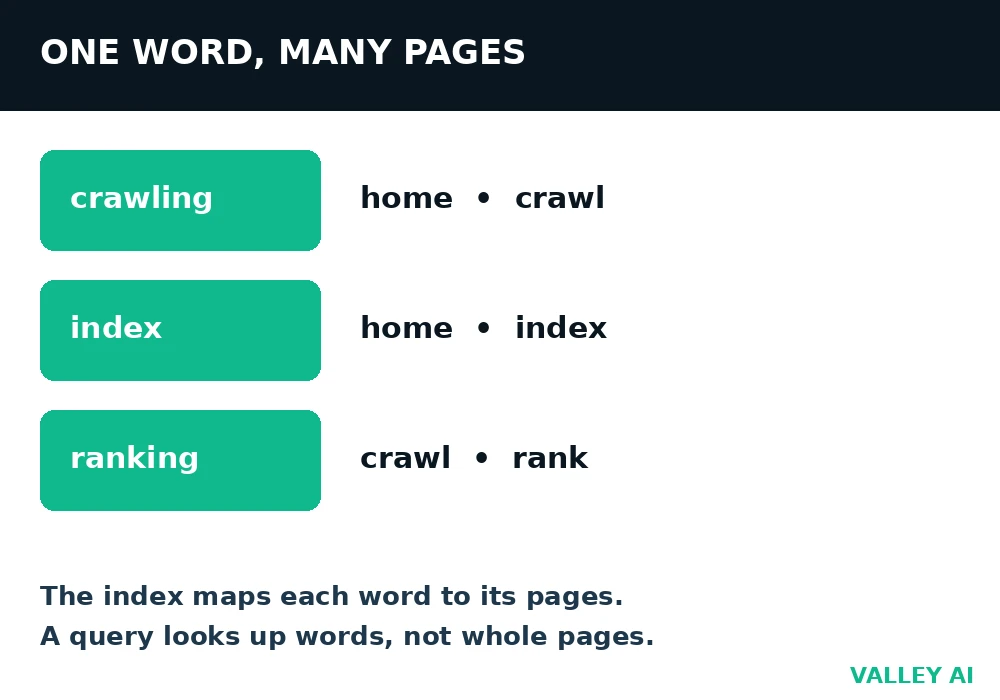
The finished store is an inverted index, like the index at the back of a book. Each word points to the pages that contain it. A query for two words becomes two lookups in that map, followed by an intersection of the page lists. That structure explains the speed. Reading every page happened during indexing. That work finished long before the query arrived.
Crawling a page does not guarantee indexing it. The processor sets aside duplicates of an existing page, pages carrying a noindex tag, and pages too thin to give a searcher anything useful. Content behind a login or a paywall stays out of the public index. The crawler cannot read it as an ordinary visitor would. Google indexes the mobile version of a page first. Content that appears only on a desktop layout can be missed. The desktop page may look complete while the indexed copy lacks that content.
Can a page be crawled and still never appear?
Yes. Crawling only proves the engine found and fetched the page. Indexing decides eligibility, and a noindex tag, a duplicate, or thin content can keep a crawled page out of the index entirely.
A miniature search engine, built and run on 5 November 2026
The claims above can be tested at small scale. A miniature crawler and index were built in Python for this test. It ran over five test pages with known content. The pages were home, crawling, indexing, ranking, and orphan. The crawler started at the home page. It followed every link it found. It extracted the words on each visited page and stored them in an inverted index. The orphan page was left with no link pointing to it.
- Seed the crawler with the home page address.
- Visit each queued page, extract its words, and queue its links.
- Store each word with the list of pages that contain it.
- Answer a query by looking up its words and scoring the matching pages.
Four pages were visited, in this order: home, crawl, index, rank. The orphan page was never visited, although it contained both words in the test query. Its words never entered the index, so no query could return it. The table shows what the miniature index held for three words.
| Word | Pages in the miniature index |
|---|---|
| crawling | home, crawl |
| index | home, index |
| ranking | crawl, rank |
Ranking landed on the crawl page as well as the rank page. The crawl page carried a link labeled Ranking page. Link text enters the index alongside body text. A query for crawling index scored the home page 2, and the crawl and index pages 1 each, so the home page ranked first. That result shows the limit of counting words alone: the home page matched both words, yet it said the least about either topic. Real engines add quality, link, freshness, and usability signals precisely because word counts alone rank broad pages above focused ones.
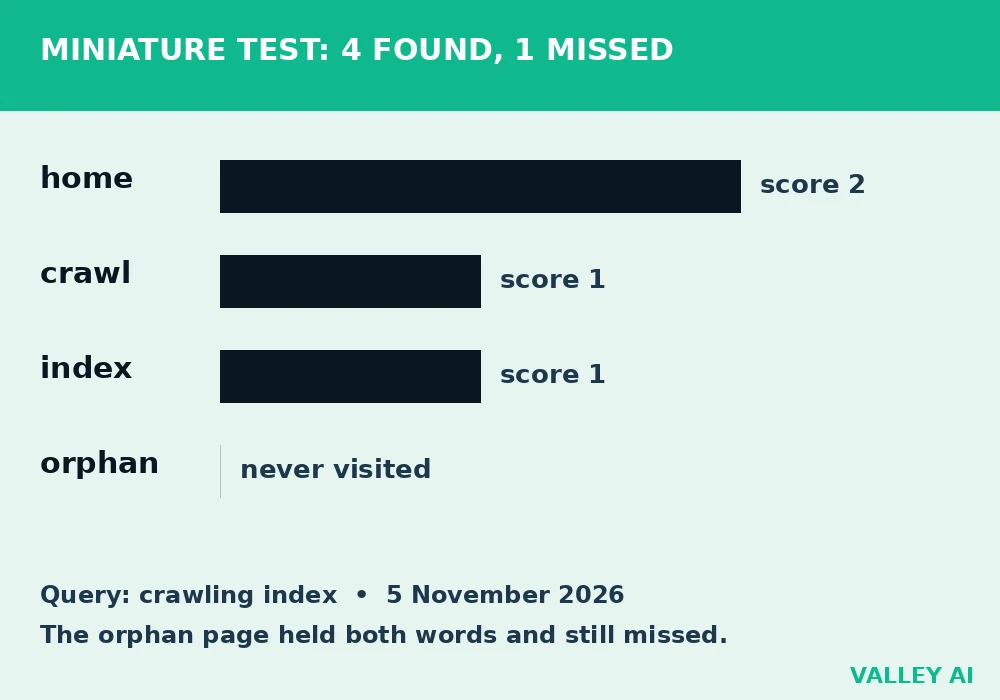
The miniature has clear limits, and they are part of the lesson. It held five pages, it skipped rendering, and it used no quality signals at all. Its value lies in two facts proved by running the test. Discovery depends on a path to the page. Ranking depends on the scoring rule. Word counts alone do not decide the order.
Ranking matches the query, then orders the matches
Ranking starts with intent, the job behind the words. Informational queries ask to learn something. Navigational queries aim at a known site. Transactional queries aim to buy or do something. Commercial investigation queries compare options before a decision. The same words can carry different intents. The engine reads clues in the phrasing. Location, language, and past results for similar queries add further clues.
Matching looks beyond exact words. The engine considers related meanings, common synonyms, and spelling variants, then pulls every indexed page it counts as a plausible match. Ordering weighs relevance to the query, depth and quality of the content, links from other pages, freshness, page speed, and mobile usability. Freshness weighs more for time-sensitive queries. A query about a new show needs fresh pages. A query about tying a knot is served well by an old page.
Location, language, and search history shape the order for queries where they matter. A restaurant query returns places near the searcher. A query in Spanish returns Spanish pages first. Past searches tilt results toward topics the searcher has explored. That personalization explains why the same query can give two people different lists. Both lists are ranked for their own context.
What happens to a page nobody links to?
It stays outside the crawl unless it appears in a sitemap or someone submits its address. A crawler can only reach pages its seed list, its links, or its sitemaps point to, and a page outside all three waits for discovery.
When a page never appears, find the stage that failed
Diagnosis works backwards from the symptom, one stage at a time. Guessing at ranking fixes for a page that was never crawled wastes the effort. Rewriting a page that was never indexed leaves the real block in place. The table pairs each symptom with the stage to check first and the check that settles it.
| Symptom | Stage to check first | Check that settles it |
|---|---|---|
| An exact address search returns nothing | Crawling | Read robots.txt and confirm the page is linked or listed in the sitemap |
| The page was fetched but never ranks | Indexing | Look for a noindex tag, a duplicate canonical, or thin content |
| The page ranks far down the list | Ranking | Compare its depth, links, speed, and intent match with the top results |
| A ranked page vanishes after an update | Indexing | Check whether the update added a noindex tag or broke the server response |
A server rule can block a crawler before it reads a page at all. A firewall rule that filters crawler traffic has the same effect as a robots.txt block. One difference remains. The firewall stops the request at the network edge. Robots.txt asks the crawler to skip a path it could otherwise fetch. Either way, the symptom is identical. The engine never sees the page. The fix sits with the site owner, in server settings.
Three checks settle most cases without tools beyond a browser. Open robots.txt at the site root and read its disallow lines. Open the sitemap and confirm the page address appears in it. Use the search engine’s coverage report for the site. It states whether an address was crawled, indexed, or excluded. It gives the reason for exclusion. A site search with the site operator gives a rough hint about indexing. It is not proof on its own. It shows a subset of indexed pages.
Reading a results page: ads, answers, and organic results
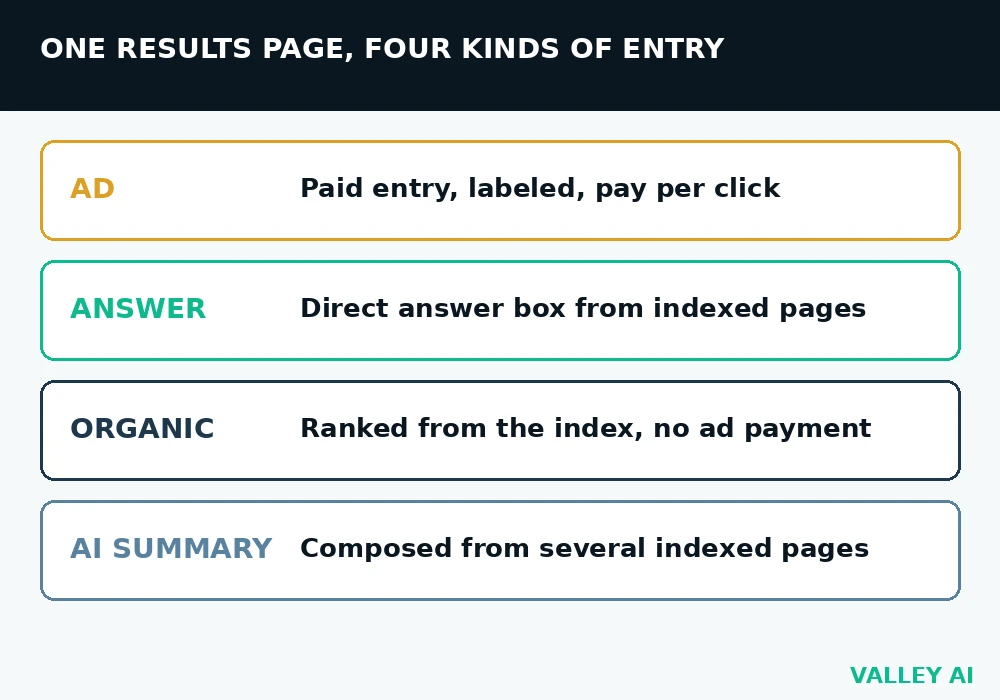
A results page mixes several kinds of entry, and the labels matter. Paid entries sit at the top or bottom with an ad label, and advertisers pay when a searcher clicks one. Organic entries come from the index, ordered by the ranking program. Ad spend buys the ad slot. It buys no organic position. Answer boxes, image packs, video packs, and knowledge panels sit between or beside those lists, drawn from indexed pages or structured data.
The padlock in the address bar shows the connection is encrypted, and it does not set a page’s rank on its own. The difference between HTTP and HTTPS decides what watchers on the network can read, while ranking decides which indexed page answers a query. Security, speed, and usability all feed ranking as signals, and none of them replaces relevance to the query.
AI summaries on some queries pull passages from several indexed pages and compose a direct answer above the list. The summary still depends on the index: a page outside the index cannot be quoted in it. Clicking through remains the way to check detail, context, and the source itself. A summary compresses several pages into a few lines. It leaves out the evidence behind each claim.
Final Thoughts
If you run a site, work in stage order. Make every important page reachable by a link, keep the sitemap current, remove any accidental noindex tag, and write each page for one clear intent. Then check the coverage report after the next recrawl, and fix the stage that still fails before touching the others. If you only search, remember one fact. Results come from an index built before your query. A brand new page may take days to appear. A missing page usually failed at crawling or indexing.
Frequently asked questions
Is Google the only search engine?
Google is the largest, and it is far from the only one. Bing, DuckDuckGo, Brave Search, Yandex, and Baidu each run their own crawlers and keep their own indexes, so their results differ. A page indexed by one engine is not automatically indexed by another, and a site owner who cares about a second engine needs that engine to crawl the site too.
Do I need to submit every new page?
Links and sitemaps surface most new pages without any submission. Submitting a single address asks the engine for a crawl sooner, which helps a new or changed page that has few links pointing to it. Submission asks for a visit, and indexing still follows its own decision after the fetch.
Why did a page rank and then disappear?
A later recrawl can change the verdict on a page. The update may have added a noindex tag, changed the canonical address to another page, returned a server error during the visit, or removed the content the page ranked for. The coverage report for that address names the current status, and the fix follows the status it names.
How long does indexing take?
Timing ranges from hours to weeks. Frequently visited pages get recrawled quickly, while a new page on a small site with few links can wait longer for its first visit and for the processing that follows. Publishing a page, then checking coverage a day later, often shows a visit still pending. It shows no rejection yet.
Why do search results change when the page did not?
The order depends on more than one page. Competitors publish new pages, the engine updates its ranking program, the index gains fresh entries for the query, and personalization shifts with location or history. A static page can slide down the list while its own text stays untouched.
How is a search engine different from an AI chatbot answer?
A search engine returns a ranked list of indexed pages to visit, with each entry pointing at its source. A chatbot composes an answer from its model and from retrieved passages, and the output reads as a single response, with sources folded into prose. The engine shows its sources as destinations; the chatbot gives one composed answer.

Kaleem
Kaleem is a Computer Science graduate (Virtual University of Pakistan) and the founder and editor of Valley AI, where he publishes in-depth, tested guides on computer hardware, artificial intelligence, and how the internet works. Every guide is researched from primary sources, tested hands-on where possible, and updated when the facts change.