

A webcam turns light into a live video stream, frame by frame, while a call runs. Light enters through a lens. It lands on a sensor, gets corrected for color and brightness, gets squeezed into a small stream, and travels over USB to a computer. Every buying decision traces back to one of those steps.
Start from the job the camera must do, then judge each step against that job. A desk call in a dim room needs a sensor that gathers enough light. A teacher who walks to a whiteboard needs focus that tracks movement. A streamer who sends a steady feed needs compression and a USB link that keep pace with the stream.
Pick by the job first
A webcam sits among the input devices that feed a computer, and the modern computer input devices page places it in that family. Each device converts a physical signal into data. A webcam converts light.
Room light decides more than resolution does. Distance and movement decide whether autofocus matters. Available bandwidth decides whether a high resolution sensor ever shows its full detail on a call. Judge a webcam on those three pressures, in that order, and the spec sheet gets easier to read.
| Job | What matters most | What to skip paying for |
|---|---|---|
| Desk calls | Sensor size and a clean image in room light | 4K output on a call capped at 1080p |
| Teaching or demos | Autofocus that tracks a moving subject | A fixed focus lens set for one distance |
| Streaming | Steady 60 frames per second and a stable USB link | Extra resolution the stream bitrate cannot carry |
| Group room | A wide field of view that covers every seat | A narrow lens meant for one face |
How light becomes a video frame
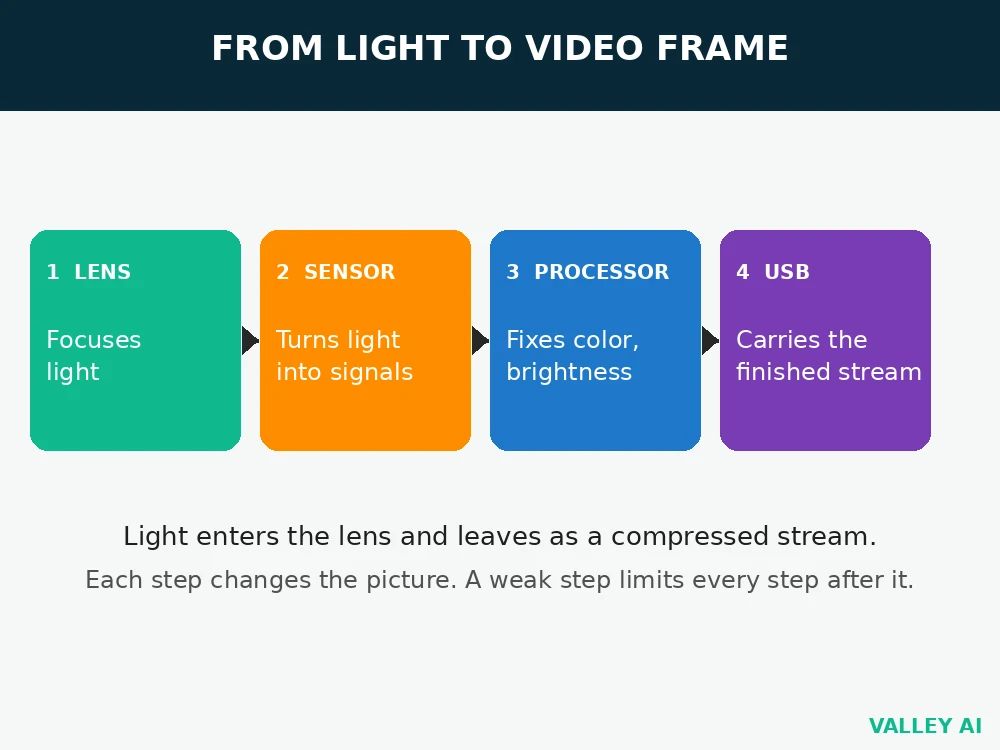
Light from a face passes through the lens and forms an image on the sensor surface. Each tiny light sensitive point on the sensor, called a pixel, measures the light that hits it and turns that measurement into an electrical signal. A processor reads those signals, corrects color and brightness, compresses the result, and hands a finished frame to the computer.
Frames follow a strict clock. At 30 frames per second, each frame gets 33.3 milliseconds. At 60 frames per second, each frame gets 16.7 milliseconds. Shorter frame times leave less time to gather light. A camera that looks fine at 30 frames per second can look darker at 60 frames per second in the same room.
Sensor types and sensor size
Two sensor types appear in webcam guides. CCD sensors shift charge across the chip to build a signal. CMOS sensors read each pixel where it sits, which uses less power and reads faster. Current webcams use CMOS sensors almost everywhere, and CCD survives mainly in older cameras and older guides.
Sensor size matters more than the megapixel count printed on the box. A larger sensor area spreads its pixels over more surface, so each pixel gathers more light in one frame. TechTimes reports that most budget webcams use 1/3-inch sensors measuring roughly 6 millimeters diagonally. The Acer WBC-0E01 uses a 1/2-inch Sony sensor measuring about 8 millimeters diagonally. Larger pixels collect more light, and more light means less grain when room light drops.
Why does a webcam look grainy in low light?
Dim light gives each pixel a weak signal. The camera raises sensor gain to brighten the picture, and gain amplifies the weak signal together with the electrical noise behind it. Grain is that amplified noise made visible. A larger sensor starts with a stronger signal, so it needs less gain for the same brightness.
Bayer color and why each pixel sees only one color
A sensor pixel measures brightness, with no color sense of its own. Color comes from a Bayer filter, a grid of tiny red, green, and blue filters laid over the pixels. Each pixel sits under one filter color and records only that color. Half the pixels carry green filters, a quarter carry red, and a quarter carry blue, because human vision reacts most strongly to green detail.
The filter works like a mosaic floor, where each tile carries one color and the eye blends neighboring tiles into a full picture. A processor performs the same blending in silicon, a step called demosaicing. It estimates the two missing colors at each pixel from neighboring pixels, then outputs a full color frame. Sharp color edges can fool that estimate, which is why fine patterns sometimes shimmer on camera.
Autofocus: contrast hunting versus phase direction
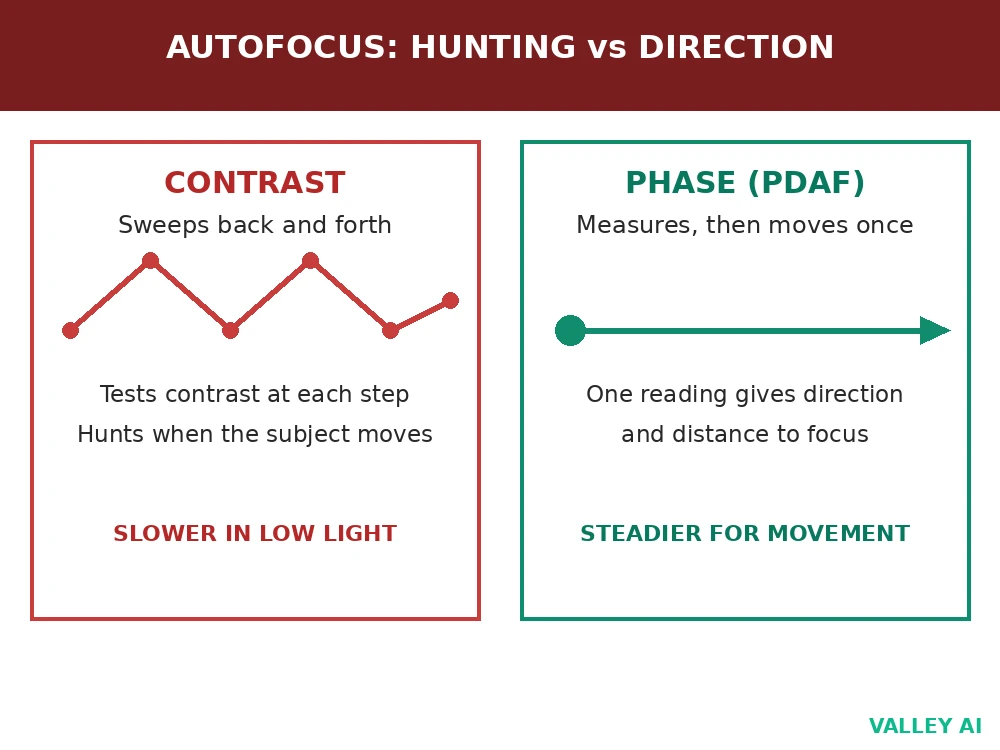
Contrast autofocus, the method PCTechKits describes for most budget webcams, moves the lens in small steps and measures image contrast at each step. Contrast peaks when edges look sharpest, so the camera sweeps back and forth until it finds that peak. Movement forces a fresh sweep, and the viewer sees the picture breathe in and out of focus during the search.
Phase autofocus works from a single measurement. TechTimes describes masked pixel pairs built into the sensor, each pair seeing light from one side of the lens. The difference between the paired signals tells the processor which direction the lens must move and how far, in a single reading. The lens then moves straight to focus, with no sweep.
Why does focus hunt when you move toward the camera?
A contrast system must retest contrast after every move, so each step toward the camera starts a new sweep. A phase system measures the new distance first and moves once. For a seated caller who stays put, either method holds focus. For a presenter who leans in, stands, or holds up an object, phase focus stays steadier.
Exposure, white balance, and low light grain
Exposure sets brightness through two controls. Exposure time sets how long each pixel gathers light. Sensor gain amplifies the gathered signal after capture. Longer exposure brightens a dim scene but blurs motion, because a moving hand crosses more pixels during the longer gather. Higher gain brightens a dim scene without motion blur, with picture cleanliness as the tradeoff.
White balance sets color under different lamps. A warm desk lamp and cool daylight throw different color casts over the same face. The processor measures the cast and shifts red and blue until white surfaces read white. Wrong white balance leaves skin orange under warm lamps or blue near a window, even when brightness looks right.
Run four checks in the room where calls happen. Trust the preview over the box.
- Preview at call distance under normal room light, reading a page of text on screen
- Brightness and color settling after switching the room lamp off and on
- Focus tracking on a hand moving toward and away from the lens, from arm length back
- A ten second test recording played back for picture, room echo, and fan noise
Compression and the bandwidth math
Raw video carries far more data than a call can move. Compression cuts that data by sending full frames only at intervals and sending only the changes between frames after that. A still background costs almost nothing after the first frame. A waving hand costs more, because more pixels change. Codecs H.264 and MJPEG do this job in most webcams, with H.264 using frame to frame differences and MJPEG compressing each frame on its own.
Worked calculation, with inputs named. A 1080p frame holds 1920 pixels across and 1080 pixels down, giving 2,073,600 pixels. At 3 bytes per pixel for red, green, and blue, one frame holds 6,220,800 bytes. At 30 frames per second, the raw stream reaches 186,624,000 bytes per second. Multiply by 8 bits per byte to reach 1,492,992,000 bits per second, about 1.49 Gbit/s. A compressed 1080p30 call runs at roughly 3 to 8 Mbit/s, around 200 to 500 times smaller than the raw stream. Compression sets the call quality ceiling, because the sensor captures far more detail than the call stream carries.
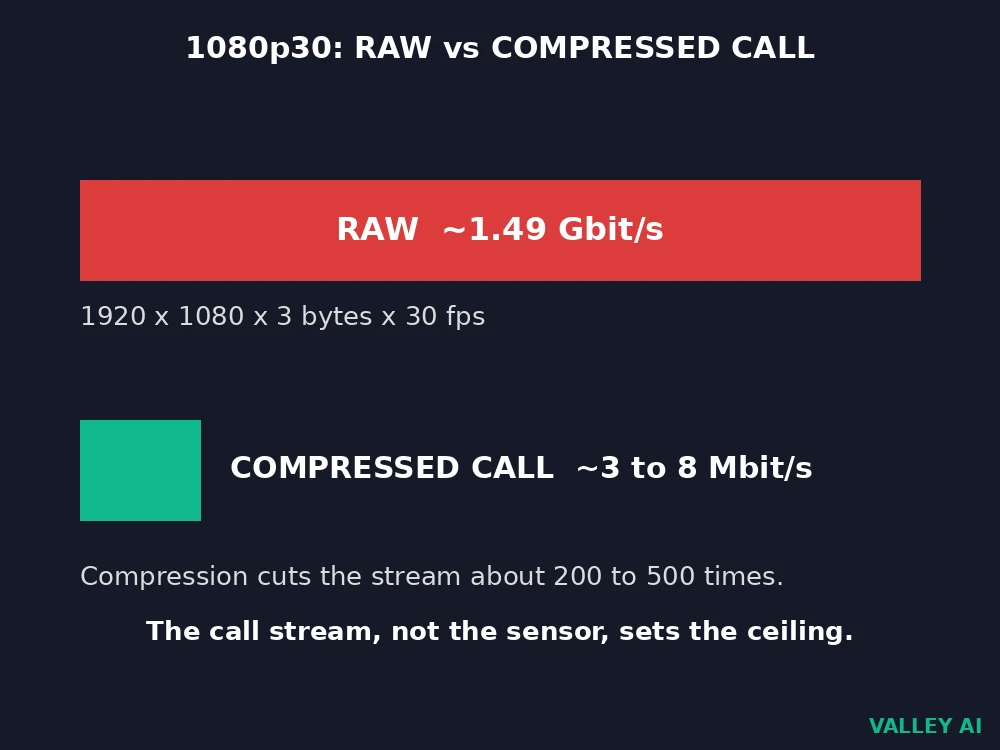
That ceiling explains why a 4K sensor can still help a 1080p call. Downsampling a larger, cleaner capture to 1080p averages neighboring pixels and leaves a smoother picture than a native 1080p capture from a small sensor. TechTimes makes the same point about 4K webcams on platforms that cap streams at 1080p. The finished feed lands on a display panel. Monitor panel types change how dark scenes look.
USB limits and privacy checks
USB sets a second ceiling, above the compression ceiling for calls. USB 2.0 tops out at 480 Mbit/s in theory, and real world throughput lands lower after protocol overhead. USB 3.0 tops out at 5 Gbit/s in theory, far above any compressed call stream. A compressed call fits easily on either link. An uncompressed or lightly compressed high resolution feed can strain USB 2.0. A 4K webcam on an old port sometimes drops to a lower resolution or frame rate without warning.
Privacy checks belong in the same pass as picture checks. A physical shutter blocks the lens with a sliding cover, so a software fault cannot open the view. An indicator light wired to the sensor power shows when the sensor runs. Cover the lens with a hand during a preview and confirm the image goes dark, then move the hand away and confirm focus returns. That pair of checks confirms the preview shows the live sensor feed, with no stale frame standing in for it.
Conclusion
Choose the camera that fits the room, the movement, and the link it will run on. Test it in that room, at call distance, under the lamps it will use every day, before the return window closes.
The same call also needs a microphone: how a microphone works explains the transducer and polar pattern behind the voice on the other end of the video feed.
Frequently asked questions
Does a webcam record sound as well as video?
Many webcams carry built-in microphones, often a pair placed to pick up a voice from across a desk. A separate USB microphone still beats a built-in pair for streaming, since a desk microphone sits closer to the speaker and farther from keyboard noise.
Can a webcam connect to a phone?
Most webcams expect a computer USB port and a desktop video app. A phone needs an adapter that supports video class devices plus an app that accepts an external camera, and many phone apps accept only the built-in cameras.
Why does a webcam preview look mirrored?
Preview software often flips the image sideways so raising a right hand appears on the right side of the screen, matching a mirror. Viewers on the other end usually receive an unflipped image, so text held up to the camera reads correctly for them.
Can a webcam see in a fully dark room?
A standard webcam needs some light, since its sensor measures visible light. Models with infrared illumination add invisible infrared light and read the reflection, which lets them show a scene the eye reads as dark, in monochrome rather than color.
What mount fits a webcam on a monitor?
Most webcams ship with a clip that grips a monitor top edge and folds into a small stand for a desk. Check the clip depth against the monitor bezel before buying, since thick bezels and curved screens can leave a clip loose.

Kaleem
Kaleem is a Computer Science graduate (Virtual University of Pakistan) and the founder and editor of Valley AI, where he publishes in-depth, tested guides on computer hardware, artificial intelligence, and how the internet works. Every guide is researched from primary sources, tested hands-on where possible, and updated when the facts change.