
Short answer: Ethernet is faster, steadier, and more reliable than Wi-Fi, but Wi-Fi wins on convenience. If a device stays in one place and cares about responsiveness, a gaming PC, a work computer, or a 4K TV, plug it in. If it moves around, like a phone or a tablet, use Wi-Fi. The rest of this guide explains why, with real numbers and a device-by-device decision list. Once the wired-or-wireless choice is settled, the wireless side still has its own decision: Wi-Fi 6 vs Wi-Fi 7 compares the two current wireless standards by bands, channel width, and the upgrade conditions that matter at home.
What Is Ethernet?
Ethernet is the wired way to connect a device to your network. It runs over a copper twisted-pair cable with an RJ45 connector, following the IEEE 802.3 standard. One end plugs into your device, the other into your router or a network switch.
The key technical advantage is that modern Ethernet is full-duplex on a switched network. Your device transmits and receives at the same time, with no waiting and no asking for permission. Think of it as a two-lane road with no traffic lights: traffic flows both ways continuously.
Cable categories set the speed ceiling. Cat5e handles 1 Gbps, Cat6 handles 10 Gbps up to 55 meters, and Cat6a handles 10 Gbps up to 100 meters. For a home, Cat6 is the sweet spot; it covers far more than any current internet plan. Under the hood, Ethernet delivers each frame to its destination by MAC address, the hardware identifier burned into every network adapter.
The one real limitation: Ethernet needs a physical cable. No mobility, and getting a cable from the router to a far room takes some effort. That effort is usually worth it for the devices that matter most.
What Is Wi-Fi?
Wi-Fi is the wireless way: radio waves carrying data between your device and your router, following the IEEE 802.11 standard. The generations you see on boxes, Wi-Fi 5, Wi-Fi 6, Wi-Fi 6E, and Wi-Fi 7, are newer versions of that standard with faster radios and smarter coordination.
The physics catch is that Wi-Fi is half-duplex over a shared medium. Every device shares the same airwaves, so they must take turns. Wi-Fi uses a listen-before-talk protocol (CSMA/CA): each device listens, waits for a clear moment, and then transmits. That coordination overhead is mandatory, not optional, and it is the reason wireless can never quite match a cable for consistency.
The radio bands are the other thing to understand. 2.4 GHz travels farthest through walls but is the slowest and most crowded band. 5 GHz is the balanced middle most devices use. 6 GHz, available on Wi-Fi 6E and Wi-Fi 7, is the fastest band with the shortest range. Each generation improved the details: Wi-Fi 6 added OFDMA, which lets the router serve several devices in a single transmission, and Wi-Fi 7 added multi-link operation, letting a device use two bands at once.
Wi-Fi vs Ethernet: Head-to-Head
Here is how the two compare on the factors that actually affect your experience:
| Factor | Ethernet | Wi-Fi (Wi-Fi 6/6E) |
|---|---|---|
| Latency to your router | Under 1 ms, steady | 2 to 30 ms, varies with signal and load |
| Jitter (latency variation) | Under 1 ms | 5 to 40 ms when the network is busy |
| Packet loss | Effectively zero | 0.5 to 3 percent is common |
| Speed on a gigabit plan | 900 to 950 Mbps, sustained | 50 to 70 percent of the plan in practice |
| Highest rated speed | 10 Gbps (Cat6a) | Multi-gigabit (Wi-Fi 7) in ideal conditions |
| Interference | None | Walls, neighbors, microwaves, distance |
| Mobility | None; the device stays put | Full; roam anywhere in range |
| Security | Needs physical access to tap | Strong with WPA2/WPA3 and a good password |
| Setup effort | Cable routing; maybe a switch | Connect and done |
Speed: Why the Advertised Numbers Don’t Tell the Whole Story
Here is something most comparisons skip: raw speed rarely decides anything in a home. A 4K Netflix stream needs about 15 to 25 Mbps. An online game needs less than 1 Mbps. What matters is whether your connection delivers its speed steadily, and that is where the two differ.
On a gigabit plan, a Cat5e or Cat6 cable delivers 900 to 950 Mbps, roughly 95 percent of the rated maximum, and holds it there all day. Wi-Fi, even on modern Wi-Fi 6 or Wi-Fi 7, typically reaches only 50 to 70 percent of the available bandwidth in a real room. The big number on the router box is the radio’s theoretical rate; walls, distance, and protocol overhead take their cut before your device sees anything.
The practical takeaway: if your internet plan is 100 Mbps or less, a good Wi-Fi signal can usually saturate it, and you will not feel a cable’s advantage. Above that, or when moving large files between devices inside your home (backups, a media server, a NAS), Ethernet’s advantage grows quickly.
Latency, Jitter, and Packet Loss: Why Gamers Still Plug In
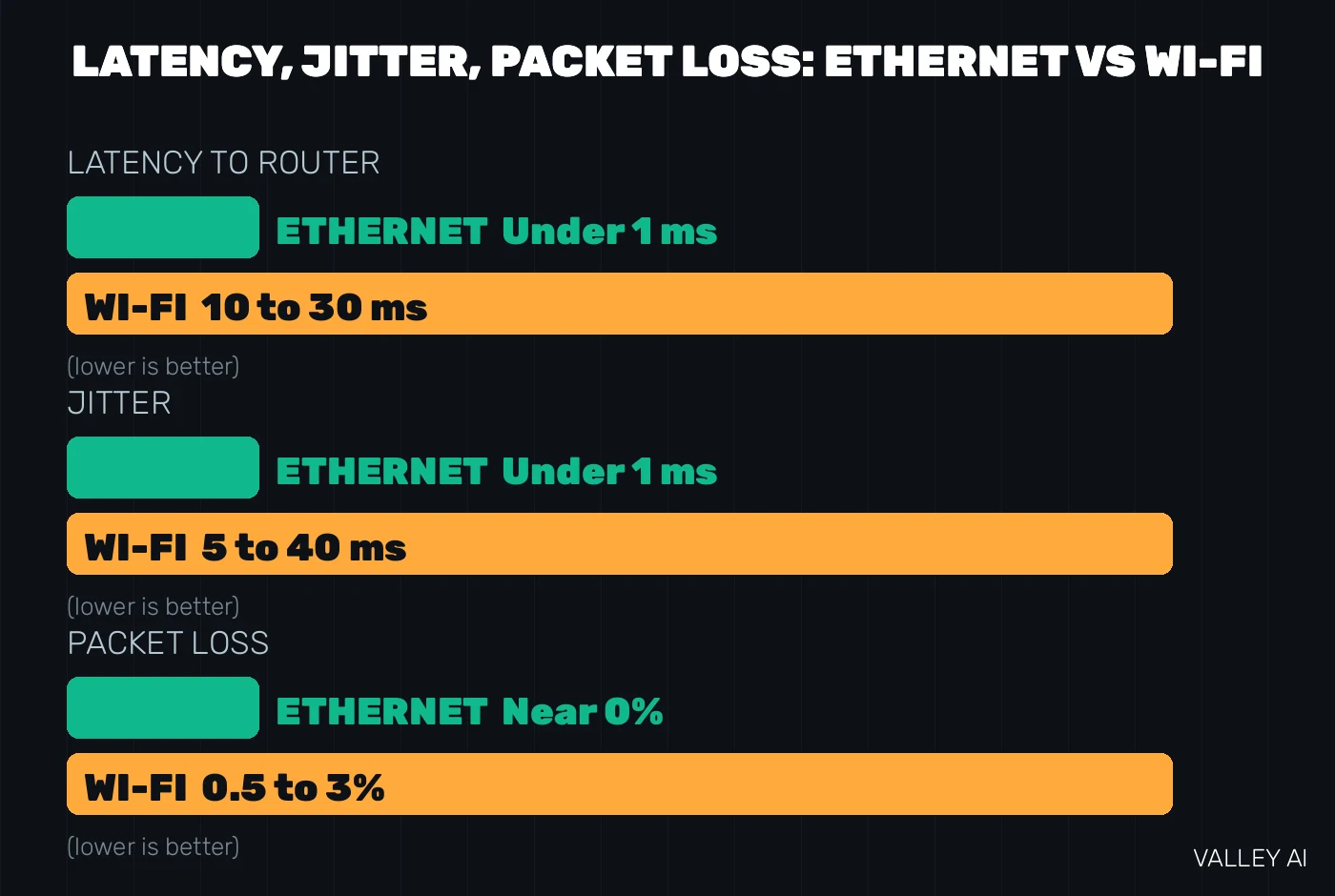
Latency is the delay between your action and the response. On a healthy Ethernet link it sits under 1 millisecond to your router and stays there. On Wi-Fi it typically runs 10 to 30 milliseconds to the same router, before your data even leaves the house. In a fast shooter, that head start is the difference between your shot registering first or second.
Jitter, the variation in that delay, is the bigger killer. A wired ping holds at 3 ms with less than 1 ms of variation. A Wi-Fi ping bounces: 18 ms, then 45, then 22, then 80, as the microwave runs, a neighbor’s router interferes, or someone starts streaming in the next room. Games handle a steady delay just fine; unpredictable delay is what causes rubber-banding in Warzone, teleporting players in Rocket League, and shots that register on your screen but never land on the server.
Then there is packet loss. Wi-Fi commonly drops 0.5 to 3 percent of packets, and even 1 percent is enough to cause visible glitches in fast games. Ethernet on a healthy cable drops effectively none.
A VPN makes all of this more important, not less. A VPN adds its own latency, and it rides on top of your base connection: if the underlying link jitters, your VPN session jitters with it. Starting from a steady Ethernet base gives a VPN the best chance of behaving.
Wi-Fi 7 on the 6 GHz band, with the device in the same room as the router, genuinely narrows the gap. But it is still a shared half-duplex medium, so the consistency crown stays with the cable.
Reliability: What Actually Kills a Wi-Fi Signal
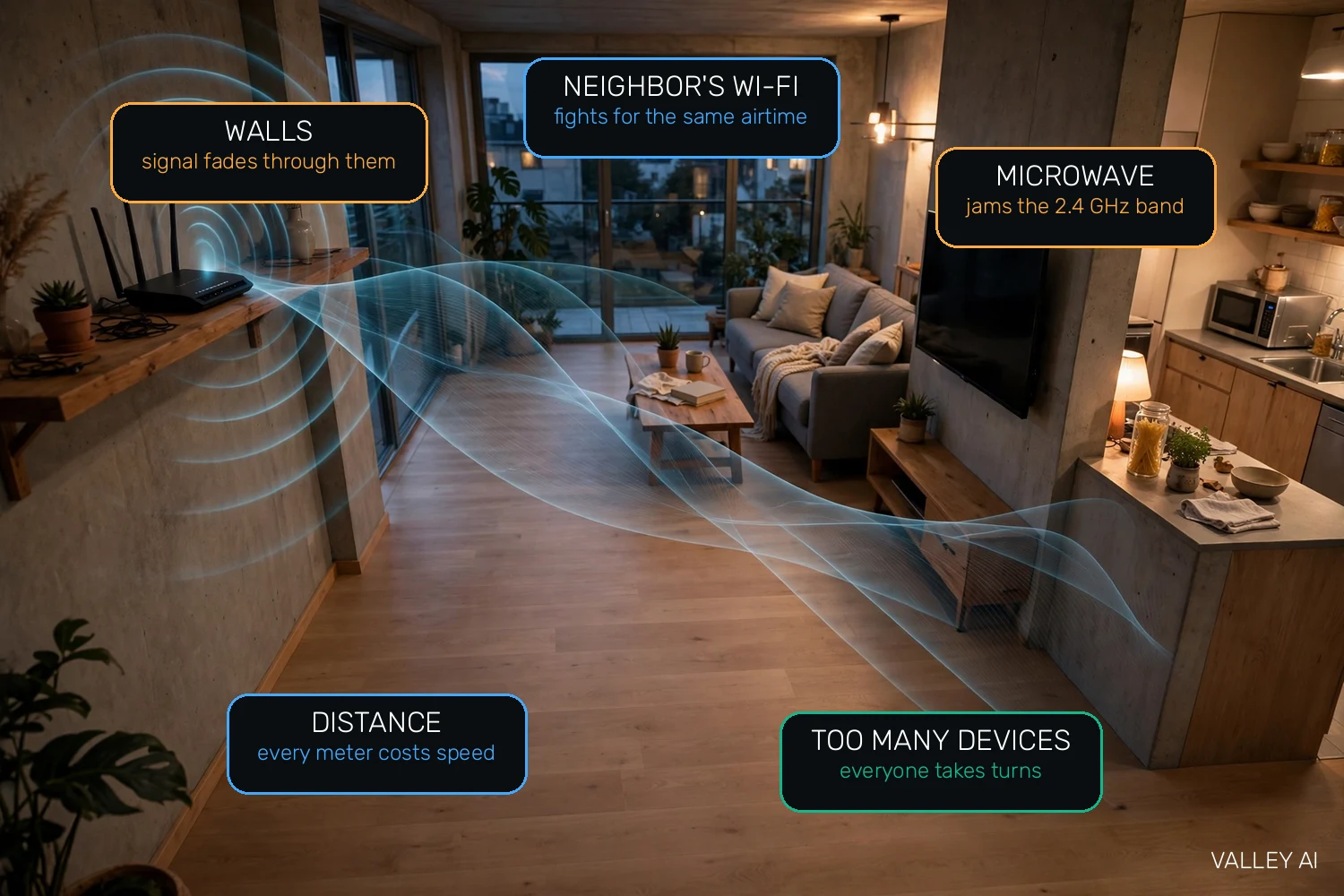
Wi-Fi does not fail randomly. It fails for specific, fixable reasons, and knowing them tells you whether a cable is the answer:
- Distance. Signal strength fades with every meter and every wall between you and the router.
- Walls and floors. Concrete and brick are the worst offenders; drywall is kinder. A router locked in a TV cabinet is a router with one hand tied behind its back.
- Neighboring networks. In an apartment building, dozens of routers fight over the same 2.4 GHz channels. Your airtime gets sliced thinner by networks you don’t own.
- Microwaves and Bluetooth. Both share the 2.4 GHz band. A running microwave is basically a jammer for that band.
- Too many devices. Remember, everyone takes turns. Twenty smart-home gadgets chattering away leaves less airtime for your laptop.
Ethernet is immune to every item on that list. A cable does not care about your neighbor’s router, your walls, or your microwave. When a device matters and a cable is possible, this immunity is the whole argument.
Security: Is Ethernet Really Safer Than Wi-Fi?
Strictly speaking, yes. To intercept Ethernet traffic, an attacker needs physical access to your cable, which at home means being inside your house. That is a high bar.
Wi-Fi broadcasts through your walls and out to the street, so encryption does the protecting. With WPA2 or WPA3 and a long, unique password, that protection is genuinely strong. The real-world Wi-Fi risks are a weak router password, an outdated encryption mode, or an open guest network, all fixable in five minutes.
Practical advice: use WPA3 if your router offers it (WPA2 with AES is fine otherwise), set a long unique Wi-Fi password, keep the router firmware updated, and put guests on a separate guest network. Do that, and Wi-Fi is safe enough for banking and work.
When to Use Each: A Simple Decision Guide
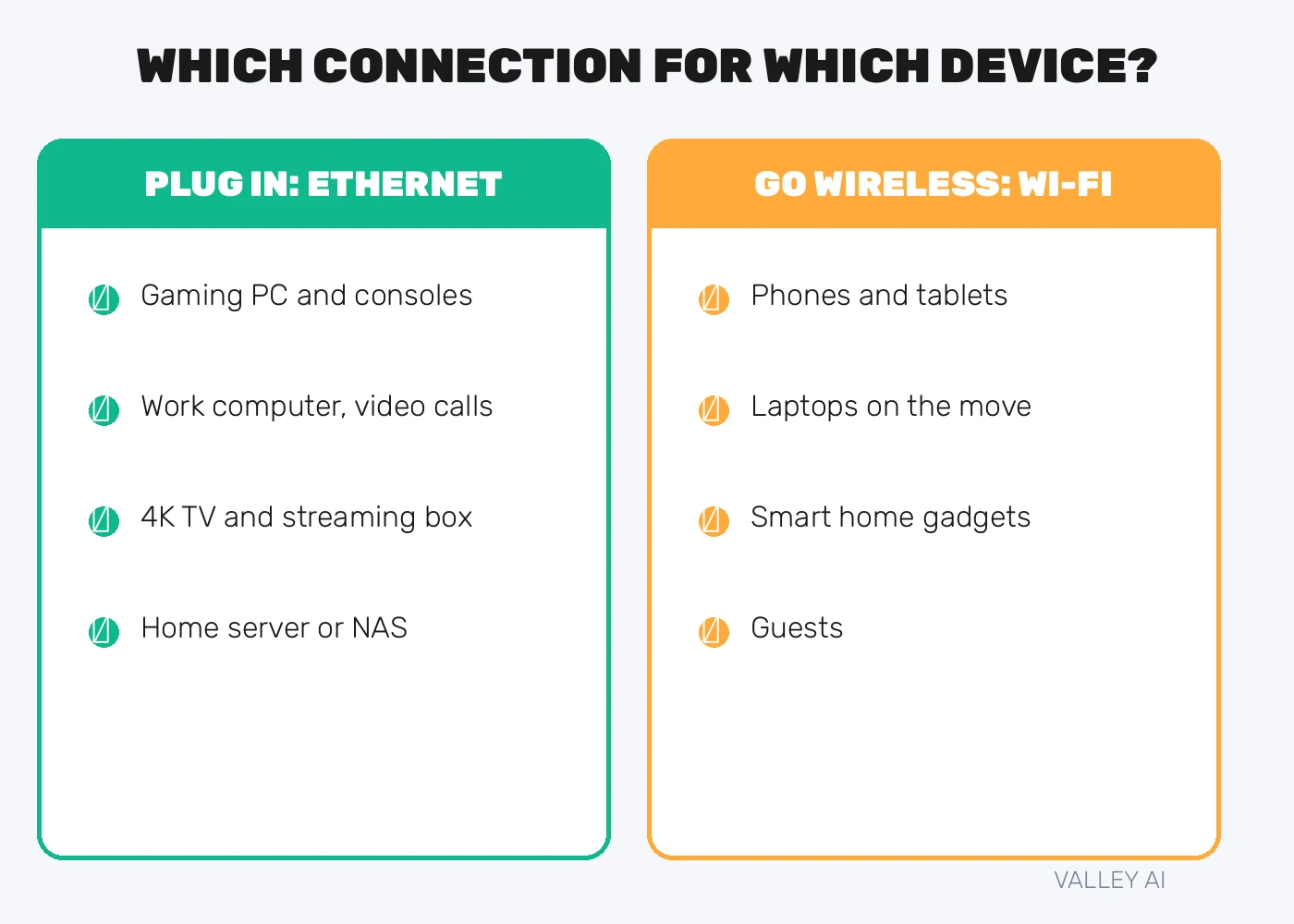
The rule is simple: stationary and latency-sensitive gets a cable; mobile gets Wi-Fi. Applied device by device:
- Plug in with Ethernet: gaming PC and consoles, your work computer (video calls and big uploads), a 4K TV or streaming box, a home server or NAS, anything that never moves and hates lag spikes.
- Go wireless with Wi-Fi: phones and tablets, laptops you carry around the house, smart-home gadgets, and guests.
Your router is the one box that hosts both connection types: Ethernet ports on the back, a Wi-Fi radio inside. Whichever link a device uses, the router treats it the same way, handing it a private IP address through DHCP and pointing it at DNS servers so names resolve. The link type changes speed and stability, never how addressing or name resolution works.
Getting the Best of Both
You do not have to choose one for the whole house. Most good home networks are hybrids: cables for the devices that matter, Wi-Fi for everything else. A few practical notes make it easy:
- One cable, many devices. A cheap gigabit switch turns a single wall port into five. Put one behind the TV stand and wire the TV, the console, and the streaming box in one go.
- Can’t run cable? Powerline adapters carry your network over the home’s electrical wiring. They are not as good as real Ethernet, but they are far steadier than weak Wi-Fi across the house.
- Buy Cat6, skip the marketing. Cat6 handles 10 Gbps up to 55 meters, more than any home needs for years. Flat cables tuck neatly under rugs.
- Place the router well. Central, elevated, and out in the open, away from the microwave and out of the TV cabinet. Placement alone can double usable Wi-Fi speed in a dead zone.
- Diagnose before you blame your ISP. Ping your router (usually 192.168.1.1) over Wi-Fi and then over Ethernet. If Wi-Fi pings swing wildly while Ethernet holds under 1 ms, the problem is your wireless, not your internet. Chrome’s net-internals page shows per-connection errors, another way to separate Wi-Fi drops from ISP problems.
One last thing the link type never changes: name resolution. Whether a device connects over a cable or over the air, the router’s DHCP hands it the same DNS servers, and lookups work identically. If pages load slowly on both links, the culprit is likelier upstream, in your DNS settings or the ISP line itself. Wired or wireless, the handoff itself is the same DHCP handshake; our guide walks through it step by step.
Bluetooth shares the 2.4 GHz band with older Wi-Fi, so a crowded wireless room can slow both; how Bluetooth works explains frequency hopping and why a Bluetooth link drops when the band fills up.
Before choosing between a cable and wireless, it helps to know how Wi-Fi moves data through the air on shared channels.
On the wired side, a cable carries signals as electrical pulses over twisted pairs, so it helps to understand how the wired link itself works.
Frequently Asked Questions
Is Ethernet faster than Wi-Fi?
In practice, yes. On a gigabit plan, Ethernet delivers 900 to 950 Mbps sustained with sub-1 ms latency, while real-world Wi-Fi typically reaches 50 to 70 percent of the plan with 10 to 30 ms latency. Ethernet also wins on jitter, packet loss, and consistency.
Is Wi-Fi 7 as good as Ethernet?
It is much closer, especially on the 6 GHz band with the device in the same room as the router. But Wi-Fi is still a shared half-duplex medium, so Ethernet keeps the crown for latency, jitter, and consistency.
Does Ethernet lower ping in games?
Yes. It cuts the hop to your router to under 1 ms and, more importantly, removes the jitter and packet loss that cause rubber-banding and teleporting on Wi-Fi.
Can I use Ethernet and Wi-Fi at the same time?
Yes. Your operating system prefers the wired connection for traffic and keeps Wi-Fi as a backup, so you get Ethernet’s stability with Wi-Fi’s fallback.
What Ethernet cable should I buy for home use?
Cat6 is the sweet spot: it handles 10 Gbps up to 55 meters, far beyond any current home internet plan. Cat5e is fine for gigabit, and expensive Cat7 or Cat8 adds nothing useful in a home.
Will Ethernet make my internet plan faster?
It cannot exceed your plan’s speed, but it lets you actually reach it. If Wi-Fi was the bottleneck, switching to Ethernet makes the same plan feel noticeably faster.

Kaleem
Kaleem is a Computer Science graduate (Virtual University of Pakistan) and the founder and editor of Valley AI, where he publishes in-depth, tested guides on computer hardware, artificial intelligence, and how the internet works. Every guide is researched from primary sources, tested hands-on where possible, and updated when the facts change.